
Influencer Hiring Marketplace Flutter App Laravel Admin Panel
Description
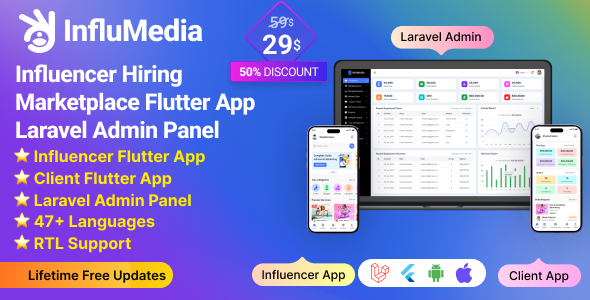
InfluMedia – Influencer hiring marketplace flutter App with Laravel Admin Panel
InfluMedia is a powerful and user-friendly influencer hiring marketplace designed to connect influencers with potential clients seamlessly. Built with Flutter for the mobile app and Laravel for the backend and API, InfluMedia offers a smooth and efficient platform for influencers to showcase their services and for clients to hire the perfect influencers for their needs.






|
|

|

|

|
Admin Url: https://influencer.acnoo.xyz/login
Super Admin Credentials
User: superadmin@superadmin.comPassword: superadmin
Admin Credentials
User: admin@admin.comPassword: superadmin
Manager Credentials
User: manager@manager.comPassword: manager
App Demo
Influencer user: acnooteam@gmail.comPassword: 123456
Client user: sahidul11182@gmail.com
Password: 123456
Offer: If you buy the extended license you will get free reskin service and full setup


Envato suggests buying an extended license for a SaaS project.
Influencer Admin Panel Menu Descriptions:
1. Dashboard:
2. Banner:
3. Manage Service:
4. Manage Influencer:
5. Manage Clients:
6. Support Ticket:
7. Withdrawal Payment:
8. Expense:
9. Manage Coupon:
10. User Management:
11. Manage Order:
12. Complain:
13. Refund Request:
14. Report Type:
15. Reports:
16. CMS Manage:
17. Roles & Permissions:
18. Settings:
Features for Influencers(App):
1. Profile Creation & Management:
2. Campaign Listings:
3. Messaging System:
4. Earnings Dashboard:
5. Review & Rating System:
6. Campaign Management:
Features for Client (App):
1. Account Setup & Dashboard:
2. Influencer Discovery:
3. Campaign Creation:
4. Proposal Management:
5. Contract & Payment Handling:
6. Campaign Analytics:
7. Review & Rating System:
Technology Stack:
Frontend: Flutter (Dart)
Backend: Laravel (PHP)
Database: MySQL/PostgreSQL
Payment Gateway Integration: Stripe, PayPal, etc.
Real-time Messaging: WebSocket/Socket.io
Flutter and Android Studio Setup Guide
Follow these steps to set up your development environment for Flutter:
Step 1: Install Flutter
Download and install Flutter by following the official instructions:
Step 2: Install Android Studio
Download and install Android Studio from the official website:
Step 3: Set Up Android Studio
- Open Android Studio.
- Go to File > Settings (on macOS, go to Android Studio > Preferences).
- Navigate to Appearance & Behavior > System Settings > Android SDK.
- Ensure that the Android SDK and necessary tools are installed.
Step 4: Configure Flutter in Android Studio
- Open Android Studio.
- Go to File > Settings (on macOS, go to Android Studio > Preferences).
- Navigate to Plugins and search for “Flutter”.
- Install the Flutter plugin and restart Android Studio.
- After restarting, open File > New > New Flutter Project to start a new Flutter project.
Step 5: Set Up Your Device
- Enable Developer Mode on your Android device.
- Enable USB Debugging from the Developer Options.
- Connect your device to your computer via USB.
Once you have completed these steps, you are ready to start developing with Flutter and Android Studio.




Version: 2.8 ( 20/05/2026 )
Currency issue fixed.
Payment gateways issue fixed.
Currency dynamic in app.
Update settings pages.
Added language settings.
Version: 2.7 ( 12/05/2026 )
Currency issue fixed.
Manual payment issue fixed.
Attachment field set as optional for manual payments.
Installer updated.
Version 2.6 ( 25/08/2025 )
1. Flutter version update 3.35.1
2. Code optimized
Version 2.5 ( 07/07/2025 )
1. Flutter version update 3.32.5
2. Code optimized
Version 2.4 ( 02/06/2025 )
1. Flutter version update 3.32
2. Code optimized
Version 2.3 ( 29/01/2025 )
1. Fixed profile edit bug for a smoother user experience.
2. Code optimized
Version 2.2 ( 05/12/2024 )
1. Theme design issue fixed
2. Code optimized
Version 2.1 ( 24/11/2024 )
1. App minor bug fixed
2. Code optimized
Version 2.0 ( 21/11/2024 )
1. Push notification added.
2. Fixed file upload security issue.
3. Fixed some database issues.
4. System settings update.
5. Code optimized
Version 1.3 ( 19/10/2024 )
Fixed queue mail issues.
Fixed system settings issues.
Influencer balanace update issue fixed.
Influencer/Client approve Feature added.
Users multi delete issues fixed.
Fixed some minor issues.
Version 1.2 ( 15/10/2024 )
Fixed queue mail issues.
Fixed system settings issues.
Influencer blanace update issue fixed.
Influencer/Client approve Feature added.
Users multi delete issues fixed.
Fixed some minor issues.
Version 1.1 ( 06/09/2024 )
47+ Languages added
RTL Support
Flutter version update 3.24
Code optimized
Version 1.0.0
Initial Release
| Author | Acnoo |
|---|---|
| Price | $49 |
| Sales | 27 |
| Rating | 0 (1) |
| Published | Aug 30, 2024 |
| Last Update | May 20, 2026 |
| Compatible Software | Joomla 3.10.x |
| Demo Url | https://influencer.acnoo.xyz/login |
| Mobile Files Included | PHP, HTML, JavaScript JSON, .java, Dart, YAML, JavaScript JSON, .java, .kotlin, .swift |
Categories
Tags
External listing. code.market does not sell this product and does not process payment for it. Pricing, payment, delivery, licensing, refunds, and support are handled by the third-party merchant on its own website. We may earn an affiliate commission from a referral. Details.