
Influence Marketing - SGE, SEO & AI Digital Marketing Agency Elementor Template Kit
Description
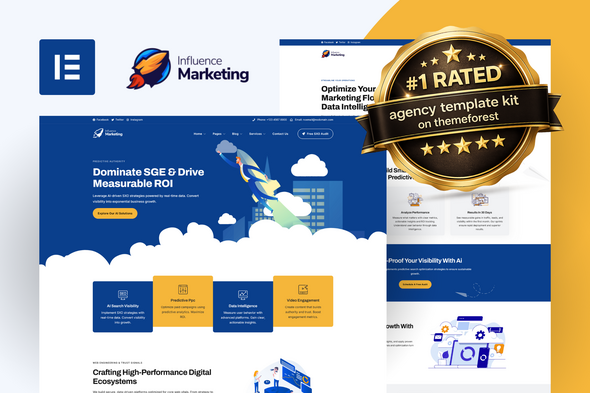
Influence is a next-generation Elementor template kit specifically engineered for modern digital marketing and SGE-focused agencies. This kit delivers an elite selection of templates optimized for AI search, SXO (Search Experience Optimization), social engagement, and high-performance growth strategies. Built for ultimate flexibility, Influence is 100% code-free and now fully compatible with the free version of Elementor, ensuring a seamless, high-end customization experience without the need for additional Pro subscriptions.
Elementor Template Kits contain page content for Elementor page builder. This kit has been optimized for use with the free Hello Elementor theme but may be used with most themes that support Elementor.
Layout Features:
- Modern, Data-Driven Design: Professional UI/UX optimized for 2026 market standards.
- No Elementor Pro Required: Full functionality using free versions of essential addons.
- 100% Responsive & Mobile-First: Flawless display and performance on all devices.
- 20+ High-End Templates: An elite selection of pages engineered for conversion.
- Code-Free Customization: Fully editable in Elementor—no coding knowledge needed.
- Optimized with Hello Theme: Built using the ultra-lightweight, high-speed Elementor Hello Theme.
What’s Included in the Zip:
- 404
- About Us
- Ai Driven CRM Flows
- Archive Blog
- Contact Us
- Data Driven Social Engagement
- Digital Authority Building
- Faq’s
- Footer – Divider Mountains
- Footer – Main
- Growth Consultancy
- Header – Main
- Header – Social
- Header – Transparent
- Homepage 01
- Homepage 02
- Homepage 03
- Metform – Contact Form
- Metform – Get Insights
- Metform – Request a Form
- Our Cases Studies
- Our Team
- Predictive Analytics and Insights
- Price Package 01
- Price Package 02
- Price Package 03
- Project Details
- SGE Visibility and ROI
- Single Post
- SXO and Performance Optimization
- Web Engineering
Plugins Installed With Kit:
- MetForm
- Nexter Extension
- Xpro Elementor Addons
How To Use Template Kit:
This is not a WordPress Theme. Template kits contain the design data for Elementor only and are installed using the envato Template Kit Import plugin for WordPress or directly through Elementor.
Detailed Guide:
For further support, go to Elementor > Get Help in WordPress menu.
How to Import MetForm Custom Forms:
1. Install and Activate MetForm: Ensure the MetForm plugin is installed and activated via the WordPress “Plugins” menu.
2. Create a New Form: Navigate to MetForm > Forms and click Add New. Name your form (e.g., “Main Contact Form”) and click Edit Form.
3. Import the Kit Template: Once the Elementor editor opens, click the Folder Icon, go to My Templates, find the specific form template (e.g., Metform – Contact Form), and click Insert.
4. Configure Notifications: Click the Form Settings button at the top of the widget. In the Notification tab, enter your email address to receive submissions. Click Save Changes.
5. Update and Save: Click the pink Update button at the bottom of the Elementor editor to save the form layout.
6. Link to Your Page: Open your “Contact” page with Elementor, find the MetForm widget, and select your newly created form from the Select Form dropdown menu.
Note: If the form does not appear immediately, simply refresh the Elementor editor to sync the database.
Theme Builder setup with Nexter Extension Plugin:
If you have Elementor Pro, setup headers and footers in Theme Builder. Pages you create with Elementor must have the Page Layout set to Elementor Full width for the global header and footer to appear.
1. Import Templates: Ensure you have imported all “Header”, “Footer”, and “Single/Archive” templates from the kit via the Template Kit Import tool.
2. Access Nexter Builder: Navigate to Nexter Builder > Dashboard in your WordPress menu.
3. Configure Global Header: Click on the “Header” tab. Select your imported Header template from the list and set the display conditions to “Entire Site”. Click Save.
4. Configure Global Footer: Click on the “Footer” tab. Select your imported Footer template and set the display conditions to “Entire Site”. Click Save.
5. Setup Post/Archive Templates: For Single Posts or Blog Archives, go to the respective tabs in Nexter Builder, select the corresponding imported template, and assign them to the correct post types.
Pro Tip: If your Header or Footer does not appear, ensure that your theme (Hello Elementor) is active and that no other global templates are overriding Nexter settings.
Image License:
This Template Kit uses demo images from Envato Elements. You will need to license these images from Envato Elements to use them on your website, or you can substitute them with your own.
https://elements.envato.com/collections/M4V987NSTB
Changelog:
| Type | Elementor Template Kit |
|---|---|
| Author | TemplateUp-Pro |
| Category | Template Kits / Elementor / Business Services |
| Price | $29 |
| Sales | 993 |
| Rating | 4.67 from 12 ratings |
| Published | Oct 1, 2020 |
| Last Update | Jan 22, 2026 |
| Template Kit Certified | No |
| Template Kit Software Version | Elementor 3.10.x |
| Template Kit Type | Envato Template Kit |
| Key Features | Easy editing and updating, Super quality design for marketing agency, Responsive & mobile friendly |
Categories
Tags
External listing. code.market does not sell this product and does not process payment for it. Pricing, payment, delivery, licensing, refunds, and support are handled by the third-party merchant on its own website. We may earn an affiliate commission from a referral. Details.
Products of the Week.
Submit🥇

STOP GUESSING WHAT TO POST
AI that learns your brand voice and builds a month of consistent, on-brand social content: carousels, posts and hooks that sound like you, not like everyone else's AI.
SaaS · 3,105 views · 28 clicksSaaS · Week 45 · 3,105 views · 28 clicks
🥈

Conversational Backlinks for Busy Founders
Place Backlink Relevant Conversation for your domain across Forums and Conversations
Website · 40,499 views · 216 clicksWebsite · Week 45 · 40,499 views · 216 clicks
🥉

upvote.club
Free Social Media Engagement that Helps Boost Your Content. Upvote Club supports 19 social networks with 100+ engagement actions in one dashboard. Add links to your posts and get free engagement from real users.
SaaS · 38,591 views · 110 clicksSaaS · Week 45 · 38,591 views · 110 clicks
#4

Substack Posting API
Onboard your Agent to Substack. Write Publish on Substack via API
SaaS · 57,630 views · 197 clicksSaaS · Week 45 · 57,630 views · 197 clicks
#5

Seenshot App
Free, Fast, MacOS Screenshot app. Make Screenshot cmd+shift+2 and send it via link
Desktop App · 27,062 views · 119 clicksDesktop App · Week 45 · 27,062 views · 119 clicks
#6

Hand-Placed Backlinks $9.99 per link. Flat rate.
Buy hand-placed forum, Q-A and directory backlinks. Flat $9.99 per link, no subscriptions — you only pay for approved listings.
Website · 2,996 views · 18 clicksWebsite · Week 45 · 2,996 views · 18 clicks
#7

Free Invoice Generator - PDF Invoices in Your Browser, No Sign-Up
A free invoice maker for freelancers and small businesses: fill in the invoice, check the live preview, and download a PDF that looks exactly like it. Any currency, tax per item, three templates, no sign-up, and nothing leaves your device.
1,692 views · 16 clicksWeek 45 · 1,692 views · 16 clicks
#8

Merge PDF Files Free - Combine PDFs in Your Browser, No Upload
A free PDF merger for office workers, students, and freelancers: combine PDFs and images into one file in the browser, reorder files and pages, pick page ranges, keep bookmarks, and open password-protected PDFs. Nothing is uploaded, no sign-up, no watermark.
1,584 views · 13 clicksWeek 45 · 1,584 views · 13 clicks