
InCut – Flutter Video Editor & Reel Maker App | 4K, Chroma Key, AdMob, IAP
Description
InCut – Full Video Editor and Reel Maker Flutter Mobile App
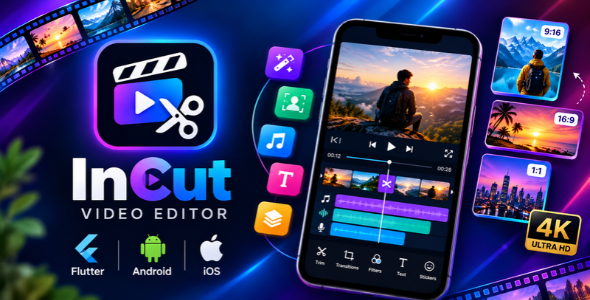
InCut is a high-performance, studio-grade video editor and movie maker mobile application built with Flutter. Engineered with native hardware acceleration (Android MediaCodec and iOS AVFoundation), InCut delivers butter-smooth real-time playback, 16 visual transitions with symmetric midpoint audio synchronization, a GPU-accelerated GLSL Chroma Key engine for green-screen removal, multi-track audio layering with a built-in microphone voiceover recorder, dynamic canvas aspect ratios (9:16 Reels/TikTok, 16:9 YouTube, 1:1 Instagram), and up to 4K Ultra HD (60/120 FPS) video rendering.
⭐ Core Features & Capabilities
- Hardware-Accelerated Video Pipeline: Fluid scrubbing, instant seek times, and stutter-free preview powered by native Android MediaCodec and iOS AVFoundation.
- 16 Studio Transitions with Symmetric Audio Sync: Eliminates audio echo and gaps by handing off clip audio at the exact 50% midpoint of transitions.
- GPU Chroma Key (Green Screen Removal): Real-time fragment shader (
shaders/chromakey.frag) for instant color keying, despill suppression, and smooth edge feathering. - Multi-Track Audio Engine: Layer unlimited background music, sound effects, and microphone voiceovers with independent trim, volume, and mute controls.
- Dynamic Canvas & Backgrounds: Presets for 9:16 (Reels/Shorts/TikTok), 16:9 (YouTube), 1:1 (Square), and 4:5 with Gaussian blur, solid colors, and custom image backgrounds.
- Rich Text & Sticker Overlays: 21 pre-bundled offline fonts, color pickers, opacity controls, transformations, and interactive pinch-to-scale.
- Filters & Color Grading: Real-time color adjustment (Brightness, Contrast, Saturation, Warmth, Vignette) and cinematic filter presets.
- Pro Export Engine: Fast FFmpeg rendering with 720p, 1080p Full HD, and 4K Ultra HD resolution options, adjustable bitrates, and background render status notifications.
- 100% On-Device & Private: All video processing is performed locally on the user’s device with zero cloud uploads or third-party tracking.
Demo & Testing Information
InCut Video Editor Pro is engineered as a 100% on-device, privacy-focused offline application. To ensure a seamless user experience:
- No Account / Login Required: InCut does not require account creation, email registration, or login passwords. All video editing features are fully functional out of the box.
- Native Google Play & Apple StoreKit Billing: In-App Purchases connect directly to the user’s device Google Play or Apple ID. Active purchases can be restored anytime with a single tap on “Restore Purchases” (no credentials needed).
- Developer Test Mode for Local QA: Developers and buyers can evaluate all Pro capabilities locally by simply enabling
enableProForTesting = true;inlib/config/app_config.dart. This activates Pro mode in debug builds without requiring live test payment credentials and is safely disabled in release builds.
Monetization & In-App Purchases
- Google AdMob Integrated: Support for AdMob Banner, Interstitial (on export), and Rewarded ads configured centrally in
AppConfig. - Google UMP (User Messaging Platform) Consent Flow: Full GDPR and privacy compliance built-in using
ConsentInformationandConsentFormto automatically request and present consent forms for EEA/UK users. Users can also manage their ad choices anytime via Settings. - iOS SKAdNetwork Attribution: Pre-configured with official Google AdMob and partner SKAdNetwork identifiers (
SKAdNetworkItems) inInfo.plistfor privacy-safe conversion attribution. - In-App Purchases (Pro Subscription): Configured product IDs for Monthly, Yearly, and Lifetime Pro access to unlock 4K exports and remove watermarks.
Free Tier vs. Pro Comparison
| Feature | Free Tier | Pro Membership |
|---|---|---|
| Max Export Resolution | Up to 1080p Full HD | 4K Ultra HD (2160p) |
| Max Export Framerate | 30 / 60 FPS | Up to 120 FPS High-Speed |
| Export Watermark | Optional / Configurable | 100% Watermark-Free |
| Chroma Key & GPU Shaders | Included | Included (Unlimited) |
| In-App Ads | Enabled | Ad-Free Experience |
️ Technical Specifications & Requirements
- Flutter SDK: 3.10.7+ / 3.x (Dart 3.x with Null Safety)
- Android Minimum SDK: API 24 (Android 7.0 Nougat)
- Android Target SDK: API 34 / 35 / 36 (Google Play Store Compliant)
- iOS Deployment Target: iOS 13.0 or higher
- IDE Support: Android Studio, Visual Studio Code, or CLI
- Automated Test Suite: 130 automated unit, widget, and audio sync tests passing (100% verified)
What You Get Inside the Download Package
- Complete Flutter Source Code (Android & iOS)
- Custom GLSL Chroma Key Fragment Shader
- 21 Pre-bundled Offline Google Fonts
- Offline Interactive HTML Documentation (Dark/Light mode, searchable)
- Ready-to-use Android Keystore & ProGuard R8 configuration files
- 6 Months of Dedicated Customer Support via CodeCanyon
AI Disclosure Statement
In accordance with Envato marketplace transparency and disclosure policies:
- Were AI tools used in the creation of this item? Yes (Minor Coding Assistance).
- Original Authorship & Engineering: This entire application, its user interface, custom video player controls, MediaCodec and FFmpeg pipelines, state management, and core features were personally authored, designed, and engineered by us from the ground up.
- Specific Scope of AI Assistance: AI developer tools were only utilized occasionally for reference assistance and code suggestions on specific features (such as optimizing certain mathematical calculations in the Chroma Key shader and drafting technical documentation).
- 100% Manually Audited & Tested: The complete codebase, custom shaders (
shaders/chromakey.frag), transitions, audio synchronization, and all 130 automated test suites have been manually coded, verified, and thoroughly tested on physical Android and iOS hardware devices for commercial production release.
⚠️ Third-Party Costs & Policy Notice
Please note: Buyers are solely responsible for any costs, registrations, or fees associated with third-party services required to run, publish, or monetize this app (such as Google Play Console $25 account fee, Apple Developer $99/year fee, or Google AdMob services). The purchase of this item grants a license for the source code only and does not include developer accounts or third-party fee coverage.
Customer Support & Assistance
We provide friendly, professional support to all verified buyers. If you need assistance with setup, configuration, or custom branding, please submit a ticket through the Support Tab on our CodeCanyon item page, and our engineering team will respond within 24 business hours.
| Author | TechArt_Studio |
|---|---|
| Price | $49 |
| Sales | 0 |
| Rating | 0 (0) |
| Published | Nov 9, 2026 |
| Last Update | Nov 9, 2026 |
| Compatible Software | Flutter 3.x |
| Demo Url | https://drive.google.com/file/d/12iLtHFSUd5IliXrKi-_Rn9f_qidVMlri/view?usp=sharing |
| Mobile Files Included | Dart, YAML, .kotlin, .swift |
Categories
Tags
External listing. code.market does not sell this product and does not process payment for it. Pricing, payment, delivery, licensing, refunds, and support are handled by the third-party merchant on its own website. We may earn an affiliate commission from a referral. Details.
Products of the Week.
Submit🥇

Perceptle
Perceptle is a daily browser-based game that challenges you to test your sensory intuition through five quick estimation and rhythm-based rounds.
Other · 1 views · 0 clicksOther · Week 47 · 1 views · 0 clicks
🥈

Free LinkedIn Likes From Real
Get free LinkedIn likes on your posts from real members who react by hand. No
SaaS · 124 views · 2 clicksSaaS · Week 47 · 124 views · 2 clicks
🥉

STOP GUESSING WHAT TO POST
AI that learns your brand voice and builds a month of consistent, on-brand social content: carousels, posts and hooks that sound like you, not like everyone else's AI.
SaaS · 7,686 views · 71 clicksSaaS · Week 47 · 7,686 views · 71 clicks
#4

aaas.market
407 reliable micro tools for solo founders, marketers and creators. They work in your browser
SaaS · 122 views · 0 clicksSaaS · Week 47 · 122 views · 0 clicks