
Import Data Files (xlsx, csv) into SQL Server

Description
Overview: The project aims to develop a robust and efficient web application using ASP.NET Core 7 technologies that allows user to import data files, such as XLSX and CSV into a SQL Server database. This application will provide a seamless and user-friendly experience for importing large volumes of data from various file formats (XLSX, CSV) using ASP.NET Core Web API, XML Bulk Insert, Dapper, CsvHelper, EPPlus and coding best practices.
Key Features: » XLSX and CSV File Support: The application supports importing data from both XLSX and CSV file formats. » File Validation and Error Handling: Before data import, files are validated for format and structure. Detailed error handling provides informative messages to users. » Mapping and Transformation: Data mapping and transformation allow users to map columns from files to database fields and perform necessary transformations during import. » Data Import Performance Optimization: The application optimizes data import performance using XML Bulk Insert and Dapper to efficiently insert large volumes of data into the SQL Server database.
Tools and Technology Used: » C# » ASP.NET Core 7 Web API » ASP.NET Core 7 Razor Pages » Clean Architecture » Dapper as ORM » XML Bulk Insert » CsvHelper » EPPlus » Bootstrap
Live Preview: http://108.181.173.241/Demo/ImportDataFile/User/ (Sample Excel File, Sample CSV File)
Screenshot:
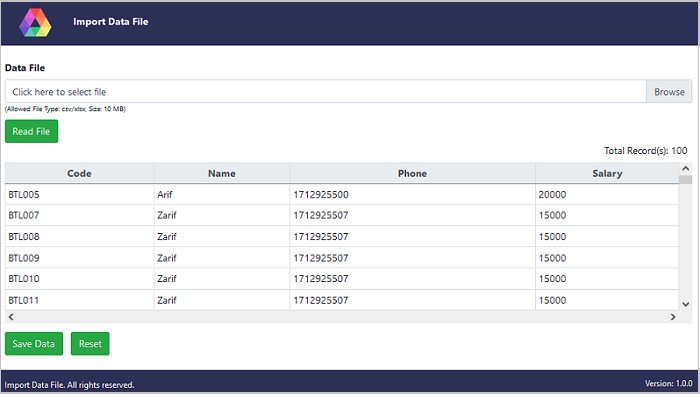
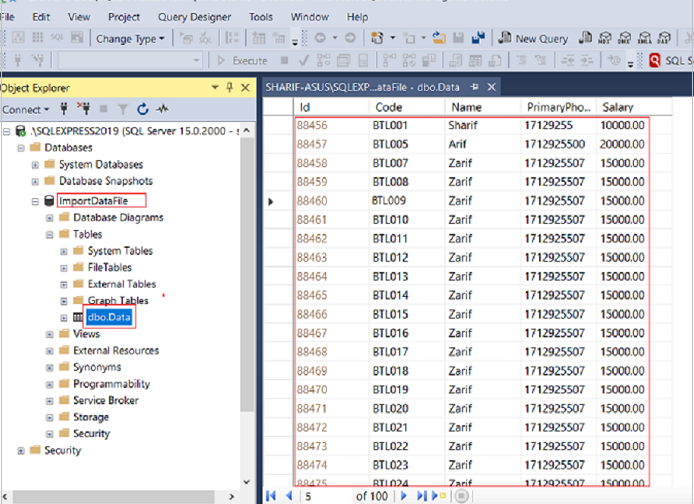
Quick Start Guide: To get started with the solution, follow these steps: » Make sure you have the required tools and technologies installed. » The solution has two separate execuable projects; ImportDataFile.API and ImportDataFile.UI. Make sure to run API project first, then the UI project. » Make sure to change the settings in appsettings files according to your UserRootPath, ConnectionStrings, BaseAPIAddress, SiteSettings etc. » Start exploring the features and functionalities of the solution. You can go through the detailed documentation for more details at: Detailed Documentation
What You Will Get: » Full Source Code with Visual Studio Solution » Database Script in SQL Express 2019
Support Facility: Have any questions, issues, or doubts? Feel free to reach out via the comments section or email for direct consultations: sharifbd88-nbt@yahoo.com
Summary: This solution provides a detailed overview of creating a web application to import data files (XLSX and CSV) into a SQL Server database using ASP.NET Core 7. By utilizing the mentioned technologies and features, you can build a robust and efficient data import system tailored to your needs. Remember to implement proper error handling and data validation to ensure the reliability of your application.
| Type | .NET Script |
|---|---|
| Author | NetBeeTech |
| Category | Net / Miscellaneous |
| Price | $24 |
| Sales | 12 |
| Published | Jun 30, 2023 |
| Last Update | Apr 15, 2024 |
| Compatible Browsers | IE11, Firefox, Safari, Opera, Chrome, Edge |
| Compatible Software | .NET 6.x, Other |
| Source Files Included | C# CS, SQL |
External listing. code.market does not sell this product and does not process payment for it. Pricing, payment, delivery, licensing, refunds, and support are handled by the third-party merchant on its own website. We may earn an affiliate commission from a referral. Details.
Products of the Week.
Submit🥇

STOP GUESSING WHAT TO POST
AI that learns your brand voice and builds a month of consistent, on-brand social content: carousels, posts and hooks that sound like you, not like everyone else's AI.
SaaS · 4,290 views · 38 clicksSaaS · Week 45 · 4,290 views · 38 clicks
🥈

Conversational Backlinks for Busy Founders
Place Backlink Relevant Conversation for your domain across Forums and Conversations
Website · 42,000 views · 223 clicksWebsite · Week 45 · 42,000 views · 223 clicks
🥉

upvote.club
Free Social Media Engagement that Helps Boost Your Content. Upvote Club supports 19 social networks with 100+ engagement actions in one dashboard. Add links to your posts and get free engagement from real users.
SaaS · 40,041 views · 117 clicksSaaS · Week 45 · 40,041 views · 117 clicks
#4

Substack Posting API
Onboard your Agent to Substack. Write Publish on Substack via API
SaaS · 59,051 views · 198 clicksSaaS · Week 45 · 59,051 views · 198 clicks
#5

Seenshot App
Free, Fast, MacOS Screenshot app. Make Screenshot cmd+shift+2 and send it via link
Desktop App · 28,425 views · 122 clicksDesktop App · Week 45 · 28,425 views · 122 clicks
#6

Hand-Placed Backlinks $9.99 per link. Flat rate.
Buy hand-placed forum, Q-A and directory backlinks. Flat $9.99 per link, no subscriptions — you only pay for approved listings.
Website · 4,260 views · 19 clicksWebsite · Week 45 · 4,260 views · 19 clicks
#7

Free Invoice Generator - PDF Invoices in Your Browser, No Sign-Up
A free invoice maker for freelancers and small businesses: fill in the invoice, check the live preview, and download a PDF that looks exactly like it. Any currency, tax per item, three templates, no sign-up, and nothing leaves your device.
2,936 views · 17 clicksWeek 45 · 2,936 views · 17 clicks
#8

Merge PDF Files Free - Combine PDFs in Your Browser, No Upload
A free PDF merger for office workers, students, and freelancers: combine PDFs and images into one file in the browser, reorder files and pages, pick page ranges, keep bookmarks, and open password-protected PDFs. Nothing is uploaded, no sign-up, no watermark.
2,712 views · 13 clicksWeek 45 · 2,712 views · 13 clicks