
IControl - Control Center OS17 APK - iControl Center iOS 16 - iCenter OS15 - Control Center IOS
Description
iOS 17 Control Center for Your Android Device!
You can change your phone to iOS design very easily and in a few steps, then configure everything to your preferences.
IOS Details
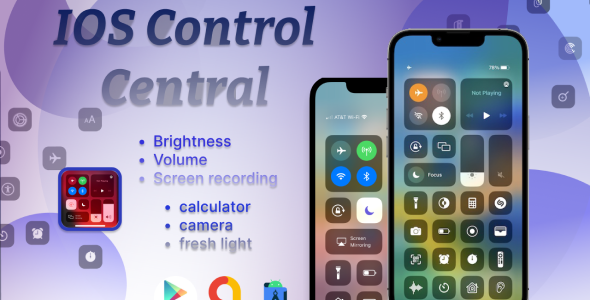
Control Center iOS 17 is a unique phone customizer and quickly helps you to change settings, night mode, lock screen, volume controller, turn on Wi-Fi and more like iOS 17. Personalize your phone to iOS design easily with a powerful control center! You can have an experience of using a newest and modern iOS phone with your current android phone.
Download DEMO APK: Click Here


Convenient Features:
Music Player: Control your music playback without switching apps, enabling you to play, pause, skip tracks, and adjust volume directly from the control center.
Camera : Launch the camera app swiftly to capture photos and videos, ensuring you never miss a moment.
Flashlight : Illuminate your surroundings with ease by toggling the flashlight on and off at your convenience.
Calculator : Access a fully functional calculator for quick calculations, making it handy for everyday tasks.
Wi-Fi and 4G Data : Manage your connectivity by toggling Wi-Fi and mobile data on or off with a single tap.
Screen Brightness : Adjust your screen’s brightness effortlessly to match your current environment.
Volume Control : Fine-tune your device’s audio volume settings without diving into complex menus.
Lock Screen : Lock the screen orientation to portrait or landscape mode, providing you with control over your device’s display.
Do Not Disturb : Silence notifications and calls with ease when you need some uninterrupted time.
⏰ Alarm & Timer : Set alarms and timers quickly, ensuring you stay on top of your schedule.
️ Custom Background : Personalize your control center with a custom background image, allowing you to express your style.
Vibration Control : Toggle device vibration on or off as per your preference.
️ Screen Recording : Initiate and terminate screen recording sessions effortlessly, making it ideal for capturing on-screen content.
Permissions containers by app:
This app uses ACCESSIBILITY SERVICE
To use some action: We do not collect any personal information through accessibility services.- We need Accessibility Permission to draw over phone’s home screen and status bar.
- We will not read your screen’s sensitive data or any content.
- For this app to function properly, we need the Accessibility Permission. Accessibility services are required to receive a response from the system when the top of the screen is touched to trigger the shade and to retrieve window content: Required for automatic clicking of some settings after the user chooses they want to toggle them in the app-provided interface. Please allow API AccessibilityService. The service is only used to allow this app to to perform above features. Please grant this permission to use these actions: Go to Settings > Accessibility > Services and turn on iCenter OS17 – Control Center

Skype ID:live:.cid.cfb6e68ca9097a84
Email: Aeon.tech2022@gmail.com
| Type | Android App |
|---|---|
| Author | AeonTech_solution |
| Price | $20 |
| Sales | 2 |
| Rating | 0 (1) |
| Published | Jan 3, 2024 |
| Last Update | Feb 26, 2024 |
| Compatible Software | Android 11.0, Android 10.0, Android 9.0 |
| Mobile Files Included | .apk, .java, .xml |
External listing. code.market does not sell this product and does not process payment for it. Pricing, payment, delivery, licensing, refunds, and support are handled by the third-party merchant on its own website. We may earn an affiliate commission from a referral. Details.
Products of the Week.
Submit🥇

Perceptle
Perceptle is a daily browser-based game that challenges you to test your sensory intuition through five quick estimation and rhythm-based rounds.
Other · 1 views · 0 clicksOther · Week 47 · 1 views · 0 clicks
🥈

Free LinkedIn Likes From Real
Get free LinkedIn likes on your posts from real members who react by hand. No
SaaS · 124 views · 2 clicksSaaS · Week 47 · 124 views · 2 clicks
🥉

STOP GUESSING WHAT TO POST
AI that learns your brand voice and builds a month of consistent, on-brand social content: carousels, posts and hooks that sound like you, not like everyone else's AI.
SaaS · 7,686 views · 71 clicksSaaS · Week 47 · 7,686 views · 71 clicks
#4

aaas.market
407 reliable micro tools for solo founders, marketers and creators. They work in your browser
SaaS · 122 views · 0 clicksSaaS · Week 47 · 122 views · 0 clicks