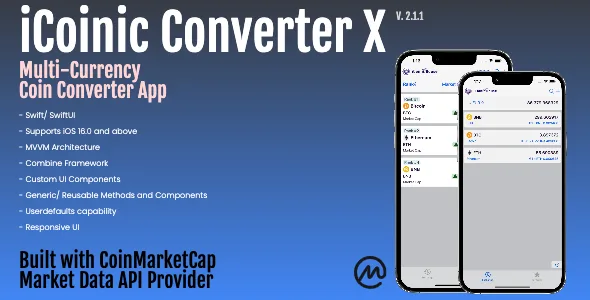
iCoinic Converter X - v. 2.1.1
Description
Description Rapid access to information in general and market developments in particular is becoming essential. Source of information, data availability and interface to access data are the main components for reliable user experience.
This app is the ultimate solution to provide interactive, reliable and instantaneous access to market developments. It provides simple screens (rich in functionalities) to facilitate getting equivalent value in several digital assets as well as in fiat currency interchangeably.
This app supports multi-currency convertibility up to 90+ fiat currencies as defined with api service provider.
This app consists of one main screen, which facilitates navigation between two child screens: - Exchange/ Converter Screen - All Digital Assets added to local database
In addition, the user will have access to master listing of all coins/ tokens listed with the service provider to add from.
Updates version 2.1.1: supports multi-currency convertibility
Design Details This app carries so many benefits in terms of architecture and implementation: 1. is built with MVVM architecture in mind. 2. uses Apple Combine framework for all api calls and managing local data. 3. comes with around 9 custom ui components, like: – search bar – navigation bar – async image view (including error handling) – action button – swipe action – sorting symbol – sorting label – navigation bar action button – scroll up button 4. comes with couple of custom utilities and generic methods, like: – url builder – network manager using Combine – generic sorting method – custom font modifiers specially for price/ market movement indicator 5. is integrated with CoinMarketCap ( as market data api provider. In order to maintain consistency and flexibility in replacing market data api provider, the integration is done by splitting data structure into: – structure of api service provider, and – structure of local data
Features - Swift/ SwiftUI - Supports iOS 16.0 and above - MVVM Architecture - Apple Combine Framework - Custom UI Components - Generic/ Reusable Functions and Components - Userdefaults storage capability - Responsive UI
Requirements - API Key from CoinMarketCap - XCode 14 and above - iOS 16 simulator or device
Instructions 1. Xcode – Unpack the App zip file into Xcode project folder. – Open the project app in Xcode (File -> Open) and navigate to Xcode project name iCoinic Converter X. – Update the Signing and Capabilities of the project targets in Xcode to create a new bundle identifier. – Once the API Key from CoinMarketCap is ready: a. create a plist file and name it APIKey-Info.plist b. insert the api key in the value field of a new record with property name “API_KEY_CMC” 2. CoinMarketCap Visit CoinMarketCap api page ( and navigate to get an API Key.
Categories
Tags
External listing. code.market does not sell this product and does not process payment for it. Pricing, payment, delivery, licensing, refunds, and support are handled by the third-party merchant on its own website. We may earn an affiliate commission from a referral. Details.
Products of the Week.
Submit🥇

STOP GUESSING WHAT TO POST
AI that learns your brand voice and builds a month of consistent, on-brand social content: carousels, posts and hooks that sound like you, not like everyone else's AI.
SaaS · 4,290 views · 38 clicksSaaS · Week 45 · 4,290 views · 38 clicks
🥈

Conversational Backlinks for Busy Founders
Place Backlink Relevant Conversation for your domain across Forums and Conversations
Website · 42,001 views · 223 clicksWebsite · Week 45 · 42,001 views · 223 clicks
🥉

upvote.club
Free Social Media Engagement that Helps Boost Your Content. Upvote Club supports 19 social networks with 100+ engagement actions in one dashboard. Add links to your posts and get free engagement from real users.
SaaS · 40,042 views · 117 clicksSaaS · Week 45 · 40,042 views · 117 clicks
#4

Substack Posting API
Onboard your Agent to Substack. Write Publish on Substack via API
SaaS · 59,052 views · 198 clicksSaaS · Week 45 · 59,052 views · 198 clicks
#5

Seenshot App
Free, Fast, MacOS Screenshot app. Make Screenshot cmd+shift+2 and send it via link
Desktop App · 28,427 views · 122 clicksDesktop App · Week 45 · 28,427 views · 122 clicks
#6

Hand-Placed Backlinks $9.99 per link. Flat rate.
Buy hand-placed forum, Q-A and directory backlinks. Flat $9.99 per link, no subscriptions — you only pay for approved listings.
Website · 4,261 views · 19 clicksWebsite · Week 45 · 4,261 views · 19 clicks
#7

Free Invoice Generator - PDF Invoices in Your Browser, No Sign-Up
A free invoice maker for freelancers and small businesses: fill in the invoice, check the live preview, and download a PDF that looks exactly like it. Any currency, tax per item, three templates, no sign-up, and nothing leaves your device.
2,937 views · 17 clicksWeek 45 · 2,937 views · 17 clicks
#8

Merge PDF Files Free - Combine PDFs in Your Browser, No Upload
A free PDF merger for office workers, students, and freelancers: combine PDFs and images into one file in the browser, reorder files and pages, pick page ranges, keep bookmarks, and open password-protected PDFs. Nothing is uploaded, no sign-up, no watermark.
2,713 views · 13 clicksWeek 45 · 2,713 views · 13 clicks