
Hyper Globe - The world for your website or app
Description
Examples
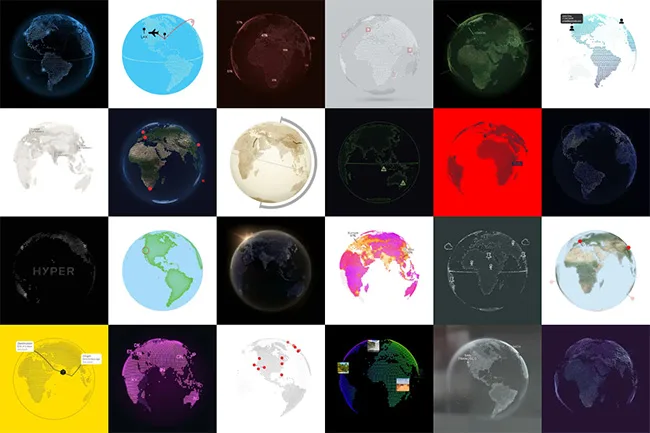
There are a ton of styling options. See what is possible…
Features
- Easy to create with a configurator.
- Can be integrated into any type of website.
- Add markers, texts, lines or HTML elements to geo locations.
- Responsive, cross-browser compatible, works in WebViews
- Lightweight: less than 50 KB (gzipped), asynchronous loading
- Secure and data protection compliant, no dependencies, no cookies
- Scripting API for advanced use cases.
- Comes with documentation, source code, support and unlimited updates.
Configurator
Get an idea of how to create a globe.
FAQ
- Where can it be integrated? Any CMS, page builder or type of website should be ok. All you have to do is insert HTML code. WordPress users have the option to integrate it with a plugin. You should be able to host files on your web server but it is not required (everything can be embedded into the code). It even works with local HTML files and in WebViews (apps).
- What skills are required? The configurator can be used by anyone. Advanced use cases may require knowledge of CSS, JavaScript or image editing.
- What can I use it for? Anything you can think of, e.g. display of branch offices, travel plans, points of interest, shipping routes, international partners, origin of resources, service apps, education, statistics, heatmaps, data visualisation, special effects.
- Is there a trail version? Sorry, we do not offer a trail version. You purchase without risk, as you get a full refund if you are not satisfied!
- What technologies are used? It is an ES6 JavaScript module that provides a custom element named <hyper-globe> CSS variables are used for styling, so the appearance can be changed with @media queries. A WebGL context is used for fast rendering.
- Can I use it with my framework? All code and examples are in native JavaScript so there are no dependencies. You are free to use it with the framework of your choice (e.g. React/Vue/Angular/...) but we cannot assist you.
- What can I do with custom CSS?
- Styling based on @media queries (e.g. for smartphones or dark mode)
- Styling of hover states
- Styling based on custom CSS selectors
- What can I do with scripting?
- Use events (e.g. marker click) for custom behaviors.
- Dynamically add or remove content
- Animate the globe and content styles
- Use helper methods (e.g. get the geo location of a click)
- Can I load locations from a database? Yes, but you have to write the server-side script to fetch and serve the data yourself. The documentation shows a way to add content loaded via an Ajax request.
External listing. code.market does not sell this product and does not process payment for it. Pricing, payment, delivery, licensing, refunds, and support are handled by the third-party merchant on its own website. We may earn an affiliate commission from a referral. Details.
Products of the Week.
Submit🥇

STOP GUESSING WHAT TO POST
AI that learns your brand voice and builds a month of consistent, on-brand social content: carousels, posts and hooks that sound like you, not like everyone else's AI.
SaaS · 4,287 views · 38 clicksSaaS · Week 45 · 4,287 views · 38 clicks
🥈

Conversational Backlinks for Busy Founders
Place Backlink Relevant Conversation for your domain across Forums and Conversations
Website · 41,998 views · 223 clicksWebsite · Week 45 · 41,998 views · 223 clicks
🥉

upvote.club
Free Social Media Engagement that Helps Boost Your Content. Upvote Club supports 19 social networks with 100+ engagement actions in one dashboard. Add links to your posts and get free engagement from real users.
SaaS · 40,039 views · 117 clicksSaaS · Week 45 · 40,039 views · 117 clicks
#4

Substack Posting API
Onboard your Agent to Substack. Write Publish on Substack via API
SaaS · 59,049 views · 198 clicksSaaS · Week 45 · 59,049 views · 198 clicks
#5

Seenshot App
Free, Fast, MacOS Screenshot app. Make Screenshot cmd+shift+2 and send it via link
Desktop App · 28,423 views · 122 clicksDesktop App · Week 45 · 28,423 views · 122 clicks
#6

Hand-Placed Backlinks $9.99 per link. Flat rate.
Buy hand-placed forum, Q-A and directory backlinks. Flat $9.99 per link, no subscriptions — you only pay for approved listings.
Website · 4,258 views · 19 clicksWebsite · Week 45 · 4,258 views · 19 clicks
#7

Free Invoice Generator - PDF Invoices in Your Browser, No Sign-Up
A free invoice maker for freelancers and small businesses: fill in the invoice, check the live preview, and download a PDF that looks exactly like it. Any currency, tax per item, three templates, no sign-up, and nothing leaves your device.
2,935 views · 17 clicksWeek 45 · 2,935 views · 17 clicks
#8

Merge PDF Files Free - Combine PDFs in Your Browser, No Upload
A free PDF merger for office workers, students, and freelancers: combine PDFs and images into one file in the browser, reorder files and pages, pick page ranges, keep bookmarks, and open password-protected PDFs. Nothing is uploaded, no sign-up, no watermark.
2,711 views · 13 clicksWeek 45 · 2,711 views · 13 clicks