
HRMS - Human Resource Management System Online HR (HRMS)
Description
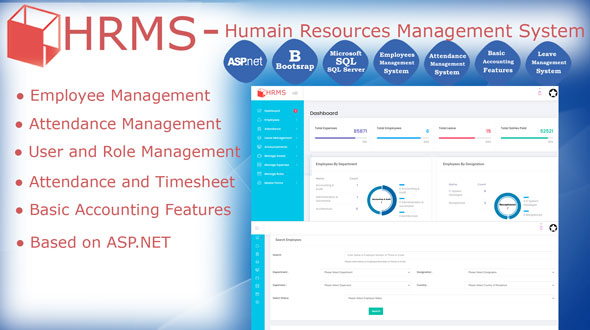
HRMS – is a key tool for any company to manage details employees and employers. HRMS is made in such a way that any employee either he is Manger or fresher can understand and able to use it.
HRMS will make it easy for your HR team to start managing your HR effectively and efficiently. HRMS is an indispensable tool not just for HR but for the entire company.
HRMS module is a centralized archive for extracting, updating, and processing employee information and data. The software allows management to oversee the complete lifecycle of an employee’s journey from onboarding to exit. HRMS offers a wide array of functions to support the management and tracking of employees, including benefits, audit trails, and generation of HR documents. HRMS will make it easy for your HR team to start managing your HR effectively and efficiently.
Important:
If demo, “Live Preview”, is not loading for you – then please click the “remove frame” button from the top right corner.
Demo Link: http://mhsteam-002-site3.ftempurl.com/Account/Login/
Super Admin Demo Credential:
- Super Admin Login: superadmin
- Super Admin Password: super@admin
HR Demo Credential:
- HR Login: hr
- HR Password: 123456
Employee Demo Credential:
- Employee Login: employee
- Employee Password: john1234
Source code is not included with any of the license variants.
Full Documentation is included for the buyer
Free Installation Support:
All the support related issue should be emailed directly to murtaza.ae@gmail.com
Free Support is available from 8:00 AM – 6:00 PM (GMT+4), Monday – Saturday.
If you are having any difficulty in understanding the product or you have any questions, We encourage you to contact us. Email us at murtaza.ae@gmail.com for a fast response.
TeamViewer (Remote) Support is also available – if need
We will be glad to help you!
| Type | .NET Script |
|---|---|
| Author | theunique |
| Category | Net / Project Management Tools |
| Price | $16 |
| Sales | 18 |
| Rating | 0.00 from 1 rating |
| Published | Oct 9, 2020 |
| Last Update | Oct 9, 2020 |
| Compatible Browsers | IE11, Firefox, Safari, Opera, Chrome, Edge |
| Compatible Software | .NET 4.8 |
| Source Files Included | C# CS, SQL, JavaScript JS, JavaScript JSON, HTML, CSS |
Categories
Tags
External listing. code.market does not sell this product and does not process payment for it. Pricing, payment, delivery, licensing, refunds, and support are handled by the third-party merchant on its own website. We may earn an affiliate commission from a referral. Details.
Products of the Week.
Submit🥇

STOP GUESSING WHAT TO POST
AI that learns your brand voice and builds a month of consistent, on-brand social content: carousels, posts and hooks that sound like you, not like everyone else's AI.
SaaS · 4,290 views · 38 clicksSaaS · Week 45 · 4,290 views · 38 clicks
🥈

Conversational Backlinks for Busy Founders
Place Backlink Relevant Conversation for your domain across Forums and Conversations
Website · 42,001 views · 223 clicksWebsite · Week 45 · 42,001 views · 223 clicks
🥉

upvote.club
Free Social Media Engagement that Helps Boost Your Content. Upvote Club supports 19 social networks with 100+ engagement actions in one dashboard. Add links to your posts and get free engagement from real users.
SaaS · 40,042 views · 117 clicksSaaS · Week 45 · 40,042 views · 117 clicks
#4

Substack Posting API
Onboard your Agent to Substack. Write Publish on Substack via API
SaaS · 59,052 views · 198 clicksSaaS · Week 45 · 59,052 views · 198 clicks
#5

Seenshot App
Free, Fast, MacOS Screenshot app. Make Screenshot cmd+shift+2 and send it via link
Desktop App · 28,427 views · 122 clicksDesktop App · Week 45 · 28,427 views · 122 clicks
#6

Hand-Placed Backlinks $9.99 per link. Flat rate.
Buy hand-placed forum, Q-A and directory backlinks. Flat $9.99 per link, no subscriptions — you only pay for approved listings.
Website · 4,261 views · 19 clicksWebsite · Week 45 · 4,261 views · 19 clicks
#7

Free Invoice Generator - PDF Invoices in Your Browser, No Sign-Up
A free invoice maker for freelancers and small businesses: fill in the invoice, check the live preview, and download a PDF that looks exactly like it. Any currency, tax per item, three templates, no sign-up, and nothing leaves your device.
2,937 views · 17 clicksWeek 45 · 2,937 views · 17 clicks
#8

Merge PDF Files Free - Combine PDFs in Your Browser, No Upload
A free PDF merger for office workers, students, and freelancers: combine PDFs and images into one file in the browser, reorder files and pages, pick page ranges, keep bookmarks, and open password-protected PDFs. Nothing is uploaded, no sign-up, no watermark.
2,713 views · 13 clicksWeek 45 · 2,713 views · 13 clicks