
HR Vault Pro - Human Resource Management System
Description
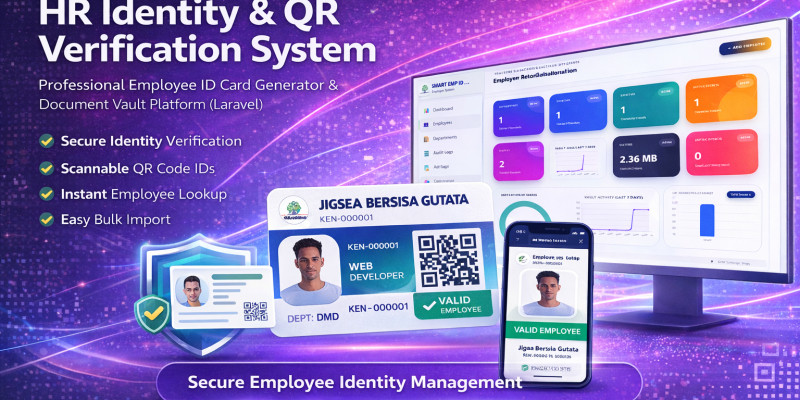
HR Vault Pro is a comprehensive, high-performance Human Resource Management System (HRMS) built on Laravel 11. It is designed to automate the most time-consuming HR tasks: employee onboarding, digital record keeping, and professional ID card production.
This system is perfect for organizations looking for a "Digital Vault" to secure employee data while maintaining a sleek, modern interface for administrators.
⭐ Standout Features
1. Dynamic ID Card Engine & Designer
- Template Switcher: Instantly switch between multiple premium ID designs (Classic, Modern, Elite).
- Batch Printing: Select multiple employees and generate print-ready PDF layouts for mass production.
- Automated Elements: Integrated QR codes, company seals, and digital HR signatures.
2. Smart Bulk Data Importer
- Excel + ZIP Sync: Upload your employee spreadsheet and a ZIP file of photos at the same time. The system automatically matches and assigns photos to the correct records.
- Import Preview: A safety layer to review data and detect duplicate emails before they are added to the database.
3. The Digital Document Vault
- Multi-File Support: Securely store contracts, IDs, and certificates (PDF, JPG, PNG, DOCX).
- Large File Handling: Optimized to handle high-resolution uploads and even video files.
- Storage Analytics: Monitor your server's physical disk space usage directly from the dashboard.
4. Advanced Administrative Tools
- Audit Logging: Every action (create, update, status change) is tracked for full accountability.
- Role-Based Security: Pre-configured roles for HR Admins and HR Staff using Spatie permissions.
- Signature Pad: Capture digital signatures directly in the browser to authorize ID cards and documents.
🛠 Technical Specifications
- Framework: Laravel 11
- Environment: PHP 8.2+
- Database: SQLite (default for easy setup) or MySQL.
- Frontend: Tailwind CSS / Alpine.js (Responsive for all devices).
- Installer: Built-in web installer for quick cPanel or VPS deployment.
📦 What's Included?
- Full Source Code (Laravel)
- Complete Documentation (Installation & User Guide)
- Excel Template for Bulk Imports
Features
🚀 Core Features List
- Smart Dashboard Analytics: Real-time tracking of employee status (Active/Inactive), department distribution, and total document storage usage.
- Dynamic ID Card Designer: Switch between 4+ professional ID templates (Classic, Modern Wave, Elite Dark, and Modern Flow) with a single click.
- Batch ID Printing: Select multiple employees and generate a consolidated, print-ready layout for high-volume ID production.
- Automated ID Elements: Every ID card automatically generates a unique QR code, incorporates the company logo, HR seal, and digital signature.
- Smart Bulk Importer: Save hours by importing hundreds of employees via Excel. Includes a unique ZIP-photo sync that matches photos to names automatically.
- Safe Preview Mode: Review imported data for duplicates or errors in a preview table before finalizing the database entry.
- The Digital Vault: A secure document management system for each employee supporting PDF, Word, Excel, Images, and Video files (up to 50MB).
- Integrated Signature Pad: Capture administrative signatures directly in the browser to be used on official IDs and documents.
- Comprehensive Audit Logs: Automated tracking of all administrative actions (Who created, updated, or changed a status and when).
- Advanced Employee Profiles: Detailed record-keeping including emergency contacts, employment types (Contract/Full-time/Intern), and automatic ID expiry logic.
- Role-Based Access Control (RBAC): Secure permission levels for "HR Admin" and "HR Staff" to protect sensitive company data.
- Automated Web Installer: A "No-Fail" installation wizard that handles database setup and storage linking for cPanel or VPS environments.
- Mobile Responsive UI: Fully optimized for Desktop, Tablet, and Smartphone access using a modern, clean interface.
- Storage Monitoring: Built-in tool to calculate and display the total physical disk space used by your digital archives.
Requirements
🖥️ Server Requirements
To run HR Vault Pro smoothly, your hosting server (cPanel, DirectAdmin, or VPS) must meet the following specifications:
- PHP Version: 8.2 or 8.3 (Required for Laravel 11).
- Database: * SQLite 3.26.0+ (Recommended for easy setup).
- OR MySQL 5.7+ / MariaDB 10.3+.
- Web Server: Apache (with mod_rewrite enabled) or Nginx.
📦 Required PHP Extensions
Ensure the following extensions are enabled in your PHP settings (usually via "Select PHP Version" in cPanel):
- BCMath
- Ctype
- Fileinfo
- JSON
- Mbstring
- OpenSSL
- PDO (with MySQL or SQLite drivers)
- Tokenizer
- XML
- GD or ImageMagick (Required for ID Card photo processing).
- ZipArchive (Required for Bulk Photo ZIP imports).
🔧 System Configurations
- Memory Limit: 256MB or higher (Recommended for processing large ZIP photo imports).
- Upload Max Filesize: 50MB (Matches the Digital Vault's default limit).
- Symlink Support: The server must allow symbolic links (for the php artisan storage:link command).
- File Permissions: Write access to storage/ and bootstrap/cache/ directories.
Instructions
📖 How to Use HR Vault Pro (Quick Start Guide)
Once you have completed the installation via the built-in web installer, follow these steps to set up your digital HR office:
Step 1: Company Branding & Authorization
Before adding employees, set up your global credentials:
- Navigate to Settings > System Settings.
- Upload your Company Logo and Official HR Seal.
- Use the Signature Pad to draw your official signature. This will automatically be placed on all generated ID cards for a professional, "authorized" look.
Step 2: Department & Role Setup
Organize your workforce structure:
- Go to Departments and create your categories (e.g., IT, Marketing, Operations).
- Assign specific colors or codes to departments to help with ID card visual identification.
Step 3: Onboarding Employees (Manual or Bulk)
You have two ways to populate your system:
- Manual Entry: Click Add New Employee to fill in personal details, emergency contacts, and upload a profile photo.
The Smart Bulk Import (Recommended): Download the Excel Template from the Import page. 2. Fill in your employee data. 3. Prepare a ZIP file containing photos named after the employee’s code (e.g., EMP001.jpg). 4. Upload both files. The system will show a Preview Table to verify data before saving.
Step 4: Designing & Issuing ID Cards
This is where the "ID Switcher" magic happens:
- Go to Settings > ID Switcher.
- Select a design from the gallery (Classic, Elite, Modern).
- Click Save. Now, every employee profile will instantly reflect this design.
- To print, go to the Employee List, check the boxes for the employees you want, and click Batch Print PDF.
Step 5: Managing the Digital Vault
Every employee has a dedicated secure storage area:
- Open an Employee Profile.
- Click the Vault tab.
- Drag and drop contracts, ID scans, or video orientations.
- The system organizes these files into secure, name-coded folders on your server automatically.
Step 6: Security & Audit Tracking
Maintain total accountability:
- Access the Audit Logs to see a history of which admin edited which record.
- If an employee leaves, change their status to "Inactive" or "Terminated". The system will keep their records in the vault but disable their ID card QR code instantly.
💡 Pro-Tips for the Administrator:
- QR Scanning: Use any smartphone camera to scan the QR code on the ID card. It links directly to the employee's public verification page (if enabled).
- Storage Alerts: Check the Dashboard regularly. If the "Storage Used" bar turns red, it’s time to clean up old documents or upgrade your server space.
| Author | jigsa |
|---|---|
| Category | Scripts & Code / PHP Scripts / Management / HR |
| Price | $25 |
| Extended License | $75 |
| Likes | 3 |
| First Release | Feb 14, 2026 |
| Last Update | Feb 14, 2026 |
| Files included | .php, .css, .html, .sql, JavaScript .js |
| Software version | PHP 8.2, PHP 8.3 |
Categories
Tags
External listing. code.market does not sell this product and does not process payment for it. Pricing, payment, delivery, licensing, refunds, and support are handled by the third-party merchant on its own website. We may earn an affiliate commission from a referral. Details.
Products of the Week.
Submit🥇

STOP GUESSING WHAT TO POST
AI that learns your brand voice and builds a month of consistent, on-brand social content: carousels, posts and hooks that sound like you, not like everyone else's AI.
SaaS · 4,799 views · 45 clicksSaaS · Week 45 · 4,799 views · 45 clicks
🥈

Conversational Backlinks for Busy Founders
Place Backlink Relevant Conversation for your domain across Forums and Conversations
Website · 42,715 views · 225 clicksWebsite · Week 45 · 42,715 views · 225 clicks
🥉

upvote.club
Free Social Media Engagement that Helps Boost Your Content. Upvote Club supports 19 social networks with 100+ engagement actions in one dashboard. Add links to your posts and get free engagement from real users.
SaaS · 40,759 views · 120 clicksSaaS · Week 45 · 40,759 views · 120 clicks
#4

Substack Posting API
Onboard your Agent to Substack. Write Publish on Substack via API
SaaS · 59,711 views · 202 clicksSaaS · Week 45 · 59,711 views · 202 clicks
#5

Seenshot App
Free, Fast, MacOS Screenshot app. Make Screenshot cmd+shift+2 and send it via link
Desktop App · 29,092 views · 124 clicksDesktop App · Week 45 · 29,092 views · 124 clicks
#6

Hand-Placed Backlinks $9.99 per link. Flat rate.
Buy hand-placed forum, Q-A and directory backlinks. Flat $9.99 per link, no subscriptions — you only pay for approved listings.
Website · 4,884 views · 19 clicksWebsite · Week 45 · 4,884 views · 19 clicks
#7

Free Invoice Generator - PDF Invoices in Your Browser, No Sign-Up
A free invoice maker for freelancers and small businesses: fill in the invoice, check the live preview, and download a PDF that looks exactly like it. Any currency, tax per item, three templates, no sign-up, and nothing leaves your device.
3,537 views · 17 clicksWeek 45 · 3,537 views · 17 clicks
#8

Merge PDF Files Free - Combine PDFs in Your Browser, No Upload
A free PDF merger for office workers, students, and freelancers: combine PDFs and images into one file in the browser, reorder files and pages, pick page ranges, keep bookmarks, and open password-protected PDFs. Nothing is uploaded, no sign-up, no watermark.
3,266 views · 14 clicksWeek 45 · 3,266 views · 14 clicks