
Hospital Management Admin Dashboard Template
Description
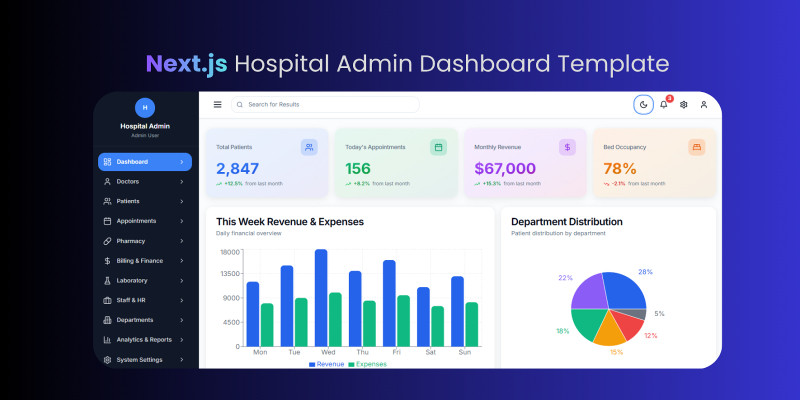
Hospital Management Admin Dashboard Template is an enterprise-grade UI kit for hospital, clinic and healthcare administration panels. Built with Next.js 14 App Router, TypeScript, and TailwindCSS, it delivers best-in-class performance, responsive layouts, dark/light theming, and production-ready dummy data across 17 modules (appointments, patients, billing, analytics, staff, AI automations, notifications, utilities, and more).
Designed specifically for marketplace buyers, the package includes polished page variations, reusable components (shadcn/ui), React Query data hooks, axios setup, and a multi-section queue, reminders, and calendar experience. It ships with thorough documentation and marketing assets so you can launch fast or extend into a fully connected SaaS.
Features
- Next.js 14 App Router, TypeScript 5, TailwindCSS 3.4, shadcn/ui stack
- 17+ admin modules: dashboard, AI analytics, appointments, patients, billing, staff HR, laboratory, pharmacy, departments, utilities, notifications, settings, auth, etc.
- Production-quality demo data & UX patterns for CodeCanyon/Codester marketing
- Fully responsive layouts, dark/light theme toggle, reusable UI primitives
- Appointment booking, calendar, queue management, cancelled/missed workflow, automated reminders
- Modern charts & analytics placeholders, KPI cards, tabs, dialogs, tables, filters
- React Query integration, axios client with interceptors, module-based data hooks
- Role-ready layout with sidebar, topbar, breadcrumbs, status badges, toasts
- Clean folder structure, ESLint/Prettier, NPM scripts (dev/build/lint)
- Marketplace asset pack: documentation, changelog, installation & customization guide
Requirements
- Node.js 18 or higher
- npm, yarn or pnpm package manager
- Basic knowledge of React/Next.js & TailwindCSS
Instructions
- Unzip the downloaded archive; copy the project folder to your workspace.
- Run
npm install(oryarn/pnpm install) to install dependencies. - Start development server with
npm run devand openhttp://localhost:3000. - Update environment variables in
.env.local(sample provided). - Customize branding, colors, typography via
tailwind.config.tsand theme files. - Replace demo data in
data/or connect to your API insidehooks/andlib/api/. - Run
npm run buildto generate production build; deploy to your preferred hosting or integrate with backend. - Consult the documentation (Docs folder) for module overview, file structure, and customization patterns.
| Author | nextfio |
|---|---|
| Category | Themes / HTML / Admin Templates |
| Price | $22 |
| Extended License | $66 |
| First Release | Nov 11, 2025 |
| Last Update | Nov 11, 2025 |
| Files included | .css, .html, JavaScript .js |
Categories
Tags
External listing. code.market does not sell this product and does not process payment for it. Pricing, payment, delivery, licensing, refunds, and support are handled by the third-party merchant on its own website. We may earn an affiliate commission from a referral. Details.
Products of the Week.
Submit🥇

Perceptle
Perceptle is a daily browser-based game that challenges you to test your sensory intuition through five quick estimation and rhythm-based rounds.
Other · 3,957 views · 16 clicksOther · Week 47 · 3,957 views · 16 clicks
🥈

Free LinkedIn Likes From Real
Get free LinkedIn likes on your posts from real members who react by hand. No
SaaS · 4,075 views · 18 clicksSaaS · Week 47 · 4,075 views · 18 clicks
🥉

STOP GUESSING WHAT TO POST
AI that learns your brand voice and builds a month of consistent, on-brand social content: carousels, posts and hooks that sound like you, not like everyone else's AI.
SaaS · 11,557 views · 80 clicksSaaS · Week 47 · 11,557 views · 80 clicks
#4

aaas.market
407 reliable micro tools for solo founders, marketers and creators. They work in your browser
SaaS · 3,936 views · 7 clicksSaaS · Week 47 · 3,936 views · 7 clicks