
Hometether | Remote TV Help for Family Flutter App for Android and iOS With Relay and Admin
Description
AI disclosure: AI tools were used to assist with parts of the code, documentation and graphics of this item. The author reviewed and tested the result. The product itself contains no AI features.
What it is
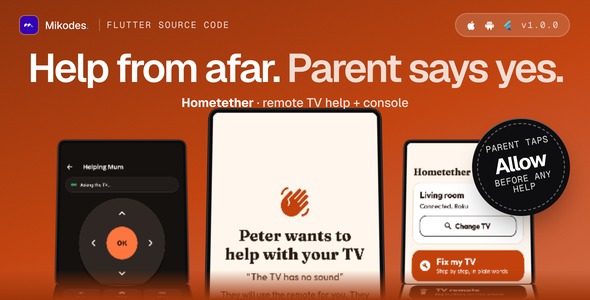
Hometether is a Flutter source code for an Android and iOS app that lets a grown-up child help a parent with the TV from far away, together with a Node.js server (WebSocket relay and operator console, MIKODES Admin Kit) to run it as a small business. The parent’s phone, on the same Wi-Fi as the TV, is the bridge. The helper’s phone sends the remote through your server’s relay. Nothing happens until the parent taps a big Allow help button; a banner shows who is helping for the whole session, and one tap on Stop ends it. There is no screen sharing and no camera stream. You rename it, add your store product ids and publish it under your own brand.
Who it is for
Developers and small studios who want a ready paid-unlock family utility app for the stores. It is remote family help with consent (relay plus guided fixes), not a universal TV remote: the parent also gets a big-button remote for their own phone, but the point is helping someone who is not in the room.
Demo Instructions
The app has no user accounts, so it has no login. The operator console demo is read-only (every change is refused). The relay (WebSocket) is switched off on the demo host, so remote help cannot be tried there; the console shows every relay setting. To try it:
- Open the demo page below, download the demo Android app (APK) or build the real app with flutter run.
- Choose the parent side and look at the big-button remote, Fix my TV (guided fixes) and Find my TV. Without a real TV on your Wi-Fi, typing a TV address shows the error states.
- Choose the helper side to see the dark remote and the Ask for help screen; sessions need a running relay server (docs, Relay).
- Open the operator console with the read-only login below and look at Relay, Paywall, Supported TVs and Guided fixes.
Live demo and docs
- Demo: https://hometether-demo.mikodes.com/ (demo page with a demo Android app; screens are labelled sample data)
- Operator console, read-only: https://hometether-demo.mikodes.com/admin
Email: demo@hometether.demo · Password: hometether-demo-2026 (read-only demo account) - Documentation: https://hometether-demo.mikodes.com/docs/
Third-party services and costs (not included in the price)
- Hosting, a domain and https/wss for the relay server (remote help needs it; the parent’s own remote and guided fixes work without it)
- Store accounts and the lifetime and yearly store products (no product ids ship)
- Release signing (Android keystore, iOS team and bundle id)
- Apple’s Multicast Networking entitlement for automatic TV discovery on iOS
- Support, privacy and terms URLs (empty by default)
- Testing on your own TVs and phones
Good to know before you buy
- Not tested on real TVs. Support for Roku, Samsung (Tizen) and LG (webOS) TVs is written from the vendors’ public documentation and open client libraries, and checked against simulated TVs in tests. Expect to adjust details on first contact with your own TV model. TV brand names only describe compatibility and belong to their owners.
- Android TV and Google TV are found on the network but are not supported yet: the app says so.
- LG pairing uses an unsigned manifest; some webOS versions may reject it.
- Samsung app launch and typing, LG power on, Roku input switching and Wake-on-LAN are not offered.
- The parent’s app must be open during a session; there is no push notification to wake it.
- Traffic is protected by TLS (use https and wss) and server-minted session tokens. It is not end-to-end encrypted, and the relay stores no command content.
- On iOS, finding TVs by multicast needs Apple’s Multicast Networking entitlement, which you request from Apple. Typing the TV address always works.
- Nothing was tested on a real phone or with a real store purchase. The Dockerfile is untested. The Android release build is debug-signed until you add your own key.
How you earn with it
- Lifetime and yearly Plus unlock with restore, using the stores’ in-app purchase (store fees apply). Without Plus a helper gets a number of included help sessions per month (a setting, 3 by default).
- Server-side purchase verification for Apple (signed transactions and Server API) and Google Play, off by default.
- A revenue page in the console showing verified store transactions.
- Paywall, product ids, session limits, brand name, accent colour and feature flags are changed from the console without a new build.
Every money setting starts empty: no product ids ship, so the paywall reads “Purchases are not set up yet” until you add your own ids. Nothing in this item promises any income.
Core features
- Consent first: a helper can only ask. The parent sees a full-screen Allow help question; no answer in 60 seconds means denied. The server and the parent’s phone both enforce it.
- Pairing: an 8-character code or QR, single use, expiring (10 minutes by default). The parent can remove a helper at any time and the helper is cut off at once.
- Relay: a WebSocket relay with session length, idle, rate and size limits and a master switch. It never talks to a TV and stores no command content.
- TV control from the parent’s phone: discovery by SSDP and mDNS or a typed address; drivers for Roku (External Control Protocol), Samsung Tizen and LG webOS over the local network, private addresses only.
- Two remotes: a large, warm remote for the parent and a dark remote with D-pad, keys and app launch (Roku and LG) for the helper.
- Guided fixes: no sound, wrong input, Wi-Fi lost. The helper can push a checklist to the parent’s screen; the texts are editable in the console.
- Paywall with lifetime, yearly and restore; announcement banner and force update; onboarding, light and dark themes.
Admin: operator console
- Brand and legal URLs; paywall, included sessions and store product ids
- Feature switches and relay limits (code lifetime, session length, idle time, helpers per family)
- Supported TV text and guided fixes
- Announcement banner and force update screen
- Help-session counts (never content) and opted-in installs
- Purchase verification and revenue
- Team, audit log, 2FA and notifications (MIKODES Admin Kit 0.7.0); read-only demo mode
Security
- Secrets (family and device secrets) are stored hashed on the server and in the Keychain or Keystore on phones; pairing codes are stored hashed.
- Replay, flood and size protection on the relay; per-address and per-family limits.
- Samsung and LG TVs use self-signed certificates on the local network; the app accepts them only for the private address the user chose.
- Console with team roles, 2FA and an audit trail. Server settings live in server/.env (a .env.example without values is included).
Tech stack
App: Flutter 3.41, Dart 3.11, web_socket_channel, multicast_dns, flutter_secure_storage, mobile_scanner (QR), in_app_purchase. Server: Node.js with Hono, ws and better-sqlite3.
Requirements
- Flutter 3.41.4 or newer (Dart 3.11.1+); Android Studio for Android; Xcode for iOS (deployment target 15.5).
- Node.js 26 LTS (22.12 or newer also works) for the server; Linux or macOS.
- Apple Developer and Google Play developer accounts to publish and to create the store products.
- A phone on the same Wi-Fi as the TV for the parent side; the parent’s app open during a session.
External paid services are not included in the item price: developer accounts, store fees, hosting, a domain with https for the relay, and any service you connect.
What is included
- Flutter app source (Android and iOS)
- Node.js relay server with the operator console
- contract/CONTRACT.md (API and relay frames), .env.example, third-party licence list and documentation
Installation summary
1) Server: copy .env.example to .env, then npm ci, npm run build, npm start; put it behind https/wss. 2) App: set your brand in app/lib/brand.dart, build with—dart-define=API_BASE_URL set to your server address, set bundle id and signing. 3) Create the two store products and enter their ids in the console. Full steps are in the documentation.
Declarations
AI declaration: AI tools were used to assist with parts of the code, documentation and graphics of this item. The author reviewed and tested the result. The product itself contains no AI features.
Changelog
v1.0.0 (first marketplace release): consent-gated remote help, pairing by code or QR, WebSocket relay, Roku, Samsung Tizen and LG webOS drivers, guided fixes, paywall with restore, announcement, force update, purchase verification, operator console.
Support
Support covers questions about the item and bugs in the included code. Help with your own store accounts, signing, your TV models or custom changes is not part of item support. Contact: https://mikodes.com/support
Credits
Open-source packages and fonts are listed in THIRD-PARTY-LICENSES.md. Preview images are real screens with labelled sample data; device frames are illustrations. Not affiliated with Apple, Google or any TV maker; their names only describe platforms and compatibility.
| Author | Mikodes |
|---|---|
| Price | $29 |
| Sales | 0 |
| Rating | 0 (0) |
| Published | Nov 19, 2026 |
| Last Update | Nov 19, 2026 |
| Compatible Software | Flutter 3.x |
| Demo Url | https://hometether-demo.mikodes.com |
| Mobile Files Included | Dart, YAML, JavaScript JSON, .kotlin, .plist, .swift, JavaScript JS, CSS, HTML |
Categories
Tags
External listing. code.market does not sell this product and does not process payment for it. Pricing, payment, delivery, licensing, refunds, and support are handled by the third-party merchant on its own website. We may earn an affiliate commission from a referral. Details.
Products of the Week.
Submit🥇

Perceptle
Perceptle is a daily browser-based game that challenges you to test your sensory intuition through five quick estimation and rhythm-based rounds.
Other · 1,800 views · 11 clicksOther · Week 47 · 1,800 views · 11 clicks
🥈

Free LinkedIn Likes From Real
Get free LinkedIn likes on your posts from real members who react by hand. No
SaaS · 1,935 views · 11 clicksSaaS · Week 47 · 1,935 views · 11 clicks
🥉

STOP GUESSING WHAT TO POST
AI that learns your brand voice and builds a month of consistent, on-brand social content: carousels, posts and hooks that sound like you, not like everyone else's AI.
SaaS · 9,478 views · 76 clicksSaaS · Week 47 · 9,478 views · 76 clicks
#4

aaas.market
407 reliable micro tools for solo founders, marketers and creators. They work in your browser
SaaS · 1,899 views · 5 clicksSaaS · Week 47 · 1,899 views · 5 clicks