
Herdly | Livestock and Dairy Farm Management App UI Kit
Description
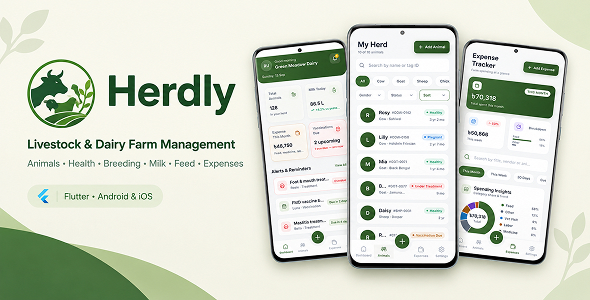
Herdly – Livestock & Dairy Farm Management Flutter App
Herdly is a complete, ready-to-use Livestock & Dairy Farm Record Book Flutter application designed for small herds — cattle, buffalo, goats, sheep and poultry. Manage your animals, health records, breeding cycles, milk production, feed inventory and farm expenses — all from one clean, modern dashboard.
Built with the latest Flutter and a clean, feature-first GetX architecture, Herdly ships with rich offline demo data so you can preview every screen instantly — no Firebase or backend required. It is designed as a professional UI/UX starter kit that you can quickly rebrand and connect to your own REST API or backend.
Important – Please Read Before Purchase
This template ships with offline demo data that lives in memory while the app runs — no Firebase or backend is required to preview it. Herdly is a front-end UI template / starter kit: you connect your own REST API or backend to make the data permanent. Records you add or edit while the app runs are kept in memory only and reset when the app restarts (only the login/session flag, owner name/phone and notification preference are saved on the device).
Key Highlights
- Flutter 3.47.0 & Dart 3.13+ — Built and tested with the latest stable release.
- Android & iOS — Single codebase, multiple platforms.
- Feature-First GetX Architecture — Self-contained modules, scalable & easy to customize.
- Offline Demo Data — Run and explore the full app without any server setup.
- Material 3 Farm-Green UI — Polished, production-quality screens with bundled Inter font.
- Null-Safe Code — The entire project is written with null safety enabled.
Key Features
- Smart Dashboard — Farm stats, finance & milk-production trend charts, health reminders (overdue/vaccination flags) & quick actions.
- Animal Registry — Filterable animal list, add/edit form & detail screen with Milk / Health / Feed / Breeding / Expense tabs.
- Health Management — Vaccination, illness, treatment & checkup records with vet name, cost & follow-up reminders.
- Breeding Management — Breeding records with gestation countdown banner, due-date reminders & offspring/outcome selectors.
- Milk Production — Milk log with calendar view, Morning/Evening session badges, stats & interactive trend charts.
- Feed Inventory — Feed list (Hay, Grain, Silage, Supplement…) with a feed entry form and per-animal/group assignment.
- Expense Tracking — Categorized expense tracker with charts and payment methods (Cash/Card/Mobile Banking).
- Settings — Profile, notifications, appearance options, backup/clear cache & logout with confirmation.
- Auth Flow — Animated splash, email login, registration, 4-digit OTP & password reset (demo-ready).
- Cross-Platform — Android & iOS from a single codebase.
- Fully Responsive — Adapts smoothly across phones and tablets of different screen sizes.
Easy Customization
Herdly is built to be rebranded quickly. Global text, labels and default values are centralized so you can make it yours in minutes.
- Change App Name — Update Android, iOS and in-app branding.
- Change Package / Bundle ID — Set your own unique identifier.
- Change App Icon — Generate launcher icons with flutter_launcher_icons.
- Change Splash Screen — In-app animated splash plus native launch screen.
- Colors & Theme — Re-theme the entire app from a single file.
- Change Currency — Update the currency symbol in one place.
- Well-Organized Code — Predictable feature-first GetX modules that are easy to extend.
Requirements
| Tool | Version | Purpose |
|---|---|---|
| Flutter SDK | 3.47.0 (stable) | Mobile framework |
| Dart SDK | 3.13+ | Programming language |
| Android Studio | Latest | IDE & Android tooling |
| Android SDK | API 36 | Compile & target SDK |
| Java JDK | 17 | Required for Android Gradle builds |
| Xcode | Latest | iOS development (macOS only) |
| CocoaPods | Latest | iOS dependency manager (macOS only) |
| VS Code | Latest | Alternative code editor |
Download Demo APK
Want to try Herdly before you buy? Download the demo APK and test every screen on your own Android device.
Download link: Download Herdly Demo APK
The demo runs entirely on offline data — no login server or backend required. Use the demo credentials listed below to sign in.
Quick Start
- Download & Extract — After purchasing, download the ZIP file from CodeCanyon and extract it.
- Open in IDE — Open the project folder in Android Studio or VS Code.
- Install Dependencies — Run flutter pub get.
- Run the App — Run flutter run.
Demo Login & Test Data
The app runs on offline demo data, so you can explore every screen without a backend. Use the credentials below to sign in.
- Email: Any valid email format. Example: demo@herdly.app
- Password: Any non-empty value. Example: 123456 (registration requires at least 6 characters + confirmation + Terms acceptance)
- OTP code: Use 4912 for registration & password-reset verification.
Login, registration, OTP and password reset are front-end demo flows — no real server validates them and no SMS/email is sent. Connect your own authentication API for production use.
Data & Backend
- All demo content loads from local Dart files, so you can run and explore the full app without any server setup.
- No API, Firebase or API keys are required to run the template — no HTTP packages are used.
- Records you add or edit are kept in memory only and reset when the app restarts.
- Connect your own API or a local database (e.g. Hive, Isar, SQLite) to make changes permanent.
Demo-Ready Features & UI Placeholders
To keep the template lightweight and flexible, the following actions are intentionally provided as UI placeholders (they display a “coming soon” or confirmation message) so you can wire them to your own logic:
- Social (Google) sign-in button on the login screen
- Change Password and Settings → Backup & Export Data (show “coming soon”/confirmation toasts only)
- Animal photo picker — Camera/Gallery shows a confirmation toast instead of opening the device camera
- Expense receipt attachment — stores a demo file name only; nothing is captured or uploaded
- Settings appearance options (theme, language, unit, currency) — UI demo selections, not wired to app logic
- Authentication (login, registration, OTP, password reset) — validated on the front end only; the OTP code is a hardcoded demo value and no SMS/email is sent
Built With
- get — state management, routing & dependency injection
- fl_chart — dashboard & trend charts
- table_calendar — milk log calendar view
- hugeicons — icon set
- toastification — toast/feedback UI
- shared_preferences — session & settings persistence
- Bundled Inter font — custom typography included in the package
Frequently Asked Questions
Does this template require Firebase?
No. This template uses only dummy/hardcoded data. Firebase is not required.
Can I use this for commercial projects?
Yes. After purchasing from CodeCanyon, you can use it according to the Envato license.
How do I connect a real API?
Replace the dummy data files in lib/data/dummy/ with API service classes using packages like http or dio, then update the models to parse JSON responses.
Is the code null-safe?
Yes. The entire project is written with null safety enabled.
Which state management is used?
GetX. The project uses a clean, feature-first GetX architecture with modular bindings, routes and self-contained feature modules.
Does the app save my data permanently?
Not in the demo. All records live in memory and reset when the app restarts (only the login flag and a few settings preferences are saved). Connect an API or a local database to persist data.
Do the photo picker / receipt attachment / Google sign-in buttons work?
They are provided as UI placeholders and show a “coming soon”/confirmation message, so you can plug in your preferred package (e.g. image_picker, share_plus) or your own backend.
Does the OTP screen send a real SMS?
No. It is a demo flow with a hardcoded 4-digit code so you can preview verification. Wire your SMS/email provider or Firebase Phone Auth for production.
Does it support Windows / macOS / Linux desktop?
The package targets Android and iOS. The code is desktop-friendly, but desktop runners are not bundled.
Support
Need help? Reach out via the CodeCanyon item comments or email: nwebdeveloper53@gmail.com
- Support hours: Sunday–Friday, 10:00 AM – 6:00 PM (GMT+6)
- Typical response time: within 24–48 business hours
- Support covers bug fixes and usage questions for the delivered code
- Custom feature development and third-party integration are outside the scope of item support
Please include your Envato purchase code and a clear description of the issue (with screenshots and error logs when possible).
Changelog
v1.0.0 – Initial release
- Dashboard with farm stats, finance & milk trend charts and health reminders
- Animal registry with list, add/edit form and detail screen (Milk / Health / Feed / Breeding / Expense tabs)
- Health records with follow-up reminders
- Breeding records with gestation countdown & offspring/outcome selectors
- Milk production log (calendar + list, session badges, trend charts) and milk entry form
- Feed inventory & feed entry form
- Categorized expense tracker with charts and expense form (payment method + simulated receipt)
- Settings, profile & notifications
- Auth flow (animated splash, email login, registration, 4-digit OTP, password reset)
- Offline demo data for instant preview
| Type | Flutter App |
|---|---|
| Author | Bottal |
| Price | $28 |
| Sales | 0 |
| Rating | 0 (0) |
| Published | Sep 22, 2026 |
| Last Update | Sep 22, 2026 |
| Compatible Software | Flutter 3.x |
| Mobile Files Included | Dart, .java, .kotlin, .swift |
Categories
Tags
External listing. code.market does not sell this product and does not process payment for it. Pricing, payment, delivery, licensing, refunds, and support are handled by the third-party merchant on its own website. We may earn an affiliate commission from a referral. Details.