HemoLink - Nearest Bloodbank,, Blood Donor With Firebase
Description
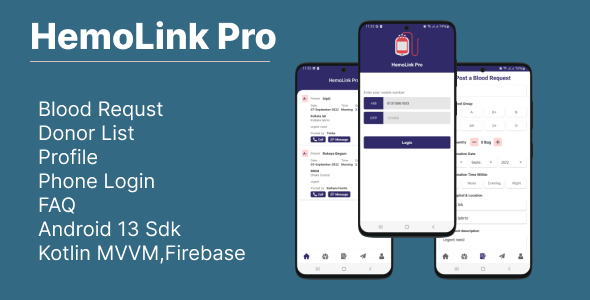
HemoLink is your all-in-one solution for blood donation management. Whether you’re a donor, a blood bank, or in need of blood, our app has you covered. With a user-friendly interface and powerful features, we make it easy to connect donors with recipients and ensure a steady supply of life-saving blood.
Key Features:
- Donor Profiles: Create and manage donor profiles with essential information, including blood type and availability.
- Blood Banks: Discover nearby blood banks with contact details and hours of operation.
- User Authentication: Secure and quick Firebase phone authentication for users.
- Blood Donation Requests: Submit and view requests for blood donations, specifying urgency and blood type.
- Nearby Donors: Find donors in your area based on your location.
- Material Design: A modern and intuitive user interface designed with Material Design principles.
- Donor Ratings: Rate and review donors based on your experience.
- Firebase Authentication: Ensure the security of user accounts with Firebase phone authentication.
- Firebase Admin Panel: Manage app data efficiently with a powerful Firebase Easy admin panel.
- Blood Type Matching: Match donors with recipients based on blood type compatibility.
- User-Generated Content: Allow users to contribute and share their experiences within the app.
- Donor Availability: Easily check donor availability and schedule appointments.
- Blood Request Management: Efficiently manage and update blood donation requests.
- Recent and Popular Donors: Discover the most recent and popular donors in your area.
HemoLink is dedicated to saving lives by bridging the gap between donors and those in need. Download our app now and become a part of our life-saving community.
For any inquiries or support, contact us at roxyhasan76@gmail.com.
Custom Development Service:
You can also hire us for your development needs. For further discussion, please email us at roxyhasan76@gmail.com.
Refund Policy
- We sell our items exclusively on Envato Market. Refunds will not be approved if you purchase the item anywhere else.
- Refunds will not be approved if the item has been downloaded.
- Refund requests will not be approved for compatibility issues.
- We will only provide a refund if our code contains errors or if the functions are not working.
 Changelog
V:0.0.2. September 26, 23

- Phone Authentication added
- Ui Huge Improvement
- Ads  code added

V:0.0.1. 25 September, 23

-
-
Categories
Tags
External listing. code.market does not sell this product and does not process payment for it. Pricing, payment, delivery, licensing, refunds, and support are handled by the third-party merchant on its own website. We may earn an affiliate commission from a referral. Details.
Products of the Week.
Submit🥇

STOP GUESSING WHAT TO POST
AI that learns your brand voice and builds a month of consistent, on-brand social content: carousels, posts and hooks that sound like you, not like everyone else's AI.
SaaS · 3,772 views · 33 clicksSaaS · Week 45 · 3,772 views · 33 clicks
🥈

Conversational Backlinks for Busy Founders
Place Backlink Relevant Conversation for your domain across Forums and Conversations
Website · 41,348 views · 222 clicksWebsite · Week 45 · 41,348 views · 222 clicks
🥉

upvote.club
Free Social Media Engagement that Helps Boost Your Content. Upvote Club supports 19 social networks with 100+ engagement actions in one dashboard. Add links to your posts and get free engagement from real users.
SaaS · 39,389 views · 114 clicksSaaS · Week 45 · 39,389 views · 114 clicks
#4

Substack Posting API
Onboard your Agent to Substack. Write Publish on Substack via API
SaaS · 58,423 views · 198 clicksSaaS · Week 45 · 58,423 views · 198 clicks
#5

Seenshot App
Free, Fast, MacOS Screenshot app. Make Screenshot cmd+shift+2 and send it via link
Desktop App · 27,811 views · 120 clicksDesktop App · Week 45 · 27,811 views · 120 clicks
#6

Hand-Placed Backlinks $9.99 per link. Flat rate.
Buy hand-placed forum, Q-A and directory backlinks. Flat $9.99 per link, no subscriptions — you only pay for approved listings.
Website · 3,684 views · 18 clicksWebsite · Week 45 · 3,684 views · 18 clicks
#7

Free Invoice Generator - PDF Invoices in Your Browser, No Sign-Up
A free invoice maker for freelancers and small businesses: fill in the invoice, check the live preview, and download a PDF that looks exactly like it. Any currency, tax per item, three templates, no sign-up, and nothing leaves your device.
2,371 views · 16 clicksWeek 45 · 2,371 views · 16 clicks
#8

Merge PDF Files Free - Combine PDFs in Your Browser, No Upload
A free PDF merger for office workers, students, and freelancers: combine PDFs and images into one file in the browser, reorder files and pages, pick page ranges, keep bookmarks, and open password-protected PDFs. Nothing is uploaded, no sign-up, no watermark.
2,208 views · 13 clicksWeek 45 · 2,208 views · 13 clicks