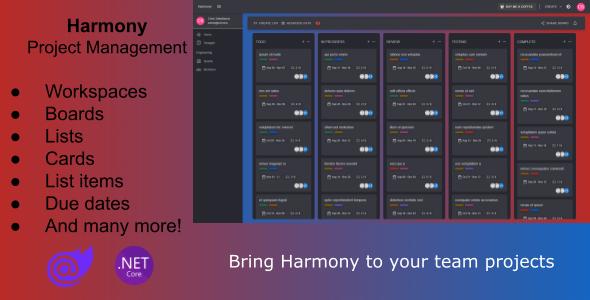
Harmony - Project Management Tool
Description
Bring harmony to your teams with this amazing project management tool.
Features
- Create workspaces to organize different departments in your organization (e.g. Engineering, Marketing, etc)
- Create Kanban Boards to track your projects
- Create Scrum Projects for agile development (coming soon)
- Instant updates across all connected members using SignalR
Official docs
KANBAN features
- Create boards
- Add lists to boards (e.g. TODO, IN PROGRESS, DONE etc)
- Rename & reorder lists
- Add cards to lists
- Reorder or move cards between lists
- Add description to card with integrated Text Editor
- Set due date to cards
- Assign team members to cards
- Add labels to cards, predefined or create new ones
- Add check lists to cards
- Add check list items to check lists
- Mark check list item as completed or set a due date
- Delete check lists
- Upload attachments to cards, images or files
- Archive cards
- Display card’s activity
- View board’s activity
- And many more!
User access features
- User registration and authentication
- Search and add members to workspaces & boards
- Workspace visibility options: Public & Private
- Board visibility options: Private, Workspace, Public
Setup
- Setup the SQL Server connection string inside appsettings.json to point to your SQL Server instance.
- Server=.;Database=Harmony;Integrated Security=True;TrustServerCertificate=True
- Set the Harmony.Server project as the startup project and run the application. This will create the database and run all migrations. Alternative you can open the Package Manager Console, select the srcInfrastructureHarmony.Persistence project as the Default project and run the following command:
- Update-Database -Context HarmonyContext -StartUpProject Harmony.Server -v
Default users created
By default two users will be created for you:
- username: administrator , password: Pa$$w0rd!
- username: johndoe , password: Pa$$w0rd!
Official docs
External listing. code.market does not sell this product and does not process payment for it. Pricing, payment, delivery, licensing, refunds, and support are handled by the third-party merchant on its own website. We may earn an affiliate commission from a referral. Details.
Products of the Week.
Submit🥇

STOP GUESSING WHAT TO POST
AI that learns your brand voice and builds a month of consistent, on-brand social content: carousels, posts and hooks that sound like you, not like everyone else's AI.
SaaS · 4,294 views · 38 clicksSaaS · Week 45 · 4,294 views · 38 clicks
🥈

Conversational Backlinks for Busy Founders
Place Backlink Relevant Conversation for your domain across Forums and Conversations
Website · 42,009 views · 223 clicksWebsite · Week 45 · 42,009 views · 223 clicks
🥉

upvote.club
Free Social Media Engagement that Helps Boost Your Content. Upvote Club supports 19 social networks with 100+ engagement actions in one dashboard. Add links to your posts and get free engagement from real users.
SaaS · 40,052 views · 117 clicksSaaS · Week 45 · 40,052 views · 117 clicks
#4

Substack Posting API
Onboard your Agent to Substack. Write Publish on Substack via API
SaaS · 59,062 views · 198 clicksSaaS · Week 45 · 59,062 views · 198 clicks
#5

Seenshot App
Free, Fast, MacOS Screenshot app. Make Screenshot cmd+shift+2 and send it via link
Desktop App · 28,438 views · 122 clicksDesktop App · Week 45 · 28,438 views · 122 clicks
#6

Hand-Placed Backlinks $9.99 per link. Flat rate.
Buy hand-placed forum, Q-A and directory backlinks. Flat $9.99 per link, no subscriptions — you only pay for approved listings.
Website · 4,271 views · 19 clicksWebsite · Week 45 · 4,271 views · 19 clicks
#7

Free Invoice Generator - PDF Invoices in Your Browser, No Sign-Up
A free invoice maker for freelancers and small businesses: fill in the invoice, check the live preview, and download a PDF that looks exactly like it. Any currency, tax per item, three templates, no sign-up, and nothing leaves your device.
2,946 views · 17 clicksWeek 45 · 2,946 views · 17 clicks
#8

Merge PDF Files Free - Combine PDFs in Your Browser, No Upload
A free PDF merger for office workers, students, and freelancers: combine PDFs and images into one file in the browser, reorder files and pages, pick page ranges, keep bookmarks, and open password-protected PDFs. Nothing is uploaded, no sign-up, no watermark.
2,720 views · 13 clicksWeek 45 · 2,720 views · 13 clicks