
Haltora | Flutter Bus Ticket Booking App with Laravel Admin
Description
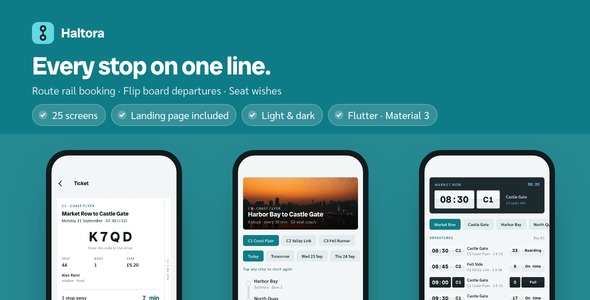
Ship a coach ticketing app your passengers actually open: 25 finished screens, a route rail they tap two stops on, a split-flap departure board, and a Laravel admin panel the operator runs it all from. Light and dark themes, GetX architecture, offline documentation, twelve licensed photographs, and a one-page product website ready to publish.

Demo Instructions: the app opens on a short introduction, so tap Skip to reach the sign-in screen. That form contacts no server and accepts any details. Use demo@haltora.app / demo1234, or tap Sign in with the fields emptied. A sample network of three lines, fourteen stops and a whole day of departures is built in, so every screen is populated the moment the preview opens with nothing to set up first.
Why this one
- Booking that fits the product: the line is drawn as a rail and you tap where you board and where you get off, so the fare and the travel time are for that stretch and no other. Every other coach template in this category opens with two text fields.
- Ready to show on day one: 25 screens with skeleton loaders, empty states and twelve photographs already wired, so nothing looks half-built while you are still deciding what to change.
- Your brand in an afternoon: one color file and one text theme drive every screen, the launcher icon and the bundled landing page. Both typefaces ship inside the app.
- Tested, not just screenshotted: 78 widget and unit tests pass, the back end has 44 more of its own, and the driver walks all 25 screens in both themes before every release.
A line, drawn as a line
Every other coach template opens with two text fields and a date picker, and then shows you a list. None of them can show you the stretch you are actually buying. Here the line is one vertical rail of stops: tap the ring you board at, tap the one you get off at, and the rail between them thickens while the fare for exactly that stretch appears underneath. A third tap starts again from the stop you just touched.

Changes you watch happen
Times, bays and seats left sit on split-flap tiles. When a bay moves or a coach fills up, the tile turns over in front of you: the old upper half falls to the hinge and the new lower half swings up to meet it. A sold-out run goes dark. A late one shows the minutes it is down.

Say what you want, get the window
Window, aisle, front, rear, extra legroom, quiet zone, table, near door. Choose what matters and the seat engine finds the seat, because a passenger knows what they want long before they know that 11A is the one by a window. The coach side view lights the window you were given; the next option is one tap away, and the ranking wraps so the button never dead-ends. A 2+1 executive coach is a different layout object, not a different screen.

Follow it stop by stop
The ticket is a stub, torn along the top, with a four-character boarding code a driver can read off a cracked screen. Below it runs the stretch of line you bought, with the coach jumping from gap to gap as it comes to you. When the run is late a second, hollow ring shows where it would have been, which is the difference between a number and a picture of what the delay cost you.

Unzip, run, look at every screen
The app opens fully populated with a sample network inside it: three lines, fourteen stops and a whole day of departures. There is no key to obtain and no server to stand up first, and the sign-in form arrives filled in. Two commands and it is on your device.

Everything a regular already knows
The lines and what they call at, each stop with its bay and what is there when you arrive, and a photograph for the ones worth a picture. Twelve of them ship inside the app, listed one per line with their source and photographer, and they are demo content you are expected to swap for your own fleet and destinations.

And the rest of them
25 screens, one bottom sheet, two themes. Light and dark come out of one color file: there is no second set of screens, and no screen is conditional on the theme.

Three folders, one download
The Flutter app, the Laravel back end and a one-page product website, plus an offline manual of 35 chapters, two recordings of the interactions, and the walk-through that captured every frame above.

Laravel back end included
The download ships a Laravel application with a Filament admin panel in backend/: six record types (lines, stops, departures, fare rules, tickets and trip notices), a token-authenticated REST API, 44 passing tests, a Docker file, an installer and a shared-hosting guide. Point the app at it with one setting, --dart-define=API_BASE_URL, and the same screens read the server instead of the bundled sample network. It is seeded with exactly the same timetable the app carries, so connecting it does not change what you see. Deploying it needs PHP 8.4 or newer, or Docker.

Landing page included
The download ships a one-page product website for your app (landing/): hero with two phone mock-ups, three feature tiles, a swipeable screen gallery, FAQ and store buttons, already set in the same colors and typefaces as the app and filled with its real screenshots. It is a single self-contained HTML file with no frameworks and no external requests, so you can put it on any static host in a minute and replace the copy and store links from the marked spots.

Built for developers
- Clean GetX architecture: View, Controller, Service, Repository, with lazy bindings per route.
- Four plain-Dart engines: fares, timetable, seat allocation and trip progress live in files with no Flutter import, a clock injected, and their own tests. Lift them straight into your own app.
- Swap in your API without touching a screen: every screen talks to one interface; pass a base URL and the HTTP implementation takes over.
- Every list handles loading and empty: skeleton loaders and empty states are already there.
- Theme-aware components: the same widgets look right in light and dark, and a contrast test measures the pairs rather than checking that a slot is filled.
- Three packages in total: get, http and cupertino_icons. No vendor SDK, which is what keeps the Flutter compatibility window wide.
What you get: full Flutter source code, README with re-theming and API integration guide, offline HTML documentation (35 chapters, 15 screenshots and 2 animated figures), the sample data layer, light and dark themes, twelve licensed photographs with their attribution file, the one-page product website, and the Laravel back end with its own deployment guide.
Requirements
Flutter SDK 3.29 or newer, for Android and iOS. Android compileSdk and targetSdk are set to 36. The included back end needs PHP 8.4 or newer, or Docker, and around 1 GB of RAM on the server.
Notes
The app holds a seat and prints a boarding code; it takes no payment, and fares in the sample flow are settled with the driver or at a ticket desk. The verification screen is interface only and sends no message. Push notifications and live vehicle positions are stubbed with written instructions rather than wired, and the documentation names the file and the method for each.
Without a server the app runs in demo mode on the bundled sample timetable; connect the included back end when you deploy it. The boarding code is text rather than a barcode, and swapping in a QR widget is described in the documentation. Figma or Sketch source files are not included; the interface is defined in the Dart source.
The bundled photographs are royalty-free stock images under the Pexels License, listed one per line with source and photographer in assets/images/coach/LICENSES.txt. They are demo content, and you are expected to replace them with your own fleet and destinations. The two typefaces are under the SIL Open Font License and ship as static files.
Third-party services and external costs: Haltora runs on bundled sample data out of the box. Connecting it to a live back end such as your own hosting, a payment gateway, a push provider or a mapping service will involve those third-party services, which will incur their own separate costs and are not part of this item. Hosting for the included back end is yours.
| Type | Flutter App |
|---|---|
| Author | coderqh |
| Price | $53 |
| Sales | 0 |
| Rating | 0 (0) |
| Published | Sep 23, 2026 |
| Last Update | Sep 23, 2026 |
| Compatible Software | Flutter 3.x |
| Mobile Files Included | Dart, YAML, JavaScript JSON, .kotlin, .swift, JavaScript JS, CSS, PHP, HTML |
Categories
Tags
External listing. code.market does not sell this product and does not process payment for it. Pricing, payment, delivery, licensing, refunds, and support are handled by the third-party merchant on its own website. We may earn an affiliate commission from a referral. Details.
Products of the Week.
Submit🥇

Perceptle
Perceptle is a daily browser-based game that challenges you to test your sensory intuition through five quick estimation and rhythm-based rounds.
Other · 1 views · 0 clicksOther · Week 47 · 1 views · 0 clicks
🥈

Free LinkedIn Likes From Real
Get free LinkedIn likes on your posts from real members who react by hand. No
SaaS · 124 views · 2 clicksSaaS · Week 47 · 124 views · 2 clicks
🥉

STOP GUESSING WHAT TO POST
AI that learns your brand voice and builds a month of consistent, on-brand social content: carousels, posts and hooks that sound like you, not like everyone else's AI.
SaaS · 7,686 views · 71 clicksSaaS · Week 47 · 7,686 views · 71 clicks
#4

aaas.market
407 reliable micro tools for solo founders, marketers and creators. They work in your browser
SaaS · 122 views · 0 clicksSaaS · Week 47 · 122 views · 0 clicks