
GymManager | Gym Membership Management System with POS and QR Access Control
Description
GymManager | Gym Membership Management System with POS and QR Access Control
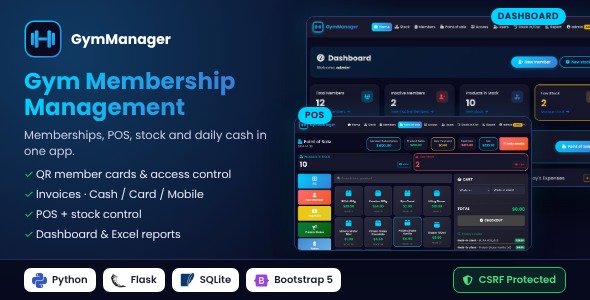
GymManager is a complete, ready-to-use management system for gyms, fitness studios, boxing clubs and sport centers. Manage memberships and payments, sell drinks and supplements at the front desk, control your stock and close your cash register every day — all from one clean, modern interface.
It runs locally on any Windows, Linux or Mac computer (one double-click to start) or on your own server. No monthly fees, no cloud subscription: your data stays with you in a single SQLite file.
Main Features
- Members & subscriptions – member code, phone, sports (multiple), coach, plan (daily, monthly, quarterly, semi-annual, yearly), insurance, discount, partial payments and live remaining balance
- Individual & corporate memberships with partner company tracking
- Payments follow-up – record new payments on existing subscriptions, see unpaid balances and inactive members
- QR member cards – a printable card with a unique QR code is generated for every new member
- QR access control – scan the card with a webcam or a USB scanner: green “Access granted” or red “Access denied” (expired, unpaid balance, inactive), with sound and daily entry log
- Payment methods – Cash, Card and Mobile on every subscription and payment, with a daily split by method
- Printable invoices – subscription invoice, renewal invoice and payment receipt with PAID / BALANCE DUE stamp
- Subscription renewal – automatic period dates (daily, monthly, quarterly, semi-annual, yearly), insurance charged for each new period
- Touch-friendly POS – category buttons, product search, cart, walk-in or member checkout
- Stock management – product code, category, unit, price, image upload, minimum quantity and low-stock alerts
- Stock movements – automatic deduction at each checkout, manual stock in/out with reason, full history
- Expenses – rent, salaries, electricity, maintenance, stock purchases and more
- Daily cash report – products sold + subscriptions + new payments − expenses = net cash, with cash carry-over to the next day
- Advanced report page – filter by client, product, status, membership type, company, phone, date, month and year
- Excel & CSV exports – full workbook, ZIP of CSV files, or individual tables
- Two roles – Admin (full control) and User (front-desk staff, no delete / no reports)
- Secure – random admin password for every installation, password change required at first login, CSRF protection on every form, POST-only deletions, hashed passwords, server-side validation of all quantities and amounts, admin-only sensitive actions
- All amounts in US dollars (USD), configurable app name
- Works offline – Bootstrap, icons and fonts are bundled, no CDN required
- Modern dark glassmorphism design, optimized for desktop and POS screens
- Optional demo data script and admin password reset tool
Requirements
- Python 3.9 or newer
- Local: Windows 10/11, Linux or macOS
- Online: cPanel hosting with “Setup Python App”, a Linux VPS, or Windows Server / IIS
- Desktop / laptop / POS screen (min. width 1280 px recommended)
- Packages installed automatically: Flask, openpyxl, waitress, qrcode
- Optional: webcam or USB/Bluetooth QR scanner for access control
Installation
On your computer (local)
- Windows: install Python, extract the package, double-click
start_windows.bat, open http://localhost:5000 - Linux / macOS: install Python 3, extract the package, run
./start_linux_mac.sh, open http://localhost:5000
On a web host / server
- cPanel (Linux shared hosting): “Setup Python App” –
passenger_wsgi.pyincluded, step-by-step guide - Linux VPS: Waitress or Gunicorn + Nginx, ready-to-copy systemd and Nginx examples
- Windows Server / IIS / Plesk Windows:
web.configtemplate for HttpPlatformHandler included
A complete offline HTML documentation is included (installation, network/server deployment, configuration, user guide, backup, troubleshooting).
What’s Included
- Full Python / Flask source code
- HTML templates (Jinja2 + Bootstrap 5), printable invoices and member cards
- One-click start scripts for Windows, Linux and macOS
- Hosting files:
passenger_wsgi.py(cPanel),web.configtemplate (IIS / Windows),wsgi.py(VPS) - Production entry point (Waitress / Gunicorn) + Nginx and systemd examples
- Documentation
Credits
- Flask (BSD-3), openpyxl (MIT), Waitress (ZPL 2.1), qrcode (BSD), html5-qrcode (Apache 2.0)
- Bootstrap 5 (MIT), Font Awesome Free 6 (CC BY 4.0 / OFL / MIT)
- Poppins font (SIL OFL 1.1)
- Names and figures shown in the screenshots are fictitious demo data.
Changelog
v1.0.0 – October 2026
- Initial release
Support
Questions or problems? Contact us through the Support tab.
| Author | elecspot1 |
|---|---|
| Price | $41 |
| Sales | 0 |
| Rating | 0 (0) |
| Published | Oct 28, 2026 |
| Last Update | Oct 28, 2026 |
| Application Runtime | Native |
| High Resolution | No |
| Operating System Versions | Windows 11, Windows 10 |
Categories
Tags
External listing. code.market does not sell this product and does not process payment for it. Pricing, payment, delivery, licensing, refunds, and support are handled by the third-party merchant on its own website. We may earn an affiliate commission from a referral. Details.
Products of the Week.
Submit🥇

STOP GUESSING WHAT TO POST
AI that learns your brand voice and builds a month of consistent, on-brand social content: carousels, posts and hooks that sound like you, not like everyone else's AI.
SaaS · 7,379 views · 67 clicksSaaS · Week 46 · 7,379 views · 67 clicks
🥈

Conversational Backlinks for Busy Founders
Place Backlink Relevant Conversation for your domain across Forums and Conversations
Website · 46,664 views · 232 clicksWebsite · Week 46 · 46,664 views · 232 clicks
🥉

upvote.club
Free Social Media Engagement that Helps Boost Your Content. Upvote Club supports 19 social networks with 100+ engagement actions in one dashboard. Add links to your posts and get free engagement from real users.
SaaS · 44,605 views · 127 clicksSaaS · Week 46 · 44,605 views · 127 clicks
#4

Substack Posting API
Onboard your Agent to Substack. Write Publish on Substack via API
SaaS · 63,491 views · 206 clicksSaaS · Week 46 · 63,491 views · 206 clicks
#5

Seenshot App
Free, Fast, MacOS Screenshot app. Make Screenshot cmd+shift+2 and send it via link
Desktop App · 32,739 views · 127 clicksDesktop App · Week 46 · 32,739 views · 127 clicks
#6

Hand-Placed Backlinks $9.99 per link. Flat rate.
Buy hand-placed forum, Q-A and directory backlinks. Flat $9.99 per link, no subscriptions — you only pay for approved listings.
Website · 8,358 views · 19 clicksWebsite · Week 46 · 8,358 views · 19 clicks
#7

Free Invoice Generator - PDF Invoices in Your Browser, No Sign-Up
A free invoice maker for freelancers and small businesses: fill in the invoice, check the live preview, and download a PDF that looks exactly like it. Any currency, tax per item, three templates, no sign-up, and nothing leaves your device.
6,986 views · 29 clicksWeek 46 · 6,986 views · 29 clicks
#8

Merge PDF Files Free - Combine PDFs in Your Browser, No Upload
A free PDF merger for office workers, students, and freelancers: combine PDFs and images into one file in the browser, reorder files and pages, pick page ranges, keep bookmarks, and open password-protected PDFs. Nothing is uploaded, no sign-up, no watermark.
6,464 views · 18 clicksWeek 46 · 6,464 views · 18 clicks