
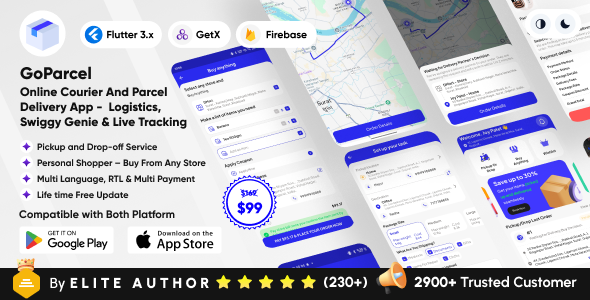
GoParcel - Online Courier & Parcel Delivery App - Buy Anything from Store Flutter Complete Solution
Description

Introduction to GoParcel:
In today’s fast-paced world, convenience is everything—and our app is built to deliver just that. Whether you need to send a package across town, pick up essentials from a nearby store, or plan future purchases, our platform is your go-to solution. We bring together delivery, shopping assistance, and wishlist planning—all in one easy-to-use app. No more juggling multiple services or stepping out for small errands.
With real-time updates, live item confirmations, and secure payment features, you stay in full control of every request. From hardware to stationery, groceries to gifts, you simply select a store, enter your list, and relax while we do the legwork. It’s the smart, flexible way to manage your day-to-day needs—efficient, personalized, and right at your fingertips.
What’s included:
- A complete fully working system.
- Customer App (Android & iOS) Flutter & Delivery boy App (Android) Native Java
- An Admin Panel (PHP)
- Database(MySQL)
- Constant development with regular updates.
- Clean, well-structured and maintainable code
- Active customer support to help.
- Value for money system.
- Flexible prices, no surprises!
Admin Panel Demo Access Click Here

Admin: https://goparcel.cscodetech.com
User: admin
Password: admin@123
Customer Demo Access

Delivery Boy/Captain Demo Access

Mobile No: +91 9988776655
Password: 123

Note: We have restricted some functions in our demo version, but if you use your own phone number, you can fully experience and test the entire app flow. We have enabled this feature specifically for users who want to sign up and explore the app's functionalities step by step.
Module 1: Pickup & Drop (Package Delivery)
- How to Order Pickup & Drop (Package Delivery) — Step-by-Step Guide
- This feature is designed to bring any store to your doorstep.
- How it works:
- You simply select the pickup and drop-off locations in the app.
- Our delivery partner will collect the item from your specified pickup point and deliver it to the drop-off location you choose.
- Perfect for:
- Moving personal items
- Sending packages to friends
- Transferring office materials
- Module 1: Pickup & Drop (Package Delivery)
- Pickup and drop service with various fee structures.
- Example 1: Normal Weather (No Extra Mileage Charge)
- Scenario: A customer wants to send a small package 4 km away.
- Base Charges:
- First 2 km: $20 (Package Up To Km Price)
- Additional 2 km: $20 (2 km × $10 Package After Km Price)
- Package Rate: $24 (Small package fee)
- Total: $64
- Additional Charges:
- Delivery Commission: $6.40 (10% of $64 going to admin)
- Total Calculation:
- Base charges: $20 + $20 + $24 = $64
- Admin commission: $6.40
- Total before discount: $70.40
- Coupon discount if applied: -$2.00
- Final amount to pay: $68.40
- Example 2: Bad Weather + Distance Over 7 km (Extra Mileage Charge Applied)
- Scenario: A customer wants to send a small package 8 km away during bad weather.
- Base Charges:
- First 2 km: $20 (Package Up To Km Price)
- Additional 6 km: $60 (6 km × $10 Package After Km Price)
- Package Rate: $24 (Small package fee)
- Total: $104
- Additional Charges:
- Delivery Commission: $10.40 (10% of $104 going to admin)
- Extra Mileage Charge: $10.40 (10% surcharge due to bad weather & distance over 7 km)
- Total Calculation:
- Base charges: $20 + $60 + $24 = $104
- Additional charges: $10.40 + $10.40 = $20.80
- Total before discount: $124.80
- Coupon discount: -$2.00
- Final amount to pay: $122.80
Module 2: Buy Order (Buy Anything)
- How to Order Buy Anything from a Store — Step-by-Step Guide
- This feature is designed to bring any store to your doorstep.
- How it works:
- You add the items you want to buy in the app and select your preferred store.
- A delivery partner will visit the store and search for the items on your list.
- They’ll send photos of each item for your confirmation.
- You approve or reject items as per your choice.
- After confirmation, you pay the total in-app and receive delivery at your chosen address.
- Key benefits:
- You get to approve every item before buying.
- You only pay once you’re satisfied.
- Saves time and adds convenience for busy lifestyles.
- Buy Anything from a Store — Step-by-Step Guide:
- Step 1: Select a Store
- Enter the name or address of the store you want to order from.
- ✅ Example: Type “Sharma Hardware Store, MG Road” and select it.
- Step 2: Add Your Shopping List
- Enter the items with exact quantities.
- ✅ Example:
- 2 rolls of electrical tape (black)
- 1 medium-sized hammer
- 10 feet of PVC pipe
- 1 liter paint (white)
- Step 3: Select or Add a Delivery Address
- Choose a saved address or add a new one (home, office, etc.).
- Step 4: Pay the Delivery Charges
- Pay a small delivery fee based on distance to place the order.
- Step 5: Wait for Store Visit & Confirmation
- Once the partner reaches the store, they’ll search for your items.
- ✅ Live Action: Photos and prices of items sent to you for confirmation.
- Step 6: Confirm or Reject Items
- Accept if correct, reject if it doesn’t match.
- ✅ Example: You requested “Fevicol 200ml” but only “Fevicol 100ml” is available — accept or reject accordingly.
- Step 7: Finalize and Pay for the Items
- Approve the items, then pay the final total securely in the app.
- Step 8: Relax While We Deliver
- After payment, the partner purchases and delivers the items.
- Your items are delivered to your doorstep with receipt.
- Step 1: Select a Store
- Payment Calculation Structure
- Two-part payment process:
- First Payment: Covers delivery fees before item confirmation.
- Second Payment: Covers approved item cost + service charge.
- Example: 8 km delivery in bad weather
- First Payment:
- First 2 km: $30
- Next 6 km: $60 (6 × $10)
- Base Fee: $90
- Admin Commission: $9 (10%)
- Extra Mile Charge: $9 (bad weather + distance > 7 km)
- Coupon Discount: -$2
- Total: $106
- Second Payment:
- Items: 5 Bananas + 1 Tea 500gm = $620
- Service Charge: $124 (20% of $620)
- Total: $744
- Grand Total: $850 ($106 + $744)
- First Payment:
- Example: 5 km delivery in normal weather
- First Payment:
- First 2 km: $30
- Next 3 km: $30 (3 × $10)
- Base Fee: $60
- Admin Commission: $6 (10%)
- Extra Mile Charge: $0 (normal weather)
- Coupon Discount: -$2
- Total: $64
- Second Payment:
- Items: 5 Bananas + 1 Tea 500gm = $620
- Service Charge: $124
- Total: $744
- Grand Total: $808 ($64 + $744)
- First Payment:
- Customer Saves $42 in normal weather due to:
- Lower delivery fee ($60 vs $90)
- No extra mileage charge ($0 vs $9)
- Lower admin commission ($6 vs $9)
- Two-part payment process:
Test accounts for payment
- Flutterwave test cards Click here: https://developer.flutterwave.com/docs/test-cards
- Credit Card for Stripe: 4242 4242 4242 4242 – Anything in the CVV and expiration date
- Credit Card for Razorpay: 4111111111111111, Exp: 12/25, CVV: 111


Faced a problem? Need assistance with the product? No worries – our customer support team is always ready to help you.
- Support requests are being processed on business days from 10:00 to 18:00 (IST +05.30) within 24h to 48h.
- We suggest, while our team reviews your support request, please read the documentation that comes in the zip file of Codecanyon. You can download it from Codecanyon: https://codecanyon.net/downloads
- We are in IST+5:30 time zone. We address all the support queries 5 days weekly (Saturday & Sunday off).
- Have pre-sales questions or concerns, please write to us via our website contact page
- If you like our product and support then please drop a rate and write a review at: https://codecanyon.net/downloads
Disclaimer
- A live hosting server and properly configured subdomain are required to access the setup panel. Localhost environments are not supported.
- Phone number verification requires a Twilio or MSG91 account.
- Twilio and MSG91 are paid third-party SMS services.
- SMS charges apply based on the provider’s pricing.
- SMS costs are not included in the item purchase price.
- A valid Google Maps API key must be required for the map functionality to work.
- Buyers are responsible for configuring external services and covering all associated costs.
Refund Policy
- We don’t offer a refund. (If the item is downloaded)
- Please read the description and compatibility content thoroughly before purchasing as we don’t offer a refund if you buy it by mistake.
- Be Aware : We do not sell any of our items outside the Envato market
Please Note: Live preview images cannot be used directly in client’s live project. Those are used for preview purpose only.
| Type | Flutter App |
|---|---|
| Author | cscode_tech |
| Price | $49 |
| Sales | 9 |
| Rating | 0 (0) |
| Published | May 6, 2025 |
| Last Update | Mar 27, 2026 |
| Compatible Software | Flutter 3.x |
| Mobile Files Included | Dart, YAML, JavaScript JSON, .java, .kotlin, .h, .plist, .swift, JavaScript JS, CSS |
Categories
Tags
External listing. code.market does not sell this product and does not process payment for it. Pricing, payment, delivery, licensing, refunds, and support are handled by the third-party merchant on its own website. We may earn an affiliate commission from a referral. Details.
Products of the Week.
Submit🥇

STOP GUESSING WHAT TO POST
AI that learns your brand voice and builds a month of consistent, on-brand social content: carousels, posts and hooks that sound like you, not like everyone else's AI.
SaaS · 7,393 views · 67 clicksSaaS · Week 46 · 7,393 views · 67 clicks
🥈

Conversational Backlinks for Busy Founders
Place Backlink Relevant Conversation for your domain across Forums and Conversations
Website · 46,685 views · 232 clicksWebsite · Week 46 · 46,685 views · 232 clicks
🥉

upvote.club
Free Social Media Engagement that Helps Boost Your Content. Upvote Club supports 19 social networks with 100+ engagement actions in one dashboard. Add links to your posts and get free engagement from real users.
SaaS · 44,623 views · 127 clicksSaaS · Week 46 · 44,623 views · 127 clicks
#4

Substack Posting API
Onboard your Agent to Substack. Write Publish on Substack via API
SaaS · 63,509 views · 206 clicksSaaS · Week 46 · 63,509 views · 206 clicks
#5

Seenshot App
Free, Fast, MacOS Screenshot app. Make Screenshot cmd+shift+2 and send it via link
Desktop App · 32,760 views · 127 clicksDesktop App · Week 46 · 32,760 views · 127 clicks
#6

Hand-Placed Backlinks $9.99 per link. Flat rate.
Buy hand-placed forum, Q-A and directory backlinks. Flat $9.99 per link, no subscriptions — you only pay for approved listings.
Website · 8,377 views · 19 clicksWebsite · Week 46 · 8,377 views · 19 clicks
#7

Free Invoice Generator - PDF Invoices in Your Browser, No Sign-Up
A free invoice maker for freelancers and small businesses: fill in the invoice, check the live preview, and download a PDF that looks exactly like it. Any currency, tax per item, three templates, no sign-up, and nothing leaves your device.
7,006 views · 29 clicksWeek 46 · 7,006 views · 29 clicks
#8

Merge PDF Files Free - Combine PDFs in Your Browser, No Upload
A free PDF merger for office workers, students, and freelancers: combine PDFs and images into one file in the browser, reorder files and pages, pick page ranges, keep bookmarks, and open password-protected PDFs. Nothing is uploaded, no sign-up, no watermark.
6,481 views · 18 clicksWeek 46 · 6,481 views · 18 clicks