
Gold Portfolio - PHP Site with Admin Dashboard
Description
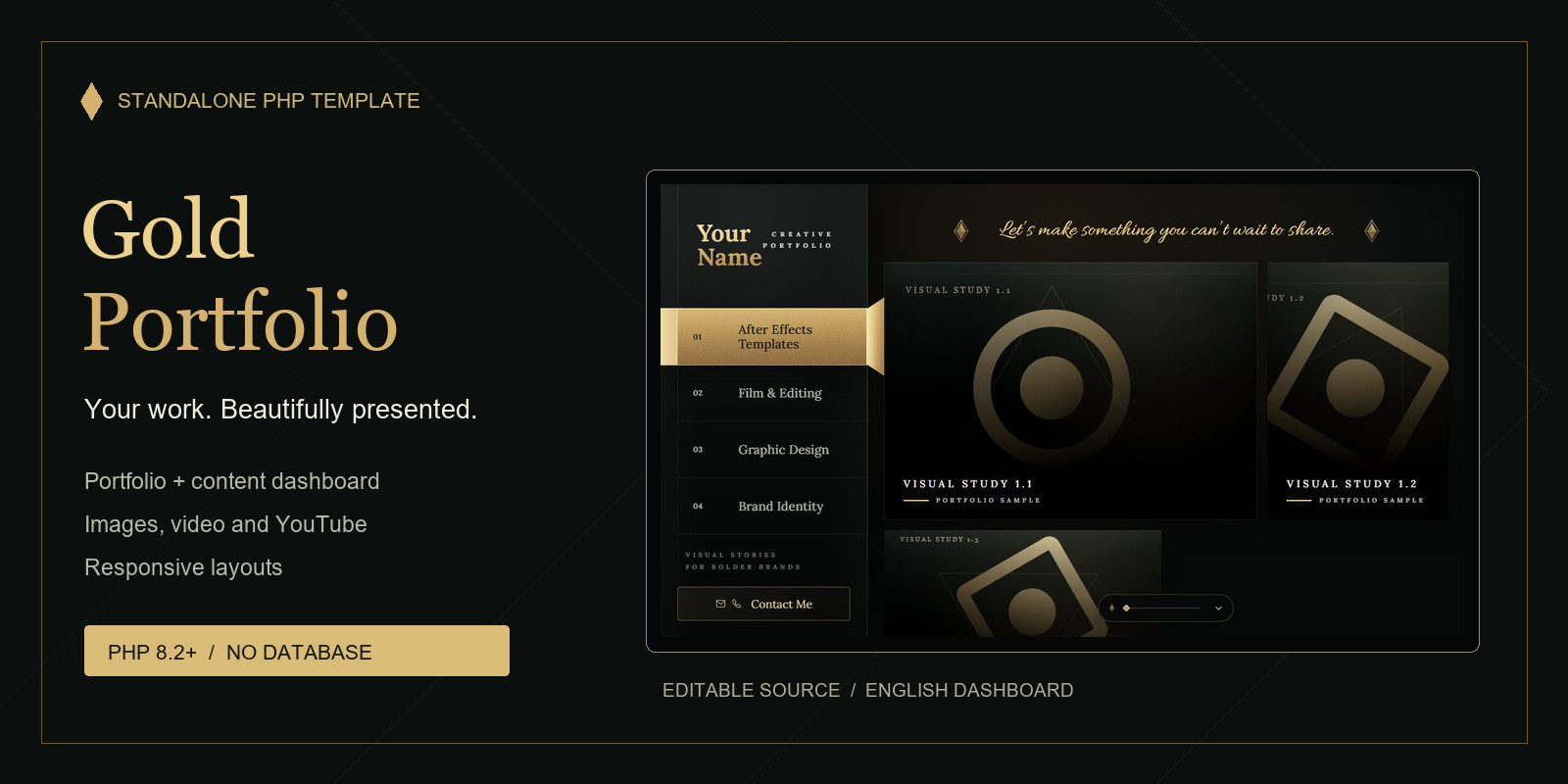
Gold Portfolio is an elegant, responsive portfolio template with a matching PHP admin dashboard. Its dark-and-gold design, textured details and jewel-inspired patterns suit designers, photographers, filmmakers and other creative professionals. Includes editable HTML, CSS, JavaScript and PHP source files, original SVG demo artwork, English and Arabic PDF installation guides, and a source-code guide. Hosting and a domain name are not included.
Features
- Animated welcome screen and smooth transitions.
- Responsive layouts for desktop, tablet and mobile. - Project previews for images, MP4/WebM videos and YouTube links. - Additional text, images and videos within each project. - Dashboard for adding, editing, deleting and reordering projects. - Customizable categories, website name and welcome text. - Media Library with multiple selection and bulk deletion. - Private recovery storage for deleted media. - Contact window with copyable email and phone details. - Administrator login, first-use account setup and password recovery. - No database, Node.js, SSH or email configuration required.
Requirements
PHP 8.2 or newer, the Fileinfo extension, PHP sessions, and Apache or LiteSpeed hosting with .htaccess support. HTTPS is required for remote dashboard access. PHP needs write access to the content and upload storage.
Google Fonts and YouTube playback require an internet connection. YouTube videos must allow embedding. Upload limits depend on your hosting configuration.
Instructions
1. Extract the downloaded ZIP file.
2. Read the included English or Arabic installation guide. 3. Upload only the contents of public_html to your website's document root, including all hidden .htaccess and .user.ini files. 4. Enable PHP 8.2 or newer, Fileinfo and HTTPS on your hosting. 5. Open https://YOUR-DOMAIN/dashboard/. 6. Open dashboard/data/install-key.txt through your hosting file manager and copy the installation key. 7. Enter that key on the setup screen and create your administrator username and password. 8. Save the recovery key shown after setup in a private location outside the website. 9. Use Website settings to update your name, welcome text, categories and contact details. 10. Replace the demonstration projects with your own work. 11. Test project previews, uploads and responsive layouts on your actual hosting. Keep all protection files in place. Detailed installation, recovery and troubleshooting instructions are included in the PDF guides.
| Author | rafeeg |
|---|---|
| Category | Scripts & Code / PHP Scripts |
| Price | $14 |
| Extended License | $42 |
| First Release | Oct 19, 2026 |
| Last Update | Oct 19, 2026 |
| Files included | .php, .css, .html, .json, .svg, JavaScript .js |
| Software version | PHP 8.5 |
| Programming language | PHP, JavaScript |
Categories
Tags
External listing. code.market does not sell this product and does not process payment for it. Pricing, payment, delivery, licensing, refunds, and support are handled by the third-party merchant on its own website. We may earn an affiliate commission from a referral. Details.
Products of the Week.
Submit🥇

Actionbook
It works inside the user's own browser with the accounts already signed in. The user describes the result they need, and the agent reads, clicks and types through the pages, then delivers a dashboard or report where each data links back to its source.
Other · 713 views · 9 clicksOther · Week 44 · 713 views · 9 clicks
🥈

Free social media tools for creators & solofounders
295 free tools for growing your social media: write, plan, grow on local AI models, 100% free forever, No sign-up required, No trial. Write, check and measure posts on LinkedIn, Instagram, TikTok, X, YouTube, Reddit, Product Hunt and more: a free social media scheduler for 17 networks, engagement rate calculators, character counters, best time to post, hook generators and follower growth calculators. No login anywhere, no API or credit usage.
683 views · 6 clicksWeek 44 · 683 views · 6 clicks
🥉

STOP GUESSING WHAT TO POST
AI that learns your brand voice and builds a month of consistent, on-brand social content: carousels, posts and hooks that sound like you, not like everyone else's AI.
SaaS · 1,929 views · 21 clicksSaaS · Week 44 · 1,929 views · 21 clicks
#4

Hand-Placed Backlinks $9.99 per link. Flat rate.
Buy hand-placed forum, Q-A and directory backlinks. Flat $9.99 per link, no subscriptions — you only pay for approved listings.
Website · 1,881 views · 17 clicksWebsite · Week 44 · 1,881 views · 17 clicks
#5

Conversational Backlinks for Busy Founders
Place Backlink Relevant Conversation for your domain across Forums and Conversations
39,339 views · 211 clicksWeek 44 · 39,339 views · 211 clicks
#6

Free Invoice Generator - PDF Invoices in Your Browser, No Sign-Up
A free invoice maker for freelancers and small businesses: fill in the invoice, check the live preview, and download a PDF that looks exactly like it. Any currency, tax per item, three templates, no sign-up, and nothing leaves your device.
621 views · 11 clicksWeek 44 · 621 views · 11 clicks
#7

Merge PDF Files Free - Combine PDFs in Your Browser, No Upload
A free PDF merger for office workers, students, and freelancers: combine PDFs and images into one file in the browser, reorder files and pages, pick page ranges, keep bookmarks, and open password-protected PDFs. Nothing is uploaded, no sign-up, no watermark.
563 views · 4 clicksWeek 44 · 563 views · 4 clicks