
GMapNexus | Business Leads Scraper and Data Extractor for Google Maps with Email Finder
Description
Stop copy-pasting leads by hand. Let GMapNexus do it in minutes.
GMapNexus is a powerful Google Maps scraper and business data extractor that pulls business names, phone numbers, emails, ratings, and more, straight to your desktop.
Built for agencies, freelancers, and marketers who need real leads fast.
No subscriptions. No hidden fees. Just a one-time purchase and unlimited searches on your own Windows PC.
Perfect For
✅ Marketing agencies & freelancers
✅ Local SEO professionals
✅ Sales & outreach teams
✅ Business prospecting & CRM building
✅ Market research analysts
✅ Anyone doing B2B lead generation
⚡ Features
Bulk Keywords Mode
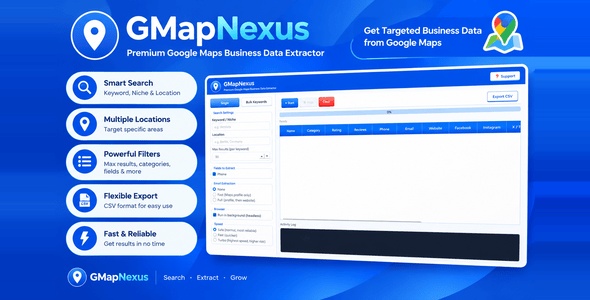
Run this Google Maps scraper across dozens of keyword and location searches in one batch. Type your list once, click Start, and walk away.
Smart Email Extractor
Choose how far GMapNexus looks. Check the Google Maps profile only, or go further and scan the business’s own website too.
Full Business Profile Data
This business data scraper captures name, category, rating, review count, phone, website, address, and exact GPS coordinates for every listing.
Social Profile Detection
Automatically picks up Facebook, Instagram, X/Twitter, and LinkedIn links when they’re available on the business’s Maps profile or website.
3 Speed Modes
Safe, Fast, or Turbo. You choose the balance between scraping speed and field reliability, depending on what you need.
⏯️ Pause, Resume & Stop Anytime
Full control over every extraction run. Pause mid-scrape without losing your progress, and pick up right where you left off.
Live Activity Log
Watch exactly what’s happening in real time. See which listing is being scraped, which job is running, and how far along you are.
One-Click CSV Export
Export your extracted leads straight to a spreadsheet, ready for Excel, Google Sheets, or your CRM of choice.
Clean, Modern Interface
A distraction-free, professional-looking desktop app. No clutter, no confusing menus.
Built-In Support Access
Reach us by email or WhatsApp directly from inside the app. No digging for contact info.
Why You Need This Google Maps Scraper
❌ Manually searching Google Maps wastes hours every day
❌ Paid lead databases are expensive and go stale fast
❌ Copy-pasting contact info one listing at a time is slow and error-prone
❌ Hiring someone to do this data entry eats into your margins
GMapNexus replaces all of that with one desktop scraper and extractor combined into a single app. Search once, or queue up dozens of searches, and let it run.
⚠️ Disclaimer: GMapNexus is a data extraction tool for publicly available Google Maps business listings. Please use responsibly and in accordance with your local laws and Google’s own terms.
Simple 3-Step Setup
1️⃣ Install
Run the installer. No dependencies, no configuration, just Google Chrome needs to already be on your PC.
2️⃣ Search
Type a keyword + location, or switch to Bulk Keywords mode and paste in a whole list at once for the scraper to work through.
3️⃣ Export
Click Export CSV and your extracted leads are ready for outreach or your CRM.
❓ Frequently Asked Questions
❓ Does this require an API key or monthly subscription?
No. GMapNexus is a one-time purchase. No external APIs, no recurring fees. Everything runs locally on your Windows PC.
❓ What data can this Google Maps extractor pull?
Business name, category, rating, review count, phone number, email, website, social media links, full address, and GPS coordinates.
❓ How does the email extractor work?
You choose the depth: Fast checks the Google Maps profile page only. Full also visits the business’s own website to look further.
❓ Can this scraper run multiple searches at once?
Yes. Switch to Bulk Keywords mode, enter one keyword/location combination per line, and GMapNexus works through the whole list automatically.
❓ Is my scraped data stored anywhere online?
No. Everything is processed and saved locally on your own computer. Nothing is sent to any third-party server.
❓ What Windows versions are supported?
Windows 10 and Windows 11.
❓ Do I need to keep the app window open while it runs?
You can run the scraper in the background (headless mode) for a faster, quieter experience while you do other work.
Version History
- Version 1.0: Initial release with Single & Bulk search, 3-tier speed control, Email extraction (None/Fast/Full), Phone/Rating/Reviews/Address/Coordinates extraction, Social profile detection, Pause/Resume, Activity Log, and CSV export.
| Type | Windows App |
|---|---|
| Author | TQNexus |
| Price | $13 |
| Sales | 0 |
| Rating | 0 (0) |
| Published | Sep 29, 2026 |
| Last Update | Sep 29, 2026 |
| Application Runtime | Native |
| High Resolution | No |
| Operating System Versions | Windows 11, Windows 10, Windows XP |
Categories
Tags
External listing. code.market does not sell this product and does not process payment for it. Pricing, payment, delivery, licensing, refunds, and support are handled by the third-party merchant on its own website. We may earn an affiliate commission from a referral. Details.
Products of the Week.
Submit🥇

STOP GUESSING WHAT TO POST
AI that learns your brand voice and builds a month of consistent, on-brand social content: carousels, posts and hooks that sound like you, not like everyone else's AI.
SaaS · 7,369 views · 67 clicksSaaS · Week 46 · 7,369 views · 67 clicks
🥈

Conversational Backlinks for Busy Founders
Place Backlink Relevant Conversation for your domain across Forums and Conversations
Website · 46,653 views · 232 clicksWebsite · Week 46 · 46,653 views · 232 clicks
🥉

upvote.club
Free Social Media Engagement that Helps Boost Your Content. Upvote Club supports 19 social networks with 100+ engagement actions in one dashboard. Add links to your posts and get free engagement from real users.
SaaS · 44,593 views · 127 clicksSaaS · Week 46 · 44,593 views · 127 clicks
#4

Substack Posting API
Onboard your Agent to Substack. Write Publish on Substack via API
SaaS · 63,480 views · 206 clicksSaaS · Week 46 · 63,480 views · 206 clicks
#5

Seenshot App
Free, Fast, MacOS Screenshot app. Make Screenshot cmd+shift+2 and send it via link
Desktop App · 32,730 views · 127 clicksDesktop App · Week 46 · 32,730 views · 127 clicks
#6

Hand-Placed Backlinks $9.99 per link. Flat rate.
Buy hand-placed forum, Q-A and directory backlinks. Flat $9.99 per link, no subscriptions — you only pay for approved listings.
Website · 8,349 views · 19 clicksWebsite · Week 46 · 8,349 views · 19 clicks
#7

Free Invoice Generator - PDF Invoices in Your Browser, No Sign-Up
A free invoice maker for freelancers and small businesses: fill in the invoice, check the live preview, and download a PDF that looks exactly like it. Any currency, tax per item, three templates, no sign-up, and nothing leaves your device.
6,977 views · 29 clicksWeek 46 · 6,977 views · 29 clicks
#8

Merge PDF Files Free - Combine PDFs in Your Browser, No Upload
A free PDF merger for office workers, students, and freelancers: combine PDFs and images into one file in the browser, reorder files and pages, pick page ranges, keep bookmarks, and open password-protected PDFs. Nothing is uploaded, no sign-up, no watermark.
6,458 views · 18 clicksWeek 46 · 6,458 views · 18 clicks