
Glucora | Blood Sugar and Food Scan Tracker - React Native / Expo
Description
Demo Instructions
There is no login and no demo credentials – the app is fully usable out of the box.
Everything works locally except the AI food photo analysis, which needs a free-to-create OpenAI API key of your own. The key is read from an environment variable on the backend server and is never stored in the source code. The analysis endpoint is protected by API key authentication and per-IP rate limiting (10 requests per minute), so only your own app can call it. See the included documentation for the 5-minute setup. All other screens (onboarding funnel, tracking, history, settings) run completely offline, so you can test everything before configuring the key.
Important: this is a template of the React Native / Expo source code, not a compiled app. You need Node.js and Xcode to run it.
Everything the App Does
- Welcome screen with hero illustration and call to action
- 19-step onboarding funnel: multi-question survey, feature list, animated plan-generating progress circle, setup progress bar with live percentage, congratulations screen, star rating request, mock notification permission, referral code entry, subscription paywall with monthly and yearly plans and 3-day free trial badge, animated spin-the-wheel discount, and a one-time discount offer screen
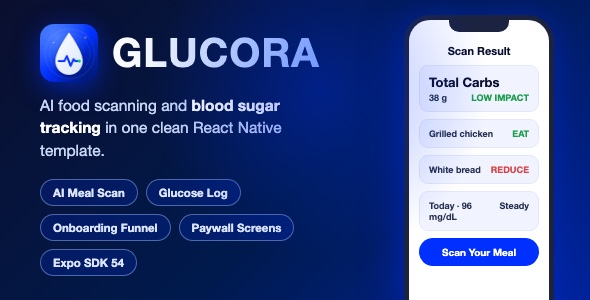
- AI meal scanning: take a photo of food, a restaurant menu, or a nutrition label and get an instant analysis from the OpenAI vision model (GPT-4o)
- Analysis results screen: detected foods with carb estimates, green light (eat now) and red light (reduce or avoid) classification, total carbs, blood sugar impact level, confidence level, recommended eating order, simple swap suggestions, and an encouragement message
- Loading, error and retry states for the AI analysis
- Daily tracking screen: blood sugar range logging by time of day, water intake counter with quick-add buttons, stress level scale 1-10 with emoji feedback, energy level scale 1-10 with battery icons
- Haptic feedback on all tracking interactions
- History screen with All / Scans / Logs filters, pattern insight cards, and a recent activity feed with relative timestamps
- Settings screen with account, subscription and legal groups, a medical disclaimer popup, and app version footer
- Custom Bebas Neue display font, branded color system, medical disclaimer notices throughout the app, and a clean tab bar navigation with 4 tabs
Technology
- React Native 0.81 with React 19 and the New Architecture
- Expo SDK 54 with expo-router (file-based navigation)
- TypeScript throughout
- Lightweight Hono REST backend server (included, runs locally with one command)
- Secured analysis endpoint: API key authentication, per-IP rate limiting and request size limiting
- OpenAI GPT-4o vision API for food photo analysis (BYO API key via environment variable)
- Zod validation of the AI response format
- expo-image-picker for the camera, expo-haptics, expo-linear-gradient, react-native-svg, lucide-react-native icons
What the Buyer Gets
- Full React Native / Expo source code (iOS and Android from one codebase)
- Full backend server source code (Hono)
- Step-by-step documentation with screenshots: installation, OpenAI key setup, renaming, re-theming, customizing the onboarding, and App Store submission checklist
- All illustrations and assets used in the app, stored locally in the project
- Preview screenshots pack
Development Disclosure
Portions of this template’s source code were developed with AI-assisted tools. All code has been reviewed, cleaned and tested.
A Note Before You Buy
This item is a source code template, not a finished published app. Basic React Native / Expo knowledge is required to customize, build and submit it. It is an educational and informational tool only. It does not provide medical advice, does not diagnose, treat, cure or prevent any disease, and is not a substitute for professional medical guidance.
OpenAI API required: the AI food photo analysis relies on the OpenAI API (GPT-4o vision), which is an external, paid third-party service. You must create your own OpenAI account with billing enabled and provide your own API key. API usage will incur ongoing costs for you (the buyer) beyond the initial purchase price of this item – typically a fraction of a cent per analysis. All other features of the app work offline without any external service.
| Type | Native Web App |
|---|---|
| Author | mefjudevllc |
| Price | $14 |
| Sales | 0 |
| Rating | 0 (0) |
| Published | Sep 24, 2026 |
| Last Update | Sep 24, 2026 |
| Compatible Software | Other, Other, Other, Other, Other |
| Mobile Files Included | JavaScript JSON |
Categories
Tags
External listing. code.market does not sell this product and does not process payment for it. Pricing, payment, delivery, licensing, refunds, and support are handled by the third-party merchant on its own website. We may earn an affiliate commission from a referral. Details.
Products of the Week.
Submit🥇

STOP GUESSING WHAT TO POST
AI that learns your brand voice and builds a month of consistent, on-brand social content: carousels, posts and hooks that sound like you, not like everyone else's AI.
SaaS · 7,344 views · 67 clicksSaaS · Week 46 · 7,344 views · 67 clicks
🥈

Conversational Backlinks for Busy Founders
Place Backlink Relevant Conversation for your domain across Forums and Conversations
Website · 46,619 views · 232 clicksWebsite · Week 46 · 46,619 views · 232 clicks
🥉

upvote.club
Free Social Media Engagement that Helps Boost Your Content. Upvote Club supports 19 social networks with 100+ engagement actions in one dashboard. Add links to your posts and get free engagement from real users.
SaaS · 44,561 views · 127 clicksSaaS · Week 46 · 44,561 views · 127 clicks
#4

Substack Posting API
Onboard your Agent to Substack. Write Publish on Substack via API
SaaS · 63,446 views · 206 clicksSaaS · Week 46 · 63,446 views · 206 clicks
#5

Seenshot App
Free, Fast, MacOS Screenshot app. Make Screenshot cmd+shift+2 and send it via link
Desktop App · 32,697 views · 127 clicksDesktop App · Week 46 · 32,697 views · 127 clicks
#6

Hand-Placed Backlinks $9.99 per link. Flat rate.
Buy hand-placed forum, Q-A and directory backlinks. Flat $9.99 per link, no subscriptions — you only pay for approved listings.
Website · 8,318 views · 19 clicksWebsite · Week 46 · 8,318 views · 19 clicks
#7

Free Invoice Generator - PDF Invoices in Your Browser, No Sign-Up
A free invoice maker for freelancers and small businesses: fill in the invoice, check the live preview, and download a PDF that looks exactly like it. Any currency, tax per item, three templates, no sign-up, and nothing leaves your device.
6,946 views · 29 clicksWeek 46 · 6,946 views · 29 clicks
#8

Merge PDF Files Free - Combine PDFs in Your Browser, No Upload
A free PDF merger for office workers, students, and freelancers: combine PDFs and images into one file in the browser, reorder files and pages, pick page ranges, keep bookmarks, and open password-protected PDFs. Nothing is uploaded, no sign-up, no watermark.
6,428 views · 18 clicksWeek 46 · 6,428 views · 18 clicks