
Glead Finder | Windows App for Google Maps Business Leads Scraping and Email Finding
Description
Find business phone numbers and emails from Google Maps, in a few clicks
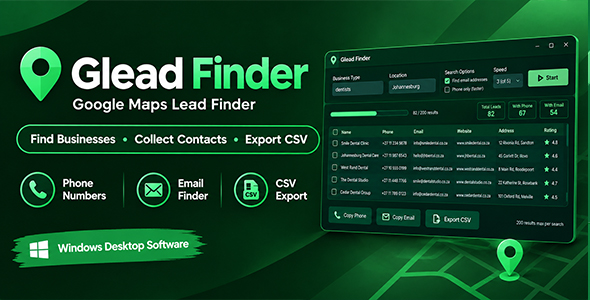
Glead Finder is a simple desktop app that builds lead lists for you. Type a type of business (for example dentists) and a place (for example Johannesburg). Glead Finder finds the businesses on Google Maps and collects their phone numbers, emails, websites, addresses and ratings into one clean table. Save the list as a spreadsheet file with one click.
No Google account. No API key. No monthly fees. No technical skills needed.
How it works
- Search: enter a business type and a location, then press Start.
- Watch: results appear live in the table while the app works.
- Save: export your list to a CSV file that opens in Excel or Google Sheets.
Features
- Phone numbers, websites and addresses collected from each Google Maps listing.
- Email finder: visits each business’s own website, checking the home page and its contact and about pages.
- Live results table with counters for total leads, leads with a phone and leads with an email.
- Filter box to find anything in your results, plus an “Only with contact” switch to hide leads with no phone or email.
- One-click copy for every phone number and email.
- Up to 200 results per search, with a Stop button that keeps everything collected so far.
- Speed control: choose how many businesses are checked at the same time (1 to 5).
- Email search on or off: turn it off for a faster, phone-only search.
- Works worldwide: search any city or country that Google Maps covers.
Perfect for
- Freelancers and agencies looking for local clients
- Web designers, SEO and marketing professionals
- Sales teams building call and email lists
- Small business owners researching competitors or partners
Requirements
- Windows 10 or Windows 11 (64-bit)
- Internet connection
- Google Chrome, Microsoft Edge or Brave installed (used quietly in the background)
What is included
- Glead Finder application
- Step-by-step user manual (HTML), written for beginners
Please read before buying
- Glead Finder reads public pages. Phone numbers and emails are only collected when the business has published them. Some businesses have no email on their website, and that is normal.
- Google sometimes changes how Google Maps is built. When that happens, the app may need an update to keep working. Updates are included.
- You are responsible for using the data lawfully, including privacy and anti-spam rules such as POPIA, GDPR and CAN-SPAM, and for respecting Google’s terms.
- Glead Finder is an independent product. It is not affiliated with, endorsed by or sponsored by Google.
Changelog
Version 1.0.0 – Initial release.
| Author | ydulana |
|---|---|
| Price | $8 |
| Sales | 0 |
| Rating | 0 (0) |
| Published | Oct 20, 2026 |
| Last Update | Oct 20, 2026 |
| Application Runtime | Native |
| High Resolution | No |
| Operating System Versions | Windows 11, Windows 10 |
Categories
Tags
External listing. code.market does not sell this product and does not process payment for it. Pricing, payment, delivery, licensing, refunds, and support are handled by the third-party merchant on its own website. We may earn an affiliate commission from a referral. Details.
Products of the Week.
Submit🥇

STOP GUESSING WHAT TO POST
AI that learns your brand voice and builds a month of consistent, on-brand social content: carousels, posts and hooks that sound like you, not like everyone else's AI.
SaaS · 7,369 views · 67 clicksSaaS · Week 46 · 7,369 views · 67 clicks
🥈

Conversational Backlinks for Busy Founders
Place Backlink Relevant Conversation for your domain across Forums and Conversations
Website · 46,653 views · 232 clicksWebsite · Week 46 · 46,653 views · 232 clicks
🥉

upvote.club
Free Social Media Engagement that Helps Boost Your Content. Upvote Club supports 19 social networks with 100+ engagement actions in one dashboard. Add links to your posts and get free engagement from real users.
SaaS · 44,593 views · 127 clicksSaaS · Week 46 · 44,593 views · 127 clicks
#4

Substack Posting API
Onboard your Agent to Substack. Write Publish on Substack via API
SaaS · 63,480 views · 206 clicksSaaS · Week 46 · 63,480 views · 206 clicks
#5

Seenshot App
Free, Fast, MacOS Screenshot app. Make Screenshot cmd+shift+2 and send it via link
Desktop App · 32,730 views · 127 clicksDesktop App · Week 46 · 32,730 views · 127 clicks
#6

Hand-Placed Backlinks $9.99 per link. Flat rate.
Buy hand-placed forum, Q-A and directory backlinks. Flat $9.99 per link, no subscriptions — you only pay for approved listings.
Website · 8,349 views · 19 clicksWebsite · Week 46 · 8,349 views · 19 clicks
#7

Free Invoice Generator - PDF Invoices in Your Browser, No Sign-Up
A free invoice maker for freelancers and small businesses: fill in the invoice, check the live preview, and download a PDF that looks exactly like it. Any currency, tax per item, three templates, no sign-up, and nothing leaves your device.
6,977 views · 29 clicksWeek 46 · 6,977 views · 29 clicks
#8

Merge PDF Files Free - Combine PDFs in Your Browser, No Upload
A free PDF merger for office workers, students, and freelancers: combine PDFs and images into one file in the browser, reorder files and pages, pick page ranges, keep bookmarks, and open password-protected PDFs. Nothing is uploaded, no sign-up, no watermark.
6,458 views · 18 clicksWeek 46 · 6,458 views · 18 clicks