
GeoFormulas - Interactive Geometry Calculator iOS App | SwiftUI | Full Source Code | Easy Reskin
Description
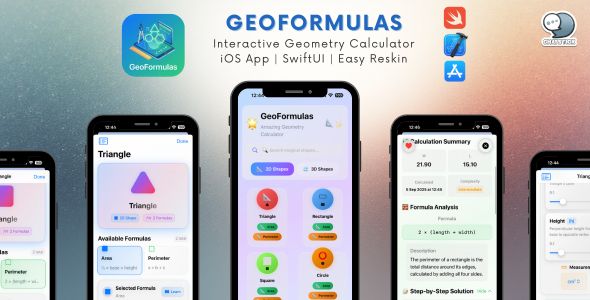
GeoFormulas – Interactive Geometry Calculator iOS App
SwiftUI • MVVM • Full Source Code • Easy Reskin • Monetization Ready
GeoFormulas is a professional iOS geometry calculator app template featuring 18+ shapes, interactive formula input, calculation history, favorites, and beautiful themes. Built with SwiftUI and a clean MVVM architecture, it’s fully documented and designed for fast customization—ideal for educational apps, math tools, and branded calculators.
️ Transform Geometry Learning with This Premium iOS App Template
GeoFormulas is a comprehensive, production-ready iOS application designed to help students, educators, and professionals master geometry through interactive calculations and visual learning. The codebase follows modern iOS best practices, works smoothly on iPhone and iPad, and is ready for publication or rebranding.
Why Choose GeoFormulas?
- ✅ Production-Ready Code — clean, tested, and well documented
- ✅ Easy Customization — centralized
AppConfig.swiftfor fast reskinning - ✅ Modern Architecture — SwiftUI + MVVM pattern
- ✅ No Dependencies — 100% native iOS, no third-party libraries
- ✅ Comprehensive Documentation — step-by-step guides included
- ✅ Monetization Ready — built-in in-app purchase system (StoreKit 2)
✨ Key Features
Comprehensive Formula Library
- 10+ 2D shapes (Triangle, Rectangle, Circle, Polygon, etc.)
- 8+ 3D shapes (Sphere, Cube, Cylinder, Pyramid, etc.)
- Area, perimeter, volume, and surface area calculations
- Real-time calculation with interactive controls
- Visual formula representations
Interactive Calculator
- Smooth parameter input controls (sliders and fields)
- Real-time calculation updates
- Unit conversion (metric ↔ imperial)
- Input validation and error handling
- Polished visual feedback and animations
Calculation History
- Automatic saving of calculations
- Search and filtering
- Favorite calculations
- Delete and manage history
- Persistent storage (Core Data)
⭐ Favorites System
- Bookmark frequently used formulas
- Quick access to saved calculations
- Sync across sessions
Beautiful Themes
- 5 built-in themes: Default, Ocean, Sunset, Forest, Lavender
- Smooth theme switching
- Dark mode support
- Customizable color schemes
⚙️ Settings & Preferences
- Unit system selection
- Theme management
- Auto-save preferences
- About & privacy policy screens
Monetization (Optional)
- In-app purchase system
- Pro/Premium unlock
- StoreKit 2 integration
- Restore purchases
- Configurable pricing and product IDs
️ Technical Specifications
Technology Stack
- Language: Swift 5.7+
- UI Framework: SwiftUI (100% SwiftUI, no UIKit)
- Architecture: MVVM (Model-View-ViewModel)
- Minimum iOS: 16.0+
- Xcode: 14.0+
- Devices: iPhone & iPad (Universal)
- Orientation: Portrait & Landscape
Features & Integrations
- Core Data: persistent history + favorites
- StoreKit 2: in-app purchases
- Combine: reactive data flow
- Accessibility: VoiceOver-ready
- Localization: ready for internationalization
Code Quality
- ✅ Clean, readable code with comprehensive comments
- ✅ Modular, reusable components
- ✅ Performance optimized and memory efficient
- ✅ No third-party dependencies
What’s Included
Source Code
- ✅ Complete Xcode project
- ✅ 18 Swift source files
- ✅
AppConfig.swift(central configuration) - ✅ SwiftUI views, models, services, utilities
- ✅ Core Data model
- ✅ Assets + app icon template
Documentation
- ✅ README.md — project overview
- ✅ RESKIN_MANUAL.md — step-by-step customization guide
- ✅ INSTALLATION_GUIDE.md — setup instructions
- ✅ CODECANYON_LISTING.md — listing reference
- ✅ Inline code comments — every function documented
Assets
- ✅ App icon template
- ✅ Color theme definitions
- ✅ SF Symbols integration
- ✅ Splash screen animations
Customization Made Easy
Quick Reskin in ~5 Minutes
Customize your brand and features from one place: AppConfig.swift
// Change app branding
static let appName = "Your App Name"
static let appTagline = "Your Tagline"
static let developerName = "Your Company"

// Customize colors
static let primaryColor = Color.blue
static let accentColor = Color.orange

// Toggle features
static let enableProFeatures = true
static let showSplashScreen = true
What You Can Customize
- ✅ App name and branding
- ✅ Color themes (5 included; add unlimited more)
- ✅ Splash screen text and visuals
- ✅ Developer info, support email, website
- ✅ In-app purchase product IDs and pricing
- ✅ Feature toggles (Pro unlock, history, favorites, etc.)
- ✅ UI animations and effects
Tip: See RESKIN_MANUAL.md for detailed instructions.
Use Cases
Educational Apps
- Geometry study aids
- Student calculators
- Teacher classroom tools
- Homework helper apps
Professional Tools
- Engineering calculators
- Architecture and design utilities
- Construction measurement tools
- Technical reference apps
Business Opportunities
- White-label builds for schools
- Custom-branded calculators
- Niche calculators (crafts, woodworking, construction)
- Institutional learning apps
Monetization Strategies
Built-in Options
- Freemium Model (Included) — basic shapes free, Pro unlock for advanced features
- One-time Purchase — suggested $4.99 (configurable)
Optional Business Models
- Completely Free — disable IAP and add ads (if desired)
- Subscription — adapt StoreKit logic for monthly/yearly billing
- White-label Licensing — sell customized versions to schools/businesses
Learning Resources
The project is designed to be easy to learn from. Each file includes clear documentation, function-level comments, and usage notes.
/// Calculates the area of a circle given its radius.
/// - Parameter radius: The radius of the circle in the current unit
/// - Returns: The calculated area in square units
func calculateCircleArea(radius: Double) -> Double {
    // Formula: A = πr²
    return Double.pi * radius * radius
}
Easy Setup & Installation
3 Simple Steps
- Download and extract the project files
- Open GeoFormulas.xcodeproj in Xcode
- Run on simulator or device (⌘R)
System Requirements
- macOS Ventura (13.0) or later
- Xcode 14.0 or later
- iOS 16.0+ SDK
See INSTALLATION_GUIDE.md for detailed setup instructions.
Target Audience
- iOS Developers — complete template, modern SwiftUI patterns, excellent starter base
- Educators & Schools — branded learning tools, teaching aids, student resources
- Entrepreneurs — educational market entry, white-label opportunities
- Designers — functional app foundation to redesign and showcase
Why This App Stands Out
- ✅ Better Documentation — every function explained
- ✅ Easier Customization — centralized configuration with
AppConfig.swift - ✅ Modern SwiftUI — latest patterns and best practices
- ✅ No Dependencies — smaller, faster, more reliable
- ✅ Production Ready — complete app, not a demo
- ✅ Active Support — help available when needed
Professional Services Available
Need help customizing or launching your app? We offer professional services:
Graphic Design Services
- Custom app icon design
- Splash screen graphics
- UI/UX improvements
- Marketing materials
Custom Development
- Add new formulas or shapes
- Integrate additional features
- Custom calculations
- API integrations
App Store Submission
- Submission process handling
- App Store optimization (ASO)
- Screenshot creation
- Description writing
️ Technical Support
- Installation assistance
- Customization guidance
- Bug fixes
- Code explanations
Contact Us:
choochai.t@chatstickmarket.com
www.chatstickmarket.com
⏱️ Response Time: Within 24 hours
Languages: English, Thai
❓ Frequently Asked Questions
-
Q: Do I need programming experience?
A: Basic iOS development knowledge is recommended. However, the documentation andAppConfig.swiftmake reskinning straightforward for beginners. -
Q: Can I publish this to the App Store?
A: Yes. This is a complete, production-ready app. Customize branding and submit following Apple guidelines. -
Q: Are there recurring fees?
A: No. This is a one-time purchase with lifetime access to the source code (per marketplace terms). -
Q: Can I use this for multiple apps?
A: Yes—create multiple niche versions. Please follow CodeCanyon license rules for your purchase type. -
Q: Do you provide updates?
A: Yes. Buyers receive updates for bug fixes and iOS compatibility improvements. -
Q: Do you offer customization services?
A: Yes. Email us for design, development, or App Store submission services.
Download Includes
GeoFormulas/
├── Source Code (18 Swift files)
├── README.md
├── RESKIN_MANUAL.md
├── INSTALLATION_GUIDE.md
├── Assets & Icons
└── Xcode Project File
Total File Size: ~2 MB (lightweight and efficient)
✅ Quality Guarantee
- ✅ Tested on iOS 16, 17, and 18
- ✅ Stable performance (no crashes)
- ✅ Clean Swift best practices
- ✅ Thorough documentation
- ✅ Support included
Get Started Today
Turn this professional geometry calculator into your own unique app. With comprehensive documentation, easy customization, and professional support, you can launch faster and focus on your brand.
Ready to Build Your App?
- Purchase and download the files
- Follow INSTALLATION_GUIDE.md
- Customize using RESKIN_MANUAL.md
- Publish to the App Store
Launch Your Geo App
Thank You
Thank you for considering GeoFormulas! We’re excited to see what you’ll create with this template. If you enjoy it, please leave a rating and review—it helps us continue building high-quality products.
Happy Coding! ✨
| Type | iOS App |
|---|---|
| Author | pooccm |
| Price | $29 |
| Sales | 1 |
| Rating | 0 (0) |
| Published | Dec 31, 2025 |
| Last Update | Dec 31, 2025 |
| Compatible Software | iOS 15, Other |
| Compatible With | Swift |
| Mobile Files Included | .h, .m, .pch, .xib/.nib |
| Video Preview Resolution | 1080x1920 |
Categories
Tags
External listing. code.market does not sell this product and does not process payment for it. Pricing, payment, delivery, licensing, refunds, and support are handled by the third-party merchant on its own website. We may earn an affiliate commission from a referral. Details.
Products of the Week.
Submit🥇

STOP GUESSING WHAT TO POST
AI that learns your brand voice and builds a month of consistent, on-brand social content: carousels, posts and hooks that sound like you, not like everyone else's AI.
SaaS · 7,395 views · 67 clicksSaaS · Week 46 · 7,395 views · 67 clicks
🥈

Conversational Backlinks for Busy Founders
Place Backlink Relevant Conversation for your domain across Forums and Conversations
Website · 46,694 views · 232 clicksWebsite · Week 46 · 46,694 views · 232 clicks
🥉

upvote.club
Free Social Media Engagement that Helps Boost Your Content. Upvote Club supports 19 social networks with 100+ engagement actions in one dashboard. Add links to your posts and get free engagement from real users.
SaaS · 44,630 views · 127 clicksSaaS · Week 46 · 44,630 views · 127 clicks
#4

Substack Posting API
Onboard your Agent to Substack. Write Publish on Substack via API
SaaS · 63,516 views · 206 clicksSaaS · Week 46 · 63,516 views · 206 clicks
#5

Seenshot App
Free, Fast, MacOS Screenshot app. Make Screenshot cmd+shift+2 and send it via link
Desktop App · 32,765 views · 127 clicksDesktop App · Week 46 · 32,765 views · 127 clicks
#6

Hand-Placed Backlinks $9.99 per link. Flat rate.
Buy hand-placed forum, Q-A and directory backlinks. Flat $9.99 per link, no subscriptions — you only pay for approved listings.
Website · 8,382 views · 19 clicksWebsite · Week 46 · 8,382 views · 19 clicks
#7

Free Invoice Generator - PDF Invoices in Your Browser, No Sign-Up
A free invoice maker for freelancers and small businesses: fill in the invoice, check the live preview, and download a PDF that looks exactly like it. Any currency, tax per item, three templates, no sign-up, and nothing leaves your device.
7,011 views · 29 clicksWeek 46 · 7,011 views · 29 clicks
#8

Merge PDF Files Free - Combine PDFs in Your Browser, No Upload
A free PDF merger for office workers, students, and freelancers: combine PDFs and images into one file in the browser, reorder files and pages, pick page ranges, keep bookmarks, and open password-protected PDFs. Nothing is uploaded, no sign-up, no watermark.
6,486 views · 18 clicksWeek 46 · 6,486 views · 18 clicks