
gAppointments - Appointment booking addon for Gravity Forms

Description
Schedule appointments within Gravity Forms. gAppointments is great for any business that depends on an appointment calendar. Scroll down to see all features list.
Now maintained by Marketing the Change – Gravity Forms 3.0 compatibility, security patches, and ongoing stability improvements. v1.17 restores provider and service selection (broken since v1.15) and confirms full compatibility with Gravity Forms 3.0.2.5.
Features
- Payed/Non-Payed Booking
- Supports any payment gateway
- Works with Gravity Perks Preview Submission. See demo
- Works with Gravity Perks Multi-Page Navigation. See demo
- Multiple slots selection & maximum bookings per date
- Services per form.
- Service interval time slots or custom time slots.
- Options for service interval slots (duration, cleanup, capacity, reduce gaps, lead time, show end times, time format, remove am/pm text, max bookings per date, multiple slots selection).
- Options for service custom slots (price per slot, capacity per slot, lead time, show end times, time format, remove am/pm text, max bookings per date, multiple slots selection). See demo
- Service option: Schedule appointments in the future, from today on an interval of days.
- Service option: Schedule appointments within a defined range of dates.
- Service option: Schedule appointments only on custom dates.
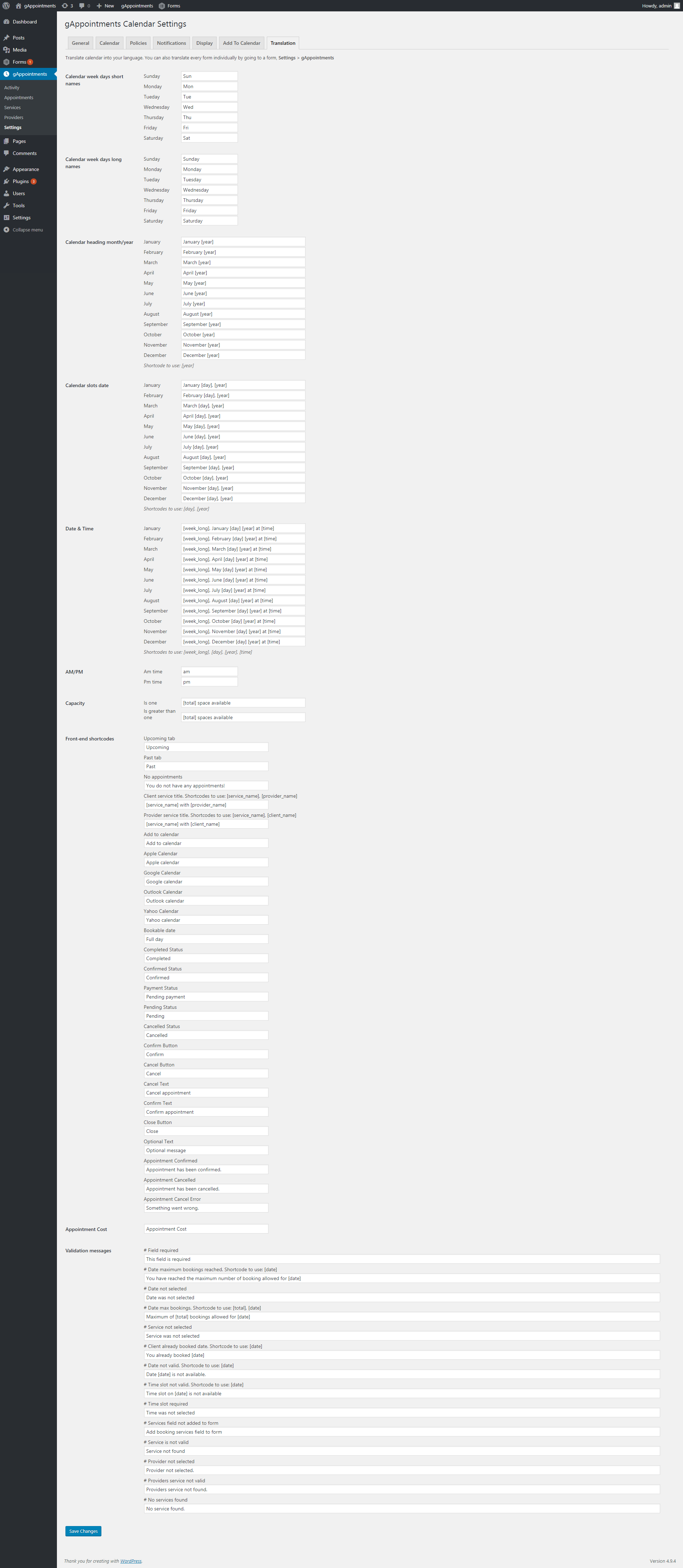
- Translation support, translation per individual form. See demo
- Flexible translation. See demo
- Activity page
- Personalized provider work hours, breaks and holidays
- Providers can edit their schedule from the front-end.
- Minimum appointment window required for new appointments (lead time required for new appointments).
- Client/Provider appointments management on the frontend.
- Clients or providers can add the appointment to their favourite calendar on the front-end. See demo
- Add calendar links (gcal, yahoo) in email
- Assign a registered user as service provider
- TimeSlot capacity
- Custom HTML Emails
- Email notifications
- SMS notifications using Twilio and WP Twilio Core free plugin
- Set calendar first day of the week to Sunday or Monday
- Auto confirm appointments
- Auto complete appointments
- Cancel unpaid appointments after a time interval
- Usage of Gravity Forms name/email/phone fields for appointments
- Endless colour possibilities
- Mobile Responsive



Support and Documentation
This plugin is now maintained by Marketing the Change. For support, contact us via Envato. Full documentation is included with the plugin.
Changelog
14.08.2026 – ver 1.17
- Fixed bug: Provider and service selection AJAX calls were returning 403 / -1 (regression introduced in v1.15). The nonce ga_calendar_nonce was added to server-side verification in v1.15 but was never passed to the front-end via wp_localize_script, nor included in the jQuery AJAX data payloads in main.js. Selecting a provider or service silently failed and the calendar never populated.
- Update: Gravity Forms version notice now has a dismiss button so administrators can hide it.
- Update: Confirmed full compatibility with Gravity Forms 3.0.2.5. Calendar render, provider and service selection, slot generation, and form submission all verified end to end.
12.08.2026 – ver 1.16
- Fixed bug: Gravity Forms 3.0 compatibility. Booking cost was not added to the Total field, causing submissions to fail with “Submitted value () does not match expected value”.
- Update: Price recalculation now uses the Gravity Forms products module (gform.products.updateProducts()), with the legacy gformInitPriceFields() retained as a fallback for Gravity Forms 2.9 and older.
- Fixed bug: main.js and total.js now declare gform_gravityforms as a script dependency, fixing a load-order race under Gravity Forms 3.0 asynchronous script loading.
- Fixed bug: Appointment cost is now resolved per form, so pages containing more than one booking form calculate their totals independently.
- Update: Added a Gravity Forms version check. An admin notice now warns when the active Gravity Forms version falls outside the tested range.
- Update: Added Requires at least and Requires PHP plugin headers.
01.04.2026 – ver 1.15 - Fixed bug: Google Calendar Sync Not Working - Security improvements: Updated use of exec() - Fixed bug: Calendar Navigation Bug - Fixed bug: Time Slot Ordering - Update: Improved general instability issues
07.11.2023 – ver 1.14.1 - Fixed bug: Providers and services selecting issue. - Fixed bug: Form submitting issue.
31.10.2023 – ver 1.14 - Security improvements. - Fixed bug: Invalid appointment name fix. - New Feature: Added custom sorting functionality for services and providers.
10.10.2023 – ver 1.13.1 - Fixed bug: Fixed service selecting crash.
03.10.2023 – ver 1.13.0 - Update: Improved compatibility with PHP 8.2.
14.08.2023 – ver 1.12.0 - Update: Google Calendar Authorize access update.
19.06.2023 – ver 1.11.0 - Update: Updated HTML entity encode.
16.08.2022 – ver 1.10.0 - Update: WordPress 6.0 – design adaptation.
02.03.2022 – ver 1.9.7 - Fixed bug: “Forms” → “Settings” → “gAppointments” → “Form booking category” (function gf_get_field_type_postid).
14.09.2021 – ver 1.9.6 - Feature: Ability to dynamically change the calendar service without resetting the provider selection during a booking - Fixed bug: Time slot capacity pop-up not displayed when available slot capacity is reduced to one - Fixed bug: “Custom” service type creation validation issues - Enhancement: Automated “Custom” service type appointment slot sorting - Feature: “Payment Order Details” appointment field will only return entries from the form in which the appointment was booked - Fixed bug: Conflicts with some WordPress themes and theme builders - Fixed bug: Failure loading the calendar widget when service/provider title contained special characters - Fixed bug: Calendar errors returning incorrect text messages - Fixed bug: Processing payment detection and handling issues during new appointment creation - Fixed bug: Unnecessary insertions of empty spaces after calendar field merge tag - Fixed bug: Conflict with Advanced Custom Fields PRO and Advanced Custom Fields Gravity Forms add-ons - Feature: New appointment time-end shortcode added in “Date & Time” translations - Feature: New hook that allows to override Google Calendar event description during calendar synchronization - Feature: New hook that allows to define additional custom hints for Google Calendar event description - Fixed bug: Issues assigning new appointments to the global provider - Fixed bug: Google Calendar access token issues within provider synchronization setup - Fixed bug: “jQuery(...).chosen is not a function” front-end error - Fixed bug: Review page issues with all date appointment slots
26.01.2021 – ver 1.9.5.2 - Fixed bug: Appointment values saved incorrectly when a service is assigned to multiple providers - Fixed bug: Inconsistencies in Google Calendar two-way sync comparison functionality - Fixed bug: Possible undefined index error message after form submission - Fixed bug: Cannot change provider to global provider in entry edits - Fixed bug: Submission validation bug when calendar field is hidden - Fixed bug: Possibility that a notification with undefined values is sent - Fixed bug: Submission issue due to duplicate get provider options method - Fixed bug: Submission issue when multiple bookings and prevent double bookings options are enabled - Fixed bug: Issue displaying Gravity Forms entries - Enhancement: Show the calendar month of the first available appointment
22.10.2020 – ver 1.9.5.1 - Fixed bug: Appointments availability issue: capacity not reduced after new appointment booking - Fixed bug: Issues with payment request authorization and capture - Fixed bug: Payment issues due to Gravity Forms conditional logic - Fixed bug: Script function incompatibilities
06.10.2020 – ver 1.9.5 - Fixed bug: Performance issues and slowdowns caused by translation functions - Fixed bug: Various duplicate query calls in booking form field pages - Enhancement: Improved how appointment entry data is processed and saved (compatibility improvements with third-party integration services, i.e. Zapier, ActiveCampaign; and other Gravity Forms add-ons, i.e. Stripe, PayPal) - Enhancement: “Communication” with Google Calendar API - Enhancement: Added support for Google Calendar recurring events - Fixed bug: Extreme performance issues related to Google Calendar two-way sync - Fixed bug: Google Calendar one-way sync functionality not working as defined - Fixed bug: Cancelled/re-confirmed appointments do not re-appear/disappear in the booking calendar - Fixed bug: Google Calendar pending and confirmed event colours do not change dynamically - Feature: Max bound option in Google Calendar settings (allows to define how far into the future events should be fetched from Google Calendar) - Feature: Added Synchronization mode option to provider page - Feature: Added option to provider and Calendar settings pages (allows to set a global or server-based availability) - Feature: Added a review page option in Gravity Forms settings (allows to show a review page before a form submission) - Fixed bug: Search functionality in Appointments page not working - Enhancement: Two-field column sorting in appointments list page - Fixed bug: Possible issues with WordPress redirects - Fixed bug: New appointment submission issues when service capacity is set to 1 - Enhancement: Improved compatibility with Gravity Forms entry export feature - Enhancement: Validations in edit provider page - Feature: Appointment booking date can now be edited in Gravity Forms entries - Fixed bug: Appointment cancellation issues due to time zone value - Fixed bug: Appointments list page display incompatibilities on mobile devices - Fixed bug: Spelling mistake in notification email calendar links
11.06.2020 – ver 1.9.4 - Enhancement: New provider can prevent duplicate title - Enhancement: Appointments page now has available options in “Bulk actions” – “Cancel”, “Confirm” appointments - Feature: Appointments page now has an option in “Bulk actions” – “Resend Email Notifications” - Feature: Appointments page can be sorted by chosen columns - Feature: Each provider now has a field “location”, which can be synced with appointments in Google Calendar
24.10.2019 – ver 1.9.3 - Fixed bug: Fixed an issue with ICS generation - Fixed bug: Default Google Calendar for appointments with no provider regardless of settings - Fixed bug: Assets unreachable - Fixed bug: Appointment date not being picked up in notifications upon submitting a form entry - Fixed bug: Email being picked up instead of phone number - Enhancement: Made some changes to work with Thrive Architect - Enhancement: Added ability to complete appointments after X hours instead of instant completion - Enhancement: Extended cancellation functionality to allow cancelling until X hours before the appointment - Feature: Clients can reschedule their appointments from the front-end
19.07.2019 – ver 1.9.2 - Fixed bug: Fixed Google Calendar API authentication not working in some cases - Fixed bug: Some calendar appearance colours not affecting front-end calendar - Fixed bug: Removed deprecated function usages - Fixed bug: Fixed an issue where appointment date was not being sent in initial Gravity Forms notification - Fixed bug: Custom time slots with the same starting hour being removed when saving service - Fixed bug: Bad available time slot calculation in certain cases - Enhancement: Added appointment_duration merge tag to certain appointment notifications - Enhancement: Added the ability to override appointment email template, see the documentation for details - Enhancement: Provider and Service fields are now sent as names instead of IDs when exporting Gravity Forms entries - Enhancement: Added ability to paginate appointments in shortcodes, see the documentation for details - Enhancement: Added ability to add a description to appointments when generating calendar links (ical) - Enhancement: Documentation is being moved to an online source instead of local
15.01.2019 – ver 1.9.1 - New Feature: Google Calendar synchronization.
22.06.2018 – ver 1.8.11 - Removed flush_rewrite_rules() function.
06.06.2018 – ver 1.8.10 - Clients or providers can cancel confirmed appointments.
30.05.2018 – ver 1.8.9 - Fixed some bugs.
20.05.2018 – ver 1.8.5 - Feature added: Custom Time Slots.
11.05.2018 – ver 1.8.4 - Fixed a conflict with the GravityView plugin.
11.05.2018 – ver 1.8.3 - Feature added: First day of the week on the calendar.
25.04.2018 – ver 1.8.2 - Providers can edit their schedule from the front-end.
26.03.2018 – ver 1.8 - SMS notifications.
08.03.2018 – ver 1.7 - Added translation support.
03.03.2018 – ver 1.6 - New feature: Multiple slots selection.
23.02.2018 – ver 1.5 - Added options: service date range & custom dates availability period.
16.02.2018 – ver 1.4 - New feature: Services per form.
13.02.2018 – ver 1.3.2 - Fixed a few issues.
11.02.2018 – ver 1.3 - New feature: Bookable dates without time slots. - Added support: Usage of Gravity Forms name/email/phone fields for appointments.
01.02.2018 – ver 1.2 - Added support for: Gravity Perks Preview Submission & Multi-Page Navigation plugins. - Some fixes.
30.01.2018 – ver 1.1 - New feature: Minimum appointment window required for new appointments (lead time required for new appointments). - Some fixes.
12.01.2018 – ver 1.0
| Type | WordPress Plugin |
|---|---|
| Author | wpcrunch |
| Category | Wordpress / Add Ons |
| Price | $60 |
| Sales | 2,928 |
| Rating | 3.92 from 73 ratings |
| Published | Jan 12, 2018 |
| Last Update | Oct 2, 2026 |
| Compatible Browsers | IE9, IE10, IE11, Firefox, Safari, Opera, Chrome, Edge |
| Compatible Software | WordPress 7.0.x, WordPress 6.9.x, WordPress 6.8.x, WordPress 6.7.x, WordPress 6.6.x, WordPress 6.5.x, WordPress 6.4.x, WordPress 6.3.x |
| Compatible With | Gravity Forms |
| Gutenberg Optimized | Yes |
| Source Files Included | JavaScript JS, HTML, CSS, PHP |
| Video Preview Resolution | 1920x1080 |
Categories
Tags
External listing. code.market does not sell this product and does not process payment for it. Pricing, payment, delivery, licensing, refunds, and support are handled by the third-party merchant on its own website. We may earn an affiliate commission from a referral. Details.
Products of the Week.
Submit🥇

STOP GUESSING WHAT TO POST
AI that learns your brand voice and builds a month of consistent, on-brand social content: carousels, posts and hooks that sound like you, not like everyone else's AI.
SaaS · 6,546 views · 61 clicksSaaS · Week 46 · 6,546 views · 61 clicks
🥈

Conversational Backlinks for Busy Founders
Place Backlink Relevant Conversation for your domain across Forums and Conversations
Website · 45,496 views · 229 clicksWebsite · Week 46 · 45,496 views · 229 clicks
🥉

upvote.club
Free Social Media Engagement that Helps Boost Your Content. Upvote Club supports 19 social networks with 100+ engagement actions in one dashboard. Add links to your posts and get free engagement from real users.
SaaS · 43,488 views · 124 clicksSaaS · Week 46 · 43,488 views · 124 clicks
#4

Substack Posting API
Onboard your Agent to Substack. Write Publish on Substack via API
SaaS · 62,422 views · 204 clicksSaaS · Week 46 · 62,422 views · 204 clicks
#5

Seenshot App
Free, Fast, MacOS Screenshot app. Make Screenshot cmd+shift+2 and send it via link
Desktop App · 31,674 views · 125 clicksDesktop App · Week 46 · 31,674 views · 125 clicks
#6

Hand-Placed Backlinks $9.99 per link. Flat rate.
Buy hand-placed forum, Q-A and directory backlinks. Flat $9.99 per link, no subscriptions — you only pay for approved listings.
Website · 7,375 views · 19 clicksWebsite · Week 46 · 7,375 views · 19 clicks
#7

Free Invoice Generator - PDF Invoices in Your Browser, No Sign-Up
A free invoice maker for freelancers and small businesses: fill in the invoice, check the live preview, and download a PDF that looks exactly like it. Any currency, tax per item, three templates, no sign-up, and nothing leaves your device.
5,992 views · 20 clicksWeek 46 · 5,992 views · 20 clicks
#8

Merge PDF Files Free - Combine PDFs in Your Browser, No Upload
A free PDF merger for office workers, students, and freelancers: combine PDFs and images into one file in the browser, reorder files and pages, pick page ranges, keep bookmarks, and open password-protected PDFs. Nothing is uploaded, no sign-up, no watermark.
5,542 views · 16 clicksWeek 46 · 5,542 views · 16 clicks