
Gamezone Arcade HTML 5 Game Portal React Js Script
Description
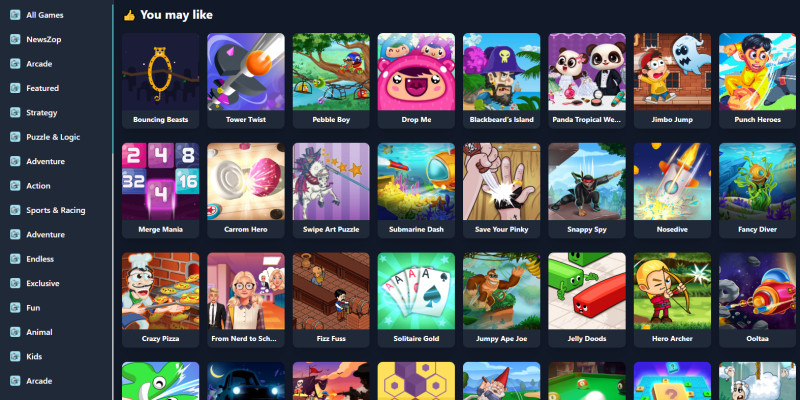
"GameZone - Play Free Online Games for Everyone" We are here to offer free online games for all groups, boys & girls alike. With GameZone - Game Online 250+ Games in One App, you can enjoy unlimited fun anytime! Discover a massive collection of 350+ instant games in one app. No need to install multiple apps; save your device's storage and time. Once loaded, these instant games work like offline games, requiring no internet. Experience stunning graphics and a user-friendly interface. Explore games across diverse categories, including Arcade, Adventure, Sports, Racing, Puzzles, Logic, Memory, Strategy, and Action. Your gaming adventure starts here!
Features
★★ Features of Fun GameZone – Online Game Portal with 250+ Games ★★
🎮 All-in-One Gaming Platform Get instant access to over 250 HTML5 games in a single, user-friendly React.js web app — no login required!
✅ Key Features:
- ⚡ Easy Access: Just upload and start playing — no installation or setup required.
- 📦 Lightweight Build: Optimized build under 8MB — loads fast, saves server space.
- 🚀 Fast & Lightweight: Secure, responsive, and optimized for performance on all devices.
- 🔐 No Login / No Admin Panel: Simple static game portal — no complex backend needed.
- 🕹️ Massive Game Collection: Includes puzzle, arcade, action, racing, and strategy games.
- 🌐 Play Offline: Many games work even without internet after initial load.
- 🧩 Diverse Game Categories: Arcade, Racing, Shooting, Sports, Adventure, and more.
- 🌟 Latest & Trending Titles:
- Popular Games: Bubble Shooter, Gun Shot, Hopper Bunny
- Trending Hits: Balloon Bash, Fishing Frenzy, Space Purge
- 🎨 High-Quality Graphics: Immersive gameplay with colorful, mobile-friendly visuals.
- 🔄 Regular Updates: Easily add or replace games to keep the experience fresh.
- 🎯 User-Friendly UI: Clean layout and intuitive navigation for players of all ages.
- 🛡️ Secure Gameplay: No data collection, no cookies — safe for everyone.
⚠️ Note: This is a static React.js site. No CMS, no WordPress plugin, and no admin panel included. Customization requires basic code editing.
Requirements
Node.js
- Install the latest version of Node.js (recommended version: LTS).
- Ensure
npm(Node Package Manager) oryarnis included.
React Framework
- Use Create React App or a custom setup:
bash
Copy code


npx create-react-app my-app
cd my-app
Browser Support
- Modern browsers: Chrome, Firefox, Edge, Safari.
Instructions
Here are the instructions for setting up and running your React.js application:
Step 1: Install Prerequisites
-
Install Node.js:
- Download and install Node.js (LTS version recommended).
- Verify installation:
node -v
npm -v
-
Install a Code Editor:
- Use Visual Studio Code for writing and managing your code.
Step 2: Create a React App
- Open your terminal or command prompt.
- Run the following command to create a new React application:
npx create-react-app my-app
cd my-app
Step 3: Install Dependencies
- Navigate to your project folder:
cd my-app
- Install additional packages as needed:
Example for routing, fetching data, and icons:
npm install react-router-dom axios react-icons
Step 4: Run the Development Server
- Start the development server:
npm start
- Open your browser and navigate to http://localhost:3000.
Step 5: Add Your Features
- Customize Components:
- Modify
src/App.jsand create your custom components.
- Modify
- Add CSS/Styling:
- Include custom CSS in
src/index.cssor use a framework like Tailwind CSS.
- Include custom CSS in
Step 6: Build for Production
- When your app is ready, create a production build:
npm run build
###licode###build/ folder.
Step 7: Deploy Your Application
- Use hosting services like Vercel, Netlify, or Firebase.
- For example, deploy to Netlify:
- Drag and drop your
build/folder into the Netlify dashboard.
- Drag and drop your
Additional Notes
- Environment Variables: Store sensitive data (e.g., API keys) in a
.envfile. - File Structure: Organize your components in the
src/folder for better maintainability. - Testing: Write test cases using tools like Jest or React Testing Library.
| Author | Thegamezone |
|---|---|
| Category | Scripts & Code / ReactJS |
| Price | $19 |
| Extended License | $57 |
| Rating | 1.00 from 1 rating |
| Reviews | 1 |
| Likes | 7 |
| First Release | Dec 27, 2024 |
| Last Update | Jun 25, 2025 |
| Files included | .css, .html, .xml, build.settings, JavaScript .js |
Categories
Tags
External listing. code.market does not sell this product and does not process payment for it. Pricing, payment, delivery, licensing, refunds, and support are handled by the third-party merchant on its own website. We may earn an affiliate commission from a referral. Details.
Products of the Week.
Submit🥇

Perceptle
Perceptle is a daily browser-based game that challenges you to test your sensory intuition through five quick estimation and rhythm-based rounds.
Other · 1,489 views · 9 clicksOther · Week 47 · 1,489 views · 9 clicks
🥈

Free LinkedIn Likes From Real
Get free LinkedIn likes on your posts from real members who react by hand. No
SaaS · 1,632 views · 10 clicksSaaS · Week 47 · 1,632 views · 10 clicks
🥉

STOP GUESSING WHAT TO POST
AI that learns your brand voice and builds a month of consistent, on-brand social content: carousels, posts and hooks that sound like you, not like everyone else's AI.
SaaS · 9,176 views · 75 clicksSaaS · Week 47 · 9,176 views · 75 clicks
#4

aaas.market
407 reliable micro tools for solo founders, marketers and creators. They work in your browser
SaaS · 1,597 views · 5 clicksSaaS · Week 47 · 1,597 views · 5 clicks