
GameStore | Hosted HTML5 Game Hub Android Studio Kotlin App with AdMob
Description
⚠️ IMPORTANT PURCHASE & HOSTING INFORMATION
This item includes the complete Android Studio Kotlin source code for the GameStore Android application. GameStore is a hosted HTML5 game hub / WebView application template. The five showcase games displayed in the live demo are loaded from configurable remote HTTPS URLs.
The standalone HTML/CSS/JavaScript source files, game engines, artwork, sounds and other files of those five seller-hosted showcase games are NOT included in this Android source-code item.
To provide a buyer-controlled and server-independent example, the package also includes one complete HTML/CSS/JavaScript sample game in Example Hosted Game/. The same full-source sample is packaged inside the Android project under app/src/main/assets/offline_sample/, and a separate enabled Offline Sample game card is configured to this packaged sample by default.
Hosted Showcase Display Permission: For a buyer using a valid license for this CodeCanyon item, the author grants non-exclusive, non-transferable permission to load and display the five seller-hosted showcase game pages directly from the configured seller HTTPS URLs inside the buyer’s compiled GameStore-based Android end product, including an end product published on Google Play, subject to the applicable Envato Market license. This permission is for in-app display from the seller’s server only and does not grant permission to download, scrape, extract, copy, self-host, resell, sublicense or redistribute the standalone hosted game source code, engines, artwork, audio or other hosted assets.
Buyers can keep the supplied hosted demonstration URLs while they are available, or replace the configured game URLs and trusted HTTPS hosts with their own hosted HTML5 games or other properly licensed compatible web content.
Live Demo: https://play.google.com/store/apps/details?id=com.krishnaapps.gamestore
⚠️ External Hosting Dependency:
The five showcase game experiences require an active internet connection and an available remote HTTPS server. If a configured game URL is changed, removed, expired, temporarily unavailable, blocked, or affected by an SSL/network/server problem, that remote game will not load until a working URL is configured.
The buyer can edit the game URLs and trusted-host configuration and can host compatible content on infrastructure they control. The included full-source local sample remains available independently of the five seller-hosted showcase URLs.
GameStore – Hosted HTML5 Game Hub Android Studio Kotlin App with AdMob
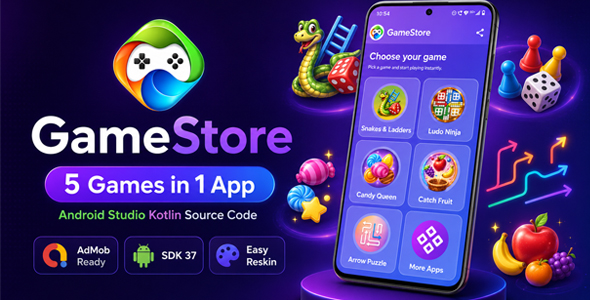
GameStore is a modern Android Studio Kotlin application template designed for creating a multi-game Android gaming hub using remotely hosted HTML5 games.
The application provides a polished Android interface where users can browse game cards, select a game and play compatible hosted HTML5 content inside an integrated WebView-based game screen.
The supplied project contains the complete Android-side source code including the user interface, navigation, secure WebView integration, network handling, generic web/native messaging, advertising system, loading states, error handling, sharing functionality, Text-to-Speech support, game configuration and More Apps functionality.
Screenshots:


Designed for Hosted HTML5 Games
GameStore is suitable for developers, publishers, agencies, startups, students and entrepreneurs who want to create an Android gaming portal without building the Android interface, navigation, advertising integration, WebView system, loading states, native/web communication and game-selection experience from scratch.
The Android application acts as the native mobile layer while compatible game content is loaded from configurable HTTPS URLs.
Buyers can use the supplied remote demonstration configuration or replace the game URLs and trusted hosts with their own properly licensed and hosted HTML5 games.
Five Preconfigured Remote Demo Game Experiences
The supplied Android configuration connects to five online game experiences hosted on the seller’s HTTPS domain. To avoid third-party trademark confusion in the Android template, the buyer-facing demo titles use neutral labels:
Board Steps
A colourful dice-and-board style demonstration experience.
Dice Arena
A casual dice-based strategy demonstration experience.
Fruit Dash
A fast casual arcade-style demonstration experience.
Sweet Match
A colourful match-style puzzle demonstration experience.
Arrow Logic
A direction-based casual logic puzzle demonstration experience.
Please note: these five entries are online hosted demonstration games connected to the Android project. Their standalone game source code is not included.
Complete AdMob Integration
✅ Banner Ads
✅ Interstitial Ads
✅ Rewarded Ads
✅ App Open Ads
The project is supplied with development/test advertising configuration. Buyers must configure their own AdMob account and production ad-unit IDs before publishing their final application.
The original configurable interstitial action mappings are retained. A global minimum interval is applied between interstitial displays so repeated taps or rapid navigation cannot trigger a full-screen ad on every interaction.
Kotlin & Android Studio Project
The application is developed using Kotlin for Android Studio and includes the Android-side source required to open, customise, build, sign and maintain the application.
Technical highlights:
✅ Kotlin-based Android application
✅ Android Studio project files
✅ Min SDK 24
✅ Target SDK 37
✅ Native Android activities and navigation
✅ WebView-based HTML5 game integration
✅ HTTPS game loading
✅ Configurable remote game URLs
✅ Buyer-editable trusted-host configuration
✅ Origin-restricted AndroidX WebMessage communication
✅ Generic JavaScript adapter pattern
✅ Internet connectivity handling
✅ Loading, refresh and retry states
✅ Offline and server-error handling
✅ Hardware-accelerated game display
✅ Configurable game definitions
✅ Share-app functionality
✅ Modern Android back navigation
✅ Standard and immersive game-screen modes
✅ Responsive large-screen behaviour without forced landscape orientation
✅ AdMob monetisation integration
✨ Modern & Customisable Android Interface
GameStore keeps the original colourful gaming-oriented Android interface with a responsive game-card layout and simple navigation.
Buyers can customise Android-side elements including:
✅ Application colours and gradients
✅ App logo and launcher icon
✅ Splash screen
✅ Application text and labels
✅ Fonts and typography
✅ Game-card icons and titles
✅ Home-screen elements
✅ Share text and store link
✅ Application name
✅ Package name
✅ Error and network messages
✅ AdMob IDs
✅ Hosted game URLs
✅ Trusted HTTPS hosts
The Android interface can therefore be reskinned and branded for a buyer’s own project.
Android Text-to-Speech Support
Selected configured games support communication with Android Text-to-Speech features.
For supported events, a compatible hosted page can request a voice announcement through the documented generic bridge. Speech availability, language quality and pronunciation depend on the Text-to-Speech engine installed on the user’s Android device.
Android ↔ Hosted Game Communication
The project includes a documented generic communication layer for compatible hosted games. Native communication uses WebViewCompat.addWebMessageListener with an explicit HTTPS allowed-origin list and accepts messages only from a trusted main-frame origin.
The generic JavaScript adapter can support:
⭐ Score updates
⏱️ Playtime information
Game completion events
Rewarded-ad requests
Interstitial-ad requests
Voice announcements
Hint-related events
⚡ Power-up related events
The legacy adapter filenames used by existing configuration are retained for compatibility, but their code is now generic and contains no seller-page DOM IDs, CSS selectors or game-specific page-class assumptions.
Not every action is used by every game. Individual behaviour remains controlled through the supplied Android-side game configuration.
Remote Game Hosting Architecture
GameStore is intentionally designed for externally hosted HTML5 content.
The Android application contains the native app source, while the five showcase game pages are loaded from configured remote HTTPS URLs.
How it works:
1. The user opens GameStore.
2. The Android home screen displays configured game cards.
3. The user selects a game.
4. The app verifies the configured URL, trusted origin and network state.
5. The hosted HTML5 page opens inside the Android WebView.
6. Supported generic bridge events can communicate with Android features.
7. Android handles supported advertising, navigation, TTS and app-level functions.
Important hosting behaviour:
✅ Buyers can replace game URLs with their own hosted content.
✅ HTTPS URLs are supported.
✅ Trusted domains/origins can be configured in the project.
✅ Network errors are handled by the Android app.
✅ SSL errors are not bypassed.
✅ Users can retry after a loading problem.
✅ A complete full-source local sample is supplied with the package.
⚠️ Internet access is required for the five remotely hosted showcase games.
⚠️ A remote game cannot load while its remote server or URL is unavailable.
If the seller’s demonstration server is ever moved, changed or discontinued, the Android source code remains usable. The buyer can update the configured URLs/trusted hosts to compatible hosted pages they control or are licensed to use.
Licensed display use: a licensed buyer may display the five seller-hosted showcase pages from the configured seller URLs inside their compiled GameStore-based Android end product, including a Google Play-published end product. Standalone hosted-game source/assets are not included and may not be extracted or redistributed.
Easy Android App Reskinning
Basic Android Studio knowledge is recommended for editing this project.
Buyers can customise the Android application by changing:
✅ App name
✅ Package name
✅ Logo
✅ Launcher icon
✅ Splash screen
✅ Theme colours
✅ Text and labels
✅ Game-card images
✅ Game titles
✅ Hosted game URLs
✅ Trusted domains/origins
✅ Share message
✅ Error messages
✅ AdMob identifiers
✅ Android-side layouts
✅ Kotlin application behaviour
Customization boundary:
✅ The Android Studio application source can be customised.
✅ Android branding and UI can be reskinned.
✅ Android navigation and Kotlin behaviour can be modified.
✅ Buyers can configure their own AdMob IDs.
✅ Buyers can replace the remote URLs with their own compatible and properly licensed HTML5 games.
❌ The five seller-hosted demonstration games are not supplied as editable standalone game projects.
❌ Their standalone HTML/CSS/JavaScript/game-engine source is not included.
❌ Their standalone hosted-game artwork and audio files are not included for extraction/redistribution.
❌ Seller-hosted demonstration content must not be scraped, extracted or redistributed as standalone game packages.
❌ Remote showcase games should not be advertised as offline games.
What Is Included
✅ Complete Android Studio project source
✅ Kotlin Android application source
✅ Splash screen implementation
✅ Home/game-grid interface
✅ Individual game WebView screen
✅ Complete More Apps screen with all 10 configured cards retained
✅ Five preconfigured online demonstration game entries
✅ Configurable remote game URLs
✅ Buyer-editable trusted-host configuration
✅ Origin-restricted web/native message integration
✅ Generic JavaScript adapter plus retained compatibility adapter filenames
✅ Banner AdMob integration
✅ Interstitial AdMob integration with global frequency cap
✅ Rewarded AdMob integration
✅ App Open AdMob integration
✅ TTS support for configured game events
✅ Score/playtime event support
✅ Network-state handling
✅ Offline and server error states
✅ Loading, refresh and retry functionality
✅ Share-app functionality
✅ Editable Android resources
✅ Adaptive launcher icon resources
✅ Density-optimized WebP artwork
✅ One complete HTML/CSS/JavaScript sample game
✅ Packaged local copy of that sample under Android assets
✅ Separate enabled Offline Sample game card configured to the packaged sample by default
✅ Original styled buyer documentation
✅ README, changelog, licence, remote-configuration guide and reviewer notes
❌ What Is Not Included
❌ Standalone source code of the five seller-hosted demonstration games
❌ Their standalone HTML5 game projects
❌ Their game engines
❌ Their standalone JavaScript game logic
❌ Their standalone artwork, sounds or other hosted-game assets for extraction/redistribution
❌ Rights to scrape, extract or redistribute seller-hosted game files separately
❌ Google Play Developer account
❌ AdMob account
❌ Production AdMob ad-unit IDs
❌ Buyer signing key
❌ Guaranteed Google Play approval
❌ Custom publishing/reskinning service unless separately agreed
❌ Third-party paid licences, accounts or services not specifically stated
What Happens if a Hosted Game URL Changes?
The game URLs are configurable inside the Android project.
If a game is moved to another domain or path, the buyer can update its configured URL and, where necessary, the trusted-host configuration.
If a remote server is temporarily unavailable, users receive the application’s loading/error state and can retry later.
If a remote showcase game is permanently removed, the buyer can replace that URL with another compatible game page that they have the right to use.
This external-server dependency applies to the five showcase games and is an intentional part of the hosted-game architecture. The supplied full-source sample provides a local reference independent of those five URLs.
More Apps Section
The complete More Apps feature and all 10 configured cards are retained in this package.
The project includes the existing configurable More Apps screen that can be used to promote additional Android applications. Each entry can include its own title, image/icon and destination URL.
The original more_apps.xml structure, screen and card behaviour remain in the project. Where a default identifier closely resembled a third-party trademark, the reviewer-risk sample name/destination was neutralized without deleting the card or the More Apps feature.
If the URL for a More Apps entry is left empty, that entry is not displayed to the user.
This allows buyers to configure only the promotional cards they actually want to use.
Google Play Publishing Workflow
After customising the project, buyers can prepare the Android application for their own Google Play publishing workflow.
Before publishing, buyers should configure:
✅ Unique package name
✅ App branding
✅ Production AdMob IDs
✅ Privacy policy
✅ Consent requirements where applicable
✅ Correct Data Safety information
✅ Ads declaration
✅ Content rating
✅ Store title and description
✅ App icon and feature graphic
✅ Screenshots
✅ Signing key
✅ Current required target SDK/API level
✅ Final testing
Google Play approval cannot be guaranteed because approval depends on the buyer’s final application, content, developer account, privacy configuration and Google Play policies in effect at the time of submission.
Ideal For
✅ Android developers
✅ Kotlin developers
✅ Mobile app publishers
✅ Development agencies
✅ Startup projects
✅ Android-development students
✅ Casual-game portals
✅ Ad-supported Android projects
✅ App reskin projects
✅ Businesses that already own or license HTML5 games
⚙️ Buyer Requirements
To customise and publish the project, buyers should have:
✅ Android Studio
✅ Basic Android/Kotlin knowledge
✅ Internet access for remote games/dependencies
✅ Their own unique package name
✅ Their own game hosting if replacing the remote demo URLs
✅ Rights/licences for any hosted or replacement games they publish
✅ Their own AdMob account and production ad units
✅ Their own privacy-policy setup
✅ Their own signing key
✅ Their own Google Play Developer account
✅ Physical Android devices and/or emulators for testing
⭐ Why Choose GameStore?
GameStore provides the complete Android-side foundation required for building a hosted HTML5 gaming application without creating the native Android infrastructure from scratch.
Instead of separately developing the home interface, WebView player, URL security, network-state handling, loading states, game configuration, secure web/native messaging, AdMob integration, TTS communication, sharing system, More Apps feature and error handling, buyers receive these components together in one organised Kotlin project.
The project is especially useful for developers or publishers who already own, develop, license or host HTML5 games and need an Android application through which users can access them.
Support
Primary marketplace support is provided through the CodeCanyon item support/comments channel and the author’s Envato Market contact method. The documentation does not direct buyers to a personal phone-number support channel.
Customise your Android brand, connect your own hosted games, configure AdMob monetisation, test your URLs, and build your own Android HTML5 gaming hub.
Final Reminder: GameStore is sold as an Android Studio Kotlin hosted-game hub/application template. The five online showcase games visible in the demonstration are remote demonstration content and are not sold as five standalone HTML5 source-code projects.
| Type | Android App |
|---|---|
| Author | Krishna-Apps |
| Price | $39 |
| Sales | 0 |
| Rating | 0 (0) |
| Published | Aug 21, 2026 |
| Last Update | Aug 21, 2026 |
| Compatible Software | Kotlin 1.x |
| Demo Url | https://play.google.com/store/apps/details?id=com.krishnaapps.gamestore |
| Mobile Files Included | .apk, .dex, .java, .xml |
Categories
Tags
External listing. code.market does not sell this product and does not process payment for it. Pricing, payment, delivery, licensing, refunds, and support are handled by the third-party merchant on its own website. We may earn an affiliate commission from a referral. Details.