
Frontier News | Flutter UI Pack with Live TV
Description
Frontier News | Flutter UI Pack with Live TV
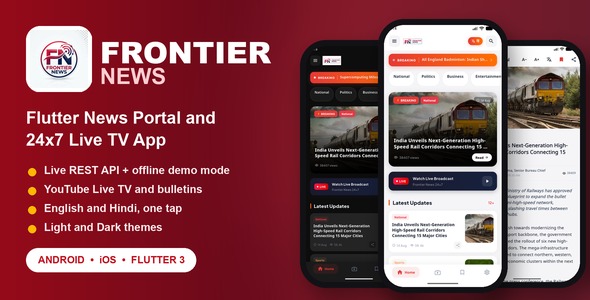
Frontier News is a modern, high-performance Flutter Mobile App UI Template (Frontend Only) designed for news agencies, magazine publishers, independent journalists, and media broadcasters. Crafted with Google’s Material 3 design guidelines, Frontier News delivers a bilingual user experience (English and Hindi), 24×7 Live TV video streaming, breaking news tickers, instant search, offline bookmarks, font resizing, and sleek Light and Dark themes.
The template includes dual data mode: it runs out of the box on bundled sample content, so every screen works before you write a line of backend code, and it has a clean, production-ready ApiService layer that connects to any backend REST API (PHP, Node.js, Python, Laravel, Django, Firebase, Supabase or WordPress) by setting a single base URL. The same sample content also keeps the app usable if your server is ever unreachable.
Key Features
- Material 3 and Fluid Animations: Clean typography, smooth transitions, and shimmer loading skeletons.
- 24×7 Live TV and Bulletins: Integrated YouTube player for live broadcast streams and video news bulletins.
- Bilingual Architecture: Seamless one-tap language switching between English and Hindi with dynamic UI and content updates.
- Breaking News Ticker: Animated real-time breaking ticker with direct article navigation.
- Dynamic Home Feed: Featured hero stories, category tabs, and paginated endless scrolling.
- Article Detail Experience: Customizable reading font size slider, related stories carousel, social sharing, and reader comments.
- Offline Bookmarks: Save favorite stories locally on the device using SharedPreferences.
- Instant Search: Fast keyword search with search history memory and category filters.
- Dark and Light Modes: Full support for Dark Theme, Light Theme, and System Default matching.
- Clean State Management: Built with Provider architecture for robust, scalable state handling.
- 100% Sound Null Safety: Zero analyze warnings, 100% sound null safety, and clean Dart code.
Connecting Your Live REST API Backend
Frontier News is built with a modular networking layer (ApiService) using Flutter’s official
http package. You can easily connect the app to your existing or custom backend:
- Open
lib/core/constants/app_constants.dart. - Update
apiBaseUrlwith your live backend domain (e.g.https://yourdomain.com/api/v1). - The included offline HTML documentation contains complete JSON schemas and sample payloads for all endpoints:
categories.php— Category list with slug, name, color, and icon.articles.php— Paginated article feed with filters (category, breaking, featured, trending, search).article.php— Single article detail with related stories and comments.livetv.php— Live stream URL, viewer count, ticker, and video bulletins.settings.php— App metadata, social channels, and contact information.comments.php— Reader comment submissions.
Important Notice: Third-Party Services and YouTube Data API v3
External Service Disclaimer: The Live TV and video playback features in this template use the embedded YouTube Player and, optionally, YouTube Data API v3. Both are external third-party services provided by Google LLC. Video playback works without a key; adding your own YouTube Data API v3 key enables real-time live status, concurrent viewer counts and bulletin durations on the Live TV screen.
- Buyer Responsibility: The buyer/licensee is solely responsible for creating their own Google Cloud account, generating their own YouTube Data API v3 credentials, managing daily API quotas, monitoring rate limits, and handling any potential usage costs.
- Setup Guide Included: The included documentation provides a comprehensive, step-by-step guide on
creating a Google Cloud Project, enabling YouTube Data API v3, generating an API key, restricting it by Bundle ID /
SHA-1, and configuring it inside
AppConstants. - Terms Compliance: All video streaming adheres to YouTube Terms of Service.
Screens Included
- Splash Screen: Animated logo branding with automatic initialization.
- Main Home Feed: Hero headline card, breaking news ticker, and category chips.
- 24×7 Live TV Screen: Embedded live video player, viewer metrics, and bulletin highlights.
- Category Articles Screen: Dedicated category feeds with pull-to-refresh and infinite scroll.
- Article Detail Screen: High-res cover image, author metadata, font resizing, share sheet, and comment list.
- Search Screen: Instant search bar with query history tags and clear actions.
- Bookmarks Screen: Locally saved articles for offline reading.
- Navigation Drawer: Category shortcuts, language switcher, and social media handles.
- Settings Screen: Theme switcher (Light/Dark/System), font scale, and app version info.
Demo Instructions
Demo login is not required. Frontier News is a reader-facing news application with no sign-in screen, no user accounts and no protected area, so there is no demo email or password to enter. Anyone who installs the build lands directly on the live news feed.
- Demo email: not applicable – the app has no login screen.
- Demo password: not applicable – the app has no login screen.
- How to run the demo: unzip the package, open
01_Source_Code, then runflutter pub getfollowed byflutter run. No configuration and no API key are needed to see the app working. - Data shown in the demo: the base URL ships as the placeholder
https://yourdomain.com/api/v1, so no traffic is sent anywhere until you enter your own domain. Until then the app renders the bundled sample content inlib/services/mock_data.dart, and every screen - feed, categories, article detail, Live TV, search, bookmarks and settings – works straight away. - Posting a comment: the comment form on the article screen asks only for a name and an email address of your choice; no account or password is involved.
- Connecting your own backend: set
apiBaseUrlinlib/core/constants/app_constants.dart. The included documentation lists the JSON schema of every endpoint and explains how to deploy your API behind Nginx or Apache.
Technical Specifications and Requirements
- Framework: Flutter 3.x (Dart 3.x) with 100% Sound Null Safety
- Android Support: Android 7.0 (API 24) to Android 15 / 16 (compileSdk 36, targetSdk 36)
- iOS Support: iOS 15.0 and newer (Xcode 15+)
- Application ID / Bundle ID:
com.frontiernews.app(configured identically on Android and iOS) - State Management: Provider (v6.1.2)
- Persistence: SharedPreferences
What You Get
- Full Flutter Frontend Source Code (clean Dart, Kotlin, Swift projects).
- Complete Offline Searchable HTML Documentation with step-by-step setup guides, screenshots, and REST API schemas.
- Licensing and Credits documentation.
- Sample graphic assets, icons, and fonts.
Customer Support and Customization Assistance
All support for this item is handled through Envato. If you need help with setup, API wiring or customization, open a ticket on the Support tab of this item page and we will reply there. Pre-purchase questions are welcome in the Comments tab.
Notes
- This item is a Flutter Mobile App UI Template (Frontend Only). It is pre-configured with demo mock data for immediate testing and includes complete documentation for live REST API backend integration.
- Preview photos shown in screenshots are sourced from Unsplash for demonstration purposes and are not bundled in the final package.
| Type | Flutter App |
|---|---|
| Author | krishdevtechnology |
| Price | $14 |
| Sales | 0 |
| Rating | 0 (0) |
| Published | Sep 28, 2026 |
| Last Update | Sep 28, 2026 |
| Compatible Software | Flutter 3.x, Other |
| Mobile Files Included | Dart, Layered PNG, JavaScript JS, CSS, HTML |
Categories
Tags
External listing. code.market does not sell this product and does not process payment for it. Pricing, payment, delivery, licensing, refunds, and support are handled by the third-party merchant on its own website. We may earn an affiliate commission from a referral. Details.