
Friendship – Social Network Meetup App With Laravel and Flutter
Description
Friendship — White-Label Social Network + Real-World Meetups (Laravel + Flutter)
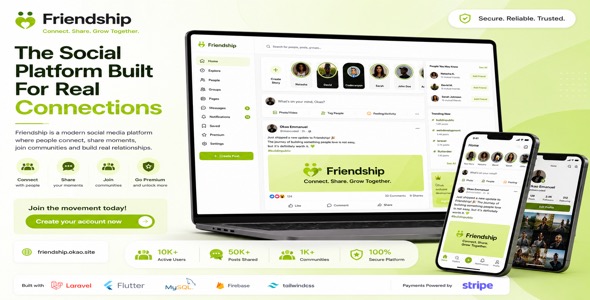
Friendship is a fully self-hosted, white-label social platform for communities that meet in real life. People post, chat, follow friends, drop plans on a map, buy tickets, go live, send gifts, and get paid as hosts — on the web and in one Flutter app for iOS, Android, and PWA. You own the brand, the data, and the revenue. No per-user SaaS fee. No third-party AI API required.
The package is a complete ecosystem: a Laravel 13 backend (marketing site, admin, REST API, web installer), a logged-in web app, and a Flutter 3 client that talks to the same API. Install once. Run website, admin, iPhone, Android, and /app from one platform.
What’s Included
- Laravel 13 backend (PHP 8.3+) — REST API (Sanctum), MySQL, queued jobs, Laravel Reverb realtime, scheduled tasks, Stripe/PayPal/Paystack/Flutterwave checkout, Stripe Connect host payouts, Agora live tokens, FCM push, and Admin settings that power web + mobile
- Flutter app (iOS + Android + Web) — one codebase: feed, stories, reels, map meetups, chat, calls, live rooms, wallet, Apple IAP, Stripe Payment Sheet, deep links, and PWA at
/app - Admin panel — users, content, meetups, orders, live rooms, reports, gifts, coins, subscriptions, push, ads, onboarding, legal, and every API key
- Marketing website — homepage, features, meetups, safety, premium, communities, contact, privacy, terms, public share pages, download QR
- Logged-in web app — feed, meet, inbox, live, wallet, people, communities, and settings in the browser (same accounts as the phone app)
- Web installer — requirements check, database, migrations, optional demo seed, admin account, then lock file at
/install - English HTML documentation — VPS, installer, Stripe, Agora, Maps, Firebase, queue/Reverb/cron, Flutter keys, admin tour, go-live, troubleshooting
What You Do After Purchase (buyer checklist)
- Unzip. Open
Documentation/index.html(no purchase key). - Put the Laravel project on a VPS (not typical shared hosting). Point the domain document root at
public/. - Visit
https://yourdomain.com/install. Enter app name, HTTPS URL, MySQL, and your admin login. Optionally seed demo users. - Sign in at
/admin. Set logo, colors, support email, Terms, and Privacy. - Create accounts at Stripe, Agora, Google Maps, Firebase, and your SMTP host. Paste keys in Admin → Settings (see Payments and APIs below). Test in sandbox first.
- Keep queue, Reverb, and cron running (Supervisor). Without them, tickets, email, chat, and reminders stall.
- Build Flutter with
--dart-define=API_BASE_URL=https://yourdomain.com. Replace Maps / Firebase placeholders, bundle ID, and deep-link domain before store upload. Copyflutter build webintopublic/app/for the PWA.
Flutter Mobile + Web App
One codebase. Same users, wallet, and content as the Laravel site.
- Social — feed, multi-photo carousels, nested comments, likes, saves, hashtags, explore, stories, highlights, reels / duet, sounds, photo tags, pin a post, restrict, hide like counts
- People — follow (default) or friend-request mode, profiles, @username, QR, waves nearby, verification requests
- Meetups — map + list, create a plan, RSVP, paid tickets, co-hosts, invites, who’s going, reminders, share pages, iCal
- Chat — DMs, groups, broadcast channels, reply, reactions, view-once photos, voice notes, gifts, mute, message privacy
- Live & calls — Agora live rooms (comments, gifts) and 1:1 voice/video when Agora is enabled
- Wallet — credits, coin packages, catalog gifts, host payouts, optional gift cash-out (keep off on iOS if it conflicts with Apple 1.1.4)
- White-label — app name, logo, and colors come from
GET /api/config. No rebuild for branding. Languages: English, Spanish, Arabic (RTL) - Sugar dating — optional tab, OFF by default. Enable only in Admin and with
--dart-define=SUGAR_ENABLED=true. Keep off for most App Store listings
User Roles
- Admin — full control at
/admin - Member — web + Flutter: post, chat, join meetups, wallet, live
- Host — create meetups, sell tickets, Stripe Connect payouts (when enabled)
- Public visitor — marketing pages and share links (
/p/u/m/c/h)
Admin Panel
- Dashboard KPIs
- Users — create, ban, verify, promote admin, credit coins, freeze
- Posts, stories, music/sounds, chats, meetup plans, ticket orders
- Live rooms (force-end), reports, ID verifications
- Gifts catalog, coin packages, levels, redeem gateways, withdrawals
- Subscription plans + sync to Stripe
- Push broadcast, announcements, events, onboarding slides
- In-app ads / promotions, help articles, media health, system health
- Settings groups: General, Website, Features, Subscriptions, Email, SMS, Payments, Economy, Languages, Sugar, Agora, OAuth, Maps, Media, Legal, System
Marketing Website + Web App
- Public: home, features, meetups, social, safety, premium, communities, contact, privacy, terms
- Auth: login, register, 2FA, demo login (if seeded)
- Signed-in
/account: feed, meet map, inbox, live, wallet, people, communities, saved, settings - Flutter PWA at
/appafter you copy the web build
Payments — what you must do (Stripe and the rest)
Friendship does not process cards by itself. You open merchant accounts, paste keys in Admin → Settings → Payments, and pay the gateway’s fees. Start in test / sandbox. Switch to live keys only when a test ticket and webhook both succeed.
Stripe (recommended) — cards, wallet top-ups, subscriptions, meetup tickets, Stripe Connect host payouts.
- Create a Stripe account at stripe.com and complete business verification when you go live.
- Developers → API keys. Copy Publishable and Secret (test keys first:
pk_test_/sk_test_). - Admin → Settings → Payments. Set default gateway to Stripe. Paste both keys. Currency (e.g. USD).
- Developers → Webhooks → Add endpoint:
https://yourdomain.com/stripe/webhook(use your real domain). Events should include payment success / checkout / Connect as listed in the HTML docs. Copy the webhook signing secret (whsec_) into Admin. - If hosts should get paid: enable Stripe Connect in Admin and have hosts finish Connect onboarding from the wallet. Platform and Connect fees are Stripe’s, not this item’s.
- Apple: digital goods (Plus / VIP / coins) on the iOS app must use Apple In-App Purchase. Configure IAP products in App Store Connect and Apple keys in Laravel
.env. Real-world meetup tickets can still use Stripe. - Flutter uses Stripe Payment Sheet with the publishable key from
/api/config. After you change keys, reload the app. Do not ship live secret keys in the Flutter project.
Optional gateways — set the default gateway in Admin, or use them as extra checkout paths:
- PayPal — Client ID + Secret. Buyers return to your site after PayPal checkout. Webhooks/return URLs as in the docs.
- Paystack — public + secret key. Common for African cards and local methods. Paste callback URL Paystack gives you.
- Flutterwave — public + secret key. Same idea: create account, paste keys, test, then live.
⚠ Third-party payment fees — important disclosure
Each gateway needs its own merchant account. Fees are charged by that company, not by this script. Amounts change; check the provider:
- Stripe — typically a % + fixed fee per charge, plus Connect fees if you pay hosts — stripe.com/pricing
- PayPal — % + fixed fee — paypal.com/fees
- Paystack — local / international rates — paystack.com/pricing
- Flutterwave — country-based rates — flutterwave.com/pricing
- Apple / Google — store commission on IAP digital goods
Other APIs you paste in Admin (what each is for)
- Agora — live rooms and voice/video calls. Create an Agora project, copy App ID + Certificate into Admin → Agora, enable the live feature. Usage is billed by Agora after the free minutes. HTTPS required for camera.
- Google Maps — meetup map, pins, places. Enable Maps SDK / Places on Google Cloud, enable billing, restrict the key. Paste in Admin → Maps. On Flutter, also replace
YOUR_GOOGLE_MAPS_API_KEYin AndroidManifest and iOS AppDelegate. Web maps load Maps JavaScript from Google when the key is set (Google Maps TOS). - Firebase Cloud Messaging — push (“someone liked your post”). Create a Firebase project, download
google-services.jsonandGoogleService-Info.plist, runflutterfire configure, replace the placeholder files. Until you do, the app still runs; push is skipped. Usually free at normal volume. - Google / Apple Sign-In — optional. OAuth client IDs in Admin → OAuth. Configure the same bundle ID / SHA-1 in Google Cloud and Apple.
- Email (SMTP) — password reset and admin mail. Hostinger, Mailgun, SES, etc. Host, port (465 SSL or 587 TLS), username, password, from address in Admin → Email.
- SMS — optional Twilio or Vonage for codes. Paste SID/token or key/secret in Admin → SMS.
- Media storage — default is local disk +
php artisan storage:link. For scale: DigitalOcean Spaces, Cloudflare R2, S3, Wasabi, Backblaze, or custom S3. Presets and a test-upload button are in Admin → Media.
Google Maps JavaScript and Stripe.js load from Google/Stripe when you turn those features on. That is required by those vendors (Maps TOS / PCI). This item’s own CSS, fonts, Chart.js, Flatpickr, and Agora Web SDK are bundled locally — no product CDNs.
Server, queue, Reverb, cron
- VPS required — Ubuntu 22.04/24.04, 2 GB RAM minimum (4 GB better), Nginx or Apache, PHP 8.3 extensions (pdo_mysql, gd, curl, mbstring, xml, fileinfo, …), MySQL 8, Composer, ffmpeg (reels), Supervisor, Certbot HTTPS
php artisan queue:work— webhooks, mail, jobsphp artisan reverb:start— live chat / presence- Cron every minute:
php artisan schedule:run— story expiry, meetup reminders, host payouts
Shared hosting that cannot run workers or WebSockets is not supported.
Flutter store build (what you replace)
YOUR_GOOGLE_MAPS_API_KEY— Android + iOS- Firebase placeholder files —
google-services.json,GoogleService-Info.plist,lib/firebase_options.dart - Bundle ID default
com.friendship.friendship— change to yours - Deep links / Associated Domains — replace
your-domain.com - Always pass
API_BASE_URL. Android release still uses the debug keystore until you add a Play signing keystore
Feature switches (Admin, no code)
Reels, story music, Agora live, in-app ads, follow vs friends graph, word filter, sugar dating, subscription gates (who can host, call, see distance, daily waves), gift cash-out, post monetization per impression.
Safety, legal, i18n
- Reports, bans, word filter, optional TOTP 2FA, help center you write in Admin
- Sample Terms and Privacy in Admin → Legal — replace with your company, domain, and support email before launch
- GDPR-style export / account delete
- en / es / ar (RTL) in the Flutter client
Tech Stack
- Backend: Laravel 13, PHP 8.3+, MySQL 8, Sanctum, Reverb, queues, Stripe PHP
- Web: Blade, compiled Tailwind (local CSS), Chart.js, Flatpickr, Agora Web SDK (local)
- Mobile / PWA: Flutter 3, Dart 3, Dio, Stripe, Agora, Google Maps, Firebase Messaging, in_app_purchase, Reverb/Pusher client
Files Included
- Laravel source (PHP, Blade, CSS, JS), installer, migrations, seeders
- Flutter source (Dart) — iOS, Android, web
- HTML documentation, licensing.txt, credits.txt, changelog.txt
- Original demo graphics (not Unsplash/Pexels stock)
Not in the ZIP (on purpose): .env, vendor/, node_modules/, Flutter build/, ios/Pods/, live API keys, keystores. Buyers run composer install, npm install, flutter pub get, pod install.
Browser & Device Support
Web: latest Chrome, Safari, Firefox, Edge (HTTPS). Flutter: Android 8.0+ (API 23), iOS 15+, Flutter web PWA. Server: Linux VPS, PHP 8.3+, MySQL, ffmpeg recommended, cron + Supervisor.
Demo
Live preview: friendship.okao.site · Flutter web: /app/ · Admin: /admin
After optional seeder: admin admin@friendship.test / password · app maya@state.edu / password. Prefer the admin you create in the installer for production.
Support & License
Item support is through the Envato item comments / support form. Documentation is English HTML in the download — host it publicly; do not hide it behind a purchase key. Licensed under the Envato Regular or Extended license you purchase. No extra author license.
| Author | OKAO-EMMANUEL |
|---|---|
| Price | $65 |
| Sales | 4 |
| Rating | 0 (1) |
| Published | Sep 7, 2026 |
| Last Update | Sep 7, 2026 |
| Compatible Software | Flutter 3.x, Flutter 2.x, Flutter 1.x, PHP 8.x, PHP 7.x, MySQL 8.x, MySQL 5.x, PHP 8.4.x, PHP 8.3.x, PHP 8.2.x, PHP 8.1.x, PHP 8.0.x, Bootstrap 5, Bootstrap 4, Laravel, iOS 15, iOS 14, iOS 13, iOS 12, Android 15.0, Android 12.0, Android 11.0, Android 10.0, Android 9.0 |
| Demo Url | https://friendship.okao.site |
| Mobile Files Included | CSS, PHP, HTML, JavaScript JSON, .apk, Dart, JavaScript JSON, .plist, .swift |
Categories
Tags
External listing. code.market does not sell this product and does not process payment for it. Pricing, payment, delivery, licensing, refunds, and support are handled by the third-party merchant on its own website. We may earn an affiliate commission from a referral. Details.
Products of the Week.
Submit🥇

Perceptle
Perceptle is a daily browser-based game that challenges you to test your sensory intuition through five quick estimation and rhythm-based rounds.
Other · 767 views · 2 clicksOther · Week 47 · 767 views · 2 clicks
🥈

Free LinkedIn Likes From Real
Get free LinkedIn likes on your posts from real members who react by hand. No
SaaS · 921 views · 8 clicksSaaS · Week 47 · 921 views · 8 clicks
🥉

STOP GUESSING WHAT TO POST
AI that learns your brand voice and builds a month of consistent, on-brand social content: carousels, posts and hooks that sound like you, not like everyone else's AI.
SaaS · 8,482 views · 74 clicksSaaS · Week 47 · 8,482 views · 74 clicks
#4

aaas.market
407 reliable micro tools for solo founders, marketers and creators. They work in your browser
SaaS · 914 views · 1 clicksSaaS · Week 47 · 914 views · 1 clicks