
Frank Bot | Windows Desktop Software for Managing Multiple AI WhatsApp Bots
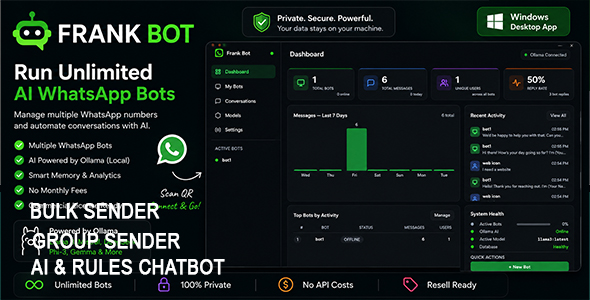
Description
Run Unlimited AI WhatsApp Bots — 100% Offline, No Monthly Fees
Turn any WhatsApp number into an AI-powered assistant in minutes.
Frank Bot allows you to create and manage multiple WhatsApp bots from a single desktop application. Handle customer support, sales enquiries, bookings, FAQs, and lead generation automatically without paying expensive monthly fees.
Perfect for businesses, agencies, and developers who want a powerful WhatsApp automation solution with complete control over their data and operations.
Why Frank Bot?
Most WhatsApp AI platforms charge monthly fees and send your customer data to external servers.
With Frank Bot:
- No OpenAI API costs
- No recurring SaaS subscriptions
- Run completely offline
- Own your customer data
- Unlimited bots
- Resell ready
Create & Manage Multiple WhatsApp Bots
Run multiple WhatsApp numbers from a single dashboard.
Each bot can have:
- Its own WhatsApp account
- Unique AI personality
- Custom system prompts
- Separate conversation memory
- Dedicated inbox and analytics
Perfect for agencies managing multiple clients or businesses running different departments.
Example Bots
- Customer Support Bot
- Sales Assistant Bot
- Booking Agent
- Lead Qualification Bot
- FAQ Assistant
- Internal Staff Assistant
Powered by Local AI with Ollama
Frank Bot can automatically install and configure Ollama during setup, allowing you to get started in just a few clicks. Once installed, you can browse, download, and switch between AI models directly from the application — no terminal commands or technical configuration needed.
Supported AI Models
- Llama 3
- DeepSeek
- Mistral
- Gemma
- Phi-3
- Qwen
- And many more
Why Local AI?
Unlike cloud-based AI platforms, Frank Bot runs AI directly on your computer.
- No monthly AI subscription fees
- No API costs or token billing
- Complete privacy and data ownership
- No usage limits
- Faster response times
Your conversations stay on your machine and are never sent to third-party AI providers.
Smart Conversation Memory
Frank Bot remembers previous messages from every contact.
This allows your AI to:
- Maintain context
- Remember customer details
- Continue conversations naturally
- Deliver more human-like responses
No more disconnected one-message replies.
AI Persona Builder
Create highly customized AI assistants in minutes.
Define:
- Personality
- Tone of voice
- Business information
- Response style
- Language preferences
- Conversation goals
Complete WhatsApp Inbox
Monitor all conversations in one place.
Features include:
- Live incoming messages
- Contact-based chat history
- Search conversations
- Clear threads
- Monitor multiple bots simultaneously
Stay in control of every customer interaction.
Real-Time Analytics Dashboard
Track performance across all bots.
View:
- Total messages
- Daily activity
- Unique contacts
- Active bots
- Response statistics
- Top-performing bots
Gain instant insight into how your AI assistants are performing.
Commercial License Protection Included
Frank Bot includes a complete license activation system.
Features:
- Product activation screen
- License validation
- Commercial-ready deployment
Start selling immediately or integrate your own licensing backend.
Auto-Reconnect & Session Recovery
Frank Bot automatically restores active WhatsApp sessions.
If:
- The application restarts
- Internet drops temporarily
- Windows reboots
Previously connected bots automatically reconnect and continue working.
Perfect For
Customer Support Teams
Provide instant 24/7 WhatsApp support without hiring additional staff.
Small Businesses
Automate inquiries, bookings, product questions, and lead generation.
Agencies
Deploy and manage AI WhatsApp assistants for multiple clients.
Developers
Customize, extend, white-label, and resell the platform under your own brand.
SaaS Builders
Use Frank Bot as the foundation for your own commercial AI automation product.
One Purchase. No Monthly Fees.
Stop paying monthly subscriptions for WhatsApp AI automation.
Deploy unlimited AI-powered WhatsApp assistants using your own hardware and local AI models.
Buy Frank Bot Today and Launch Your First AI WhatsApp Agent in Minutes.
System Requirements
Operating System
- Windows 10 (64-bit)
- Windows 11 (64-bit)
Processor
- Intel Core i5 (4th Generation or newer) or equivalent AMD Ryzen processor
- Intel Core i7 / Ryzen 7 recommended for larger AI models
Memory (RAM)
- 8 GB RAM minimum
- 16 GB RAM recommended
- 32 GB RAM recommended for larger models such as DeepSeek, Llama 3 70B, and other advanced LLMs
Storage
- 5 GB free disk space for application installation
- Additional storage required for AI models (varies by model size)
AI Engine
- Automatic Ollama installation during setup
- Supports Llama 3, DeepSeek, Mistral, Gemma, Phi-3, Qwen, and other Ollama-compatible models
- One WhatsApp account per bot
- Supports Personal and Business WhatsApp accounts
Internet Connection
- Required for WhatsApp connectivity and model downloads
- AI processing runs locally on your computer
Recommended Configuration
For the best experience running multiple WhatsApp AI bots simultaneously:
- Windows 11 (64-bit)
- Intel Core i7 or AMD Ryzen 7
- 16 GB+ RAM
- SSD storage
| Type | Windows App |
|---|---|
| Author | ydulana |
| Price | $20 |
| Sales | 4 |
| Rating | 0 (0) |
| Published | Jul 3, 2026 |
| Last Update | Jul 3, 2026 |
| Application Runtime | Native |
| High Resolution | No |
| Operating System Versions | Windows 11, Windows 10 |
| Video Preview Resolution | 1902x1004 |
Categories
Tags
External listing. code.market does not sell this product and does not process payment for it. Pricing, payment, delivery, licensing, refunds, and support are handled by the third-party merchant on its own website. We may earn an affiliate commission from a referral. Details.
Products of the Week.
Submit🥇

STOP GUESSING WHAT TO POST
AI that learns your brand voice and builds a month of consistent, on-brand social content: carousels, posts and hooks that sound like you, not like everyone else's AI.
SaaS · 7,348 views · 67 clicksSaaS · Week 46 · 7,348 views · 67 clicks
🥈

Conversational Backlinks for Busy Founders
Place Backlink Relevant Conversation for your domain across Forums and Conversations
Website · 46,626 views · 232 clicksWebsite · Week 46 · 46,626 views · 232 clicks
🥉

upvote.club
Free Social Media Engagement that Helps Boost Your Content. Upvote Club supports 19 social networks with 100+ engagement actions in one dashboard. Add links to your posts and get free engagement from real users.
SaaS · 44,568 views · 127 clicksSaaS · Week 46 · 44,568 views · 127 clicks
#4

Substack Posting API
Onboard your Agent to Substack. Write Publish on Substack via API
SaaS · 63,454 views · 206 clicksSaaS · Week 46 · 63,454 views · 206 clicks
#5

Seenshot App
Free, Fast, MacOS Screenshot app. Make Screenshot cmd+shift+2 and send it via link
Desktop App · 32,704 views · 127 clicksDesktop App · Week 46 · 32,704 views · 127 clicks
#6

Hand-Placed Backlinks $9.99 per link. Flat rate.
Buy hand-placed forum, Q-A and directory backlinks. Flat $9.99 per link, no subscriptions — you only pay for approved listings.
Website · 8,326 views · 19 clicksWebsite · Week 46 · 8,326 views · 19 clicks
#7

Free Invoice Generator - PDF Invoices in Your Browser, No Sign-Up
A free invoice maker for freelancers and small businesses: fill in the invoice, check the live preview, and download a PDF that looks exactly like it. Any currency, tax per item, three templates, no sign-up, and nothing leaves your device.
6,953 views · 29 clicksWeek 46 · 6,953 views · 29 clicks
#8

Merge PDF Files Free - Combine PDFs in Your Browser, No Upload
A free PDF merger for office workers, students, and freelancers: combine PDFs and images into one file in the browser, reorder files and pages, pick page ranges, keep bookmarks, and open password-protected PDFs. Nothing is uploaded, no sign-up, no watermark.
6,436 views · 18 clicksWeek 46 · 6,436 views · 18 clicks