
FotoProtect | Bulk Text and Logo Watermarking Windows App
Description
Your Images Are Being Stolen Right Now
Every unprotected image you publish is a risk.
Thieves copy, resell, and profit from your work — without you even knowing.
FotoProtect stops that instantly.
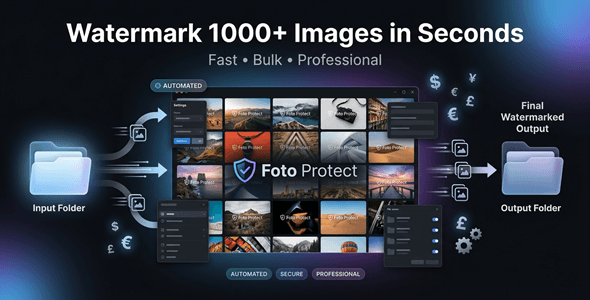
Bulk watermark 1000+ images in seconds — right from your Windows desktop.



Perfect For
✔ Etsy sellers protecting digital products
✔ Photographers branding their portfolios
✔ Digital product creators securing their work
✔ Marketers and content teams
✔ Agencies managing large image libraries
✔ Freelancers working with client content
Features
 |
Bulk Watermark 1000+ Images Process your entire image library in one click. No limits. No waiting. No repetition. |
|
Text Watermark with Full Customization Add your brand name, copyright, or custom message. Control font, size, color, and opacity. |
|
Logo Watermark Support Upload your logo and apply it across all images. Professional branding at scale — in seconds. |
|
Smart Positioning & Auto Scaling Watermarks auto-adjust to fit every image size. No manual resizing or repositioning needed. |
|
High-Speed Processing Engine Optimized for performance — handles large batches fast. No lag. No crashes. No slowdowns. |
|
Batch Processing with Progress Tracking Watch your images get processed in real time. Always know exactly where you are in the queue. |
|
Multi-Format Support Works with JPG, PNG, and WebP formats. One tool — all your image types covered. |
|
100% Offline — No Internet Required Your images stay on your machine — always. No uploads. No accounts. No privacy risks. |
|
Clean, Simple Desktop Interface Designed for speed — not complexity. Anyone can use it from day one. |
Why You Need This
❌ Your images get stolen and resold without permission
❌ Manual watermarking takes hours per batch
❌ Online tools upload your files to unknown servers
❌ Photoshop actions are complex and time-consuming
❌ No watermark = no brand recognition, no protection
FotoProtect solves every one of these problems.
One app. One click. Thousands of protected images.
No cloud. No subscriptions. No technical skills needed.
Just fast, secure, professional watermarking — on your terms.
How You Can Profit
✔ Protect and sell digital image packs on Etsy or Gumroad
✔ Brand client photo deliverables before sending proofs
✔ Offer bulk watermarking as a service to photographers
✔ Secure product mockups before publishing to stores
✔ Watermark stock photos and sell with full attribution control
✔ Speed up agency workflows across multiple client accounts
Protection builds trust. Trust builds sales.
This is not just a tool — it’s your brand’s first line of defense.
⚡ Fast Results
Load your image folder.
Choose your watermark — text or logo.
Process hundreds of images in seconds.
No Photoshop. No plugins. No cloud uploads.
Just clean, protected, branded images — instantly.
Example:
Watermark 500 product photos in under 60 seconds — fully offline.
Simple 3-Step Setup
 |
Step 1 — Install & Open Download and install FotoProtect on your Windows PC. No internet or account setup required. |
 |
Step 2 — Load Images & Set Watermark Drag in your image folder and choose text or logo. Customize position, size, and opacity to your liking. |
 |
Step 3 — Process & Export Hit the process button and let FotoProtect do the work. Your watermarked images are ready in seconds. |
⚙️ System Requirements
| OS | Windows 10 or Windows 11 |
| RAM | 4 GB minimum recommended |
| Disk Space | Minimum 200 MB |
- Version 1.0.0 – Initial release with full bulk watermarking, text and logo support, smart positioning, auto scaling, multi-format export, and 100% offline processing.
 |
Does FotoProtect work without an internet connection? Yes — it is 100% offline. Your images never leave your computer. |
|
How many images can I watermark at once? You can process 1000+ images in a single batch. The high-speed engine handles large volumes with ease. |
|
Can I use my own logo as a watermark? Yes — simply upload your logo file and apply it to any batch. Supports transparent PNG logos for clean results. |
|
What image formats does FotoProtect support? It supports JPG, PNG, and WebP. All major formats are covered in one tool. |
|
Can I control where the watermark appears? Yes — you can set the position and it auto-scales to fit. Choose corners, center, or custom placement. |
|
Is this suitable for beginners? Absolutely — the interface is clean and simple. No design or technical experience needed. |
| Type | Windows App |
|---|---|
| Author | GoGrowTools |
| Price | $29 |
| Sales | 0 |
| Rating | 0 (0) |
| Published | May 11, 2026 |
| Last Update | May 11, 2026 |
| Application Runtime | Native |
| Operating System Versions | Windows 11, Windows 10 |
Categories
Tags
External listing. code.market does not sell this product and does not process payment for it. Pricing, payment, delivery, licensing, refunds, and support are handled by the third-party merchant on its own website. We may earn an affiliate commission from a referral. Details.
Products of the Week.
Submit🥇

STOP GUESSING WHAT TO POST
AI that learns your brand voice and builds a month of consistent, on-brand social content: carousels, posts and hooks that sound like you, not like everyone else's AI.
SaaS · 7,369 views · 67 clicksSaaS · Week 46 · 7,369 views · 67 clicks
🥈

Conversational Backlinks for Busy Founders
Place Backlink Relevant Conversation for your domain across Forums and Conversations
Website · 46,653 views · 232 clicksWebsite · Week 46 · 46,653 views · 232 clicks
🥉

upvote.club
Free Social Media Engagement that Helps Boost Your Content. Upvote Club supports 19 social networks with 100+ engagement actions in one dashboard. Add links to your posts and get free engagement from real users.
SaaS · 44,593 views · 127 clicksSaaS · Week 46 · 44,593 views · 127 clicks
#4

Substack Posting API
Onboard your Agent to Substack. Write Publish on Substack via API
SaaS · 63,480 views · 206 clicksSaaS · Week 46 · 63,480 views · 206 clicks
#5

Seenshot App
Free, Fast, MacOS Screenshot app. Make Screenshot cmd+shift+2 and send it via link
Desktop App · 32,730 views · 127 clicksDesktop App · Week 46 · 32,730 views · 127 clicks
#6

Hand-Placed Backlinks $9.99 per link. Flat rate.
Buy hand-placed forum, Q-A and directory backlinks. Flat $9.99 per link, no subscriptions — you only pay for approved listings.
Website · 8,349 views · 19 clicksWebsite · Week 46 · 8,349 views · 19 clicks
#7

Free Invoice Generator - PDF Invoices in Your Browser, No Sign-Up
A free invoice maker for freelancers and small businesses: fill in the invoice, check the live preview, and download a PDF that looks exactly like it. Any currency, tax per item, three templates, no sign-up, and nothing leaves your device.
6,977 views · 29 clicksWeek 46 · 6,977 views · 29 clicks
#8

Merge PDF Files Free - Combine PDFs in Your Browser, No Upload
A free PDF merger for office workers, students, and freelancers: combine PDFs and images into one file in the browser, reorder files and pages, pick page ranges, keep bookmarks, and open password-protected PDFs. Nothing is uploaded, no sign-up, no watermark.
6,458 views · 18 clicksWeek 46 · 6,458 views · 18 clicks