
Flutter Chat Messenger | @Username Based | WhatsApp-like features |Groups, Stories, Calls+| Full App

Description
GET THIS SPECIAL DISCOUNT NOW. THIS OFFER WILL END SOON – HURRY UP
– Last update: April 19, 2026 – Version 1.0.7 supports Flutter v3.41.x – Included Files: Full Flutter App Source Code for (Android & iOS) – Purchase your Chat Admin Panel
Introduction
Flutter Chat Messenger is a complete chat messaging app that introduces revolutionary communication based on @Username as Contact ID instead phone number. It allows you to connect effortlessly with your friends, team members, and family by using your @username, eliminating the need to share your phone numbers. Experience the same exciting features as WhatsApp, Facebook Messenger, Telegram, and more in our Flutter Chat Messenger app. Enjoy privacy and freedom on our cutting-edge Flutter Chat Messenger platform. Additionally, seamlessly monetize your app with integrated AdMob Ads in our Flutter Chat Messenger app.
Key Purpose Note: Our Flutter Chat Messenger app operates similarly to WhatsApp, but instead of using a phone number, it utilizes @username to add a contact for chatting. This feature provides privacy for your phone number, especially in group chats.
App Features
- @Username Contact-Based
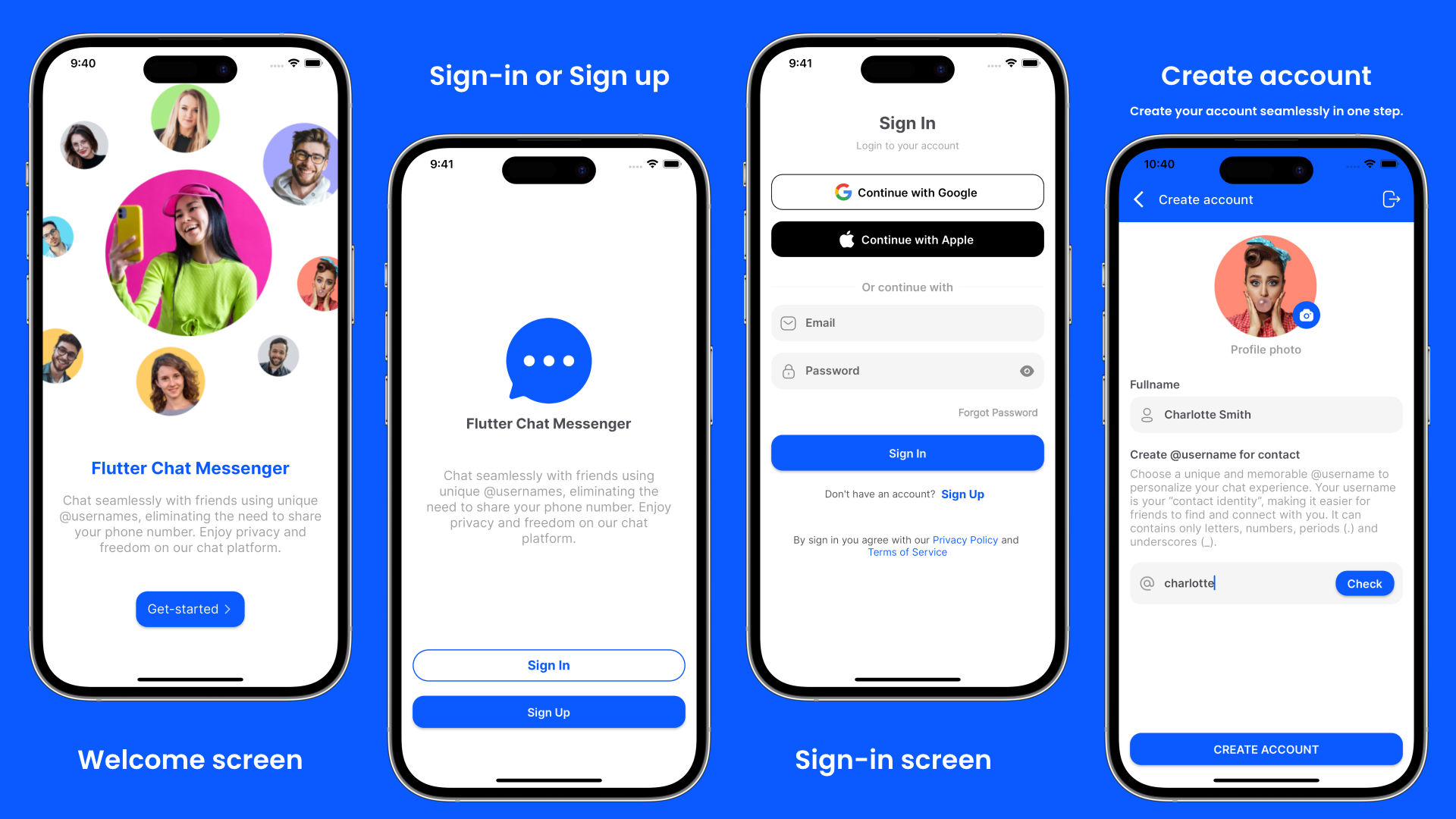
- Login with Email & Password
- Login with Google & Apple
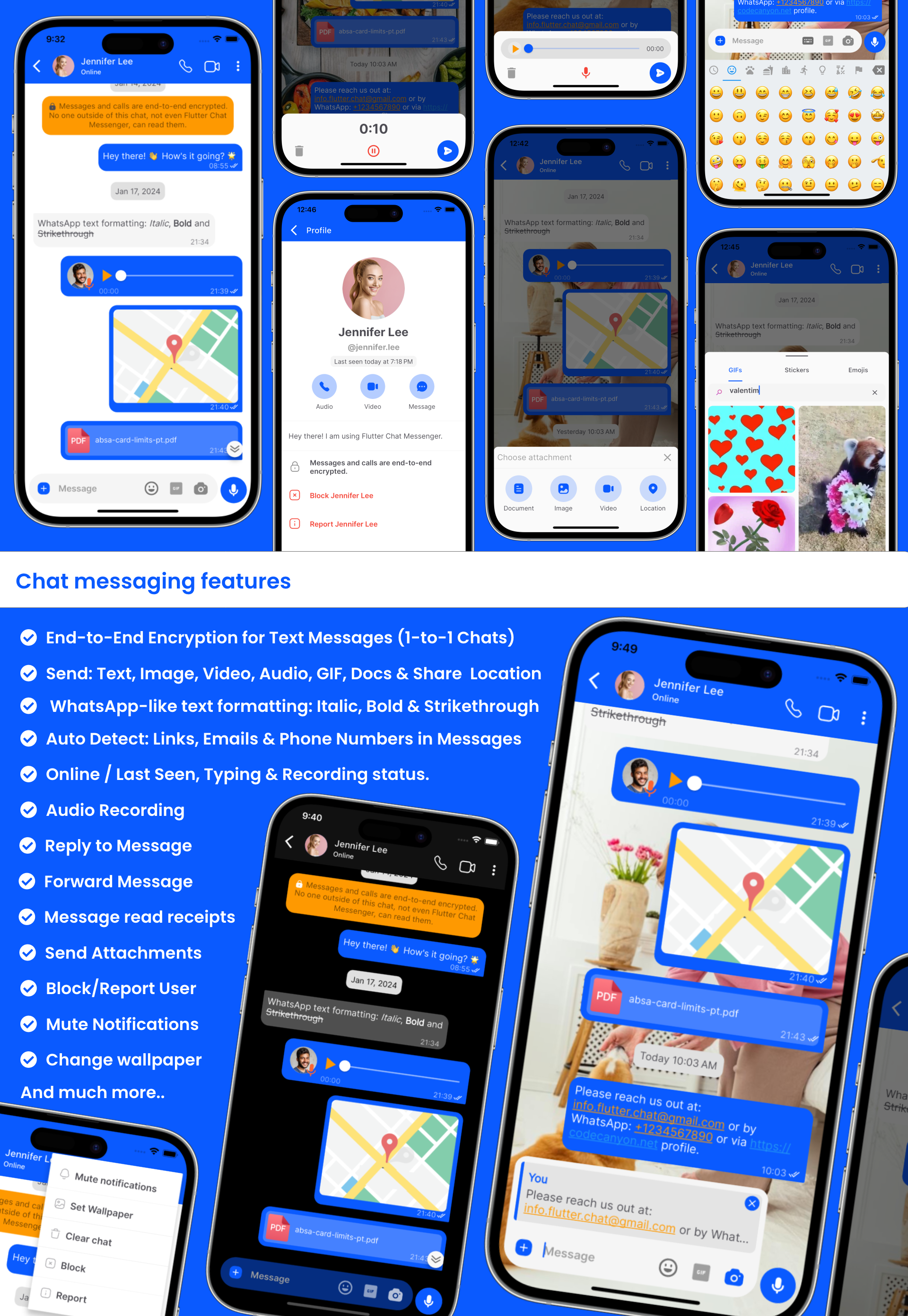
- End-to-End Encryption
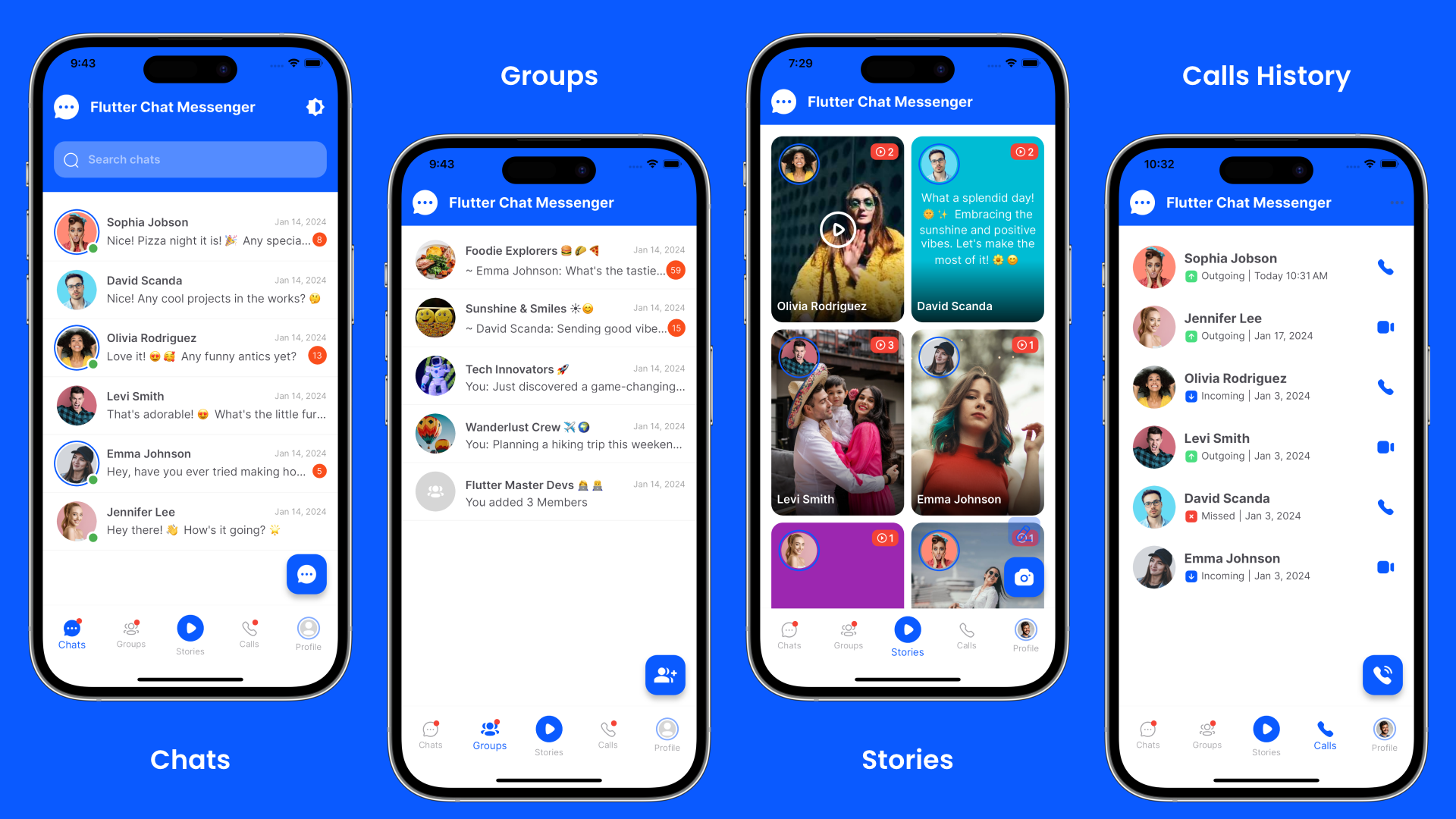
- Groups Chat, Broadcast messages
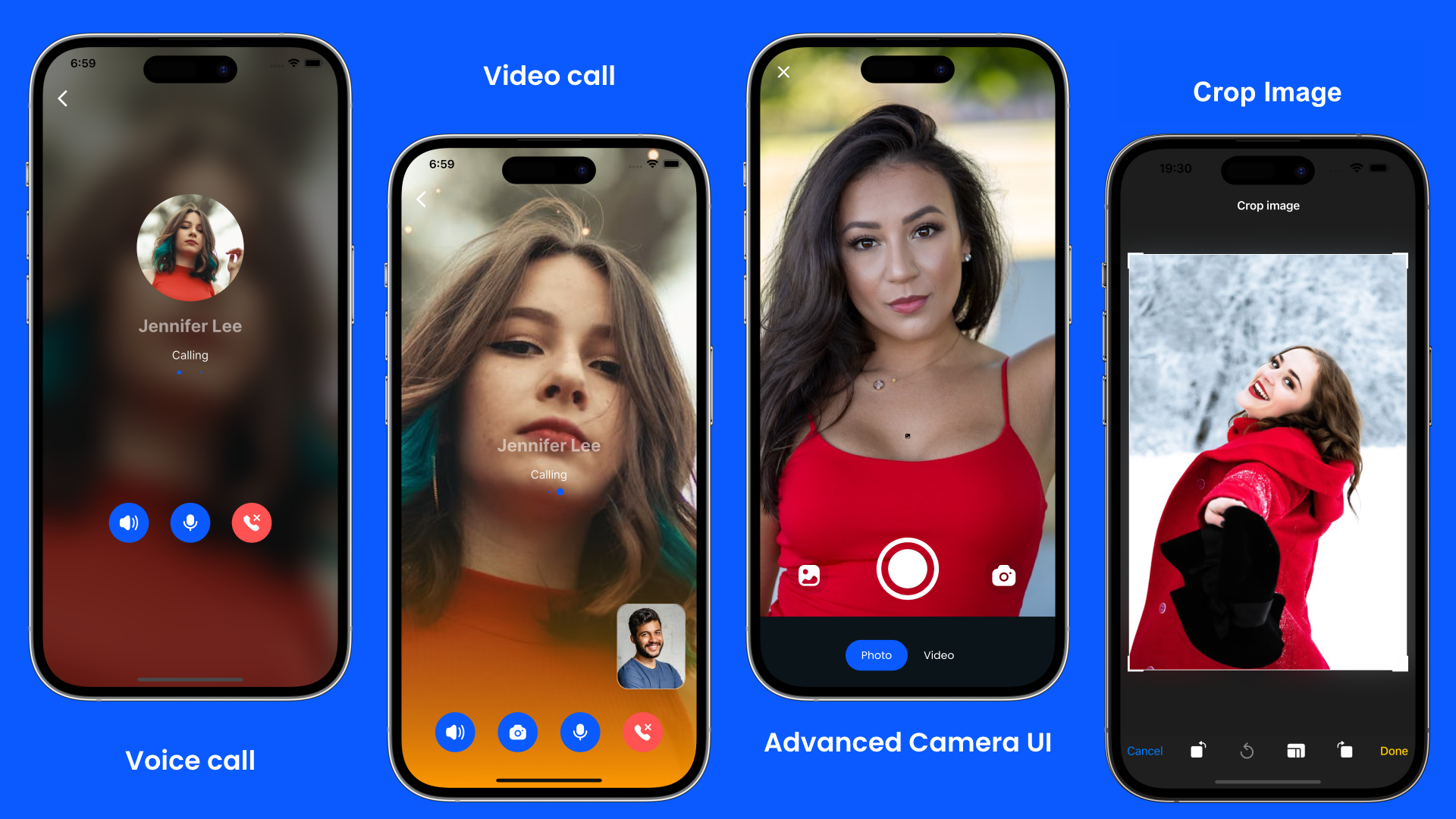
- Video & Voice Calls History: (Outgoing, Incoming & Missed)
- WhatsApp-like text formatting: Italic, Bold & Strikethrough
- Share Stories: Texts, Images & Videos
- User presence: Online / Last Seen, Typing & Recording status
- Send Message Features: Text, Image, Video, Audio, GIF, Docs & Share Location
- Auto-detection of Links, Emails & Phone Numbers in Messages
- Message read receipts
- Send Attachments
- Reply to Message
- Forward Message
- Audio Recording
- Change Wallpaper
- Mute Notifications
- Block/Report User
- Report Group
- Advancend Camera UI
- Multi-Language Support
- Light & Dark themes
- Push Notifications
- AdMob Ads Monetization
- Messages/Files Backup in the Cloud
- 100% Firebase Backend & Cloud Firestore Database
- And much more…
Extra Features – Customizations (Optional)
Supercharge your Chat Messenger app with extra features add-ons below:
- AI Chatbot Assistant features for premium members.
- Premium Subscriptions features to charge your users for AI Chatbot Assistant features and to Remove Ads within the app
- Native CallKit UI features: Enhance your users’ experience by integrating Native UI Notifications for Incoming Calls.
- Join Groups by Link | QR Code Features: Enhance your users’ experience by integrating deep linking features that allow your users to invite their friends to join groups via links and boost your Chat app audience.
- App Lock Feature: A robust security enhancement to protect your Chat app when opened. With App Lock, you can secure your Chat app with a PIN, Fingerprint, or Face ID, ensuring that only authorized individuals can open your Chat app. Protect your users’ private conversations and sensitive information.
Take your Chat Messenger app to the next level. Interested? Purchase your license and contact us via WhatsApp or email for paid customizations.
App Screenshots
Welcome & Authentication screens.
Chats list, Groups/Broadcasts, Stories & Calls History features.
Chat messaging features.
Video & Voice Calls, Advanced Camera UI features.
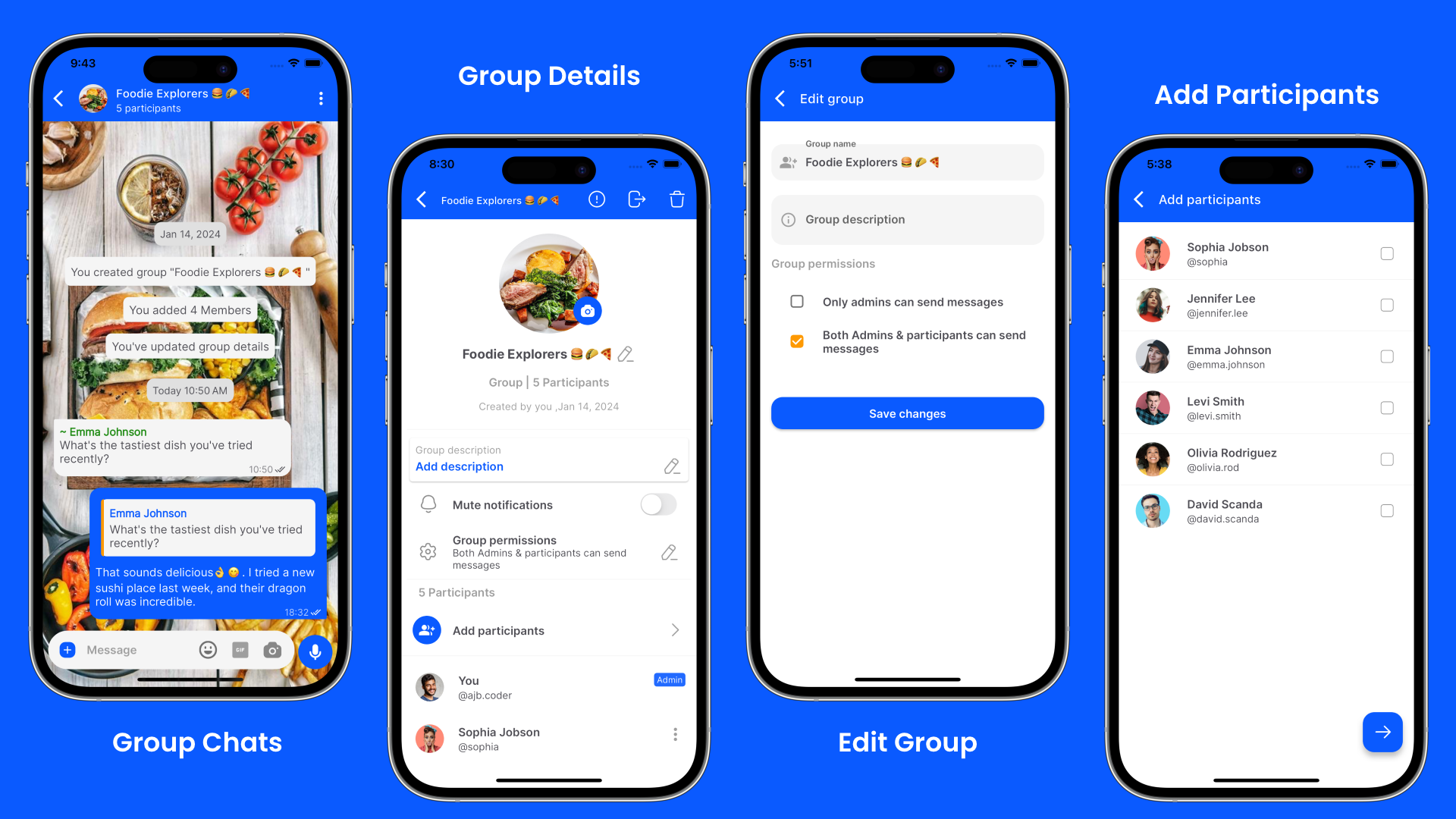
Group Chatting features
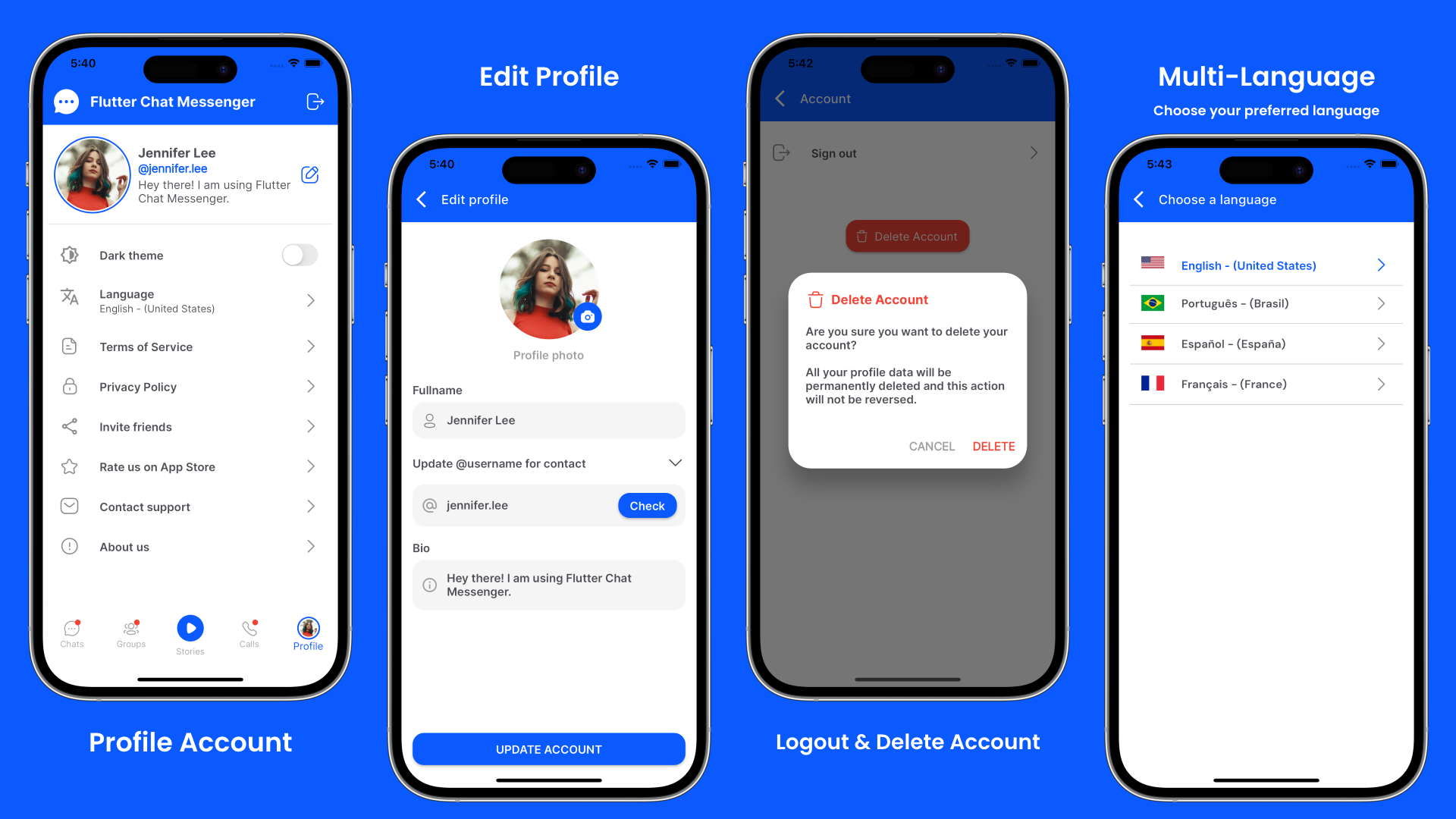
Profile Account, Edit Profile, Logout-Delete Account and Multi-Language features.
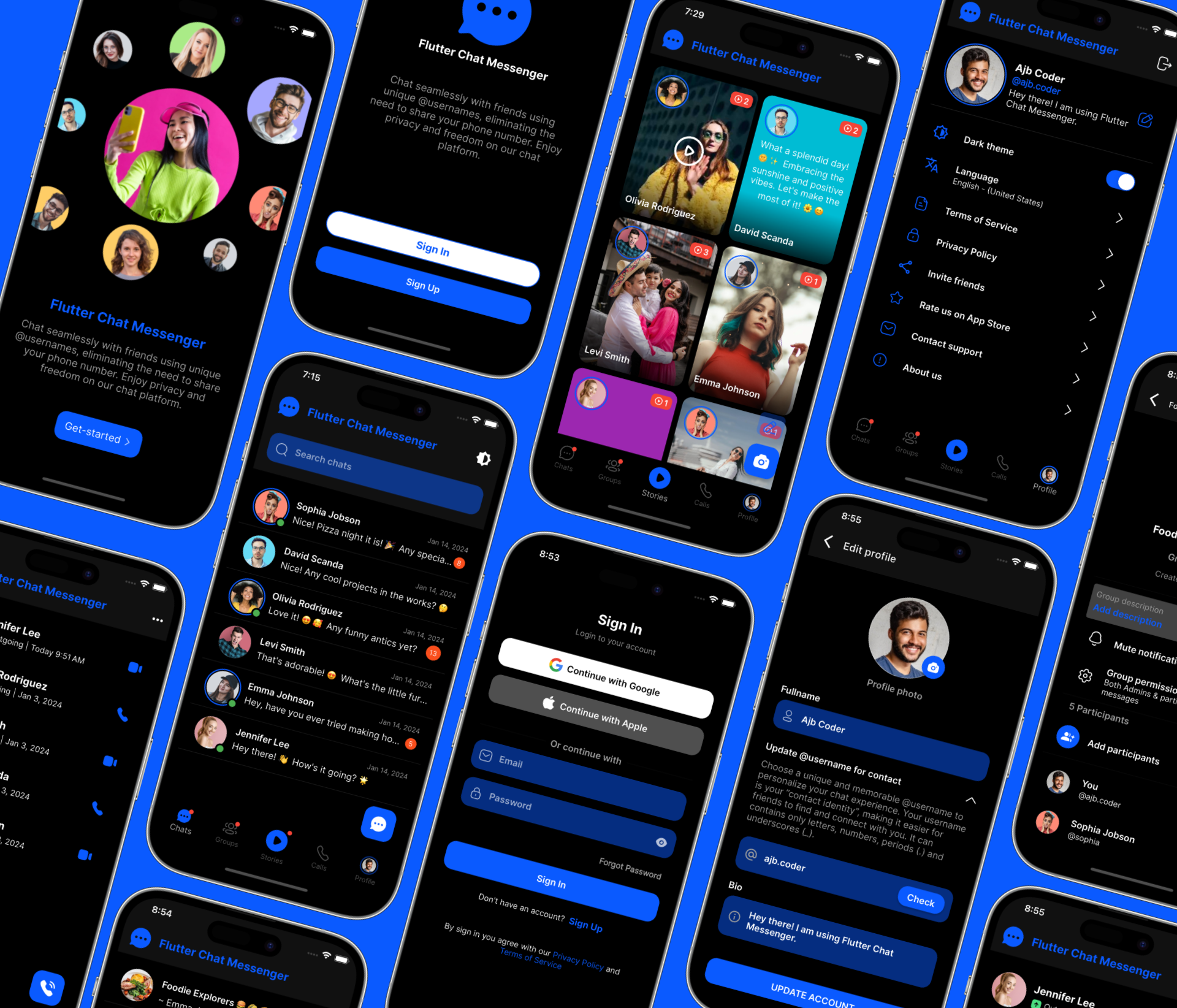
Dark Mode Theme.
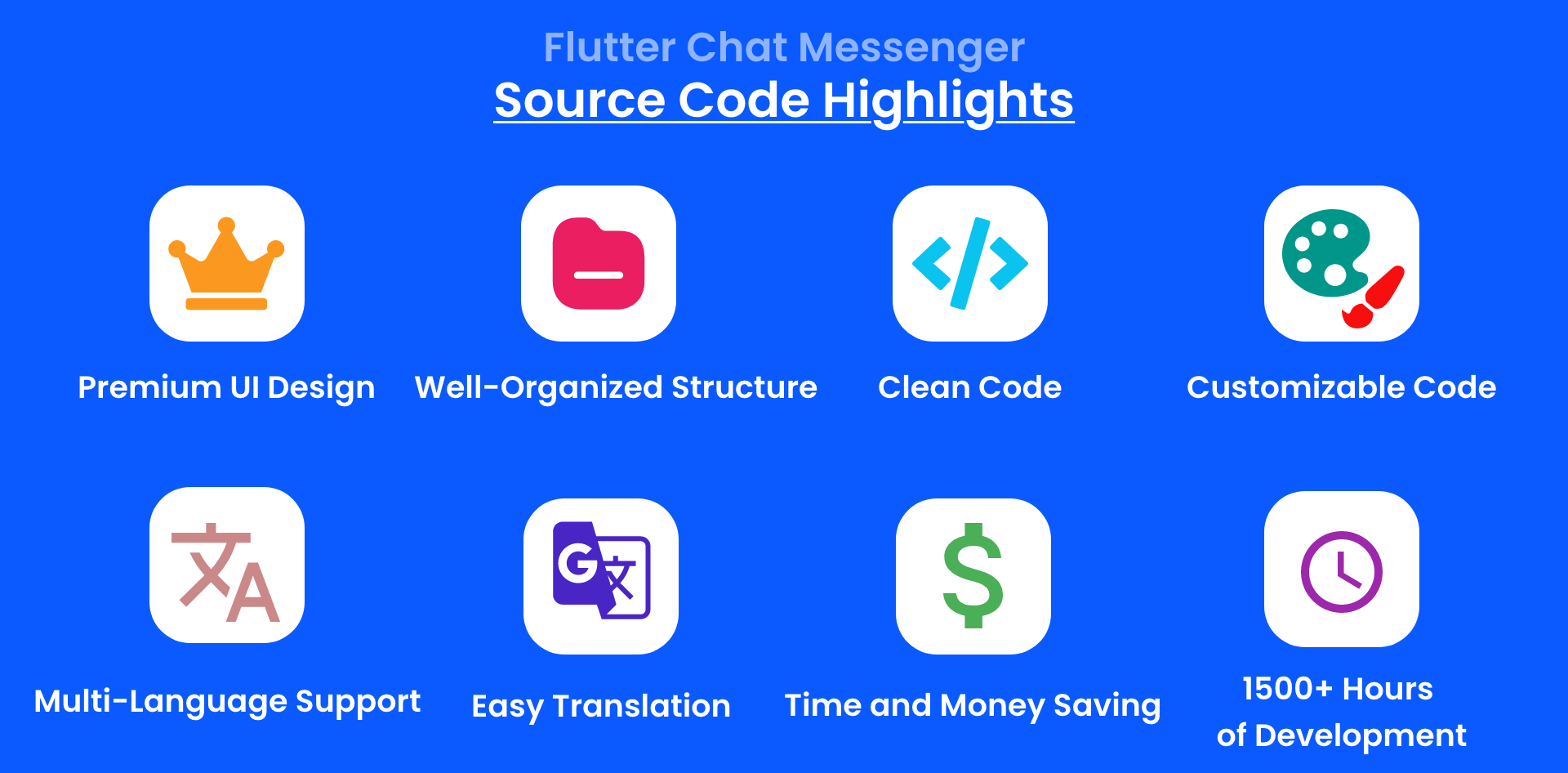
Why buy this source code?
Download Flutter Chat Messenger Demo App


Test the Chat Admin Panel Demo

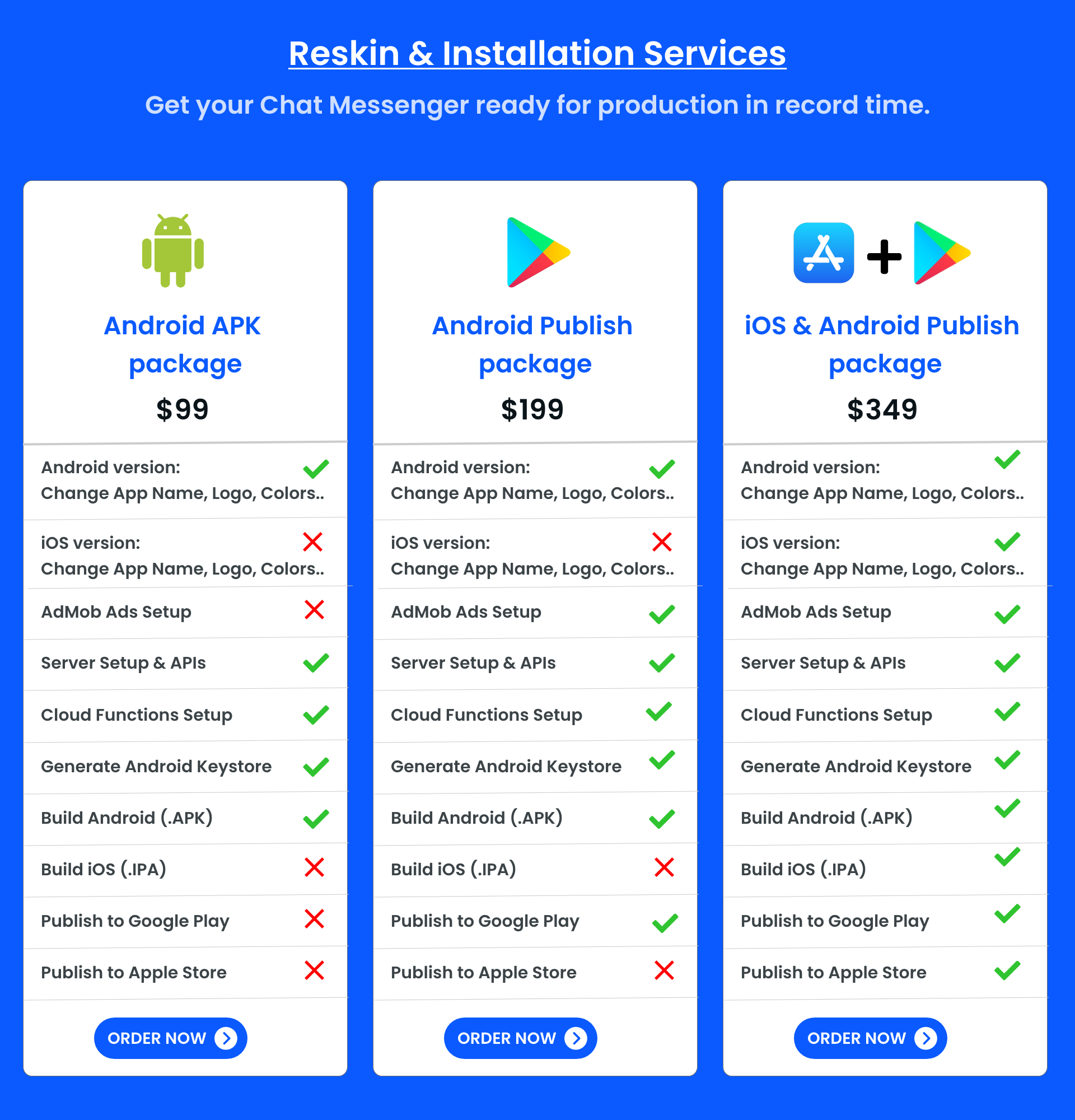
Reskin & Installation Services
Get your Chat Messenger ready for production in record time. Please check the screenshot below and choose your installation package to get-started now.
Technologies used
– Built with Latest Flutter v3.41.x – GetX State Management. – Firebase Backend & Firestore DB. – Agora SDK for Video & Voice Call features.
Included Files
- Flutter Chat Messenger Full App Source Code for (Android & iOS).
- Setup Documentation Guides.
- Updates and bug fixes are provided monthly, or ASAP, (Free of Charge).
Project Requirements
- Latest Flutter v3.41.x
- Install Java 17 to build your Android app
- Latest Android Studio to build your Android app.
- Latest Xcode to build your iOS app.
- Recommend Code Editor: Visual Studio Code aka (VS Code) or Android Studio
Refund Policy
Please be advised that refunds will not be issued once you have downloaded our source code. It is crucial to test the demo app and have a basic understanding of Flutter, Dart, and the other essential tools described on this page in order to successfully set up your Flutter Chat Messenger app version. If you lack experience with these technologies, you have the option to hire our Reskin & Installation Services to prepare your app for production.Pre-Sale questions
If you have any Pre-Sale inquiries, please feel free to Chat with us on WhatsApp Or send your inquiries to our email: info.flutter.chat@gmail.com.About our Support & Working Days
- Working Days: Monday to Friday
- Business Hours: 9:00 AM to 5:00 PM
- Time Zone: GMT+2
Note: we don’t provide bug fixes support via comments or WhatsApp, if you are facing any issue with our source code, please make sure to send your issue details to our email address for support:: info.flutter.chat@gmail.com
What is flutter?
Flutter is a popular open-source software development framework created by Google. It’s used to build mobile applications that compile natively for Android, iOS, Web and Desktop from a single codebase, which means developers can write code once and run their apps on both platforms. Flutter is known for its fast development, expressive user interfaces, and a rich set of pre-designed widgets. It uses the Dart programming language and provides a robust toolkit for creating visually appealing and high-performance mobile apps.
Last Update: April 19, 2026
- Chat-Messenger project UPGRADED to support the latest Flutter v3.41.x
- Updated project dependencies to the latest versions.
- Bug fixes & other improvements.
| Type | Flutter App |
|---|---|
| Author | AmericoBila |
| Category | Mobile / Flutter / Full Applications |
| Price | $119 |
| Sales | 112 |
| Rating | 3.13 from 8 ratings |
| Published | Jan 23, 2024 |
| Last Update | Apr 19, 2026 |
| Compatible Software | Flutter 3.x |
| Mobile Files Included | Dart |
Categories
Tags
External listing. code.market does not sell this product and does not process payment for it. Pricing, payment, delivery, licensing, refunds, and support are handled by the third-party merchant on its own website. We may earn an affiliate commission from a referral. Details.
Products of the Week.
Submit🥇

STOP GUESSING WHAT TO POST
AI that learns your brand voice and builds a month of consistent, on-brand social content: carousels, posts and hooks that sound like you, not like everyone else's AI.
SaaS · 5,037 views · 47 clicksSaaS · Week 45 · 5,037 views · 47 clicks
🥈

Conversational Backlinks for Busy Founders
Place Backlink Relevant Conversation for your domain across Forums and Conversations
Website · 43,048 views · 226 clicksWebsite · Week 45 · 43,048 views · 226 clicks
🥉

upvote.club
Free Social Media Engagement that Helps Boost Your Content. Upvote Club supports 19 social networks with 100+ engagement actions in one dashboard. Add links to your posts and get free engagement from real users.
SaaS · 41,075 views · 122 clicksSaaS · Week 45 · 41,075 views · 122 clicks
#4

Substack Posting API
Onboard your Agent to Substack. Write Publish on Substack via API
SaaS · 60,027 views · 202 clicksSaaS · Week 45 · 60,027 views · 202 clicks
#5

Seenshot App
Free, Fast, MacOS Screenshot app. Make Screenshot cmd+shift+2 and send it via link
Desktop App · 29,392 views · 124 clicksDesktop App · Week 45 · 29,392 views · 124 clicks
#6

Hand-Placed Backlinks $9.99 per link. Flat rate.
Buy hand-placed forum, Q-A and directory backlinks. Flat $9.99 per link, no subscriptions — you only pay for approved listings.
Website · 5,176 views · 19 clicksWebsite · Week 45 · 5,176 views · 19 clicks
#7

Free Invoice Generator - PDF Invoices in Your Browser, No Sign-Up
A free invoice maker for freelancers and small businesses: fill in the invoice, check the live preview, and download a PDF that looks exactly like it. Any currency, tax per item, three templates, no sign-up, and nothing leaves your device.
3,820 views · 17 clicksWeek 45 · 3,820 views · 17 clicks
#8

Merge PDF Files Free - Combine PDFs in Your Browser, No Upload
A free PDF merger for office workers, students, and freelancers: combine PDFs and images into one file in the browser, reorder files and pages, pick page ranges, keep bookmarks, and open password-protected PDFs. Nothing is uploaded, no sign-up, no watermark.
3,528 views · 14 clicksWeek 45 · 3,528 views · 14 clicks