
FlutIoT — Smart Home UI Template Clean Architecture BLoC
Description
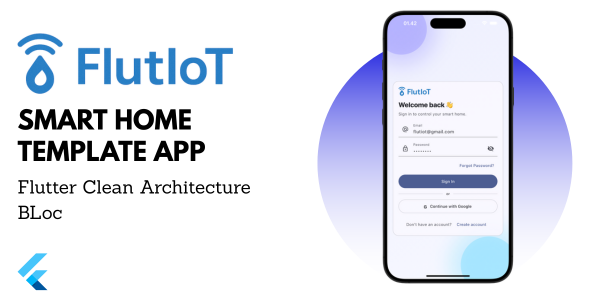
Build a modern smart-home / IoT app fast. FlutIoT ships a complete flow: glassy onboarding, authentication, dashboard, Rooms & Devices, Device Detail, Scenes/Routines, Automations (IFTTT-style), Schedules, mock Notifications & Activity Log, Energy & Analytics, Gateway/MQTT Setup, Device Pairing, and Profile & Settings.
It follows a production-friendly structure: Clean Architecture + BLoC, DI with get_it, go_router with guards, Material 3 (light/dark), i18n (en/id), and a mock MQTT gateway abstraction you can replace with a real one later.
Key Features
Beautiful UI/UX: Material 3, glassy onboarding, dark/light, responsive. Auth: Email/Password + Google (mock), Forgot Password (dummy). Dashboard: Quick Actions, Recently Active, daily stats. Rooms & Devices: Per-room list/grid; lamp, AC, fan, plug, sensor, camera (dummy data). Device Detail: Power, brightness/speed, mode, target temperature, mini chart & activity log (mock). Scenes/Routines: “Movie Night”, “Sleep”, “Leave Home” — batch device actions. Automations (IFTTT): Time/sensor conditions → device/scene actions, with delay. Schedules: Daily/weekly, repeat days, start/stop. Notifications & Activity Log: Mock events (motion, door, firmware). Energy & Analytics: Daily/weekly/monthly charts (dummy), cost estimate per kWh. Gateway Setup: Choose protocol (MQTT/HTTP placeholder), host/port/topic prefix, mock connection test, real-time status (connected/disconnected). Device Pairing: Choose type, name, room, map MQTT topics, sample JSON payload templates. Settings: Theme, language (en/id), °C/°F, currency, privacy, about.
Tech Stack
Flutter (Material 3, adaptive layout) Clean Architecture + BLoC (flutter_bloc, equatable) Dependency Injection: get_it Routing: go_router + onboarding/auth guards i18n: intl (English/Indonesian samples) Storage: SharedPreferences (mock) Gateway: MQTT (mock) + GatewayClient abstraction (swap for REST/WebSocket)
What You Get
Full source code (organized, production-style structure) Mock data + onboarding assets (smart_home / automation / analytics) Example MQTT topic prefix & mapping “1-Click Run” README (setup, run, Android/iOS build) Sample scenes/automations/schedules
Perfect For
IoT system integrators & smart-home installers Startups/agencies needing a fast MVP Enthusiasts who want great UX + solid architecture
Requirements
Flutter SDK (stable), Android Studio/Xcode (Optional) Local MQTT broker to test connectivity (mock supported)
Support
Template bug-fixes: included Custom features/branding: optional (paid) Real device/broker integrations are out of scope (beyond mock)
FAQ
Do I need a backend? No for the demo. It uses mock data + a mock MQTT flow.
Can it work with Home Assistant? Yes, via MQTT topics you control. Map them to your devices.
Is it production-ready? It’s a template. You’re responsible for security reviews, server-side auth, and encrypted connections before going live.
Can I publish to Play/App Store? Yes—after changing branding, package IDs, icons, and reviewing permissions & performance.
| Type | Flutter App |
|---|---|
| Author | flutfy |
| Price | $15 |
| Sales | 3 |
| Rating | 0 (0) |
| Published | Sep 9, 2025 |
| Last Update | Sep 9, 2025 |
| Compatible Software | Flutter 3.x |
| Demo Url | https://drive.google.com/drive/folders/1utGJhoUzrcjiab3MNe5LZW-afp5OSgBj?usp=sharing |
| Mobile Files Included | Dart, YAML |
Categories
Tags
External listing. code.market does not sell this product and does not process payment for it. Pricing, payment, delivery, licensing, refunds, and support are handled by the third-party merchant on its own website. We may earn an affiliate commission from a referral. Details.
Products of the Week.
Submit🥇

STOP GUESSING WHAT TO POST
AI that learns your brand voice and builds a month of consistent, on-brand social content: carousels, posts and hooks that sound like you, not like everyone else's AI.
SaaS · 7,393 views · 67 clicksSaaS · Week 46 · 7,393 views · 67 clicks
🥈

Conversational Backlinks for Busy Founders
Place Backlink Relevant Conversation for your domain across Forums and Conversations
Website · 46,685 views · 232 clicksWebsite · Week 46 · 46,685 views · 232 clicks
🥉

upvote.club
Free Social Media Engagement that Helps Boost Your Content. Upvote Club supports 19 social networks with 100+ engagement actions in one dashboard. Add links to your posts and get free engagement from real users.
SaaS · 44,623 views · 127 clicksSaaS · Week 46 · 44,623 views · 127 clicks
#4

Substack Posting API
Onboard your Agent to Substack. Write Publish on Substack via API
SaaS · 63,509 views · 206 clicksSaaS · Week 46 · 63,509 views · 206 clicks
#5

Seenshot App
Free, Fast, MacOS Screenshot app. Make Screenshot cmd+shift+2 and send it via link
Desktop App · 32,760 views · 127 clicksDesktop App · Week 46 · 32,760 views · 127 clicks
#6

Hand-Placed Backlinks $9.99 per link. Flat rate.
Buy hand-placed forum, Q-A and directory backlinks. Flat $9.99 per link, no subscriptions — you only pay for approved listings.
Website · 8,377 views · 19 clicksWebsite · Week 46 · 8,377 views · 19 clicks
#7

Free Invoice Generator - PDF Invoices in Your Browser, No Sign-Up
A free invoice maker for freelancers and small businesses: fill in the invoice, check the live preview, and download a PDF that looks exactly like it. Any currency, tax per item, three templates, no sign-up, and nothing leaves your device.
7,006 views · 29 clicksWeek 46 · 7,006 views · 29 clicks
#8

Merge PDF Files Free - Combine PDFs in Your Browser, No Upload
A free PDF merger for office workers, students, and freelancers: combine PDFs and images into one file in the browser, reorder files and pages, pick page ranges, keep bookmarks, and open password-protected PDFs. Nothing is uploaded, no sign-up, no watermark.
6,481 views · 18 clicksWeek 46 · 6,481 views · 18 clicks