
Flip360 | IMU Motion and Jump Tracker With Live Sensor Streaming, CSV Export and Watch App - UIKit
Description
Flip360 – IMU Motion and Jump Tracker for iOS and Apple Watch
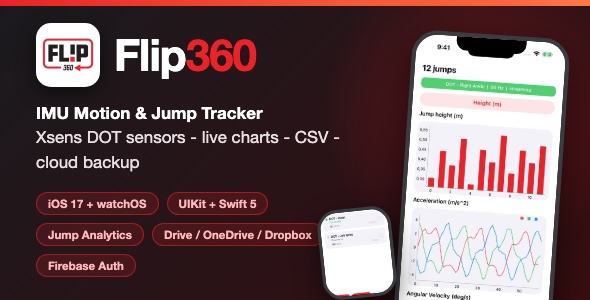
Flip360 is a complete, production-style iOS template for coaches, athletes and sports-tech startups. It connects Movella Xsens DOT wearable sensors over Bluetooth LE, streams live motion data, detects and measures jumps, logs every session to CSV and backs data up to Google Drive, OneDrive or Dropbox. A standalone Apple Watch companion app tracks jumps using only the watch motion sensors and syncs with the iPhone in real time.
Demo Instructions
- Demo login credentials: email
demo@flip360.app/ passwordflip360demo. This account is built into the app and signs in locally, so you can test the app on any device – no backend setup required. - In the iOS Simulator, run the DEV scheme and the app opens directly on the main screen – no login needed in the simulator.
- Optionally, connect your own free Firebase project to enable real email/password accounts, forgot-password and change-password flows (step-by-step instructions with screenshots are included in documentation.html, section 4).
- Cloud backup (Google Drive / OneDrive / Dropbox) and sensor hardware features require the buyer’s own developer keys and a Movella Xsens DOT sensor. The Apple Watch tracking mode works without any DOT hardware.
Third-Party Services Disclaimer
Flip360 integrates with external services: Google Drive, Microsoft Graph (OneDrive), Dropbox and Firebase. These are third-party platforms and are not included with this template. Depending on your usage, each platform may require you to create your own developer account and may involve paid subscriptions, paid API usage plans or usage-based billing (for example, Google Cloud / Firebase billing, Microsoft Azure plans or Dropbox API apps). All cloud features are optional – the app remains fully functional for local tracking, jump detection, CSV export and Apple Watch tracking without connecting any of these services. Buyers are responsible for reviewing and complying with each provider’s terms, quotas and pricing.
Everything the App Does
- Scan, discover and connect Movella Xsens DOT sensors over Bluetooth LE
- Multi-sensor management: connect, name, configure frequency, filter mode and noise filter per sensor
- Live streaming screen with real-time charts: free acceleration, angular velocity and magnetic field
- Jump detection engine with four metric filters: jump height, takeoff speed, air time and landing impact
- Jump counter bar chart plus per-jump metric visualization in real time
- Sensor logging mode: record DOT sessions on the sensor and export the data
- Apple Watch companion app: standalone jump tracking with CoreMotion, workout session integration and live data transfer to the iPhone
- CSV export: every jump session is written to a dated CSV file (date, time, sensor, jump count, height, takeoff velocity, air time, landing impact)
- CSV file browser tab with pull-to-refresh and cloud upload actions
- Cloud backup to Google Drive, OneDrive (Microsoft Graph) and Dropbox with automatic uploading switch and configurable folder name
- Session notes: create, browse and search notes, attached to jump sessions
- Firebase email/password authentication: sign in, sign out, forgot password (reset email) and change password
- Profile screen: avatar with initials, editable display name, Bluetooth status indicator and per-provider cloud connection switches
- In-app file logging system for diagnostics
- Permission handling dialogs for Bluetooth access
- Custom red accent theme, smooth corner cards, pill buttons and subtle animations throughout
Technology
- Language: Swift 5, UIKit with XIB-based screens (SnapKit for layout)
- Minimum iOS: 17.0 – also includes a watchOS companion target
- Architecture: clean layering – Presentation, Domain (use cases), Transfer (data providers), shared framework targets for iOS and watchOS
- Charts: fully included charting library source (line and bar charts)
- Backend: Firebase Authentication and Firestore hooks (buyer’s own project)
- Cloud storage: Google Drive REST API, Microsoft Graph / MSAL, Dropbox SDK
- Dependencies: managed with CocoaPods (Podfile included) – run “pod install” and build
What the Buyer Gets
- Complete Xcode workspace source code: iPhone app, Apple Watch app and shared framework targets
- Full documentation.html setup guide with embedded screenshots
- All artwork sources: app icon, logo assets and launch images
- Free support for setup questions via the item comments
Development Disclosure
Portions of this template’s source code were developed with AI-assisted tools. All code has been reviewed, tested and is provided as a fully working template.
A Note Before You Buy
This item is a source-code template, not a compiled end-user app. To build and publish it you need Xcode and basic iOS development knowledge. Buyers are responsible for creating their own Firebase project and cloud-provider developer accounts, and for complying with the Movella Xsens DOT SDK license terms when using DOT hardware features.
| Type | iOS App |
|---|---|
| Author | mefjudevllc |
| Price | $14 |
| Sales | 0 |
| Rating | 0 (0) |
| Published | Sep 24, 2026 |
| Last Update | Sep 24, 2026 |
| Compatible Software | Other |
| Compatible With | Swift |
| Mobile Files Included | .h |
Categories
Tags
External listing. code.market does not sell this product and does not process payment for it. Pricing, payment, delivery, licensing, refunds, and support are handled by the third-party merchant on its own website. We may earn an affiliate commission from a referral. Details.