
FlightEasy - Flight Booking Web App with Admin
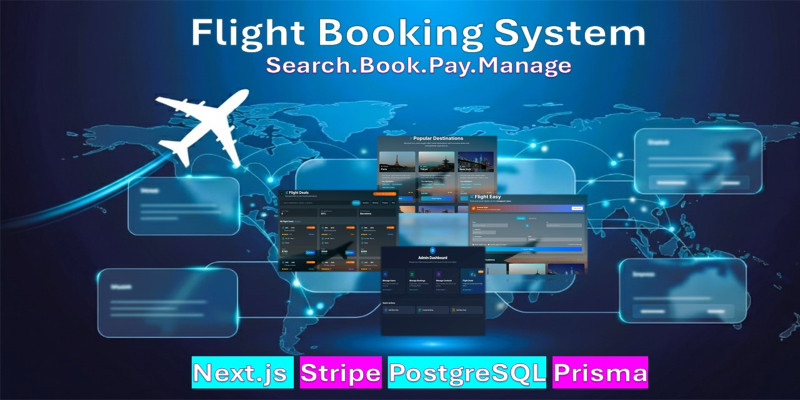
Description
FlightEasy is a modern full-stack flight booking web application built with Next.js, PostgreSQL, and Prisma ORM. It allows users to search flights, book tickets, make payments via Stripe, and download PDF tickets with QR codes. The application also includes a powerful admin panel to manage users, bookings, support messages, and travel deals.
The project is built with a responsive UI using Tailwind CSS, integrates Stripe for payments, Tawk.to for live chat, and provides mock flight data which can be replaced with real APIs (Amadeus, Skyscanner, Travelpayouts).
Perfect for startups, travel agencies, or anyone looking to launch a flight booking system quickly.
Features
- User authentication (signup, login, profile management)
- Flight search with filters (price, airline, duration)
- Booking workflow with passenger details & passport info
- Stripe payment integration (test mode)
- PDF ticket with unique QR code
- User dashboard with booking history & analytics
- Deals & destinations page
- Live chat (preset + Tawk.to support)
- Admin panel: manage users, bookings, messages & deals
- Responsive design (mobile-first with Tailwind)
- Charts & analytics with Recharts
- Ready-to-deploy on Vercel, Netlify, or any Node.js host
Requirements
- Node.js 18+
- PostgreSQL (local or cloud, e.g., Supabase, Neon)
- Stripe account (test or live keys)
- Modern browser (Chrome, Edge, Safari, Firefox)
Instructions
Default Credentials Admin Login: Email: admin@gmail.com Password: 123456
Default User Login: Email: user@gmail.com Password: 123456
Promote User to Admin: Any user can be promoted to admin by changing the isAdmin status to true in the users table of the database.
Installation Guide 1. Clone & Extract Download the project ZIP and extract. Or clone from Git (if repo available):
cd flighteasy 2. Install Dependencies Navigate into the FlightEasy folder and install packages:
npm install 3. Setup Database Make sure PostgreSQL is running locally or on a cloud provider. Create a new database:
CREATE DATABASE flighteasy; 4. Configure Environment Variables Inside FlightEasy/, create a .env file:
DATABASE_URL="postgresql://username:password@localhost:5432/flighteasy?schema=public" NEXTAUTH_SECRET="your_random_secret" NEXT_PUBLIC_BASE_URL="http://localhost:3000" STRIPE_SECRET_KEY="your_stripe_secret_key" NEXT_PUBLIC_STRIPE_PUBLISHABLE_KEY="your_stripe_public_key" # Optional: Tawk.to live chat widget # Replace with your Tawk.to Property ID / Widget ID NEXT_PUBLIC_TAWKTO_PROPERTY_ID="your_tawkto_property_id" ⚠️ Replace values with your real credentials.
5. Run Database Migrations npx prisma generate npx prisma migrate dev --name init 6. Run Development Server npm run dev Visit http://localhost:3000
7. Production Build For deployment (Vercel, Netlify, custom server):
npm run build npm run start
User Side 1. Register/Login 2. Search Flights → Apply filters 3. Select Flight → Fill booking form with passenger details, passport, email, etc. 4. Proceed to Payment → Stripe (test/live) Stripe Test Card: Card number: 4242 4242 4242 4242 Expiry: any future date (e.g., 12/34) CVC: any 3 digits (e.g., 123) 5. Download Ticket (PDF with unique QR code linked to your booking) 6. Manage Profile & Dashboard → View bookings, history, past trips 7. Support Messaging → Users can send messages to the admin; admin replies appear directly in the user dashboard.
"A detailed project description is provided in the project directory, available in readme.pdf, readme.html, and readme.md files."
| Author | JewelSal |
|---|---|
| Category | Scripts & Code / NodeJS |
| Price | $54 |
| Extended License | $162 |
| Likes | 6 |
| First Release | Sep 2, 2025 |
| Last Update | Sep 2, 2025 |
| Files included | .css, .html, .sql, Layered .png, .dat, JavaScript .js |
Categories
Tags
External listing. code.market does not sell this product and does not process payment for it. Pricing, payment, delivery, licensing, refunds, and support are handled by the third-party merchant on its own website. We may earn an affiliate commission from a referral. Details.
Products of the Week.
Submit🥇

STOP GUESSING WHAT TO POST
AI that learns your brand voice and builds a month of consistent, on-brand social content: carousels, posts and hooks that sound like you, not like everyone else's AI.
SaaS · 4,642 views · 44 clicksSaaS · Week 45 · 4,642 views · 44 clicks
🥈

Conversational Backlinks for Busy Founders
Place Backlink Relevant Conversation for your domain across Forums and Conversations
Website · 42,500 views · 225 clicksWebsite · Week 45 · 42,500 views · 225 clicks
🥉

upvote.club
Free Social Media Engagement that Helps Boost Your Content. Upvote Club supports 19 social networks with 100+ engagement actions in one dashboard. Add links to your posts and get free engagement from real users.
SaaS · 40,544 views · 120 clicksSaaS · Week 45 · 40,544 views · 120 clicks
#4

Substack Posting API
Onboard your Agent to Substack. Write Publish on Substack via API
SaaS · 59,511 views · 200 clicksSaaS · Week 45 · 59,511 views · 200 clicks
#5

Seenshot App
Free, Fast, MacOS Screenshot app. Make Screenshot cmd+shift+2 and send it via link
Desktop App · 28,888 views · 124 clicksDesktop App · Week 45 · 28,888 views · 124 clicks
#6

Hand-Placed Backlinks $9.99 per link. Flat rate.
Buy hand-placed forum, Q-A and directory backlinks. Flat $9.99 per link, no subscriptions — you only pay for approved listings.
Website · 4,685 views · 19 clicksWebsite · Week 45 · 4,685 views · 19 clicks
#7

Free Invoice Generator - PDF Invoices in Your Browser, No Sign-Up
A free invoice maker for freelancers and small businesses: fill in the invoice, check the live preview, and download a PDF that looks exactly like it. Any currency, tax per item, three templates, no sign-up, and nothing leaves your device.
3,342 views · 17 clicksWeek 45 · 3,342 views · 17 clicks
#8

Merge PDF Files Free - Combine PDFs in Your Browser, No Upload
A free PDF merger for office workers, students, and freelancers: combine PDFs and images into one file in the browser, reorder files and pages, pick page ranges, keep bookmarks, and open password-protected PDFs. Nothing is uploaded, no sign-up, no watermark.
3,089 views · 14 clicksWeek 45 · 3,089 views · 14 clicks