
FixPDF - Ultimate Android PDF Tools & Document Utility App (Jetpack Compose, Kotlin, AdMob)
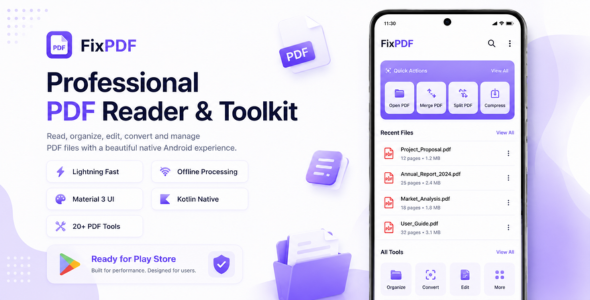
Description
FixPDF – All-in-One Android PDF Tools Suite & Laravel Admin Control Panel
Ultimate PDF Editor & Utility App | Built on Native Kotlin & Jetpack Compose | Modern Laravel 12 Control Center + React Landing Page | Dual-Mode (Works 100% Standalone or Connected to Admin Panel) | Integrated AdMob Monetization | Targets Latest Google Play Store SDK
Test Before You Buy – Live Demo APKs
Experience the performance and fluid UI directly on your Android phone. We provide two test APKs so you can see how smoothly the app functions both standalone and dynamically managed:
|
Option 1: With Live Admin Panel 
|
Option 2: Without Admin Panel (Standalone) 
|
️ Live Admin Panel & Website Demo
Test the live Admin Control Center and change app settings, ad frequencies, and tool visibility in real-time:
- Live Website & Landing Page: https://magiclocksafe.com
- Admin Login URL: https://magiclocksafe.com/login
- Admin Email:
admin@fixpdf.com - Admin Password:
admin123
✅ See Our Customer’s App Live on Google Play Store
One of our customers has already customized and published this application on the Google Play Store. The screenshot below shows a real customer deployment, demonstrating that this project is ready to be branded and published for your own business.
View the live customer app on Google Play: PDF Reader & PDF Editor: Drut

FixPDF is a complete, market-ready Android utility powerhouse designed for comprehensive on-device document management. Built with modern Kotlin, Jetpack Compose, clean architecture, and a sleek obsidian dark theme, it offers users over 20+ powerful PDF & Office tools without requiring expensive external cloud processing servers.
FixPDF introduces a revolutionary Dual-Mode Architecture: run it as a 100% standalone offline utility app with zero backend requirements, or connect it to the included Laravel 12 Admin Control Center to dynamically toggle AdMob placements, kill-switch tools, and trigger force updates across all users without republishing to the Play Store!
⭐ What Makes FixPDF Outstanding?
- Dual-Mode Flexibility: Operates 100% standalone out of the box or seamlessly synced with the Admin Panel.
- 20+ Native PDF & Office Utilities: Covers every essential PDF requirement on-device.
- AI Document & ID Card Scanner: Google ML Kit powered scanning with automatic edge detection, perspective transformation, and smart enhancement filters.
- Full Office Document Viewer: View Word (.doc, .docx), Excel (.xls, .xlsx, .csv), and PowerPoint (.ppt, .pptx) directly inside the app.
- Complete Document Converters: Convert Word, Excel, PowerPoint, Images, and HTML webpages into PDF.
- Pre-Integrated AdMob Monetization: App Open, Adaptive Banners, Interstitial Ads, and Native Ads with smart frequency capping.
- Laravel 12 Admin Control Center: Easily manage tools, AdMob IDs, frequency rules, app updates, and landing page content.
- React Material One Landing Page: Modern, responsive web landing page included with built-in client-side PDF tools.
- Offline-First & Zero Latency: App launches instantaneously using local DataStore caching; never hangs on splash screens.
- Play Store Ready: Targets latest Android SDK (targetSdk 37, minSdk 27), fully scoped storage compliant.
️ 20+ Powerful PDF & Document Utilities Included
1. AI Document Scanner (ML Kit)
Scan multi-page physical receipts, contracts, and documents with automatic edge detection, perspective correction, shadow removal, and contrast filters.
2. ID Card Scanner
Scan front and back sides of identity cards, driver licenses, or badges and automatically combine them onto a clean single A4 page.
3. All-in-One Office Document Viewer
Read and inspect Word documents (.doc, .docx), Excel spreadsheets (.xls, .xlsx, .csv), and PowerPoint slides (.ppt, .pptx) without installing third-party office apps.
4. Merge PDFs
Select multiple PDF documents and combine them into a single file with drag-and-drop page reordering.
5. Split PDF
Split large PDF documents into multiple smaller files by custom page numbers or individual ranges.
6. Compress PDF
Reduce PDF file sizes with multi-level compression to save storage and facilitate fast email sharing.
7. Word to PDF (.docx to .pdf)
Convert Microsoft Word documents directly into high-fidelity PDF documents.
8. Excel to PDF (.xlsx to .pdf)
Convert spreadsheet workbooks and CSV sheets into standardized PDF tables.
9. PowerPoint to PDF (.pptx to .pdf)
Transform slide decks and presentations into printable, shareable PDF documents.
10. Image to PDF
Turn camera photos, receipts, or gallery screenshots into clean multi-page PDF documents.
11. PDF to Images
Extract embedded pictures or export all PDF pages into high-resolution JPG or PNG image files.
12. Lock PDF (Add Password)
Protect sensitive documents with user and owner passwords using robust industry-standard AES-256 encryption.
13. Unlock PDF (Remove Password)
Permanently remove passwords from protected PDFs for quick, friction-free opening.
14. Rotate Pages
Correct orientation issues by rotating individual pages or all pages at 90°, 180°, or 270°.
15. Remove Pages
Visually preview and delete blank, redundant, or confidential pages from any document.
16. Reorder Pages
Reorganize page sequences with an interactive drag-and-drop thumbnail grid.
17. Sign PDF
Draw handwritten digital signatures, resize, position, and stamp them onto any PDF page.
18. Add Watermarks
Add customized text or image watermarks with controls for opacity, rotation, scaling, and positioning.
19. Add Page Numbers
Stamp formatted page numbers on headers or footers with customizable prefixes and alignments.
20. HTML to PDF
Convert live URLs or HTML source code directly into offline PDF files via on-device rendering.
21. Fill PDF Forms
Fill out interactive PDF forms, text inputs, radio buttons, and checkboxes locally.
22. Flatten PDF
Lock in form entries, annotations, and visual signatures permanently into the content stream to prevent tampering.
23. Extract Text & Metadata
Extract plain text directly to the clipboard or inspect and edit document properties (Author, Title, Keywords).
Pre-Integrated AdMob Monetization
Generate consistent passive revenue with thoughtfully configured Google Mobile Ads units that follow AdMob policies:
- App Open Ads: Loaded on application launch with customizable cooldown hours to prevent user frustration.
- Adaptive Banner Ads: Automatically adapts to screen dimensions, placed cleanly on the Tools screen.
- Interstitial Ads: Configured with action intervals (e.g., every 2 tool completions) and minimum time gap thresholds.
- Native Ads: Seamlessly interleaved inside home list and grid views with custom measuring to prevent layout shifts.
- Remote Kill-Switch: Turn ads on or off globally, or toggle specific screens directly from the Admin Panel.
️ Premium Technical Architecture
- 100% Kotlin & Jetpack Compose: Modern, declarative UI architecture without legacy XML fragmentation.
- Clean Architecture & MVVM: Strict separation between Domain, Data, and Presentation layers.
- Koin Dependency Injection: Lightweight, fast dependency injection container.
- Room Database: Fast offline persistence for file bookmarks, favorites, and recent history.
- Hardened Security: Brute-force rate limiting, CSRF protection, and SQL injection immunity in the Admin Panel.
- Pre-Configured .htaccess: Ready for cPanel, shared hosting, VPS, or Docker deployment.
App Screens Showcase

What You Get (Package Deliverables)
- FixPDF-Android-App.zip: Complete, clean Android Studio project source code (ready to build and customize).
- Documentation/: Interactive, responsive HTML documentation guide with step-by-step setup tutorials for Android Studio, cPanel, and VPS.
- Free Lifetime Updates: All future improvements, bug fixes, and feature additions included.
✉️ Dedicated Customer Support
Have pre-purchase questions or need setup assistance? We’re here to help you get your app published quickly:
- Support Email: therohitjagan@gmail.com
- Author Profile: https://codecanyon.net/user/therohitjagan
Note: For Admin Panel, Please contact us.
Changelog
v1.1 - Major Feature & Ecosystem Update

[ADDED] Laravel 12 Admin Control Center
  Remotely control ad frequencies, screen toggles, tool visibility, and app update alerts.

[ADDED] Dual-Mode Architecture
  Works autonomously with or without the Admin Panel.

[ADDED] AI Document Scanner
  Google ML Kit edge detection, perspective warping, and document enhancement filters.

[ADDED] ID Card Scanner
  Front and back side capture merged onto a single printable page.

[ADDED] All-in-One Office Viewer
  View Word, Excel, CSV, and PowerPoint documents inside the app.

[ADDED] Document Converters
  Word to PDF, Excel to PDF, PPT to PDF, Image to PDF, PDF to Images, and HTML to PDF.

[FIXED] Minor UI bugs and PDF memory caching issues.
[UPDATED] Dependencies updated to the latest stable versions.

v1.0 - Initial Release

[RELEASED] FixPDF Android App Template
[RELEASED] 18+ premium local offline PDF tools.
[RELEASED] AdMob App Open, Banner, Interstitial, and Native Ads.
[BUILT] Kotlin, Jetpack Compose, and clean architecture.
[TARGET] Latest Google Play Store SDK requirements, minSdk 27, targetSdk 37.| Type | Android App |
|---|---|
| Author | therohitjagan |
| Price | $53 |
| Sales | 3 |
| Rating | 0 (1) |
| Published | Jul 7, 2026 |
| Last Update | Sep 14, 2026 |
| Compatible Software | Kotlin 1.x, Android 15.0, Android 12.0, Android 11.0, Android 10.0, Android 9.0 |
| Mobile Files Included | .apk, .java, .xml |
Categories
Tags
External listing. code.market does not sell this product and does not process payment for it. Pricing, payment, delivery, licensing, refunds, and support are handled by the third-party merchant on its own website. We may earn an affiliate commission from a referral. Details.
Products of the Week.
Submit🥇

Perceptle
Perceptle is a daily browser-based game that challenges you to test your sensory intuition through five quick estimation and rhythm-based rounds.
Other · 1 views · 0 clicksOther · Week 47 · 1 views · 0 clicks
🥈

Free LinkedIn Likes From Real
Get free LinkedIn likes on your posts from real members who react by hand. No
SaaS · 124 views · 2 clicksSaaS · Week 47 · 124 views · 2 clicks
🥉

STOP GUESSING WHAT TO POST
AI that learns your brand voice and builds a month of consistent, on-brand social content: carousels, posts and hooks that sound like you, not like everyone else's AI.
SaaS · 7,686 views · 71 clicksSaaS · Week 47 · 7,686 views · 71 clicks
#4

aaas.market
407 reliable micro tools for solo founders, marketers and creators. They work in your browser
SaaS · 122 views · 0 clicksSaaS · Week 47 · 122 views · 0 clicks