
Filters | iOS Universal Photo Filters App Template (Swift)
Description











25 July 2024
• Issues of old source code and crashes are resolved
• iOS 17+ version issues are resolved
• Updated documents folder and video recording for app.
28 May 2020
• Fixed a the crash on getting images from library and camera
• Updated camera permission alert in iOS 13.4.1
• Fixed the code to support iOS dark mode.
• Updated documents folder and video recording for app.
20 Aug 2019
• Improved design of Main Home screen with two separated buttons of camera and gallery by adding shadows and views with color contrast in the background and foreground.
• Changed the layout with new buttons of back and share and also added background color in a view to contrast.
• Fixed a crash while converting the original image to a filtered image.
• Adjusted the layout of the app for new design patterns of iPhone X and XS Max etc.
23 April 2018
• Replace the AdMob banner code with the Interstitial one in ImeEditor.swift | Changed Unit ID variable in Configs.swift
• Added a "Privacy - Photo Library Additions Usage Description" row in Info.plist, so the app won't crash when you try to save an image into the Camera Roll
10 April 2018
• Updated to Xcode 9.3
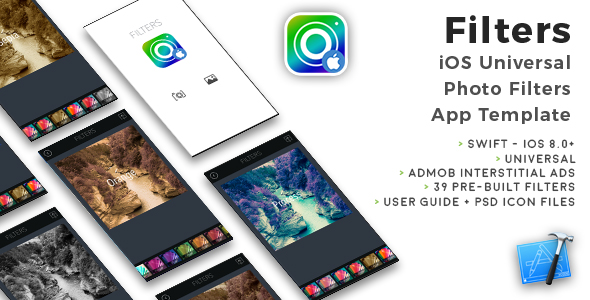
FILTERS is a Universal App Template that showcases 39 custom iOS filters (from Apple CoreImage Filters), it’s easy to customize and the included pdf User Guide explains how to edit filters or add a new one. You can also share your edited image to social networks or Mail and Message.
FILTERS is a native XCode project, Storyboard, Swift, very easy to customize, it works with Apple Core Image filters.


What about iOS Core Image Filters
You can check the iOS Filters Reference here: https://developer.apple.com/library/content/documentation/GraphicsImaging/Reference/CoreImageFilterReference/index.html#//apple_ref/doc/uid/TP30000136-SW29
I get a Code signing error in Xcode 8.x
That’s a bug of Xcode 8 with macOS Sierra, check this sample video to see how to fix it: https://youtu.be/z2LemT1_LqA
How to remove AdMob banner ads
Check this video out to see how to remove the code that shows AdMob banners: https://youtu.be/e-HQYnta2Jg Keep in mind that you must repeat the shown steps for every .swift file that contains this line on the top:import GoogleMobileAds
What about free support for this template?
I can offer free support for bugs encountered in the original code. Instead, if you’ve edited the code and messed something up with it, I may apply some fee to fix it either via TeamViewer or by checking your app project files directly on my computer.
Should I use the latest version of Xcode to edit this template?
Yes, I always update my apps to the latest version of the IDE.
Screenshots


- XCode 9.x project – Swift – 64bit
- Universal – Storyboard – iOS 8.0+
- AdMob banners
- Easy to Customize
- Works with Apple CoreImage Filters
- Snap pictures from Custom Camera Controller – Pick photos from Library
- Share Photos to Facebook, Twitter, Mail, WhatsApp and SMS
- Apple Mac with its latest OS version installed
- The latest version of Xcode and some knowledge about its UI interface
- Photoshop or any other image editor software
- An Apple Developer account to submit apps to the App Store
- An AdMob account to generate your own banner UNIT ID




| Type | iOS App |
|---|---|
| Author | cubycode |
| Price | $22 |
| Sales | 78 |
| Rating | 0 (2) |
| Published | Oct 11, 2014 |
| Last Update | Jul 25, 2024 |
| Compatible Software | iOS 12 |
| Compatible With | Swift |
| Mobile Files Included | Layered PSD |
Categories
Tags
External listing. code.market does not sell this product and does not process payment for it. Pricing, payment, delivery, licensing, refunds, and support are handled by the third-party merchant on its own website. We may earn an affiliate commission from a referral. Details.
Products of the Week.
Submit🥇

STOP GUESSING WHAT TO POST
AI that learns your brand voice and builds a month of consistent, on-brand social content: carousels, posts and hooks that sound like you, not like everyone else's AI.
SaaS · 7,326 views · 67 clicksSaaS · Week 46 · 7,326 views · 67 clicks
🥈

Conversational Backlinks for Busy Founders
Place Backlink Relevant Conversation for your domain across Forums and Conversations
Website · 46,594 views · 232 clicksWebsite · Week 46 · 46,594 views · 232 clicks
🥉

upvote.club
Free Social Media Engagement that Helps Boost Your Content. Upvote Club supports 19 social networks with 100+ engagement actions in one dashboard. Add links to your posts and get free engagement from real users.
SaaS · 44,535 views · 127 clicksSaaS · Week 46 · 44,535 views · 127 clicks
#4

Substack Posting API
Onboard your Agent to Substack. Write Publish on Substack via API
SaaS · 63,422 views · 206 clicksSaaS · Week 46 · 63,422 views · 206 clicks
#5

Seenshot App
Free, Fast, MacOS Screenshot app. Make Screenshot cmd+shift+2 and send it via link
Desktop App · 32,668 views · 127 clicksDesktop App · Week 46 · 32,668 views · 127 clicks
#6

Hand-Placed Backlinks $9.99 per link. Flat rate.
Buy hand-placed forum, Q-A and directory backlinks. Flat $9.99 per link, no subscriptions — you only pay for approved listings.
Website · 8,295 views · 19 clicksWebsite · Week 46 · 8,295 views · 19 clicks
#7

Free Invoice Generator - PDF Invoices in Your Browser, No Sign-Up
A free invoice maker for freelancers and small businesses: fill in the invoice, check the live preview, and download a PDF that looks exactly like it. Any currency, tax per item, three templates, no sign-up, and nothing leaves your device.
6,922 views · 29 clicksWeek 46 · 6,922 views · 29 clicks
#8

Merge PDF Files Free - Combine PDFs in Your Browser, No Upload
A free PDF merger for office workers, students, and freelancers: combine PDFs and images into one file in the browser, reorder files and pages, pick page ranges, keep bookmarks, and open password-protected PDFs. Nothing is uploaded, no sign-up, no watermark.
6,406 views · 18 clicksWeek 46 · 6,406 views · 18 clicks