
File Rewind | Windows File Backup, Version History and Recovery Software
Description
File Rewind | File Backup, Version History and Recovery for Windows
Protect your files. Track changes. Restore available previous versions.
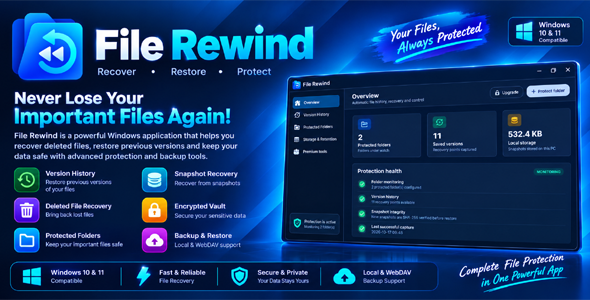
File Rewind is a Flutter-based Windows desktop application designed to help users manage file protection through protected-folder monitoring, file version history, local snapshots, and recovery tools.
Featuring a modern desktop interface, File Rewind brings file history, snapshot management, file comparison, integrity verification, and additional backup utilities together in one convenient workspace.
Whether you want to maintain historical copies of important files, review previous versions, manage protected folders, or organize local backup storage, File Rewind provides a practical workflow for managing your files.
Key Features
- Automatic File History: Capture historical snapshots of files in configured protected folders while the application is running, subject to the selected settings and available storage.
- Version History & Recovery: Browse available saved versions and restore supported previous file states when the required snapshot data is available.
- Protected Folder Management: Add and manage the folders included in the application’s file protection workflow.
- Storage & Retention Management: Review snapshot storage usage and manage historical data using the available retention controls.
- Snapshot Integrity Verification: Use SHA-256 checks to help identify unexpected changes to saved snapshot data.
- File Comparison Tools: Compare supported text and image files when reviewing changes.
- Recovery Checkpoints: Work with available recovery checkpoints and historical snapshots to support file recovery workflows.
- External Drive Backup: Use supported external-storage workflows to maintain additional backup copies when the destination is available and properly configured.
- Encrypted Vault: Use the application’s encrypted vault functionality to protect supported backup data.
- WebDAV Integration: Transfer supported backup data to or from compatible WebDAV destinations, subject to server configuration and network availability.
- Automation Tools: Configure available checkpoint automation and unusual-change alerts to help review file activity.
- System Tray Support: Keep the application running in the background by closing its main window to the system tray, where supported by the current configuration.
- Modern Windows Interface: Manage file protection, version history, storage, and additional tools through an organized desktop interface.
- Flutter Source Code: Customize the included source project and adapt the application to your development requirements.
Application Sections
1. Overview Dashboard
View available protection information, protected-folder counts, saved-version statistics, and local storage information from a centralized dashboard.
2. Version History
Browse available historical versions and use the recovery workflow to restore supported file snapshots when the necessary backup data is available.
3. Protected Folders
Manage the folders included in your file protection workflow and review the folders configured for monitoring.
4. Storage & Retention
Review local snapshot storage and manage historical data using the retention controls available in the application.
5. Advanced Protection Tools
Access available recovery, file comparison, integrity verification, vault, backup, and automation features from the application’s interface.
Technology Stack
- Flutter: Windows desktop application framework.
- Dart: Application programming language.
- Windows Desktop: Target operating system.
- SHA-256: Snapshot integrity verification.
- Local Storage: File history and snapshot management.
- WebDAV: Supported network-based backup transfer functionality.
What Is Included
- File Rewind Flutter source code.
- Application project structure and included resources.
- Application assets available in the source package.
- HTML documentation.
- Setup, build, and customization guidance included in the package.
System Requirements
- A compatible 64-bit Windows 10 or Windows 11 environment.
- Flutter SDK and the required development tools when building from source.
- Appropriate file-system permissions for selected folders and backup locations.
- Sufficient available disk space for snapshots and historical versions.
- Internet or network connectivity for network-dependent features such as WebDAV transfers.
Important Information & Limitations
- File Rewind is a file protection and recovery utility. It is not a substitute for a comprehensive, independent backup strategy.
- Folder monitoring and automatic history capture operate while the application process is running. File Rewind is not a Windows service.
- Closing the main window may hide the application in the system tray instead of exiting it. Use the application’s tray menu to quit when you want to stop the process and its monitoring.
- Recovery depends on the availability, completeness, and integrity of previously saved snapshots or backup copies.
- Files that were never captured or backed up may not be recoverable.
- SHA-256 verification can help identify data changes but does not guarantee that a snapshot is recoverable, malware-free, or otherwise safe.
- Unusual-change alerts are intended to help review file activity and should not be considered guaranteed ransomware detection or prevention.
- External-drive and WebDAV operations depend on destination availability, permissions, network configuration, and the settings used.
- Encrypted-vault protection depends on correct use of the supported workflow and secure handling of any required credentials or keys. Losing required credentials may prevent access to protected data.
- Available functionality may vary depending on Windows permissions, storage availability, selected locations, and network configuration.
- Test backup and recovery procedures before relying on them for important files.
- Keep independent backups of critical data, preferably on a separate storage device or location.
Developer-Friendly Source Code
The included Flutter source code provides a foundation for developers who want to study, customize, maintain, or extend a Windows file protection application.
Use the source project to explore the application structure, adapt the interface, and develop supported functionality according to your requirements. Building from source requires Flutter and the appropriate Windows development tools.
File Rewind
Keep your file history. Restore available previous versions.
File Rewind brings file protection, version history, snapshot integrity checks, and recovery tools together in one Windows desktop application.
| Author | Noni_Gopal_Chandro |
|---|---|
| Price | $49 |
| Sales | 0 |
| Rating | 0 (0) |
| Published | Oct 23, 2026 |
| Last Update | Oct 23, 2026 |
| Application Runtime | Native |
| Operating System Versions | Windows 11, Windows 10 |
Categories
Tags
External listing. code.market does not sell this product and does not process payment for it. Pricing, payment, delivery, licensing, refunds, and support are handled by the third-party merchant on its own website. We may earn an affiliate commission from a referral. Details.
Products of the Week.
Submit🥇

STOP GUESSING WHAT TO POST
AI that learns your brand voice and builds a month of consistent, on-brand social content: carousels, posts and hooks that sound like you, not like everyone else's AI.
SaaS · 7,369 views · 67 clicksSaaS · Week 46 · 7,369 views · 67 clicks
🥈

Conversational Backlinks for Busy Founders
Place Backlink Relevant Conversation for your domain across Forums and Conversations
Website · 46,653 views · 232 clicksWebsite · Week 46 · 46,653 views · 232 clicks
🥉

upvote.club
Free Social Media Engagement that Helps Boost Your Content. Upvote Club supports 19 social networks with 100+ engagement actions in one dashboard. Add links to your posts and get free engagement from real users.
SaaS · 44,593 views · 127 clicksSaaS · Week 46 · 44,593 views · 127 clicks
#4

Substack Posting API
Onboard your Agent to Substack. Write Publish on Substack via API
SaaS · 63,480 views · 206 clicksSaaS · Week 46 · 63,480 views · 206 clicks
#5

Seenshot App
Free, Fast, MacOS Screenshot app. Make Screenshot cmd+shift+2 and send it via link
Desktop App · 32,730 views · 127 clicksDesktop App · Week 46 · 32,730 views · 127 clicks
#6

Hand-Placed Backlinks $9.99 per link. Flat rate.
Buy hand-placed forum, Q-A and directory backlinks. Flat $9.99 per link, no subscriptions — you only pay for approved listings.
Website · 8,349 views · 19 clicksWebsite · Week 46 · 8,349 views · 19 clicks
#7

Free Invoice Generator - PDF Invoices in Your Browser, No Sign-Up
A free invoice maker for freelancers and small businesses: fill in the invoice, check the live preview, and download a PDF that looks exactly like it. Any currency, tax per item, three templates, no sign-up, and nothing leaves your device.
6,977 views · 29 clicksWeek 46 · 6,977 views · 29 clicks
#8

Merge PDF Files Free - Combine PDFs in Your Browser, No Upload
A free PDF merger for office workers, students, and freelancers: combine PDFs and images into one file in the browser, reorder files and pages, pick page ranges, keep bookmarks, and open password-protected PDFs. Nothing is uploaded, no sign-up, no watermark.
6,458 views · 18 clicksWeek 46 · 6,458 views · 18 clicks