
Fernhall - Pilates Studio HTML Website Template
Description
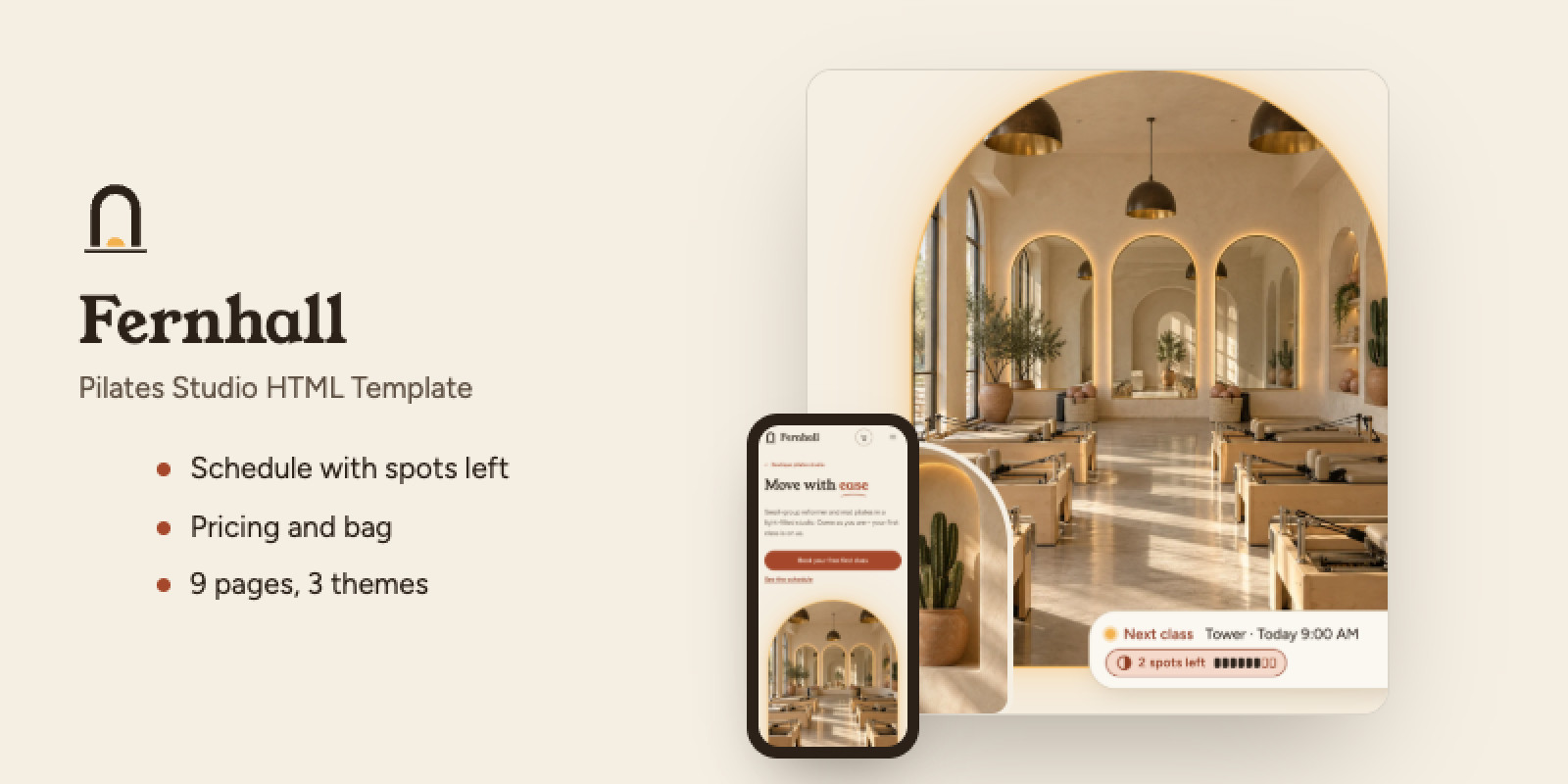
Most studio templates are yoga or gym themes with the class names changed. A reformer studio needs three specific things from its website: a timetable people can check on their phone, clear prices from the intro offer up to memberships, and enough reassurance that a nervous beginner books a first class. Fernhall is built around those three jobs, across 9 pages.
Schedule. The Schedule page shows the next seven days, built from one weekly timetable file. Visitors filter by class type, level, instructor and day, and the filtered view can be shared as a link. Each class shows how many spots are left, "Full" with a waitlist button, or "Spots not listed" if you'd rather not publish numbers. You type the numbers in a data file. If your booking tool can publish them as JSON, the page can read that feed instead.
Pricing. A three-step ladder: intro offer, class packs, memberships. The monthly/annual toggle recalculates the annual total, the monthly equivalent and the saving from the prices you enter. Visitors add packs and memberships to a bag, and the bag sends them on to your booking tool's or payment provider's checkout. The site itself takes no payments.
First class. The Contact page doubles as a free-first-class form. It checks each field, preselects the class a visitor chose on the Schedule, and comes with setup steps for Formspree-style services, your own script or Netlify Forms. Until you connect one, it tells visitors plainly that nothing was sent. It never shows a fake "Thanks, we got it".
Instructors. Each instructor card opens a full bio with certifications, the classes they teach and a link to their slots on the Schedule.
Classes, Studio and About. The Classes page gives each class type its own section: who it's for, what to expect, what to bring and who teaches it. The Studio page shows your amenities and a photo gallery with category filters and a full-screen viewer. The About page tells the studio's story next to a photo that changes with each step on desktop.
Find-your-class quiz. Three questions for newcomers, with no account or email. Pregnancy and injury answers point visitors to the right class and remind them to check with their doctor.
Design. Cream pages, terracotta buttons and arch-framed photos. The free-first-class band, the mobile menu and the footer sit on olive green with pale-yellow accents, and the "Most popular" plan card is cocoa brown. Headings are set in Young Serif, body text in Figtree. That is the default Warm theme. Eucalyptus and Sand are two more complete palettes, each with its own corner and arch shapes, and you switch between them with one setting.
Editing. All content lives in commented data files: studio name, contact details, timetable, prices, instructors, opening hours, FAQ, gallery, quiz and social links. Colors sit in one theme file. There is no build step, no npm and no framework. The fonts are embedded in the CSS, so you can double-click index.html and preview the site straight from the download folder, then upload it to any static host. Nine Markdown guides cover setup, rebranding, every data field, forms and checkout, themes and the quiz, plus a step-by-step booking-integration guide.
Live demo. Add ?theme=eucalyptus or ?theme=sand to the address to see the other themes.
Browsers. Tested in Chrome (full QA) and Firefox (smoke test).
Demo photos are AI-generated (OpenAI ChatGPT Images) and included in the download (34 photos). They show a fictional studio, so replace them with your own photos before launch.
Features
- Schedule for the next 7 days from one weekly timetable (
data/schedule.js): a 7-column week grid from 1200 px, day tabs with a list on tablets and phones. Each class opens a details dialog with who it's for, what to expect and what to bring, plus a calendar file (.ics) and an "Add to Google Calendar" link. - Filters by class type, level, instructor and day. They combine, show a result count and stay in the address, so
schedule.html?type=reformeropens a filtered view. - Spots-left chip on every class: "3 spots left", "Full" with a "Join waitlist" button, or "Spots not listed". Each state is shown with an icon, text and color, not color alone. Type the numbers in a data file, hide them with one setting, or connect a live availability feed (JSON). If the feed fails, the page says so and shows the typed numbers.
- Pricing ladder in three steps (intro offer, class packs, memberships), with a sub-menu that marks the step in view and a comparison table that scrolls sideways on phones with the first column fixed.
- Monthly/annual toggle that recalculates annual totals, monthly equivalents and "Save N%". Prices with cents are shown correctly, and
?billing=annualopens the page on annual. - Bag (cart drawer) for packs and memberships, with quantity buttons, remove and a total. It stays in the visitor's browser and hands off to your checkout link or to an email. You can switch it off with one setting.
- Free-first-class form with field checks, an error summary, class preselect, a hidden spam trap, and setup instructions for Formspree-style services, your own script or Netlify Forms. It tells visitors plainly when nothing was sent.
- Instructor cards and bio dialogs with certifications, the classes they teach and "Book {name}'s classes".
instructors.html#nameopens a bio directly. - Classes page: one section per class type with who it's for, what to expect, what to bring and who teaches it, plus a sticky sub-menu.
- Studio page: amenities and a filterable photo gallery. The full-screen viewer has previous/next buttons, arrow keys, Esc and a "3 of 12" counter.
- About page: the studio's story with a sticky arch photo that changes with each step on desktop, plus values and a team strip.
- Find-your-class quiz: three questions, no account or email. Pregnancy and injury answers point visitors to the right class and remind them to check with their doctor. Available on Home and Classes.
- FAQ accordion by topic (what to wear, first class, injuries, pregnancy, cancellations), reusable on any page with one attribute.
- Data-driven editing: 12 data files with comments saying what's safe to change. Colors are in one theme file, spacing and type sizes in
css/tokens.css. No build step: the fonts are embedded in the CSS, so pages, timetable, bag and menus work when you double-clickindex.html. - Nine Markdown guides: preview and deployment (Netlify, Vercel, FTP/cPanel, 404 setup), step-by-step rebranding, every data field, forms and checkout, themes, the quiz, and a booking-integration guide from a single booking link up to per-class links, an embedded booking page and a live spots-left feed, with a test checklist.
- Accessibility: keyboard navigation, visible focus, a skip link, native dialogs that hold and return focus, and reduced-motion support. Automated axe checks at desktop and mobile widths report no critical or serious issues.
- SEO basics: per-page title, description and Open Graph tags, business details as JSON-LD from your settings,
sitemap.xml,robots.txt, and a 404 page marked noindex. - Responsive layouts for desktop, tablet and phone, checked at 1440, 1280, 1024, 768, 390, 375 and 320 px with no horizontal scrolling.
Requirements
A modern browser, a text editor and static web hosting. No framework, build tools or database are required. Optional forms, booking and payment integrations require buyer-configured services.
Instructions
- Extract the ZIP and open README.md.
- Edit the files in site/ to customize branding, text, images, schedules and prices.
- Follow the included customization and booking guides to connect your forms and booking or payment provider.
- Upload the contents of site/ to your static hosting service.
| Author | Kentav3 |
|---|---|
| Category | Themes / HTML / Sport |
| Price | $47 |
| Extended License | $141 |
| First Release | Sep 27, 2026 |
| Last Update | Oct 1, 2026 |
| Files included | .css, .html, .svg, .webp, .md, JavaScript .js |
Categories
Tags
External listing. code.market does not sell this product and does not process payment for it. Pricing, payment, delivery, licensing, refunds, and support are handled by the third-party merchant on its own website. We may earn an affiliate commission from a referral. Details.
Products of the Week.
Submit🥇

Actionbook
It works inside the user's own browser with the accounts already signed in. The user describes the result they need, and the agent reads, clicks and types through the pages, then delivers a dashboard or report where each data links back to its source.
Other · 700 views · 9 clicksOther · Week 44 · 700 views · 9 clicks
🥈

Free social media tools for creators & solofounders
295 free tools for growing your social media: write, plan, grow on local AI models, 100% free forever, No sign-up required, No trial. Write, check and measure posts on LinkedIn, Instagram, TikTok, X, YouTube, Reddit, Product Hunt and more: a free social media scheduler for 17 networks, engagement rate calculators, character counters, best time to post, hook generators and follower growth calculators. No login anywhere, no API or credit usage.
669 views · 6 clicksWeek 44 · 669 views · 6 clicks
🥉

STOP GUESSING WHAT TO POST
AI that learns your brand voice and builds a month of consistent, on-brand social content: carousels, posts and hooks that sound like you, not like everyone else's AI.
SaaS · 1,919 views · 21 clicksSaaS · Week 44 · 1,919 views · 21 clicks
#4

Hand-Placed Backlinks $9.99 per link. Flat rate.
Buy hand-placed forum, Q-A and directory backlinks. Flat $9.99 per link, no subscriptions — you only pay for approved listings.
Website · 1,870 views · 17 clicksWebsite · Week 44 · 1,870 views · 17 clicks
#5

Conversational Backlinks for Busy Founders
Place Backlink Relevant Conversation for your domain across Forums and Conversations
39,327 views · 210 clicksWeek 44 · 39,327 views · 210 clicks
#6

Free Invoice Generator - PDF Invoices in Your Browser, No Sign-Up
A free invoice maker for freelancers and small businesses: fill in the invoice, check the live preview, and download a PDF that looks exactly like it. Any currency, tax per item, three templates, no sign-up, and nothing leaves your device.
609 views · 11 clicksWeek 44 · 609 views · 11 clicks
#7

Merge PDF Files Free - Combine PDFs in Your Browser, No Upload
A free PDF merger for office workers, students, and freelancers: combine PDFs and images into one file in the browser, reorder files and pages, pick page ranges, keep bookmarks, and open password-protected PDFs. Nothing is uploaded, no sign-up, no watermark.
550 views · 4 clicksWeek 44 · 550 views · 4 clicks