
Extra Settings Module For Perfex CRM

Description
Note: This is a module for Perfex CRM. Not a standalone script.
This module aims to make your work easier by providing extra settings for Perfex CRM.
Settings you can find in this module :
Contract
- You can activate your contract signature as a merge field. This way, you can use your customer’s signature in more than one place on the contract.
- You can create contracts in different currencies by activating the multi currency feature for contracts
- When you enable the sorting feature for contracts, you can set which column the list will be sorted by when it is loaded
Invoice
- By activating multi-currency on the invoice, you can invoice your customers in different currencies.
- You can add a new currency and exchange rate to your invoice by activating the secondary currency feature. In this way, you can also track your invoice in foreign currency.
- You can activate the number of days for overdue invoices in the list. In this way, it becomes easier to track how many days have passed since the due date.
- You can activate the amount to be paid in the list. In this way, you can easily track the remaining balance in partial payments.
- By activating the feature, you can follow the sales agent through the list.
- You can track when the status changes via the list.
- When you enable the sorting feature for invoices, you can set which column the list will be sorted by when it is loaded
Estimate
- By activating multi-currency on the estimate, you can estimate your customers in different currencies.
- You can add a new currency and exchange rate to your estimate by activating the secondary currency feature. In this way, you can also track your estimate in foreign currency.
- By activating the feature, you can follow the sales agent on the list.
- When you enable the sorting feature for estimates, you can set which column the list will be sorted by when it is loaded
Customer
- By enabling the feature of showing customer admins in the list, you can easily follow the customer admins on the list.
- You can track the customer’s status change date on the list.
- You can track the customer’s last invoice date date on the list.
- Your customers can log in using their mobile phones without requiring a username and password.
- You can improve customer tracking by using the source feature, which is used for leads, with your customers as well.
- When you enable the sorting feature for customers, you can set which column the list will be sorted by when it is loaded
Proposal
- By activating multi-currency on the proposal, you can proposal your customers in different currencies.
- You can add a new currency and exchange rate to your proposal by activating the secondary currency feature. In this way, you can also track your proposal in foreign currency.
- By activating the feature, you can follow the assigned staff through the list.
- When you enable the display of proposal items, you will also be able to see the proposal items in the preview.
- When you enable the sorting feature for proposal, you can set which column the list will be sorted by when it is loaded
Expenses
- By activating multi-currency on the expense, you can expense in different currencies.
- You can activate the total tax amount in the list. In this way, you can easily track the total tax amount.
- You can activate the total amount without tax in the list. In this way, you can easily track the total net amount.
- When you enable the sorting feature for expenses, you can set which column the list will be sorted by when it is loaded
Project
- You can track when the status changes on the list.
- When you enable the secondary currency in your projects, you can also track them in a different currency.
- When you enable the sorting feature for project, you can set which column the list will be sorted by when it is loaded
Tasks
- You can track when the status changes on the list.
- You can simplify tracking by enabling the display of the related record in a new column within the task table.
- When you enable the sorting feature for tasks, you can set which column the list will be sorted by when it is loaded
Leads
- You can set new required fields in the form.
- You can track when the status changes on the list.
- When you enable the sorting feature for tasks, you can set which column the list will be sorted by when it is loaded
General
- Enable redirect of phone numbers to web.whatsapp.com. In this way you can easily contact your customers via web WhatsApp
OTP Example
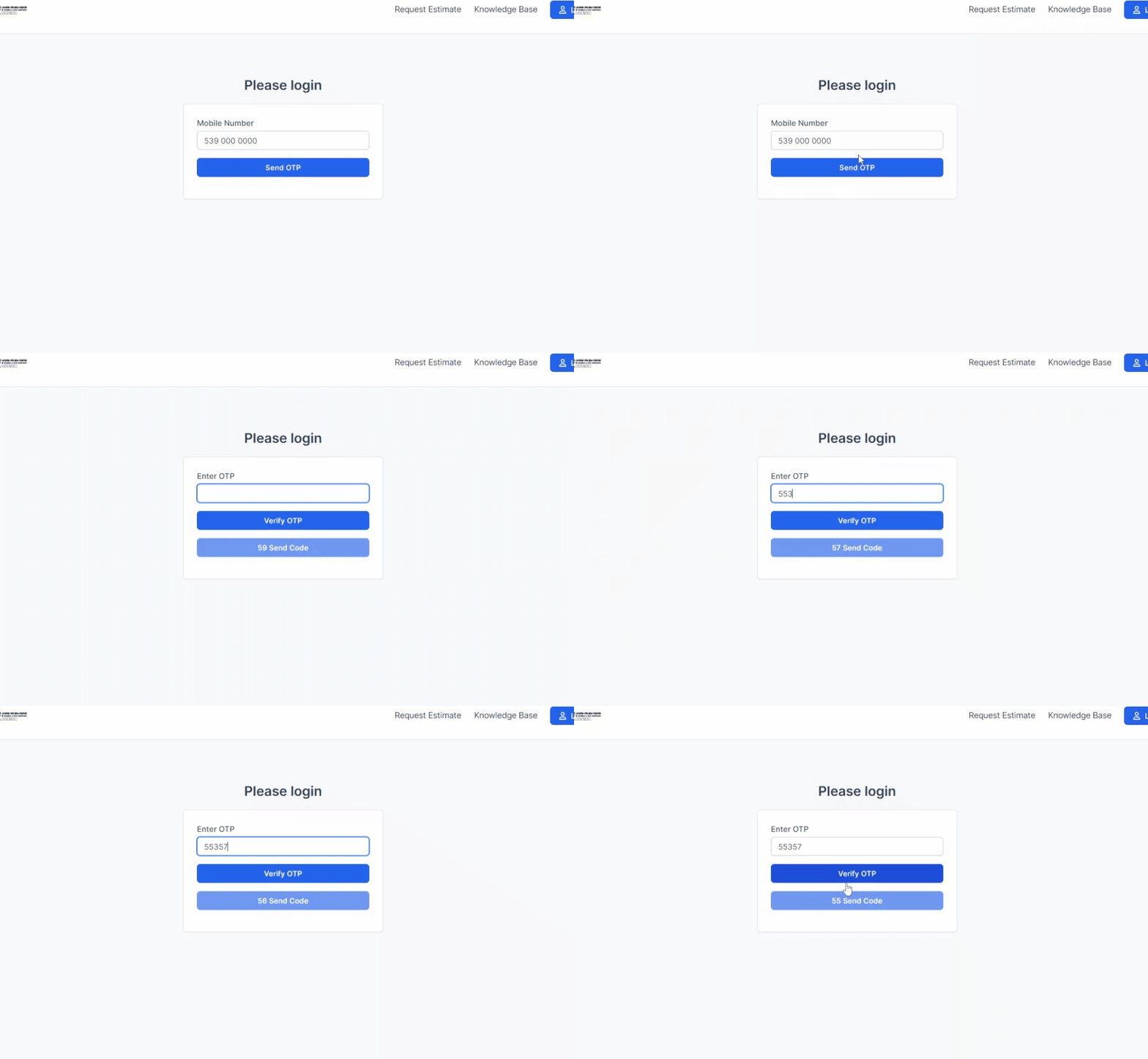
Username : demo@demo.com
Password : 1234
If there are any other features you would like to see added, you can contact me at halilyazilim1@gmail.com.
Change Logs
Version 1.1.4 / 2025-12-02
Fixed project expense list bug
Version 1.1.3 / 2025-08-22
The paid amount was added to the invoice list.
Version 1.1.2 / 2025-05-16
A list of proposal items has been added to the proposal view.
A second currency and amount field has been added to projects.
Version 1.1.1 / 2025-01-06
client upload bug fixed
Version 1.1.0 / 2024-09-22
Source feature activated in customer list
Related record shown in new column activated in tasks
Version 1.0.9 / 2024-08-06
Added ability to log in using email for customers
Version 1.0.8 / 2024-08-01
Added ability to log in using phone number for customers
Version 1.0.7 / 2024-07-28
Added feature to specify tag and phone number as mandatory fields in lead record.
Version 1.0.6 / 2024-07-24
Status change date option has been added to the lists.
Sales manager/assigned personnel option has been added to the lists.
Version 1.0.5 / 2024-06-20
- Added multi-currency for contract.
Version 1.0.4 / 2024-05-26
- Added secondary currency for invoice, proposal and estimate.
Version 1.0.3 / 2024-05-21
- Added the option to sort tables according to the column you want.
Version 1.0.2 / 2024-05-13
- Added column order setting for new fields added to tables.
| Type | PHP Script |
|---|---|
| Author | halilaltndg |
| Category | Php Scripts / Add Ons |
| Price | $39 |
| Sales | 144 |
| Rating | 4.90 from 10 ratings |
| Published | Apr 24, 2024 |
| Last Update | Dec 2, 2025 |
| Compatible Browsers | IE11, Firefox, Safari, Opera, Chrome, Edge |
| Compatible Software | PHP 8.x, PHP 7.x |
| Software Framework | CodeIgniter |
| Source Files Included | JavaScript JS, HTML, CSS |
External listing. code.market does not sell this product and does not process payment for it. Pricing, payment, delivery, licensing, refunds, and support are handled by the third-party merchant on its own website. We may earn an affiliate commission from a referral. Details.
Products of the Week.
Submit🥇

STOP GUESSING WHAT TO POST
AI that learns your brand voice and builds a month of consistent, on-brand social content: carousels, posts and hooks that sound like you, not like everyone else's AI.
SaaS · 5,037 views · 47 clicksSaaS · Week 45 · 5,037 views · 47 clicks
🥈

Conversational Backlinks for Busy Founders
Place Backlink Relevant Conversation for your domain across Forums and Conversations
Website · 43,048 views · 226 clicksWebsite · Week 45 · 43,048 views · 226 clicks
🥉

upvote.club
Free Social Media Engagement that Helps Boost Your Content. Upvote Club supports 19 social networks with 100+ engagement actions in one dashboard. Add links to your posts and get free engagement from real users.
SaaS · 41,075 views · 122 clicksSaaS · Week 45 · 41,075 views · 122 clicks
#4

Substack Posting API
Onboard your Agent to Substack. Write Publish on Substack via API
SaaS · 60,027 views · 202 clicksSaaS · Week 45 · 60,027 views · 202 clicks
#5

Seenshot App
Free, Fast, MacOS Screenshot app. Make Screenshot cmd+shift+2 and send it via link
Desktop App · 29,392 views · 124 clicksDesktop App · Week 45 · 29,392 views · 124 clicks
#6

Hand-Placed Backlinks $9.99 per link. Flat rate.
Buy hand-placed forum, Q-A and directory backlinks. Flat $9.99 per link, no subscriptions — you only pay for approved listings.
Website · 5,176 views · 19 clicksWebsite · Week 45 · 5,176 views · 19 clicks
#7

Free Invoice Generator - PDF Invoices in Your Browser, No Sign-Up
A free invoice maker for freelancers and small businesses: fill in the invoice, check the live preview, and download a PDF that looks exactly like it. Any currency, tax per item, three templates, no sign-up, and nothing leaves your device.
3,820 views · 17 clicksWeek 45 · 3,820 views · 17 clicks
#8

Merge PDF Files Free - Combine PDFs in Your Browser, No Upload
A free PDF merger for office workers, students, and freelancers: combine PDFs and images into one file in the browser, reorder files and pages, pick page ranges, keep bookmarks, and open password-protected PDFs. Nothing is uploaded, no sign-up, no watermark.
3,528 views · 14 clicksWeek 45 · 3,528 views · 14 clicks