
Expense Tracker App - Flutter Firebase App
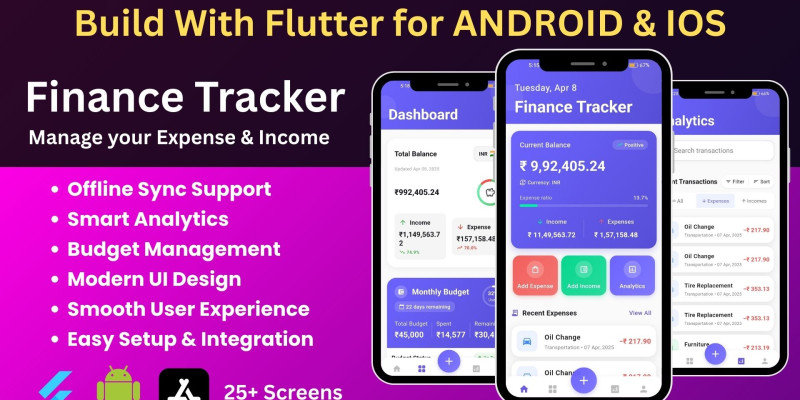
Description
Release app Demo :-
https://play.google.com/store/...
✅ DESCRIPTION:
🔥 FinFlow – Smarter Finance Starts Here
FinFlow is a powerful and beautifully designed Expense & Income Tracker App, built with Flutter and Firebase. It's perfect for individuals or developers looking to offer seamless personal finance solutions with analytics, budget planning, category breakdowns, and intuitive UI/UX.
Whether you're launching your own finance app or integrating it into a larger system, FinFlow gives you a rock-solid, production-ready source code built with best practices and reusable components.
🚀 Core Features:
- 💰 200+ Currency And Country
- 📈 Advanced Analytics – Visual charts for income, expense, and budget trends
- 🗂️ Category Breakdown – Color-coded, customizable income/expense categories
- 💰 Budget Planning – Set monthly budgets, monitor overspending
- 🔐 Secure Firebase Auth – Google Sign-in, Email/Password login
- ☁️ Real-Time Sync – Firebase Firestore integration
- 📱 Smooth UI/UX – Built with Flutter & Provider architecture
- 🌙 Dark/Light Theme Support
- 🧠 Smart Overview Screen – Insights at a glance
- ➕ Add/Edit/Delete Transactions – with notes and icons
- ✅ One-Time Onboarding with Shared Preferences
- 💰 In-App Purchase
Features
🔥 Expense Track – Smarter Finance Starts HereExpense Track is a powerful and beautifully designed Expense & Income Tracker App, built with Flutter and Firebase. It's perfect for individuals or developers looking to offer seamless personal finance solutions with advanced analytics, budget planning, category breakdowns, premium features, and intuitive UI/UX.
Whether you're launching your own finance app or integrating it into a larger system, Expense Track gives you a rock-solid, production-ready source code built with best practices and reusable components.
🔥 Key Features📱 User Interface
- Material Design: Clean and modern interface
- Responsive Layout: Adapts to different screen sizes
- Animations: Smooth transitions and loading animations
- Theme Support: Dark and light mode support
- Minimalistic Design: Beautiful UI with minimal scrolling and clutter-free interface
🔒 Authentication
- Multiple Sign-in Methods: Email/password, Google, and Facebook authentication
- User Profile: Basic profile management
- Password Reset: Forgot password functionality
- Secure Firebase Auth: Industry-standard authentication with Firebase
💰 Expense Management
- Add Expenses: Record expenses with details, notes, and payment methods
- Expense Categories: Organize expenses by categories with custom icons and colors
- Expense Filtering: Sort and filter expenses by date, category, amount
- Expense History: View complete expense history with search functionality
- Datewise Expense Tracking: Filter and view expenses by specific dates, date ranges, daily, weekly, and monthly periods
- Edit/Delete: Full CRUD operations for expense management
💼 Income Tracking
- Add Income: Record income from different sources
- Income Categories: Categorize income types with custom categories
- Income History: View income transaction history
- Income Sources: Track multiple income sources with detailed information
📊 Analytics
- Charts: Visual representation of spending patterns with interactive charts
- Category Analysis: Breakdown of expenses by category with visual indicators
- Date Range Filtering: View analytics for specific periods (daily, weekly, monthly, yearly)
- Search Functionality: Search through transactions by title, notes, category
- Advanced Analytics: Visual charts for income, expense, and budget trends
- Details Analytics Budget View: Comprehensive budget analysis with spending patterns, category-wise breakdowns, and visual progress indicators
- Smart Overview Screen: Insights at a glance with balance cards and quick actions
💹 Budget Management
- Create Budgets: Set up budgets for weekly, monthly, and yearly periods
- Budget Tracking: Monitor budget usage in real-time with progress indicators
- Budget History: View past budgets and their performance
- Budget Progress: Visual indicators of budget status with percentage completion
- Active Budget Display: Real-time tracking of current period expenses against budget
- Budget Alerts: Visual warnings when approaching or exceeding budget limits
👑 Premium User Features
- Monthly Budget Management: Advanced budget planning and tracking (Premium feature)
- Detailed Analytics: Enhanced analytics and insights for premium users
- Budget View: Comprehensive budget analysis with advanced insights
- RevenueCat Integration: Seamless subscription management with RevenueCat
- Premium Indicators: Clear visual distinction between free and premium features
📁 Category Management
- Custom Categories: Create and manage expense/income categories
- Category Icons: Assign icons to categories for better visual identification
- Category Colors: Customize category colors for personalization
- Category Details: View category-specific analytics and spending patterns
- Color-Coded Categories: Visual organization with color-coded income/expense categories
📅 Transaction Management
- Transaction List: View all transactions in a unified list
- Transaction Search: Search through transactions by multiple criteria
- Transaction Filtering: Filter by date, amount, category, and type
- Transaction Details: View complete transaction information with notes and metadata
- Datewise Filtering: Filter transactions by specific dates or date ranges
- Transaction Sorting: Sort by date, amount, category, or type
📊 Reports
- Monthly Summaries: Overview of monthly finances with detailed breakdowns
- Data Export: Export transactions to CSV or Excel format
- Custom Reports: Generate reports based on filters and date ranges
- Export to CSV/Excel: Export all transaction data to CSV or Excel format for external analysis and record-keeping
- Date Range Export: Export transactions for custom time periods
🔄 Data Synchronization
- Firebase Sync: Real-time data synchronization with Firebase Firestore
- Offline Support: Work without internet connection with local database
- Data Backup: Cloud backup of financial data
- Offline-First Architecture: ObjectBox local database with Firebase cloud sync
- Automatic Sync: Seamless synchronization when connection is restored
⚙️ Settings
- Currency: 200+ currency and country support
- Account Settings: User can change name and password
- Change Theme: User can change theme (dark/light mode)
- Export Data: User can export all transactions into .csv file of custom time periods
- Multiple Currency Support: Support for 200+ currencies with automatic formatting
- One-Time Onboarding: Smooth onboarding experience with Shared Preferences
🔧 Technical Features
- Environment Variables Implementation: Secure configuration management for API keys and sensitive data
- Firebase Integration: Authentication and Firestore for cloud storage
- Bloc/Cubit State Management: Clean state management architecture
- ObjectBox Database: Local storage for offline support
- Clean Architecture: Well-structured codebase following best practices
- Cross-Platform: Works on Android, iOS, and Web
- Production-Ready: Built with best practices and reusable components
📱 Platform Support
Cross-Platform: Works on Android, iOS, and Web
Responsive Design: Optimized for different devices and screen sizes
🚀 Ready to Use
This expense tracking app provides a comprehensive solution for personal finance management. All features listed above are implemented and working in the current version of the app. The app uses Firebase for authentication and data storage, with ObjectBox for local database support and RevenueCat for premium subscription management.
Instructions
Set Up FirebaseExpense App - Quick Start Guide
Thank you for purchasing the Expense App! This guide will help you get started quickly.
1. Install Dependencies
<code>flutter pub get</code>
- Go to Firebase Console
- Create a new project
- Add your app (Android/iOS/Web) and follow the setup wizard
- Enable Authentication (Email/Password at minimum)
- Create a Firestore Database
3. Configure Your App
- Install FlutterFire CLI:
<code>dart pub global activate flutterfire_cli</code>
- Run configuration:
<code>flutterfire configure</code>
- Select your Firebase project
- Choose the platforms you want to support
- The tool will automatically update all necessary files
4. Run the App
<code>flutter run</code>
Customization
Change App Name
- Android: Edit
android/app/src/main/AndroidManifest.xml - iOS: Edit
ios/Runner/Info.plist
Change App Colors
Edit lib/core/theme/app_theme.dart
Need Help?
Contact us at oveshdevwala@gmail.com
Thank you for your purchase! We hope you enjoy using the Expense App.
| Author | oveshdevwala1 |
|---|---|
| Category | App Templates / Flutter / Full Applications |
| Price | $14 |
| Extended License | $42 |
| Likes | 8 |
| First Release | Apr 14, 2025 |
| Last Update | Nov 19, 2025 |
Categories
Tags
External listing. code.market does not sell this product and does not process payment for it. Pricing, payment, delivery, licensing, refunds, and support are handled by the third-party merchant on its own website. We may earn an affiliate commission from a referral. Details.
Products of the Week.
Submit🥇

Perceptle
Perceptle is a daily browser-based game that challenges you to test your sensory intuition through five quick estimation and rhythm-based rounds.
Other · 1,800 views · 11 clicksOther · Week 47 · 1,800 views · 11 clicks
🥈

Free LinkedIn Likes From Real
Get free LinkedIn likes on your posts from real members who react by hand. No
SaaS · 1,935 views · 11 clicksSaaS · Week 47 · 1,935 views · 11 clicks
🥉

STOP GUESSING WHAT TO POST
AI that learns your brand voice and builds a month of consistent, on-brand social content: carousels, posts and hooks that sound like you, not like everyone else's AI.
SaaS · 9,478 views · 76 clicksSaaS · Week 47 · 9,478 views · 76 clicks
#4

aaas.market
407 reliable micro tools for solo founders, marketers and creators. They work in your browser
SaaS · 1,899 views · 5 clicksSaaS · Week 47 · 1,899 views · 5 clicks