
EXMAGE – WordPress Image Links

Description





EXMAGE – WordPress Image Links helps you save storage by using external image URLs. These images are shown in the Media library like normal images so that you can choose them for post/product featured image, WooCommerce product gallery… or everywhere that images are chosen from the Media library.
What are EXMAGE – WordPress Image Links benefits?
If you’re a WordPress user, you may be familiar with the hassle of managing and storing images on your website. EXMAGE – WordPress Image Links is a plugin that can help you save images in external storage and help free up space on your website.
- One of the primary benefits of using EXMAGE is the ability to save images in external storage, instead of using up your website’s storage space. This can be especially helpful if you have a large number of images on your website or if you’re dealing with limited storage options.
- In addition to saving space, EXMAGE also allows you to easily manage your images. With the plugin, you can quickly and easily upload, update, and remove images from external storage, all from within your WordPress dashboard. This can save you time and make managing your images a breeze.
- Another benefit of using EXMAGE is that it can help improve your website’s loading speed. When you save images in external storage, they’re loaded from that storage location instead of your website’s server. This can help reduce the strain on your server and improve your website’s overall performance.
- Using EXMAGE is simple. Once you’ve installed the plugin, you’ll need to set up your external storage location.
- Once you’ve set up your external storage location, you can begin uploading and managing your images through the WordPress dashboard. The plugin also includes several customization options, such as the ability to change image filenames and the option to exclude certain images from being saved externally.

Why should you choose EXMAGE – WordPress Image Links?
EXMAGE is a useful plugin for WordPress users who are looking for an easy and efficient way to manage and store images on their websites. By saving images in external storage and reducing the strain on your website’s server, EXMAGE can help improve your website’s performance and user experience.
In terms of SEO benefits, using EXMAGE can help improve your website’s loading speed, which is a key ranking factor in Google’s algorithm. By reducing your website’s load time, you can improve your website’s overall user experience and increase the likelihood that users will stay on your website and engage with your content.
Important note:
- This plugin only supports real image URLs that have the correct image mime type. It does not support image URLs from an image hosting service(such as Flickr, Imgur, or Photobucket …) or a file storage service(such as Google drive)
- External images added by this plugin will no longer work if the plugin is not active
Keys features of EXMAGE – WordPress Image Links
- Add a single external image URL directly from the Upload Files tab in the Media Library.
- Bulk add multiple external image URLs in one go from the Upload New Media page, below the file upload section.
- External image identification: External images are marked with a unique icon to distinguish them from locally stored attachments.
- Full compatibility with WooCommerce and WordPress media features: External images are assigned an attachment ID,
allowing you to use them anywhere in WordPress that supports Media Library images, including:
- Post and product featured images
- Product galleries
- Variation images
- Product category images
- Filter external images in the Media Dashboard with three filtering options:
- All External Images: View all externally hosted images.
- Downloaded: See external images that have already been saved to your server.
- Undownloaded: Identify external images still hosted externally and not yet downloaded.
- Download external images: Convert external images into local files to improve site performance and ensure long-term availability.
- Bulk download external images: Select multiple external images or use Select All to download them at once, automatically updating image paths.
- CDN Support: Upload WordPress image links to CDNs or third-party servers, to reduce hosting storage and bandwidth costs.
- AI Integration (Alt Text Generation): Automatic alt text generation powered by AI for better SEO and accessibility; generates descriptive, keyword-friendly alt text for external images. This helps improve rankings, user experience, and compliance with accessibility standards.
In conclusion, if you’re looking for a simple and effective way to manage and store images on your WordPress website, EXMAGE – WordPress Image Links is a plugin worth considering. By saving images in external storage and reducing the strain on your website’s server, EXMAGE can help improve your website’s performance, user experience, and SEO rankings.
Compatible solutions

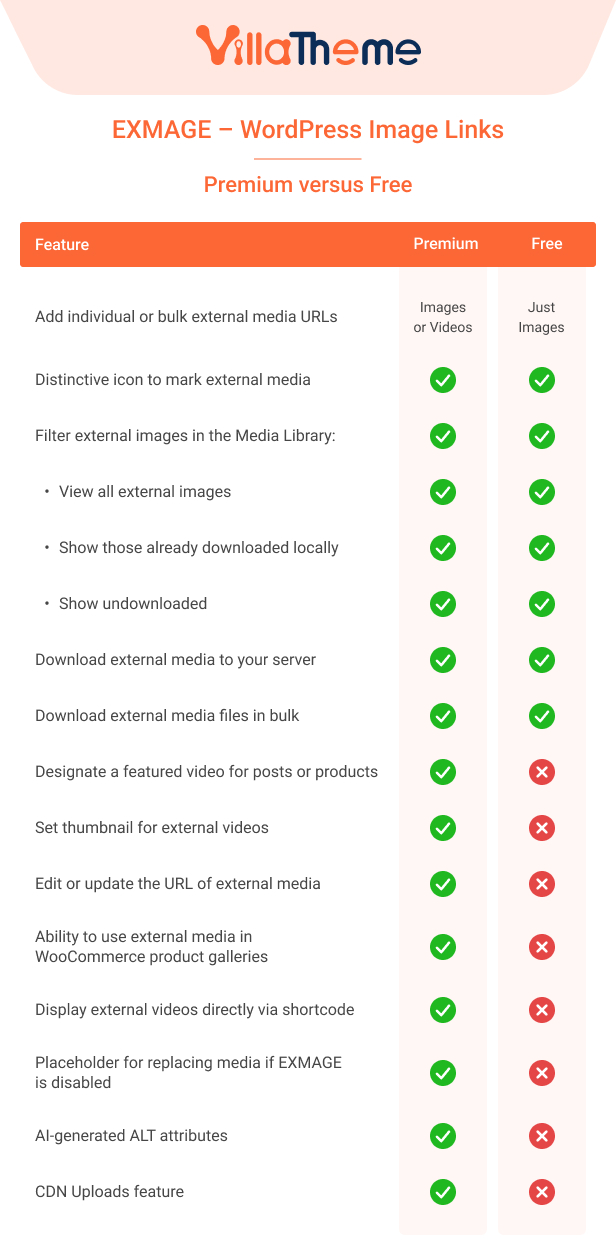
Premium vs Free comparison
CHANGEDLOG
| Type | WordPress Plugin |
|---|---|
| Author | villatheme |
| Category | Wordpress / Media |
| Price | $10 |
| Sales | 37 |
| Published | Sep 4, 2025 |
| Last Update | Aug 20, 2026 |
| Compatible Browsers | Firefox, Safari, Opera, Chrome, Edge |
| Compatible Software | WordPress 7.0.x, WordPress 6.9.x, WordPress 6.8.x, WordPress 6.7.x, WordPress 6.6.x, WordPress 6.5.x, WordPress 6.4.x, WordPress 6.3.x |
| Gutenberg Optimized | Yes |
| Source Files Included | JavaScript JS, HTML, CSS, PHP |
Categories
Tags
External listing. code.market does not sell this product and does not process payment for it. Pricing, payment, delivery, licensing, refunds, and support are handled by the third-party merchant on its own website. We may earn an affiliate commission from a referral. Details.
Products of the Week.
Submit🥇

Perceptle
Perceptle is a daily browser-based game that challenges you to test your sensory intuition through five quick estimation and rhythm-based rounds.
Other · 3,957 views · 16 clicksOther · Week 47 · 3,957 views · 16 clicks
🥈

Free LinkedIn Likes From Real
Get free LinkedIn likes on your posts from real members who react by hand. No
SaaS · 4,075 views · 18 clicksSaaS · Week 47 · 4,075 views · 18 clicks
🥉

STOP GUESSING WHAT TO POST
AI that learns your brand voice and builds a month of consistent, on-brand social content: carousels, posts and hooks that sound like you, not like everyone else's AI.
SaaS · 11,557 views · 80 clicksSaaS · Week 47 · 11,557 views · 80 clicks
#4

aaas.market
407 reliable micro tools for solo founders, marketers and creators. They work in your browser
SaaS · 3,936 views · 7 clicksSaaS · Week 47 · 3,936 views · 7 clicks