
eSIMDesk | eSIM Marketplace Platform
Description
Hello!
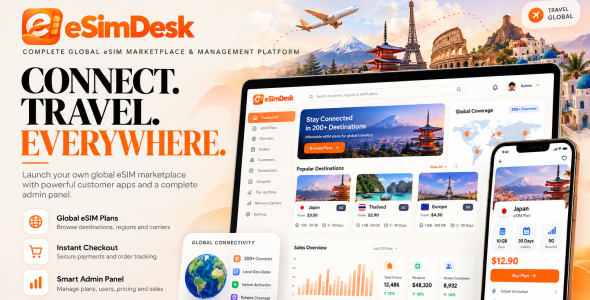
eSIMDesk | Complete Global eSIM Marketplace and Management Platform is a Flutter + Dart mobile app for Android and iOS together with a Laravel + MySQL backend and Filament admin panel. It lets your customers browse global, regional and country data plans, pay securely, install their eSIM by QR code or manually, and manage everything from Android and iOS devices.
The app talks to the included backend through its REST API and provides a mobile-first storefront for data plans, checkout with coupons and wallet, eSIM installation and top-ups, usage tracking, a coverage map, referrals, an affiliate programme, support tickets, blog and CMS pages, and more. The admin panel lets you manage eSIM providers, plans, pricing, orders, customers, coupons, payouts and content from one place.
It is designed for travel eSIM stores, telecom resellers, connectivity startups, travel agencies and digital businesses who want to sell eSIM data plans from their own branded mobile app.
Demo Instructions
Demo: Click Here
Email: admin@nextlinestudio.com
Password: 12345678
Mobile app (Android APK): Download the demo APK
Sign in with the same credentials above, or register a new account inside the app.
The demo runs with payments and eSIM providers in sandbox mode, so no real card is charged and the QR codes shown are samples. Data resets periodically.
Important — Third-Party Services & Additional Costs
Some functionality depends on external services such as eSIM providers (Airalo, Holafly), payment gateways, Firebase (push notifications, Google and Facebook sign-in), email/SMTP, and map tile services.
Supported payment gateways are Stripe, Razorpay, PayPal, Paystack, Cashfree, Flutterwave (Rave) and Omise. These services require separate accounts and may involve additional charges.
This item does not include third-party API keys, provider credit, eSIM inventory, subscriptions, or service fees. All external service costs are the responsibility of the buyer. eSIMDesk ships the integration code only.
Server Requirements (Backend)
The Laravel backend and Filament admin panel run on standard PHP hosting (shared hosting, VPS or cloud). The mobile app itself has no server requirements — it only needs your backend’s API base URL. Minimum requirements for the backend:
- PHP: 8.2 or higher (PHP 8.3 recommended)
- Database: MySQL 5.7+ or MySQL 8.0+ (MariaDB 10.3+ also supported)
- Web server: Apache with
mod_rewrite, or Nginx - Composer: 2.x (for installation and updates)
- SSL / HTTPS: a valid certificate (required by payment gateways and eSIM provider callbacks)
- Outbound HTTPS:
allow_url_fopenenabled, so the backend can reach eSIM providers, payment gateways and Firebase - Memory:
memory_limitof 256 MB or higher recommended
Required PHP Extensions
- BCMath
- Ctype
- cURL
- DOM
- Fileinfo
- GD or Imagick (image processing)
- Intl
- JSON
- Mbstring
- OpenSSL
- PCRE
- PDO and PDO_MySQL
- Tokenizer
- XML
- Zip
- Exif (recommended, for image uploads)
Most managed and shared hosts that support modern Laravel already meet these requirements. A full installation guide and a server pre-flight checklist are included in the documentation.
Who Is eSIMDesk For?
- Travel eSIM Stores: Sell country, regional and global data plans to travellers from a branded mobile app.
- Telecom Resellers & MVNOs: Resell Airalo and Holafly inventory under your own name with your own pricing rules and margins.
- Travel Agencies & Tour Operators: Add connectivity as an upsell with instant QR delivery after payment.
- Connectivity Startups: Launch quickly with checkout, wallet, referrals, affiliate payouts and support built in.
- Digital Businesses & Founders: Run a complete eSIM marketplace from one admin panel with the app as the customer-facing storefront.
Key Features
Onboarding & Authentication
- Splash & Onboarding: Branded splash screen and three intro slides (Global Coverage, Secure & Private, Instant Activation) shown on first launch, with a language picker before sign in.
- Email & Password: Registration with full name, email, phone (country-code picker), optional referral code and Terms acceptance; secure login with show/hide password.
- Google Sign-In: Native Google flow exchanged with your backend for an app token.
- Facebook Sign-In: Facebook login using the same token exchange.
- Forgot Password: Reset link sent by email from the backend.
- Two-Factor Authentication: Optional PIN-based 2FA step before the app unlocks.
- Stay Signed In: Session persists between launches; the token is stored in Android Keystore / iOS Keychain.
Home Dashboard
- One-Call Home Screen: Wallet balance, notification bell, eSIM status pill, active data packs, services grid, popular packages and a countries list are loaded in a single API call.
- Active eSIM Selector: Tap a flag to switch which eSIM the dashboard reports on.
- Check Left Data: See remaining data on active packs at a glance.
- Quick-Access Services: Coverage, Security, Referral and Help shortcuts.
- Buy Data Pack: Region picker and search straight from the home screen.
Browse & Search Plans
- Destinations: Browse countries and regions with a starting price per destination.
- Regions: Quick region picker (Africa, Asia, Europe, Middle East, North America, Oceania and more).
- Country Explorer: Searchable country list with flags.
- Store: The full catalogue of local, regional and global plans with search and filtering.
- Plan Details: Data allowance, validity, coverage list, network type (3G/4G/5G), price, device compatibility and activation rules, plus best offers for the same destination.
Checkout & Payments
- Coupons: Apply discount codes validated on the server, with an Available Coupons sheet showing code, discount and minimum order.
- Pay with Wallet: Use the in-app wallet balance at checkout.
- Order Review & Totals: Plan, price, subtotal, discount and processing fee before placing the order.
- 7 Payment Gateways: Stripe (native payment sheet), Razorpay (UPI, cards, wallets), Flutterwave (native SDK), Cashfree (native SDK), PayPal (hosted checkout), Paystack (hosted checkout) and Omise (tokenised card charge).
- Currency-Aware Gateways: Only gateways enabled in the admin panel and supporting the plan’s currency are shown.
- Server-Side Sessions: Payment intents are created and verified by the backend; the app only receives publishable keys and one-time sessions.
- Payment Successful Screen: Shown only after the server verifies the payment, with transaction ID, amount and a direct Install eSIM Now button.
- Auto-Refund: If eSIM provisioning fails after payment, the payment is refunded automatically.
eSIM Installation & Management
- QR Code Install: Scan the QR from another device or save it to the gallery.
- Manual Install: Copy the SM-DP+ address and activation code, with step-by-step iOS and Android instructions supplied live from the provider.
- Share Install Details: Send install details through the OS share sheet.
- My eSIMs: Active plans and history with data used, days remaining, network type and speed.
- Top Up: List eSIMs eligible for top-up, choose a bundle and pay through the same checkout.
- Order History: Past orders with status and invoice details.
Wallet, Referrals & Affiliate
- My Wallet: Balance and a full transaction statement.
- Add Money: Top up the wallet through any enabled payment gateway with preset amounts.
- Refer & Earn: Personal referral code, share sheet, reward history and tier progress.
- Affiliate Program: In-app earnings dashboard with performance stats, payout method and payout requests.
Tools & Resources
- Network Coverage Map: Interactive map with 5G / 4G / 3G availability that centres on the user when location is allowed. Uses OpenStreetMap tiles, so no Google Maps key is required.
- Speed Test: Measure download and upload speed from the coverage screen.
- Notifications: In-app notification centre with unread badge, mark-all-read and clear.
- Push Notifications: Firebase Cloud Messaging alerts.
- Support Tickets: Raise a ticket with category and priority and track existing tickets.
- Blog: List and article views rendered from the backend.
- Help & Info Pages: FAQ, About, Terms, Privacy and any other CMS page published in the admin panel appear under Settings.
Security
- Biometric App Lock: Optional Face ID / fingerprint gate on launch and resume.
- eSIM Security Screen: Security overview and alerts with toggles for biometric lock, PIN-based 2FA and SIM lock.
- Payment Amount Validation: All gateways verify the paid amount matches the order total.
- Coupon Fraud Protection: Database row locking prevents double use of single-use coupons.
- Double Provisioning Guard: Atomic check prevents duplicate eSIM creation.
- Rate Limiting: Auth, payment and general API limits enforced by the backend.
- No Secrets in the App: Gateway and provider keys stay on the server; HTTPS only; logging silenced in release builds.
Profile & Settings
- Edit Profile: Name, phone, gender, address, country, state, city and a profile picture from the gallery.
- Dark & Light Theme: Switches instantly and is remembered between launches.
- 10 Bundled Languages: Including English, Spanish, French, German, Portuguese, Russian, Arabic, Chinese and Japanese; add or edit languages from the admin panel. The choice persists across launches.
- Earn Section: Refer a Friend and Affiliate Program entries directly in Settings.
- Legal Pages: Privacy Policy and About served from the backend.
Performance & App Experience
- Combined Boot & Home APIs: A cold start costs two round trips instead of a dozen.
- In-Memory State: Switching tabs does not refetch data.
- Skeleton Loaders: Shimmer placeholders in the shape of the real content.
- Typed Errors with Retry: 401, 403, 404, 422 and 5xx each become a clear message with a Retry button.
- Offline Detection & Empty States: Clear messages on connectivity changes and designed empty states on every list.
- Five-Tab Navigation: Home, Destinations, Store, My eSIMs and Settings, each keeping its scroll position.
- Responsive Layout: Adapts to all phone and tablet sizes.
- Flutter: One codebase for Android and iOS, Material design, Provider state management.
Admin Panel (Included)
- eSIM & Plans: Airalo and Holafly provider integrations, eSIM plans, network carriers and top-up plans.
- Orders & Sales: Orders, transactions, refunds, deposits, affiliate commissions, coupons, tax configuration and dynamic pricing rules.
- Users & Security: Users, roles and permissions, sessions, audit logs, activity logs and API tokens.
- CMS: Pages, blog, banners, FAQs, testimonials, services and premium plan content.
- Settings: Locations, currencies, languages, PWA, general, theme, SEO and security settings.
- Communication & Reports: Support tickets, email campaigns, admin and marketing dashboards, reports.
What’s Included
- Full Flutter source code (Dart) for Android and iOS
- Full Laravel backend source code with REST API (
/api/v1) and Filament admin panel - Web installer for the backend, plus shared hosting and step-by-step installation guides
- Clean, layered project structure (screens, providers, services, API config in one file)
- Placeholder configuration files for Firebase, Facebook Login and Google Sign-In
- Step-by-step documentation covering server requirements, backend installation, admin settings, eSIM provider setup (Airalo, Holafly), payment gateways, mail, multi-language, PWA, Flutter environment setup, Firebase, branding, build, iOS setup, publishing checklist, troubleshooting and FAQ
Detailed setup instructions are included for backend installation, the app REST API base URL, Firebase, social login credentials, payment gateway setup and eSIM provider configuration.
Both parts ship in this one item. Install the backend and admin panel on your server first, then point the app at your API base URL, add your provider and gateway keys in the admin panel, and build the app with your own branding.
Note
Images, icons, logos, and other media used in the preview are not included with this item. Please contact the author if you require permission to use any preview assets in commercial or non-commercial projects. Refer to the help documentation after purchase for additional information.
AI Usage Disclosure
1. AI-Assisted Development
AI-assisted tools were used during the development of this item for certain development-related tasks, including source code assistance, code generation, images, debugging, problem-solving, documentation preparation, and other development activities.
Any AI-generated or AI-assisted content was reviewed, modified, tested, and integrated by the development team. The final source code and documentation have been manually reviewed to ensure quality, functionality, and compatibility.
2. AI-Powered Features Included in the Product
Yes — this product includes AI-powered functionality. The features listed below can call an external AI provider that you configure with your own API key. No external AI provider is contacted until you add your own key. Until then the chat assistant runs in FAQ-only mode, answering from your own knowledge base on your own server, and the content and drafting tools fall back to built-in templates. Each feature can also be switched off entirely, and the platform is fully functional without any of them.
- AI support chatbot — answers customer questions about plans,
coverage, activation and orders, and escalates to a human support ticket when it cannot
help. Requires: OpenAI (default model
gpt-4o-mini) or Google Gemini (default modelgemini-1.5-flash). A built-in keyword FAQ mode (faq_only, the default) answers from your own knowledge-base entries and uses no external provider at all. - AI content generation — drafts eSIM plan descriptions, SEO meta titles/descriptions and country landing-page copy on demand from the admin panel. Where: Admin → Plans → Edit (“Generate with AI” on the description, and “Generate all three with AI” in the SEO & Meta Tags panel) and Admin → Countries → Edit (Travel Description). Requires: OpenAI or Google Gemini; without a key it falls back to a built-in template.
- AI email & ticket drafting — drafts support-ticket replies, marketing campaign emails and customer welcome emails for an administrator to review before sending. Where: Admin → Support Tickets (“Draft reply with AI”), Admin → Email Campaigns (“Draft subject & content with AI”) and Admin → Users (“Welcome email (AI)”). Nothing is sent until you review and submit. Requires: OpenAI or Google Gemini; without a key it falls back to a built-in template.
The three features below are labelled “AI” or “smart” in the admin panel but are statistical and rule-based only. They run entirely on your own server, transmit nothing to any third party, and need no AI provider and no API key:
- Plan recommendations — weighted scoring across the customer’s own order history, browsing events and pre-computed plan-similarity scores (database queries only).
- Pricing optimisation suggestions — rule-based margin and sales-volume arithmetic, bounded by the increase/decrease caps you configure.
- Data-usage prediction — linear extrapolation of stored usage snapshots to estimate a depletion date and trigger top-up reminders.
3. AI Feature Requirements
The AI-powered features listed in section 2 are integration points only.
No AI provider account, API key, model access or usage allowance is included with, resold by,
or provided through this purchase. To enable them you must register directly with
OpenAI (platform.openai.com) and/or Google Gemini
(ai.google.dev), generate
your own API key, and paste it into Admin → Settings or your
.env file (OPENAI_API_KEY / GEMINI_API_KEY).
All API usage, token costs, rate limits, model deprecations and policy compliance for those
providers are solely your responsibility. When an AI feature is enabled, the
relevant prompt content (for example a customer’s chat message plus your knowledge-base
excerpts, or the plan attributes being described) is sent to the provider you selected and is
subject to that provider’s own terms and privacy policy. When the features are left disabled,
or when the chatbot runs in faq_only mode, no data leaves your server.
AI output is generated text and may be inaccurate or incomplete. Administrator review before publishing or sending is strongly recommended; eSIMDesk makes no warranty as to the accuracy of provider-generated content.
The product’s AI-powered functionality described above is separate and independent from the AI-assisted development tools described in section 1.
| Author | nextlinestudio |
|---|---|
| Price | $14 |
| Sales | 0 |
| Rating | 0 (0) |
| Published | Nov 16, 2026 |
| Last Update | Nov 16, 2026 |
| Compatible Software | Flutter 3.x |
| Demo Url | https://nextlinestudio.com/eSimDesk/public |
| Mobile Files Included | CSS, PHP |
Categories
Tags
External listing. code.market does not sell this product and does not process payment for it. Pricing, payment, delivery, licensing, refunds, and support are handled by the third-party merchant on its own website. We may earn an affiliate commission from a referral. Details.
Products of the Week.
Submit🥇

Perceptle
Perceptle is a daily browser-based game that challenges you to test your sensory intuition through five quick estimation and rhythm-based rounds.
Other · 1,800 views · 11 clicksOther · Week 47 · 1,800 views · 11 clicks
🥈

Free LinkedIn Likes From Real
Get free LinkedIn likes on your posts from real members who react by hand. No
SaaS · 1,935 views · 11 clicksSaaS · Week 47 · 1,935 views · 11 clicks
🥉

STOP GUESSING WHAT TO POST
AI that learns your brand voice and builds a month of consistent, on-brand social content: carousels, posts and hooks that sound like you, not like everyone else's AI.
SaaS · 9,478 views · 76 clicksSaaS · Week 47 · 9,478 views · 76 clicks
#4

aaas.market
407 reliable micro tools for solo founders, marketers and creators. They work in your browser
SaaS · 1,899 views · 5 clicksSaaS · Week 47 · 1,899 views · 5 clicks