
Escape - Responsive Email + Online Builder
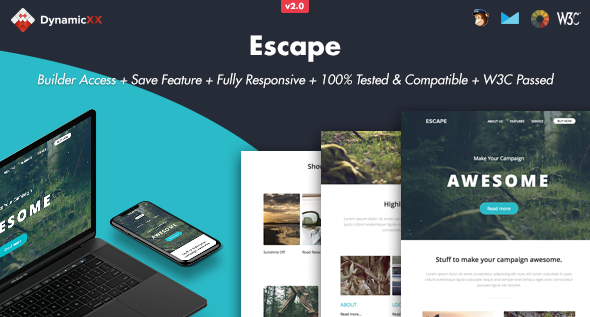
Description
August 01 2019 - BUILDER VERSION 2.0
 New Email Builder
Save templates multiple times in your account
Export HTML, MailChimp or Campaigns monitor files
Drag&drop modules
Remove / Duplicate modules
Change background / text colors
Instant Text Editor
Replace (background) Images
Open code editor
Send tests
Preview mode. Desktop, tablet or mobile view
Redo or Undo Adjustments
Premade modules (more coming soon)
New Email Builder
Save templates multiple times in your account
Export HTML, MailChimp or Campaigns monitor files
Drag&drop modules
Remove / Duplicate modules
Change background / text colors
Instant Text Editor
Replace (background) Images
Open code editor
Send tests
Preview mode. Desktop, tablet or mobile view
Redo or Undo Adjustments
Premade modules (more coming soon)
Version 1.0.1 – Jun 28 2016
- New save / login feature. Check download folder called “BUILDER” for details.
Online Template Builder Features
- Save Option
- Upload Option
- Drag & Drop, Duplicate or Hide Modules
- Change Colours
- Instant Edit Text
- Upload (background) Images by desktop or upload by URL Link
- Redo or Undo Adjustments
- Preview Mode
- Export file to Desktop
Information about the Template
- Litmus Tested
- MailChimp Compatible
- Campaign Monitor Compatible
- HTML files Works with Constant Contact
- HTML files Works with iContact
- HTML files Works with Aweber
- W3C Passed
- Fully Responsive
- Full Width Design
Compatible Email Clients and Devices
- Apple Mail
- Android
- AOL
- Outlook.com
- Yahoo Mail
- Thunderbird
- Microsoft Outlook 2003/2007/2010
- Outlook Express
- Windows Mail
- Lotus Notes 8/8.5
- OperaMail
- iPad
- iPhone (4/5/6/6+)
- Live Mail
Version 1.1 – Nov 26 2015
- Updated Buttons for Lotus Notus 8.5
- Added background images for Outlook Webmail
Notes
- The animated dots in the header image works in Apple mail, iPad, iPhone and Thunderbird Latest, other mail clients see a normal background image without animated dots. Please upload background images with a minimum size of 2000px.
- MailChimp currently don’t support Keyframes and unsupported code is automatically stripped out by their editor. This means the animated dots are not supported in MailChimp It replace with a normal background image.
- The Online Template Builder is hosted on our server and is not included in the purchase of our products.
- Gmail App for Android is not supported
- Outlook does not accept background images, it will replace with a solid background colour
- Outlook does not accept custom fonts, it will replace with standard web font
- The images we used for the live previews are not included in the download package
| Type | Email Template |
|---|---|
| Author | DynamicXX |
| Category | Marketing / Email Templates |
| Price | $19 |
| Sales | 205 |
| Rating | 0.00 from 1 rating |
| Published | Nov 10, 2015 |
| Last Update | Sep 26, 2019 |
| Columns | 4+ |
| Compatible Browsers | Gmail, Yahoo Mail, Microsoft Outlook, Thunderbird, Hotmail, Apple Mail |
| Compatible Email Services | MailChimp, Campaign Monitor, iContact |
| Documentation | Well Documented |
| Layout | Responsive |
| Files Included | Layered PSD, HTML Files |
Categories
Tags
External listing. code.market does not sell this product and does not process payment for it. Pricing, payment, delivery, licensing, refunds, and support are handled by the third-party merchant on its own website. We may earn an affiliate commission from a referral. Details.
Products of the Week.
Submit🥇

STOP GUESSING WHAT TO POST
AI that learns your brand voice and builds a month of consistent, on-brand social content: carousels, posts and hooks that sound like you, not like everyone else's AI.
SaaS · 4,706 views · 45 clicksSaaS · Week 45 · 4,706 views · 45 clicks
🥈

Conversational Backlinks for Busy Founders
Place Backlink Relevant Conversation for your domain across Forums and Conversations
Website · 42,601 views · 225 clicksWebsite · Week 45 · 42,601 views · 225 clicks
🥉

upvote.club
Free Social Media Engagement that Helps Boost Your Content. Upvote Club supports 19 social networks with 100+ engagement actions in one dashboard. Add links to your posts and get free engagement from real users.
SaaS · 40,646 views · 120 clicksSaaS · Week 45 · 40,646 views · 120 clicks
#4

Substack Posting API
Onboard your Agent to Substack. Write Publish on Substack via API
SaaS · 59,603 views · 200 clicksSaaS · Week 45 · 59,603 views · 200 clicks
#5

Seenshot App
Free, Fast, MacOS Screenshot app. Make Screenshot cmd+shift+2 and send it via link
Desktop App · 28,981 views · 124 clicksDesktop App · Week 45 · 28,981 views · 124 clicks
#6

Hand-Placed Backlinks $9.99 per link. Flat rate.
Buy hand-placed forum, Q-A and directory backlinks. Flat $9.99 per link, no subscriptions — you only pay for approved listings.
Website · 4,772 views · 19 clicksWebsite · Week 45 · 4,772 views · 19 clicks
#7

Free Invoice Generator - PDF Invoices in Your Browser, No Sign-Up
A free invoice maker for freelancers and small businesses: fill in the invoice, check the live preview, and download a PDF that looks exactly like it. Any currency, tax per item, three templates, no sign-up, and nothing leaves your device.
3,430 views · 17 clicksWeek 45 · 3,430 views · 17 clicks
#8

Merge PDF Files Free - Combine PDFs in Your Browser, No Upload
A free PDF merger for office workers, students, and freelancers: combine PDFs and images into one file in the browser, reorder files and pages, pick page ranges, keep bookmarks, and open password-protected PDFs. Nothing is uploaded, no sign-up, no watermark.
3,169 views · 14 clicksWeek 45 · 3,169 views · 14 clicks