
Errand Go | On-Demand Shopping and Grocery Delivery Apps With Laravel and Flutter
Description
Errand Go | On-Demand Shopping & Grocery Delivery Apps with Laravel and Flutter
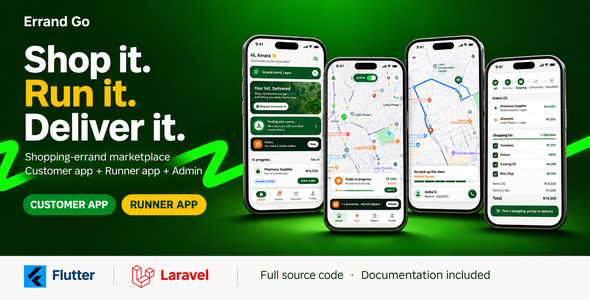
Errand Go is a complete on-demand errand marketplace for grocery delivery, personal shopping, market runs, pharmacy pickups and “buy it for me” services. Customers create a shopping list, choose the shop or market, pin their delivery location on the map and send the request. Nearby Runners receive the job with a ringing alert, accept it, travel to the shop, buy the items, upload the shop receipt for the customer to approve and then deliver to the customer’s door while the customer watches them move live on the map.
It is a full working system made of three complete projects:
- Customer app – Flutter, Android and iOS
- Runner app (shopper / courier) – Flutter, Android and iOS
- Laravel 13 backend – REST API, full admin panel and responsive public website
Use it to start a grocery delivery business, a personal shopper service, a local courier and errand company, a market runner service, a pharmacy delivery service or a campus delivery service in your city.
Demo Instructions
Live demo: https://errandgo.okao.site/
- Admin panel (https://errandgo.okao.site/admin/login) – email: admin@errandgo.com, password: password
- Customer app – email: customer2@demo.com, password: 12345678
- Runner app – email: runner1@demo.com, password: 12345678
How to test: sign in to the Customer app and create an errand with a shopping list. Sign in to the Runner app on a second device, accept the request, tick the items on the checklist and upload a receipt. Then approve the receipt as the Customer and watch the errand change status in the admin panel. The demo data is reset regularly; please do not change the demo passwords.
After you install the package yourself, the included demo seeder (php artisan db:seed --class=DemoSeeder) creates similar accounts (all with the password password), or run php artisan errandgo:install to create only your own admin account. Change or remove demo accounts before you go live.
IMPORTANT: external services are paid and not included
Errand Go needs services that are not part of this item: Google Maps Platform, Firebase, OneSignal, Stripe (or another payment gateway), an SMS provider (for phone codes or SMS), an e-mail (SMTP) provider, web hosting with a domain and HTTPS, and the Apple Developer Program and Google Play Console to publish the apps. These are external, paid services. Some have a free tier that is enough for testing, but they charge for usage, per message, by subscription or as a processing fee. You must create your own accounts, and you are solely responsible for all current and ongoing costs. The author does not provide, resell or control these services. Cash on delivery needs no payment provider.
Who is it for
- Entrepreneurs launching a grocery delivery or errand running startup
- Supermarkets, markets and pharmacies that want their own delivery service
- Courier and logistics companies adding a “shop and deliver” service
- Agencies and developers building delivery apps for clients
- Businesses in markets where cash on delivery is important, as well as card-first markets
How Errand Go works
- Customer creates an errand – picks a shop from the list (or types any shop address), adds items with quantities, notes, estimated prices and photos, pins the delivery point on the map, sets a maximum budget and chooses cash on delivery or card.
- Customer sees the price – the delivery fee is calculated from the distance between the shop and the delivery point using the zone’s rates, plus the service fee.
- Runners are matched – the request goes to the nearest online Runners (up to 3 at a time within the search radius). Each one gets a push notification, a ringtone and a countdown. If no one accepts in time, the next group is offered the job automatically.
- Runner shops – the Runner follows the road route to the shop, arrival is detected automatically, then the Runner ticks each item as found or unavailable. Unavailable items can be replaced with a substitution that the customer approves or declines.
- Receipt approval – the Runner photographs the shop receipt and enters the total. The customer instantly gets a pop-up on whatever screen they are on, with the receipt photo to zoom, and approves it or reports a problem.
- Live delivery – after approval the customer tracks the Runner live on the map with the road route and arrival time.
- Completion and earnings – the Runner confirms delivery, the payment is captured (or cash is collected), the platform commission is taken and the Runner’s earnings and tip are recorded.
Customer app features (Flutter)
- Onboarding screens, sign in, create account and forgot password
- Modern home screen with greeting, prominent “New errand” button, promotional hero card, live errand card and in-progress list
- Floating bottom navigation: Home, Errands, New, Account, with an active errand badge
- New errand flow with progress header (Shop, List, Deliver, Pay):
- Searchable shop and market picker loaded from the admin’s shop list, or type any address
- Shopping list builder with quick-add chips, quantity stepper, estimated price, notes and item photos, swipe to remove
- Delivery location picker with a draggable map pin, automatic address lookup, “Use my location” and an extra details field (house, flat, landmark)
- Maximum shopping budget and notes for the Runner
- Payment choice: cash on delivery or card
- Live price quote showing delivery fee, service fee and maximum total before ordering
- Keyboard-friendly form with a Done bar
- “Finding your runner” card with radar animation while the request is being offered
- Errand details: map header with shop and delivery points, status badge and reference number, step-by-step progress timeline, Runner card with rating, route, shopping list with item status, and price breakdown
- Substitutions: approve or decline replacement items suggested by the Runner
- Receipt approval pop-up that appears on any screen as soon as the Runner submits the receipt: zoomable receipt photo, receipt total, “Approve and start delivery” or “Report a problem”
- Live tracking screen: Runner marker that moves smoothly between updates, road route to the customer, arrival time and progress steps
- Errands list with Active, Past and All filters, grouped by Today, Yesterday and date
- Card payments with Stripe and retry options for failed payments
- Cancel an errand with a reason, and report a receipt dispute
- In-app top banners and a chime sound for every status change (runner accepted, shopping, on the way, delivered)
- Push notifications for every stage, even when the app is closed
- Account area: profile, help and support tickets, change password, sign out and account deletion
Runner app features (Flutter)
- Onboarding, sign in and “Become a Runner” sign up
- Full-screen map home with the Runner’s live position and an Online / Offline switch
- “Looking for errands nearby” radar animation while online
- Incoming request cards floating over the map: shop name, item count, distance, earnings and a countdown timer, with a pulsing “New request” badge
- Ringtone and vibration that repeat until the request is opened or expires, so no request is missed
- Request details: map with shop and delivery points, earnings, distances, customer name and full shopping list
- Accept or decline, with a reason sheet before declining
- Live trip screen: road route with follow camera, automatic arrival detection at the shop, step indicator and next action button
- Location shared with the customer every few seconds during the trip
- Shopping checklist: mark each item found or unavailable, suggest substitutions, upload item photos
- Receipt upload from the camera or gallery with the receipt total, then a “waiting for customer approval” state
- Delivery confirmation step to finish the errand
- Jobs list with Active and Past tabs
- Earnings screen: total earned, available balance, awaiting payout, paid out, and every completed errand with date and amount
- Profile with photo, name, phone, rating and completed errands
- Push notifications for new requests, receipt approval, reports, cancellations and payments
- Separate app name and launcher icon from the Customer app
Admin panel and website features (Laravel)
- Secure admin sign in with roles (admin and admin staff)
- Dashboard: active errands, today’s order value, online Runners, open disputes, pending Runner applications, pending payouts, 7-day activity charts and a live errand map
- Errands: search and filter every errand, open full details (customer, Runner, shop, items, prices, payment hold, receipt, status history) and cancel with a reason
- Disputes: review receipt disputes and resolve with full capture, partial capture or refund
- Runners: review applications and documents, approve, reject or suspend, edit details, view performance
- Customers: view, edit and remove customer accounts; create Customer and Runner accounts manually
- Destinations: manage the shops, supermarkets, markets and pharmacies customers can choose, with category, address and map position
- Service zones: draw coverage areas on a map and set base delivery fee, per-kilometre fee and surge multiplier for each zone
- Payouts: approve or reject Runner withdrawal requests; Stripe Connect payouts are sent automatically on approval
- Coupons: create discount codes
- Support tickets: reply to and close customer and Runner tickets
- Push messages: send notifications to users
- CMS pages: edit content pages such as terms and privacy policy
- Reports with CSV export
- Settings without touching code:
- Fees: service fee type and value, Runner commission rate
- Payments: currency, pre-authorisation multiplier, overage threshold, active gateways and their keys
- Matching: Runner request timeout, search radius, offers at once, automatic re-assign and attempts, Runner idle timeout
- Tracking: arrival geofence radius, delivery confirmation type
- Maps, push notifications, email (SMTP) and SMS provider settings
- Branding: app name, primary colour, light and dark logos
- Responsive public landing website that explains the service to customers and Runners
Payments and money
- Cash on delivery works out of the box with no payment provider
- Stripe card payments with a pre-authorised hold for the estimated total, and capture of the real receipt amount after the customer approves
- Automatic re-authorisation of card holds before they expire
- Automatic Runner commission calculation: delivery fee minus platform commission, plus 100% of the tip
- Runner wallet with balance, pending balance, totals and transaction history, and payouts with automatic Stripe Connect transfers
- Payment audit log for every money event
- Disputes freeze capture until an admin resolves them
- The backend API also has wallet top-up endpoints for Flutterwave, PawaPay, M-Pesa, MTN Mobile Money and Airtel Money (each needs your own provider account)
Real-time features
- Push notifications for both apps, with sound, for every errand stage
- Live Runner tracking with Firebase Realtime Database and secure database rules (only the assigned Runner can write, only the errand’s customer can read)
- Road routes, ETAs and distance-based pricing with the Google Maps Directions API
- Automatic arrival detection at the shop using a geofence
- In-app sounds: ringing for new Runner requests, chime for updates
Technical highlights
- Flutter apps (Dart 3) with MobX state management, Google Maps, Firebase, OneSignal, image picker and geolocation
- Laravel 13 (PHP 8.3+) backend with Sanctum token authentication, Spatie roles and permissions, and a Blade admin panel built with Vite (compiled assets are included, so Node.js is not needed to run it)
- Clean errand state machine: requested, runner assigned, heading to store, shopping, awaiting substitution, receipt submitted, awaiting customer confirmation, heading to customer, delivered, completed, paid, disputed, cancelled. Invalid status changes are blocked.
- 88 REST API endpoints for customers, Runners and shared features, with an OpenAPI file and a Postman collection
- Security defaults: rate-limited sign-in and one-time codes, expiring API tokens, role-based admin access, and receipts and Runner ID documents stored privately and served through expiring links
- Queue job that re-offers unanswered requests to the next Runners, and scheduled tasks for card hold renewal and clean-up
php artisan errandgo:installcreates your roles, settings and admin account;php artisan errandgo:checktests your installation- 29 automated backend tests covering the errand state machine, payments, disputes, commissions and security checks
- Demo seeder with sample shops, a service zone, customers, Runners, errands, coupons and settings, so you can test in minutes
- Build-time configuration for the API address and Maps key, with HTTPS enforced for release builds
- No private keys or credentials in the source: every buyer uses their own accounts
Documentation included
A detailed HTML guide and a matching PDF (35 pages) with screenshots of the main Customer and Runner screens and key flows:
- Requirements and third-party services, and who pays for them
- Step-by-step backend installation on a VPS or shared hosting
- Every environment setting explained
- Cron and queue worker setup
- Firebase, push notification and Apple APNs setup
- Google Maps setup for both apps
- Building and publishing to the App Store and Google Play
- Demo accounts, errand lifecycle, fees, payments and payouts explained
- Rebranding: app names, bundle IDs, icons, colours, sounds
- Customer app, Runner app and backend manuals, project structure, API reference, asset credits, troubleshooting and a go-live security checklist
What you get
- Full source code of the Customer app (Flutter)
- Full source code of the Runner app (Flutter)
- Full source code of the Laravel 13 API, admin panel and website
- Database migrations and demo seeder
- Firebase Realtime Database security rules
- HTML and PDF documentation
Requirements
- Server: PHP 8.3 or newer, MySQL 8 or MariaDB 10.6+, Composer 2, HTTPS, cron (VPS or shared hosting with SSH)
- Mobile: Flutter 3.x stable (Dart 3.2+), Android Studio and Android SDK, Xcode 16+ and CocoaPods on a Mac for iOS
- Your own Google Maps API key and Firebase project
- Apple Developer and Google Play Console accounts to publish the apps
Third-party services and APIs used
- Google Maps Platform – maps, routes and geocoding
- Firebase – push notifications and live tracking
- OneSignal – optional push channel
- Stripe – card payments and payouts (optional)
- Laravel and Flutter – frameworks
Good to know
- SMS settings are available in the admin, but SMS one-time code sending is not connected in version 1.0.0 (you add your own SMS provider). Sign-in uses email and password; e-mail codes are sent through your mail settings.
- The Runner app shows earnings and payout status. Withdrawal requests are supported by the API and approved in the admin, but there is no withdrawal screen in the Runner app in version 1.0.0.
- The Customer app has no wallet top-up screen in version 1.0.0; top-ups exist only as backend API endpoints.
- Tested on iOS (simulator and real iPhones). Android uses the same code; test with your own Firebase file before publishing.
- Names, shops, prices and photos in the screenshots and demo are sample data for preview.
Support
Questions and problems are handled through the item’s support tab. Please include your server and Flutter versions, the steps to reproduce and any error message.
Changelog
Version 1.0.0 – Initial release.
| Author | OKAO-EMMANUEL |
|---|---|
| Price | $34 |
| Sales | 0 |
| Rating | 0 (0) |
| Published | Nov 11, 2026 |
| Last Update | Nov 11, 2026 |
| Compatible Software | PHP 8.x, PHP 7.x, MySQL 8.x, MySQL 5.x, CSS3, HTML5, PHP 8.4.x, PHP 8.3.x, PHP 8.2.x, PHP 8.1.x, Bootstrap 5, Bootstrap 4, Laravel, iOS 15, iOS 14, iOS 13, iOS 12, Android 15.0, Android 12.0, Android 11.0 |
| Demo Url | https://errandgo.okao.site/ |
| Mobile Files Included | CSS, PHP, HTML, .apk, Dart, .plist, .swift |
Categories
Tags
External listing. code.market does not sell this product and does not process payment for it. Pricing, payment, delivery, licensing, refunds, and support are handled by the third-party merchant on its own website. We may earn an affiliate commission from a referral. Details.
Products of the Week.
Submit🥇

Perceptle
Perceptle is a daily browser-based game that challenges you to test your sensory intuition through five quick estimation and rhythm-based rounds.
Other · 1,800 views · 11 clicksOther · Week 47 · 1,800 views · 11 clicks
🥈

Free LinkedIn Likes From Real
Get free LinkedIn likes on your posts from real members who react by hand. No
SaaS · 1,935 views · 11 clicksSaaS · Week 47 · 1,935 views · 11 clicks
🥉

STOP GUESSING WHAT TO POST
AI that learns your brand voice and builds a month of consistent, on-brand social content: carousels, posts and hooks that sound like you, not like everyone else's AI.
SaaS · 9,478 views · 76 clicksSaaS · Week 47 · 9,478 views · 76 clicks
#4

aaas.market
407 reliable micro tools for solo founders, marketers and creators. They work in your browser
SaaS · 1,899 views · 5 clicksSaaS · Week 47 · 1,899 views · 5 clicks