
EraPDF PDF to JPG Converter Software

Description
Unlock Your PDFs’ Visual Potential with EraPDF PDF to JPG Conversion Software!
Have you ever struggled with extracting images from PDF files for your projects? Tired of time-consuming manual methods that lead to poor-quality image extraction? Say goodbye to these frustrations and experience the ultimate solution for your PDF image extraction needs – EraPDF!
Effortless PDF to JPG Conversion
EraPDF empowers you to convert your PDF pages into vibrant and high-quality JPG images with just a few clicks. Say goodbye to complex manual methods and hello to a streamlined process that saves you time, enhances your workflow, and improves the quality of your images.
Why Choose EraPDF PDF to JPG Conversion Software?
-
Seamless Image Extraction: EraPDF’s advanced algorithms ensure precise and accurate image extraction from your PDF files. No more blurry or distorted images – our technology preserves every detail.
-
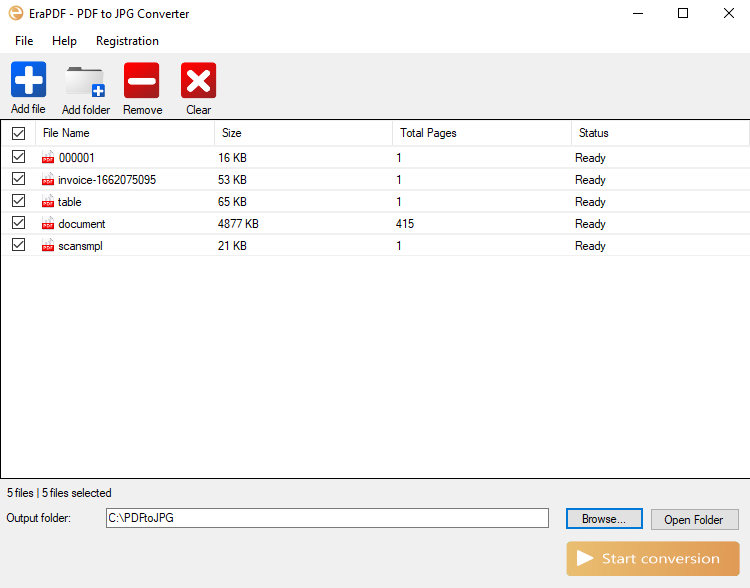
Bulk Processing: Whether you have a single PDF or an entire folder of PDF files, EraPDF can handle it all. Our bulk processing feature ensures efficiency and productivity, even for large-scale projects.
-
Enhanced Workflow: Imagine the time you’ll save by eliminating the manual process of extracting images. EraPDF streamlines your workflow and allows you to focus on what truly matters – your creative projects.
-
Data Security at the Core: Rest assured, nothing is uploaded to the internet during the conversion. Everything remains securely stored on your own computer. Our tool respects your confidentiality, and you can convert your PDFs to JPG images with complete peace of mind. Your data is yours alone, and EraPDF keeps it that way.
-
Organized Image Folders for Every PDF: EraPDF ensures that every converted PDF comes with its own dedicated folder. This means all your extracted JPG images are neatly organized and easily accessible, enhancing your workflow and keeping your workspace tidy. With EraPDF, image management becomes effortless and efficient.
How Does EraPDF PDF to JPG Conversion Software Work?
-
Installation: Unzip the EraPDFSetup.zip file and run the setup.exe file to install the software on your Windows PC.
-
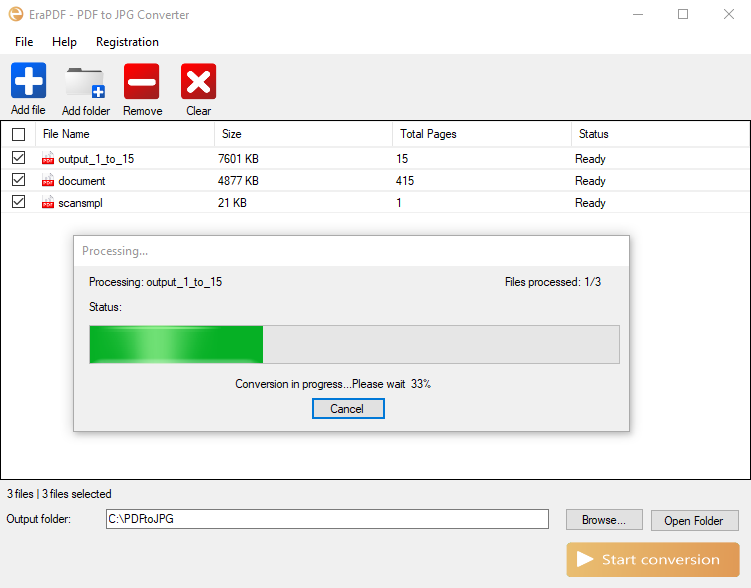
Add Your PDFs: Use the “Add File” button to add individual PDF files or the “Add Folder” button to add all PDF files within a folder.
-
Customize Output: Specify your desired output folder where the converted JPG images will be saved.
-
Conversion: Click “Start Conversion” and watch as EraPDF works its magic, extracting PDF pages and converting them into high-quality JPG images.
-
Download & Enjoy: Your JPG images are ready! Easily access and use them for your projects, presentations, or any creative needs.
Your Visual Possibilities, Unleashed!
EraPDF PDF to JPG Converter Software is your gateway to unlocking the potential of your PDFs. No matter your domain – graphic design, presentations, or any visual-driven tasks – EraPDF simplifies the process, allowing you to convert PDF pages into JPG images with ease.

Don’t let the limitations of PDF files hold you back. Try EraPDF today and experience the transformation of your PDFs into vibrant, ready-to-use JPG images. Revolutionize your creative journey with EraPDF – your ultimate PDF to JPG solution!
Get EraPDF PDF to JPG Converter Software and Elevate Your Visual Creations Today!
Your PDF to JPG Converter Software license is lifetime and valid for use on one PC. This license allows you to convert PDF files to JPG images efficiently and seamlessly.
| Type | Windows App |
|---|---|
| Author | EvaStudio9 |
| Category | Apps / Windows |
| Price | $19 |
| Sales | 1 |
| Published | Sep 4, 2023 |
| Last Update | Sep 4, 2023 |
| Application Runtime | .NET 4 |
| Operating System Versions | Windows XP, Windows Vista, Windows 7, Windows 8 Desktop, Windows 8 Metro, Windows 10 |
External listing. code.market does not sell this product and does not process payment for it. Pricing, payment, delivery, licensing, refunds, and support are handled by the third-party merchant on its own website. We may earn an affiliate commission from a referral. Details.
Products of the Week.
Submit🥇

STOP GUESSING WHAT TO POST
AI that learns your brand voice and builds a month of consistent, on-brand social content: carousels, posts and hooks that sound like you, not like everyone else's AI.
SaaS · 6,437 views · 59 clicksSaaS · Week 46 · 6,437 views · 59 clicks
🥈

Conversational Backlinks for Busy Founders
Place Backlink Relevant Conversation for your domain across Forums and Conversations
Website · 45,247 views · 229 clicksWebsite · Week 46 · 45,247 views · 229 clicks
🥉

upvote.club
Free Social Media Engagement that Helps Boost Your Content. Upvote Club supports 19 social networks with 100+ engagement actions in one dashboard. Add links to your posts and get free engagement from real users.
SaaS · 43,246 views · 124 clicksSaaS · Week 46 · 43,246 views · 124 clicks
#4

Substack Posting API
Onboard your Agent to Substack. Write Publish on Substack via API
SaaS · 62,182 views · 204 clicksSaaS · Week 46 · 62,182 views · 204 clicks
#5

Seenshot App
Free, Fast, MacOS Screenshot app. Make Screenshot cmd+shift+2 and send it via link
Desktop App · 31,441 views · 125 clicksDesktop App · Week 46 · 31,441 views · 125 clicks
#6

Hand-Placed Backlinks $9.99 per link. Flat rate.
Buy hand-placed forum, Q-A and directory backlinks. Flat $9.99 per link, no subscriptions — you only pay for approved listings.
Website · 7,160 views · 19 clicksWebsite · Week 46 · 7,160 views · 19 clicks
#7

Free Invoice Generator - PDF Invoices in Your Browser, No Sign-Up
A free invoice maker for freelancers and small businesses: fill in the invoice, check the live preview, and download a PDF that looks exactly like it. Any currency, tax per item, three templates, no sign-up, and nothing leaves your device.
5,781 views · 20 clicksWeek 46 · 5,781 views · 20 clicks
#8

Merge PDF Files Free - Combine PDFs in Your Browser, No Upload
A free PDF merger for office workers, students, and freelancers: combine PDFs and images into one file in the browser, reorder files and pages, pick page ranges, keep bookmarks, and open password-protected PDFs. Nothing is uploaded, no sign-up, no watermark.
5,335 views · 15 clicksWeek 46 · 5,335 views · 15 clicks