
EmilyLawson - Psychologist & Counsellor Elementor Template Kit
Description
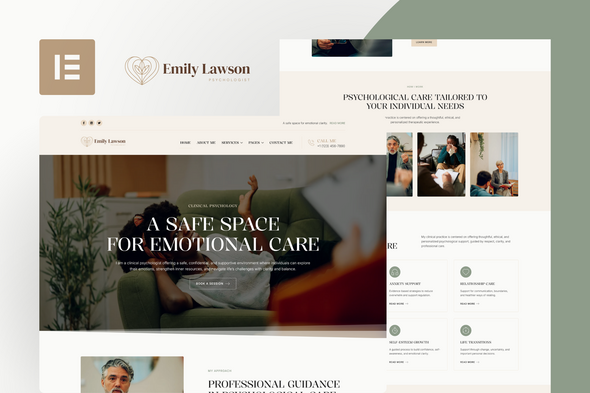
Emily Lawson is a Elementor Template Kit thoughtfully designed for individual psychologists, therapists, and mental health professionals who value clarity, trust, and a refined online presence. Built with a calm, human-centered aesthetic, elegant typography, and content-focused layouts, this kit is ideal for presenting your therapeutic approach, services, personal story, blog content, and contact information in a professional, welcoming, and emotionally safe way.
Elementor Template Kits include page content for the Elementor page builder. This kit has been optimized for use with the free Hello Elementor theme but is compatible with most themes that support Elementor.
Layout Features:
Elegant & Editorial Design: A refined, calm visual direction thoughtfully crafted for individual psychologists, therapists, and mental health professionals who value trust, clarity, and emotional balance.
Built with Elementor: Fully created using free Elementor widgets — no Elementor Pro or custom coding required.
Immersive Homepage Experience: Includes a thoughtfully structured homepage with an elegant hero section, therapeutic approach highlights, services overview, areas of support, blog previews, FAQs, and subtle calls to action designed to guide visitors with clarity and care.
Professional Page Structure: Includes essential pages such as Home, About Me, Therapeutic Approach, Services, Service Details, Who I Support, Blog, Single Post, FAQ, Contact, and a custom 404 page.
Purpose-Driven Copy & Layout: Carefully crafted to convey trust, ethical care, and professional clarity across every section, supporting a calm and human-centered user experience.
Fully Responsive: Carefully optimized to deliver a seamless and consistent experience across desktop, tablet, and mobile devices.
Ideal for: Individual psychologists, therapists, counselors, and mental health professionals seeking a refined, personal, and trustworthy online presence.
What’s Included in the Zip:
- 404 Page
- About Me
- Therapeutic Approach
- Who I Support
- Home
- Services
- Service Details
- Blog
- Single Post
- FAQ
- Contact
- Header
- Footer
- Global Kit Styles
- Forms (Contact & Inquiry)
Plugins Installed With Kit:
- MetForm
- Xpro Elementor Addons
- Nexter Extension
How To Use Template Kit:
This is not a WordPress Theme. Template kits contain the design data for Elementor only and are installed using the envato Template Kit Import plugin for WordPress or directly through Elementor.
Detailed Guide:
For further support, go to Elementor > Get Help in WordPress menu.
How to Import MetForm Custom Forms:
1. Install and Activate MetForm: Ensure the MetForm plugin is installed and activated via the WordPress “Plugins” menu.
2. Create a New Form: Navigate to MetForm > Forms and click Add New. Name your form (e.g., “Main Contact Form”) and click Edit Form.
3. Import the Kit Template: Once the Elementor editor opens, click the Folder Icon, go to My Templates, find the specific form template (e.g., Metform – Contact Form), and click Insert.
4. Configure Notifications: Click the Form Settings button at the top of the widget. In the Notification tab, enter your email address to receive submissions. Click Save Changes.
5. Update and Save: Click the pink Update button at the bottom of the Elementor editor to save the form layout.
6. Link to Your Page: Open your “Contact” page with Elementor, find the MetForm widget, and select your newly created form from the Select Form dropdown menu.
Note: If the form does not appear immediately, simply refresh the Elementor editor to sync the database.
Theme Builder setup with Nexter Extension Plugin:
If you have Elementor Pro, setup headers and footers in Theme Builder. Pages you create with Elementor must have the Page Layout set to Elementor Full width for the global header and footer to appear.
1. Import Templates: Ensure you have imported all “Header”, “Footer”, and “Single/Archive” templates from the kit via the Template Kit Import tool.
2. Access Nexter Builder: Navigate to Nexter Builder > Dashboard in your WordPress menu.
3. Configure Global Header: Click on the “Header” tab. Select your imported Header template from the list and set the display conditions to “Entire Site”. Click Save.
4. Configure Global Footer: Click on the “Footer” tab. Select your imported Footer template and set the display conditions to “Entire Site”. Click Save.
5. Setup Post/Archive Templates: For Single Posts or Blog Archives, go to the respective tabs in Nexter Builder, select the corresponding imported template, and assign them to the correct post types.
Pro Tip: If your Header or Footer does not appear, ensure that your theme (Hello Elementor) is active and that no other global templates are overriding Nexter settings.
Image License:
This Template Kit uses demo images from Envato Elements. You will need to license these images from Envato Elements to use them on your website, or you can substitute them with your own.
| Type | Elementor Template Kit |
|---|---|
| Author | TemplateUp-Pro |
| Category | Template Kits / Elementor / Health Medical |
| Price | $29 |
| Sales | 28 |
| Published | Jan 23, 2026 |
| Last Update | Jan 23, 2026 |
| Template Kit Certified | No |
| Template Kit Software Version | Elementor 3.10.x |
| Template Kit Type | Envato Template Kit |
| Key Features | Calm editorial design for psychologists, Built with Elementor Free no Pro required, Includes blog services and Theme Builder |
Categories
Tags
External listing. code.market does not sell this product and does not process payment for it. Pricing, payment, delivery, licensing, refunds, and support are handled by the third-party merchant on its own website. We may earn an affiliate commission from a referral. Details.
Products of the Week.
Submit🥇

Perceptle
Perceptle is a daily browser-based game that challenges you to test your sensory intuition through five quick estimation and rhythm-based rounds.
Other · 1,489 views · 9 clicksOther · Week 47 · 1,489 views · 9 clicks
🥈

Free LinkedIn Likes From Real
Get free LinkedIn likes on your posts from real members who react by hand. No
SaaS · 1,632 views · 10 clicksSaaS · Week 47 · 1,632 views · 10 clicks
🥉

STOP GUESSING WHAT TO POST
AI that learns your brand voice and builds a month of consistent, on-brand social content: carousels, posts and hooks that sound like you, not like everyone else's AI.
SaaS · 9,176 views · 75 clicksSaaS · Week 47 · 9,176 views · 75 clicks
#4

aaas.market
407 reliable micro tools for solo founders, marketers and creators. They work in your browser
SaaS · 1,597 views · 5 clicksSaaS · Week 47 · 1,597 views · 5 clicks