
Eduverse | Flutter Course UI Kit
Description
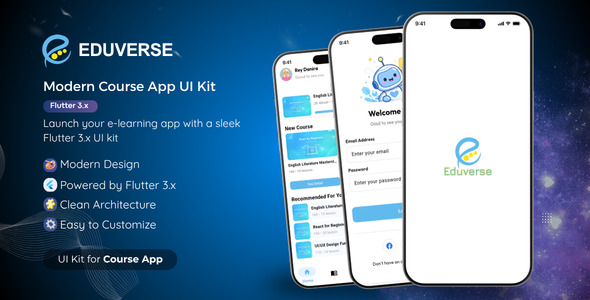
Eduverse is a modern, clean, and premium Flutter UI Kit meticulously designed for building online course or e-learning mobile applications. It provides a highly structured, scalable, and reusable UI system to help developers accelerate their development process and deliver stunning apps faster.
Key Features
- Modern & Clean UI: Beautifully crafted screens following the latest design trends.
- Reusable Components: Modular UI components that can be easily repurposed.
- Smooth Animations: Enhanced user experience with fluid animations and transitions.
- Shimmer Placeholders: Modern loading states for a premium app feel.
- Responsive Layout: Optimized for various mobile screen sizes.
Screens Included
- Splash Screen
- Onboarding Screen
- Login & Register
- Home Screen
- Course List & Course Detail
- Mentor List & Mentor Profile
- Wishlist Screen
- Certificates Screen
- Profile Screen
Requirements
- Flutter SDK 3.x
- Dart SDK 3.x
- Android Studio or Visual Studio Code
Installation Guide
- Download the project files.
- Extract the ZIP file.
- Open the project in VS Code or Android Studio.
1. Install Dependencies
flutter pub get2. Generate Splash Screen
flutter pub run flutter_native_splash:createNote: The splash screen is generated using flutter_native_splash. Make sure to run this command before launching the app.
3. Run the App
flutter runOptional Setup (App Icon Customization)
To customize the app icon, replace the placeholder image file at:
assets/app_launcher.pngThen run the following command:
flutter pub run flutter_launcher_iconsProject Structure
lib/— Main source codeassets/— Images and resourcesandroid/— Android configurationios/— iOS configuration
Dependencies Used
- google_fonts → Custom typography
- flutter_animate → Animations
- shimmer → Loading placeholders
- go_router → Navigation
- flutter_native_splash → Splash screen generator
- flutter_launcher_icons → App icon generator
Easy Customization
You can easily customize the UI to match your branding:
- Edit colors and themes in
lib/constants/colors.dart - Replace images in the
assets/folder (onboarding, mentors, logos, etc.) - Modify UI components inside the
lib/folder
How to Change App Name
Android:
Edit android/app/src/main/AndroidManifest.xml and change android:label="Eduverse"
iOS:
Edit ios/Runner/Info.plist and update CFBundleName
How to Change Package Name (Bundle ID)
Format example: com.yourcompany.appname
- Android: Update
applicationIdinandroid/app/build.gradle - iOS: Change Bundle Identifier via Xcode
Extending the App
- Add new screens inside the
lib/folder. - Navigation is fully handled using
go_router. - Global theme can be customized inside
lib/constants/colors.dart.
Troubleshooting
- flutter pub get failed: Run
flutter cleanand try running the command again. - iOS setup (optional): If building for iOS, run
cd ios && pod install. - Build failed: Ensure your Flutter SDK version matches the project requirements (3.x).
Important Notes
- This is a UI Kit only: No backend, database integration, or API connection is included.
- The project is structurally optimized to make customization simple, clean, and developer-friendly.
Support
If you need any help, have questions, or need further customization, please feel free to contact us via our Profile Page container.
| Type | Flutter App |
|---|---|
| Author | gebygintingg |
| Price | $16 |
| Sales | 0 |
| Rating | 0 (0) |
| Published | Jun 18, 2026 |
| Last Update | Jun 18, 2026 |
| Compatible Software | Flutter 3.x |
| Mobile Files Included | Dart, YAML, HTML |
| Video Preview Resolution | 1920x1080 |
Categories
Tags
External listing. code.market does not sell this product and does not process payment for it. Pricing, payment, delivery, licensing, refunds, and support are handled by the third-party merchant on its own website. We may earn an affiliate commission from a referral. Details.