
EdgeSwipe | Edge Swipe Sidebar - Android App with Ads
Description

Your apps, one swipe from anywhere.
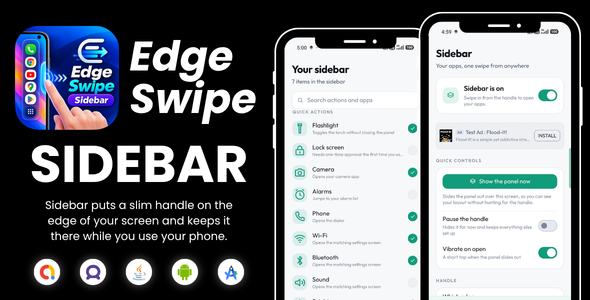
Sidebar puts a slim handle on the edge of your screen and keeps it there while you use your phone. Swipe it in, or just tap it, and a panel slides out holding the apps and shortcuts you actually reach for. Tap one and you’re there. No going back to the home screen, no swiping through pages of icons, no digging into folders.
HOW IT WORKS
- Turn it on and allow Sidebar to draw over other apps.
- Pick the apps and quick actions you want within reach.
- Swipe in from the handle whenever you need them.
PUT ANYTHING IN IT
Add as many apps as you like. There’s no limit, and the panel scrolls once the list gets long. Alongside your apps you can drop in built-in quick actions:
- Flashlight, which toggles right inside the panel so you can see it turn on
- Lock screen
- Camera
- Alarms
- Phone dialer
- Wi-Fi settings
- Bluetooth settings
- Sound settings
- Display and brightness
- Battery
- All settings
- App info
Uninstall an app and its tile clears itself out, so the panel never fills up with things that aren’t on your phone any more.
MAKE IT YOURS
- Left edge or right edge, whichever thumb you use
- Drag the handle up or down so it sits exactly where you reach
- Set how tall the handle is and how visible it should be, from barely there to fully solid
- Choose 3, 4 or 5 columns of tiles
- Haptic tap when the panel opens, on or off
- Close the panel after launching an app, or leave it open for the next one
- Preview the panel from inside the app while you’re tuning it
- Pause the handle for a while without switching Sidebar off, then bring it straight back
- Starts itself again after you restart your phone
BUILT TO STAY OUT OF THE WAY -
The handle is thin, and the area you can grab is a little wider than the part you can see, so it’s easy to catch without painting a stripe across whatever you’re doing. Everywhere else on screen your taps pass straight through to the app underneath. When the panel is open, a tap outside it or your back gesture closes it again.
PRIVATE BY DESIGN -
Sidebar runs entirely on your device. It has no internet permission at all, so there is nothing to send anywhere. No account to create, no tracking.
PERMISSIONS -
Draw over other apps. Required. This is what lets the handle stay on screen while you use everything else.
Notifications. Optional. Android needs an ongoing notification to keep the handle running. Sidebar still works without it, you just won’t see the notice.
Device admin. Only asked for if you add the Lock screen tile, and only after you approve it on the system screen. It is used for one thing, locking your screen, and nothing else.
Technical Specifications:
- Android Studio Narwhal or newer
- Java Source Code
- Target SDK 36
- Minimum SDK 24
- Supports Android 7
- APK File Size: 9 MB
- App is properly 16KB aligned
Built entirely using Java and Android SDK:
- Developed in Java
- Android SDK based architecture
- Material Design UI
- Edge Swipe Sidebar
| Type | Android App |
|---|---|
| Author | MJAppsStudio |
| Price | $20 |
| Sales | 0 |
| Rating | 0 (0) |
| Published | Aug 27, 2026 |
| Last Update | Aug 27, 2026 |
| Compatible Software | Android 15.0, Android 12.0, Android 11.0, Android 10.0, Android 9.0, Other |
| Mobile Files Included | .apk, .java, .xml, JavaScript JS, CSS, HTML |
Categories
Tags
External listing. code.market does not sell this product and does not process payment for it. Pricing, payment, delivery, licensing, refunds, and support are handled by the third-party merchant on its own website. We may earn an affiliate commission from a referral. Details.