
ECSP - Elegant Coming Soon Pages For WordPress
Description
ECSP - Elegant Coming Soon Pages
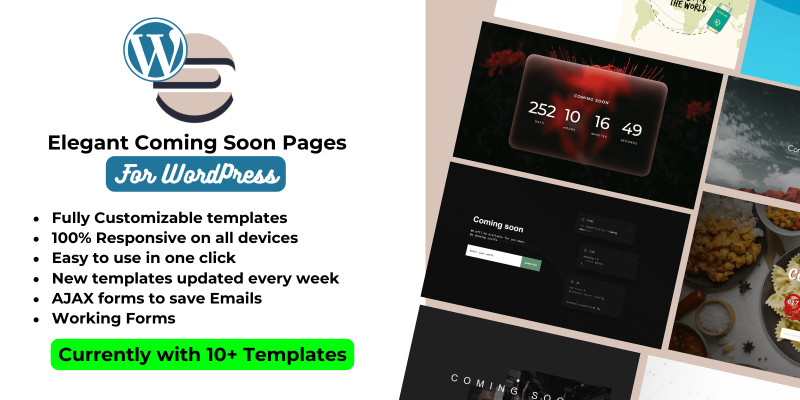
ECSP is a WordPress plugin that allows you to quickly and easily set up stylish coming soon pages for your website. With a variety of templates to choose from, you can create a professional-looking coming soon page in just a few clicks.
Take a look at the available templates
Check out the gallery of all the templates https://ecsp.netlify.app/preview
- Template 11: https://ecsp.netlify.app/preview/previews/tmp11
- Template 10: https://ecsp.netlify.app/preview/previews/tmp10
- Template 9: https://ecsp.netlify.app/preview/previews/tmp9
- Template 8: https://ecsp.netlify.app/preview/previews/tmp8
- Template 7: https://ecsp.netlify.app/preview/previews/tmp7
- Template 6: https://ecsp.netlify.app/preview/previews/tmp6
- Template 5: https://ecsp.netlify.app/preview/previews/tmp5
- Template 4: https://ecsp.netlify.app/preview/previews/tmp4
- Template 3: https://ecsp.netlify.app/preview/previews/tmp3
- Template 2: https://ecsp.netlify.app/preview/previews/tmp2
Changelog
Version 1.0.1 (05/17/2024)
+ Indications for new templates has been added
= Plugin Admin Page Optimized
Version 1.0 (04/27/2024)
+ Initial Release
Features
Features
Template Selection
Choose from a variety of professionally designed templates for your coming soon page. Each template is fully customizable to match your branding.
Customization Options
Customize the text, logo, background color, and other settings to create a unique and personalized coming soon page.
Contact Form
Some templates include a contact form section where visitors can submit their email addresses to be notified when your website launches. Manage your subscriber list and view contact form submissions from the admin dashboard.
Export to CSV
Export your subscriber list to a CSV file for easy management and analysis.
- Easy-to-use interface for configuring coming soon page settings.
- Multiple professionally designed templates to choose from.
- Customization options for text content, background image, logo, and social media links.
- Built-in functionality to redirect visitors to the coming soon page.
Requirements
- PHP 8.0+
- Wordpress 6.x
Instructions
Installation
- Download the Plugin: Visit the Codester Downloads page and download the plugin from there.
- Log in to WordPress: Log in to your WordPress admin dashboard using your username and password.
- Navigate to Plugins: Once logged in, go to the Plugins > Add New page in the admin menu.
- Upload the Plugin: Click on the Upload Plugin button at the top of the page.
- Choose the Plugin File: Click the Choose File button and select the ECSP plugin ZIP file you downloaded earlier. Click Install Now.
- Activate the Plugin: After the plugin is successfully installed, click the Activate Plugin link to activate ECSP on your website.
More information, read the Documentation
| Author | ThemeSizers |
|---|---|
| Category | Plugins / WordPress / Notification |
| Price | $15 |
| Extended License | $45 |
| Likes | 3 |
| First Release | Apr 27, 2024 |
| Last Update | May 21, 2024 |
| Supported cms | WooCommerce 6.x, WooCommerce 7.x, WooCommerce 8.x, WordPress 6.0, WordPress 6.1, WordPress 6.2, WordPress 6.3 |
| Files included | .php, .css, .html, JavaScript .js |
Categories
Tags
External listing. code.market does not sell this product and does not process payment for it. Pricing, payment, delivery, licensing, refunds, and support are handled by the third-party merchant on its own website. We may earn an affiliate commission from a referral. Details.
Products of the Week.
Submit🥇

Perceptle
Perceptle is a daily browser-based game that challenges you to test your sensory intuition through five quick estimation and rhythm-based rounds.
Other · 1,489 views · 9 clicksOther · Week 47 · 1,489 views · 9 clicks
🥈

Free LinkedIn Likes From Real
Get free LinkedIn likes on your posts from real members who react by hand. No
SaaS · 1,632 views · 10 clicksSaaS · Week 47 · 1,632 views · 10 clicks
🥉

STOP GUESSING WHAT TO POST
AI that learns your brand voice and builds a month of consistent, on-brand social content: carousels, posts and hooks that sound like you, not like everyone else's AI.
SaaS · 9,176 views · 75 clicksSaaS · Week 47 · 9,176 views · 75 clicks
#4

aaas.market
407 reliable micro tools for solo founders, marketers and creators. They work in your browser
SaaS · 1,597 views · 5 clicksSaaS · Week 47 · 1,597 views · 5 clicks