Easy Side Tab Pro - Responsive Floating Tab Plugin For Wordpress icon

Easy Side Tab Pro - Responsive Floating Tab Plugin For Wordpress

Hot or Not
Easy Side Tab Pro - Responsive Floating Tab Plugin For Wordpress

Description

Floating / Sticky Side Tab Plugin For Wordpress

The Best plugin to add side tabs or bar easily in your WordPress site!

Video Preview

Add side tabs and display your featured content in-line! An easy way to promote your content & increase leads!

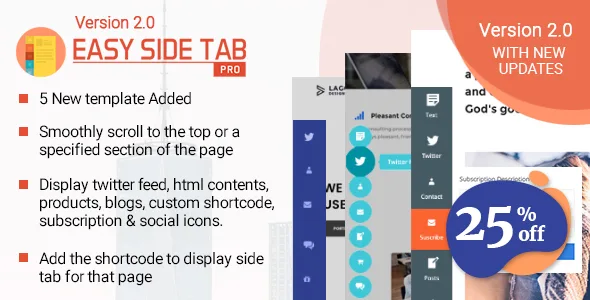
Easy Side Tab Pro – is a Call To Action Floating Tabs plugin for WordPress which allows you to create any number of quick side tabs and stick them to any of the vertical or horizontal edge position. When the tab is clicked the popup associated to that tab pops out. The plugin has a very easy and user-friendly backend interface to create your tabs and assign different functions to each of the tabs. There are many functionalities to choose from for each tab like twitter feed, social share icons, recent posts, woo-commerce product, custom shortcode, wp editor content, subscription form, internal page link, custom external page link.

And with many other multiple customization options to change to fit the layout of the site along with highly mobile-friendly responsive and sleek designs.

A standout amongst the most powerful side tab display platform with the pre-available layout for each tab and 15 templates for tabs in the most attractive and easy way.

It is a premium WordPress side tab plugin packaged with 15 Beautifully pre-designed templates enriched with elegant components, animations and functionalities.

Multiple Layout Options For Popup Components

- Altogether 26 different beautiful and sleek layout design to choose from for each popup components.

  • 4 Twitter Feed Layout
  • 5 Subscription Form Layout
  • 6 Recent Post Layout
  • 6 Woocommerce Product Layout
  • 5 Social Icons Layout

Tab Template Desgins

- 15 templates altogether for each tab groups.

  • 15 colourful layout designs
  • Animations and transitions for popup.
  • Varieties of shapes and sizes for tabs.

Custom Designs

- You can build custom template with custom design options to customize the selected template tabs design according to your need and requirement for the site.

4 Different Orientation for Side Tab display

-You can choose among 4 different layout positions.

  • Left Middle
  • Right Middle
  • Bottom Left
  • Bottom Right

Twitter Settings

Set the twitter credentials in the backend and display options.

  • Number of tweets to display.
  • Set the cache period in which the feeds should be fetched.
  • Enable Cache option for quicker site load.

Subscribers Settings

Displays all the users subscribed to your channel in backend settings.

  • Lists the subscribers name and email.
  • Option to Export the subscribers information in a CSV file.
  • Add the subscribers into your MailChimp Lists.
  • Get email notification when you gain new subscriber.

Easy Import Export Side tabs

  • Supports Export of all necessary tab settings into JSON File.
  • Quickly Import the backed up tab settings using JSON File.

Full Responsive

- Supports various mobile devices so it will be no issue to view in any desktop and mobile devices.

Documentation

Please check our detailed documentation here

WordPress Compatible

- Tested with multiple themes and WordPress versions

Customer Feedback

Lifetime Dedicated Support

- You can find us anytime when you have some queries, problems or with any valuable suggestions for plugin or us. This plugin is supported. All you need to do is contact the developer through following ways:

  • Forum Support From here.
  • Plugin Comment here
  • Dedicated Support Forum – You can contact us through our support forum through
  • Online Chat Support

Our Support Includes

  • Errors and Bugs

    If your website reports any error due to our plugins, let us know. Send us the problem details with necessary links and screenshots, we’ll dig into it and get it resolved.

  • Lifetime updates

    We test and keep on updating our WordPress themes and plugins. So check for the new updates and keep your site secure and up to date with new technology.

  • Customer-friendly development

    If our products’ features don’t quite fit your requirement and you have some better suggestions – we are always happy to hear from you. We are ready to equip your business with better options. For this you can request a paid customization.

Our Support Does not Include

  • Plugin installation

    Our plugin price doesn’t include installation service. But we have plenty of tutorials and extensive documentation that you can rely on. And in case of any issues detected during installation, we are there to help. If you need a professional installation done – you can ask us for paid installation and configuration.

  • Plugin customization

    Any core customization of features and function of the plugin doesn’t fall into our free support. However if you want the plugin to be customized to fit your need – ask us for the customization quotation. We work on a fixed price and hourly basis model.

  • 3rd-party issues

    We do not take care of issues that are related to 3rd party plugins and themes. Also, we do not provide support to integrate any 3rd party themes or plugins.

Constant Free Upgrades

- Not fixed on dates, but we assure you to provide you new updates and feature upgrade in the plugin at regular basis.

Update Logs

2.0.7

Fixed issue related to custom icon upload in the backend settings.

2.0.6

Fixed issue with icon picker and made compatible with page builder and latest WordPress version.

2.0.5

Fixed custom icon issues.
Fixed MailChimp issues.
Fixed WooCommerce issues.
Fixed missing translation issues.
Fixed text hover issues.

2.0.4

General bug fixes and refinement in the script

2.0.3

Minor Changes: Refinement in code

2.0.2

Minor Changes: Bug fix related to class conflict

2.0.1

Minor Changes: Refinement in CSS script.

2.0.0

- 5 New Elegant Template
- Scroll Navigation
- Shortcode Enabled
- WooCommerce Multi Product Display
- Add Subscriber to Mailchimp List
- Subscription Mail Notification

1.0.5

Minor Changes: Multisite Compatibility Support.

1.0.4

Minor Changes: Added tooltip for template-2.
Minor Changes: Added active page color for an internal page.
Minor Changes: Some Minor Fixes.

1.0.3

Issue Fixed: Minor bug fixes.

1.0.2

Issue Fixed: Hide and Show Side Tab for Desktop and mobile separately.

1.0.1

Issue Fixed: Bugs Fixed.

1.0.0

Initial release of the plugin.

More WordPress Resources

Themes Compatible with the Plugin :

Easy Side Tab Pro works best with every WordPress theme. It’s even more remarkable when used with popular themes like VMagazine and AccessPress Parallax.

AND IF THIS PLUGIN HAS IMPRESSED YOU, THEN YOU WOULD ENJOY OUR OTHER PROJECTS TOO. DO CHECK THESE OUT :

WPAll Club – A complete WordPress resources club. WordPress tutorials, blogs, curated free and premium themes and plugins, WordPress deals, offers, hosting info and more.

Premium WordPress Themes – 6 premium WordPress themes well suited for all sort of websites. Professional, well coded and highly configurable themes for you.

Premium WordPress Plugins – 45+ premium WordPress plugins of many different types. High user ratings, great quality and best sellers in CodeCanyon marketplace.

AccessPress Themes – AccessPress Themes has 50+ beautiful and elegant, fully responsive, multipurpose themes to meet your need for free and commercial basis.

8Degree Themes – 8Degree Themes offers 15+ free WordPress themes and 16+ premium WordPress themes carefully crafted with creativity.

Check out our other great plugins

  • AccessPress Anonymous Post Pro
  • AccessPress Social Icons Pro
  • AccessPress Social Pro
  • AShop Slider Pro
  • AccessPress Twitter Feed Pro
  • AccessPress Pinterest Pro
  • AccessPress Social Auto Post
  • AccessPress Social Login
  • WP Ultimate Social
  • AccessPress Instagram Feed Pro
  • Ultimate Form Builder
  • AP – Custom Testimonials for WordPress
  • WP Floating Menu Pro – One page navigator, sticky menu for WordPress
  • WP1 Slider Pro – WordPress Responsive Touch Slider for a Layman
  • WP Mega Menu Pro – Responsive Mega Menu Plugin for WordPress
  • Smart Logo Showcase – Responsive Clients Logo Gallery Plugin for WordPress
  • AP Pricing Tables – Responsive Pricing Table Builder Plugin for WordPress
  • Apex Notification Bar – Responsive Notification Bar Plugin for WordPress
  • Ultimate Author Box – Responsive Post/Article Author Section Plugin for WordPress
  • WP Popup Banners Pro – Ultimate popup plugin for WordPress
  • Everest Gallery – Responsive WordPress Gallery Plugin
  • WP Media Manager – The Easiest WordPress Media Manager Plugin
  • Everest Counter – Beautiful Stat Counter Plugin for WordPress
  • WP Blog Manager – Plugin to Manage / Design WordPress Blog
  • Everest Coming Soon – Ultimate Coming Soon, Maintenance Mode Plugin for WordPress
  • Everest Review – Post / Page / Custom post type Review plugin for WordPress by User and admin
  • Everest Google Places Reviews – Best WordPress Plugin To Showcase Google Places / Business Reviews
  • Everest Timeline – Responsive WordPress Timeline Plugin
  • WP Viber Contact Button – Premium Viber Contact Button Plugin for WordPress
  • Everest Comment Rating – Display Like/Dislike With Reaction Emojis For WordPress Comments
  • Everest FAQ Manager – Responsive Frequently Asked Questions (FAQ) Plugin for WordPress
  • Everest Tab – Responsive Tab Plugin For WordPress
  • WP FB Messenger Button – Premium FB Messenger Button Plugin for WordPress
  • Everest Admin Theme – WordPress Backend customizer
  • Total Team – Responsive Team Showcase Plugin For WordPress
  • WP WhatsApp Button – Premium WhatsApp Button Plugin for WordPress
  • WP Comment Designer- Customize And Design WordPress Comments And Comment Form
  • WP Product Gallery – Responsive Products Showcase Listing for WordPress
  • WP Cookie User Info Pro – Cookie Notification Plugin for WordPress
  • Ultimate Contact Buttons – Connect To Viber, WhatsApp, Messenger & Skype Via WordPress
  • Inline CTA Builder – Call To Action Layer For WordPress
  • Contact Form 7 Store to DB – CF7 Extension to Store Form Entries (Fully GDPR Compliance)
  • WP Skype Contact Button
  • Smart Scroll to Top – Faster and Smarter scroll to top plugin for Wordpress
  • WP Menu Icons – Effectively Add & Customize Icons For WordPress Menus

New Release: The Most Comprehensive FREE WordPress Theme – Punte

New Release: All in one Free WordPress theme – Bingle

External listing. code.market does not sell this product and does not process payment for it. Pricing, payment, delivery, licensing, refunds, and support are handled by the third-party merchant on its own website. We may earn an affiliate commission from a referral. Details.

WooCommerce Designer Pro icon

WooCommerce Designer Pro

Hot or Not
WooCommerce Designer Pro

Description

CMYK WORKSPACE

Select CMYK or RGB workspace in one click. Convert uploaded images including SVG vectors in CMYK automatically.

TEMPLATES

Add multiple designs in the template section and help your customers choose and design in a more comfortable way.

CUSTOM COLORS

Customize full style of the editor with the colors of your site.

CLIPARTS

Add a variety of organized clipart by categories so that your customers can easily find and customize their products. The categories can be attached individually in the parameters to be displayed according to the theme of the designs.

QR CODE

Adding a QR code to the design is an easy access to information from a smartphone and therefore a great tool for marketing professionals.

SVG EDIT COLORS

Change the colors of the vectors quickly and easily.

GROUP & UNGROUP SVG

Create designs quickly and easily by grouping and ungrouping SVG.

STATIC MAPS

It allows its customers to add a map to their business cards or flyers and have a more efficient advertising of their trade.

MASK LAYER

Add to the images a mask layer with texts, clipart or shapes.

MULTIPLE ALIGNMENTS

Woocommerce designer pro has many ways to align objects. You can align with grid and when moving the layers will adjust to the guidelines, vertically with more or less space, very useful for texts, or align layers with each other.

SHAPES

You can add shapes to your designs and make offers with circles or stars, highlight texts or images inside squares, etc.

TEXT EFFECTS

Curved text, reverse, arc, small to large, large to small and bulge.

CALENDARS

Add images of calendars by categories, ideal for business cards. The categories can be attached individually in the parameters to be displayed according to the theme of the designs.

TRANSFORM

Woocommerce designer pro can make multiple transformations such as move, resize, rotate, skew and flip any text, shape or clipart.

LAYERS

Manage layers in a simple way. You can quickly identify the layer by the image or icon, set the name, sort, block, unlock or delete.

SAVE & DOWNLOADS DESIGNS

It allows its customers to save and download their designs easily and manage them from the editor. You can also disable the option to download the designs from the plugin settings.

CROP IMAGES

Crop your images easily to the exact size you want.

IMAGE FILTERS

Selection of filters so that your clients can easily adjust their photos.

MANAGE DESIGNS

Your customers can manage their saved designs from a page that you choose in the plugin configuration.

CUSTOM BLEED AREA

You can adjust the height and width of the bleed area, change the color and also set the radius.

VARIATION PRICES

100% compatible with woocommerce variations.

SUPPORT GOOGLE AND CUSTOM FONTS

Select from more 800 google fonts or add custom font files to the editor so your customers can customize the texts. Supported custom files TTF, EOT, WOFF, WOFF2.

CUSTOM PALETTES

Customize the palettes by adding or removing colors for your clients to use in texts, shapes, vectors and backgrounds.

WATERMARK

Add watermark when your customers download designs to protect them from unauthorized copying.

MULTIPLE OUTPUT FORMATS

It configures the dimensions of the output files and generates the formats, JPG, PNG, SVG, PDF, JSON and CMYK 300DPI in high resolution.

POWERFULL TOOLBAR

Select and erase all, grid, align and flip vertical and horizontal, rotate, bring to front, send to back, lock and group layers, duplicate, undo, redo and preview design.

SHORTCUT KEYS

The speed to design is important, woocommerce designer pro has many keyboard shortcuts for you and your customers to save time when designing and be much more comfortable. You can customize the keyboard shortcuts with the combinations you want.

COMPATIBLE WITH WPML

Woocommerce designer pro is compatible with the WPML plugin and can be translated into any language in the world easily.

Requirements

    PHP ImageMagick Extension only if the workspace is used in CMYK.

Changelog

Version 1.9.24 – Released: February 21, 2021

    - Added new actions in the attribute actions tab: Canvas width & height, Canvas output width, PDF output width & height.
    - Fixed: Several no important editor bugs.
    - Updated: User manual & language file.

Version 1.9.23 – Released: December 13, 2020

    - Added support for WordPress 5.6.
    - Fixed: The product is not correctly added to the cart with custom attributes and different slugs.
    - Fixed: Several no important style bugs.

Version 1.9.22 – Released: September 22, 2020

    - Added support for WooCommerce 4.5.x.
    - Fixed: Minor bugs.

Version 1.9.21 – Released: May 25, 2020

    - Added new action in the attribute actions tab: Show product sides.
    - Added new option in style settings: Enable / Disable auto snap mode.
    - Added options in the style settings: Auto snap tolerance and color of the guides.
    - Added a option to set the design title to users in the editor.
    - Added new button to the my designs page that allows users to change the design title.
    - Added a option in the parameters that allows you to hide background color of design when generating the output files.
    - Fixed: "Layout type radio checkbox" attribute values show the slug when added with created taxonomies.
    - Fixed: When updating the product, new changes to attribute actions are not saved correctly.
    - Fixed: When using the quick edit option on parameters and products, the set values are cleared.
    - Fixed: Fonts in grouped text were not embedded in the PDF output.
    - Fixed: When a group is duplicated from side to side the objects are added backwards.
    - Fixed: The link of custom products is not correct with simple permalink structure setting.
    - Fixed: Users cannot upload images to the editor with the extension in capital letters.
    - Fixed: In IE browser, position of the page is jumping from bottom to center in big designs.
    - Fixed: The coordinates are not correct when aligning rotated objects.
    - Fixed: The coordinates are not correct when scaling objects with zoom.
    - Fixed: New session cannot be started with registered users on some servers.
    - Fixed: Several no important style bugs.
    - Check: Add to cart with CMYK enabled when ImageMagick is not installed on the server to avoid crashes.
    - Updated: Business card demo with new action "Show product sides".
    - Updated: User manual & language file.

Version 1.9.18 – Released: January 27, 2020

    - Updated: New API Envato 
    - Changed: API Key by Token Key in the license settings.
    - Added new option in style settings: Enable / Disable display color of the light bleed area on dark backgrounds.
    - Fixed: The coords are not correct when loading templates with the "Load only template objects" option on mobile devices.
    - Updated: User manual.

Version 1.9.17 – Released: January 03, 2020

    - Added new tab in the docs section: Demos with automatic installer.
    - Added new tab in the product data: Set attribute actions.
    - Added new layouts in the attribute actions tab: Product colors and radio checkbox.
    - Added new option in custom product: Load only template objects.
    - Added a option in the parameters that allows you auto hide bleed area when there is no object selected in the editor.
    - Added a option in the parameters that allows you clipping and hide the objects outside the bleed area.
    - Added two options in the parameters that allows you set top and left position of border bleed area.
    - Added new option in style settings: Enable / Disable corners outside the object's controlling box.
    - Added new option in style settings: Hide the middle scaling corners of object's controlling box.
    - Added new option in style settings: Padding between object and its controlling borders.
    - The selected variations are now attached when saving the designs.
    - By adding new designs now the default canvas color is transparent.
    - Improved editor style with many important changes.
    - Changed: Object alignments are now set inside the bleed area.
    - Fixed: Custom fonts with curved text were not embedded in the SVG output.
    - Fixed: When selecting the options on the product page, the attributes are not sent sanitized to the editor.
    - Fixed: The coords are not correct when adding SVG to the editor with zoom below 100%.
    - Updated: User manual & language file.

Version 1.9.12 – Released: October 16, 2019

    - Added support for resource: Flaticon.
    - Added new option in general settings: Add Flaticon icons to the canvas in SVG format.
    - Added the Masonry grid layout library for the resources images.
    - Added new option in general settings: RTL right to left reading mode.
    - Added a option in the parameters that allows you to capture only the inside of the bleed area in the output file.
    - Added new option in general settings: Preload fonts unicode with Arabic or Latin extended alphabet.
    - Added a prevention in the pop-up preview when scrolling the thumbnails.
    - Fixed: The size of the svg output image is not correct on mobile devices.
    - Fixed: The outline is not added correctly in curved texts.
    - Openclipart resource was removed because it is no longer active.
    - Updated: New icons have been added to the wcdp-sprites font.
    - Updated: User manual & language file.

Version 1.9.11 – Released: September 10, 2019

    - Added a option in style settings to select 5 new predesigned skin colors.
    - Added new icons and style in the object's control corners.
    - Added options in the object's control corners: Duplicate, rotate, delete and scale.
    - Added new option in style settings: Enable / disable to add borders the object's control corners.
    - Added a option in style settings that allows you to change the color of the borders the object's control corners.
    - Added a option in style settings that allows you to change the color of the icons the object's control corners.
    - Added the jQuery custom content scroller library and the editor scrollbars were changed.
    - Added a option in style settings that allows you change the color of the scrollbars.
    - Improved editor style with many important changes.
    - Fixed: Search images in the cliparts tab are not added to the canvas.
    - Updated: New icons have been added to the wcdp-sprites font.
    - Updated: User manual & language file.

Version 1.9.10 – Released: August 05, 2019

    - Added new option in general settings: Set number of designs the user can save.
    - Added a option in the parameters that allows you to stretch the output image to the PDF size automatically.
    - Added thumbnails in JPG, PNG, GIF formats for the clipart categories in the editor.
    - Fixed: Google fonts in TTF format with "HTTPS" protocol cannot be imported to generate in PDF output with SVG.
    - Fixed: Background color is not generated in PDF output with SVG.
    - Fixed: Several no important style bugs.
    - Updated: User manual & language file.

Version 1.9.9 – Released: July 21, 2019

    - Check: Change svg image with fill patterns to jpg when the export of the pdf with svg crashes.
    - Fixed: The names of sides in CMYK are not generated correctly when sending form ajax to save files.
    - Fixed: The images added in the background or overlay in the pdf with svg export is not generated correctly.
    - Fixed: The images added in the background or overlay in the svg export is not generated correctly.

Version 1.9.8 – Released: July 20, 2019

    - Fixed: The scale the output image in the PDF is incorrect.

Version 1.9.7 – Released: July 20, 2019

    - Added new option in general settings: Output PDF with SVG.
    - Added new option in general settings: Enable / disable output CMYK to the user.
    - Added the JSZip library, the PHP Zip extension is no longer necessary.
    - Added a option in the parameters that allows you to scale the output image in the PDF.
    - Added temp folder in uploads for images and temporary files.
    - Improved the export of svg with stroke and fill transparent colors.
    - The user downloads are now direct and are not saved on the server.
    - The TCPDF library has been replaced by PDFKit.
    - The PHP GD extension is no longer needed to add the watermark in the designs.
    - Fixed: The letter spacing in the svg export is not generated correctly.
    - Fixed: The size of the svg output image is not correct.
    - Fixed: When adding the product to the cart the attributes show the Slug.
    - Fixed: The link to the editor with multiple translations is not generated correctly.
    - Fixed: Several no important editor bugs.
    - Updated: User manual & language file.

Version 1.9.6 – Released: March 29, 2019

    - Added new function Mask layer.
    - Added new toolbar for the options of the images.
    - Added a option in the parameters that allows you to enable / disable the user, the mask layer option.
    - Added new options in the parameters that allows you to add all calendars categories or cliparts.
    - Added new options in the parameters that allows you to set the default sizes in images, shape and codes QR.
    - Added new option in general settings: Enable / disable download designs only to user logged.
    - Added new option in general settings: Enable / disable SVG image uploads to the user.
    - Fixed: The editor crashes when you open the color picker with iPhone mobiles.
    - Fixed: Axis point for texts does not work with font size and font family select.
    - Fixed: Undefined function array_column() with PHP version 5.4.
    - Fixed: Several no important editor bugs.
    - Updated: User manual & language file.

Version 1.9.5 – Released: February 09, 2019

    - Added new option for admin in the layers tab: Allows you to lock / unlock layers the user.
    - Added new option for admin in the layers tab: Allows you to hide layers in the output files.
    - Added new option in general settings: Download design in the order for user.
    - Added axis point for texts with alignments from left to center or right.
    - Added new function for admin to add or extract images or svg from the overlay.
    - Added a option in the parameters that allows you to hide overlay image of design when generating the output files.
    - Added new option in the parameters: Radius bleed area. The "Editor corners rounded" option is now independent.
    - Added gray background to the thumbnails of the layers with white color.
    - Added a option in style settings that allows you to hide note boxes.
    - Fixed: The thumbnails of the layers are not generated correctly when change zoom in the editor.
    - Fixed: Option "Hide background image in the output files" is also hidden with the preview.
    - Fixed: The template search does not find designs with complete words.
    - Fixed: The design is not added in the order with unregistered users.
    - Fixed: Several no important editor bugs.
    - Updated: User manual & language file.

Version 1.9.4 – Released: January 19, 2019

    - Added new tab in the editor: Manage layers.
    - Added a option in the parameters that allows you to enable / disable the section of manage layers.
    - Added new section in the admin: Design categories.
    - Added new option in custom product: Add designs to the templates section by categories.
    - Added new option to search for templates in the editor.
    - Added an option in the parameters that allows you to hide background image of design when generating the output files.
    - Added new option in general settings: Add link to email for download the design after change order status to completed.
    - Added new option in general settings: Hide add to cart button in the editor.
    - Fixed: The design is not added in the order pending payment.
    - Fixed: Unable to activate plugin with PHP version 5.4.
    - Updated: User manual & language file.

Version 1.9.3 – Released: December 06, 2018

    - Added support for designs with different parameters in the same product.
    - Added new option in custom product: Load parameters by Ajax query.
    - Added new option in general settings: Enable / disable the output CMYK in the admin download.
    - Fixed: "Request Entity Too Large" on servers with Ajax limitations.
    - Fixed: When adding a new design it does not load the editor with some themes.
    - Fixed: When the browser zoom is changed, the toolbar shakes.
    - Updated: User manual & language file.

Version 1.9.2 – Released: November 13, 2018

    - Added new functions: Group and ungroup SVG & Shapes, from the toolbar.
    - Added a option in the parameters that allows you to enable / disable the user, group and ungroup SVG.
    - Added new functions: Stroke width and color for SVG grouped and ungrouped.
    - Improved multicolor function, transparent colors were also added in the fill and stroke of the SVG.
    - Added new filters for images and improved the style of selection.
    - Added new section in the admin: Manage image filters, to enable or disable the filters.
    - Fixed: When selecting the options on the product page, the attributes are not sent to editor.
    - Fixed: Activated option sold individually product, does not hide quantity button in the editor.
    - Fixed: Changing the side by editing a text, overwrites the design.
    - Fixed: Duplicate side to side multiple layers cloned backwards.
    - Fixed: Scaling a group of objects the transform is wrong.
    - Fixed: Simple product price set to 0 can not be added to the cart.
    - Fixed: Can not find the translation strings with plugin Loco Translate.
    - Fixed: Several no important style bugs.
    - Updated: User manual & language file.

Version 1.9.1 – Released: September 24, 2018

    - Added support for resources: Pixabay, Unsplash, Pexels, Openclipart.
    - Added new option in general settings: Convert images of resources in CMYK before adding it to the canvas.
    - Added new options in general settings: Output PNG & Add PNG to the user downloads.
    - Added new status tab in the docs section, to check and help with possible errors.
    - Improved zip compression system, faster when downloading designs and adding to cart.
    - Fixed: Designs with default parameter "Warning: Division by zero".
    - Updated: User manual & language file.

Version 1.9.0 – Released: August 26, 2018

    - Added pop-up for preview the thumbnails.
    - Added a option in style settings  that allows you to enable / disable pop-up of the thumbnails.
    - Added option in style settings, centered scaling for objects.
    - Added option in style settings add the objects centered on canvas.
    - Added new function to add or extract images or svg from the background.
    - Added a option in the parameters that allows you to enable / disable the user, add or extract background images.
    - Removed pop-up element select images background and logo.
    - Disabled pointer events in the images and svg.
    - Fixed: When moving the panning area with a group of objects, the coordinates are not updated.
    - Fixed: Letter spacing for texts without effects.
    - Fixed: Discard group when adding objects.
    - Fixed: Skewing a group of objects the transform is wrong.
    - Updated: User manual & language file.

Version 1.8.9 – Released: August 10, 2018

    - Added 50+ new shapes. 
    - Added auto snap when rotating objects. 
    - Added new option in general settings: Hide add to cart button for customizable products. 
    - Fixed: Select, delete and edit locked objects. 
    - Fixed: Does not close the contents of the cliparts and calendars folders in the editor. 
    - Fixed: It does not save the design if the table "wp_usermeta > _wcdp_designs_save_user_list" is empty. 

Version 1.8.8 – Released: July 19, 2018

    - Added support for Google Fonts.
    - Fixed: Include bleed area and grid layers when selecting all objects.
    - Update: Language File.

Version 1.8.7 – Released: July 12, 2018

    - Added new function Crop image.
    - Added new function Zoom and panning area.
    - Changed Grid and Bleed area html to inside canvas.
    - Fixed: Not load the fonts by selecting new templates.

External listing. code.market does not sell this product and does not process payment for it. Pricing, payment, delivery, licensing, refunds, and support are handled by the third-party merchant on its own website. We may earn an affiliate commission from a referral. Details.







