
Dropdown Quantity for Opencart
Description
Support
If you need some custom modifications that aren’t already included ? Or your theme does not not supporting ? Or you want more features on next release? Feel free contact us

Admin Panel Demo
- click to view admin panel
- user: demo
- password: demo
Main Features
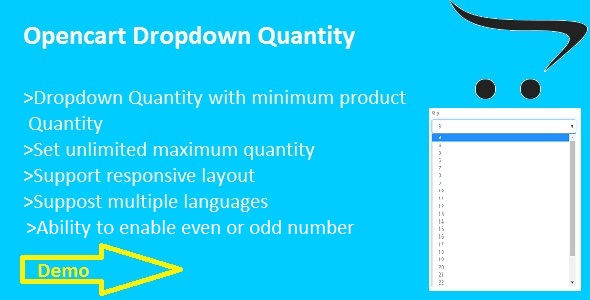
- Customer can easily and quick select quantity by dropdown list
- Standard design view
- Ability to set unlimited maximum number of quantity with drop down scroll
- Automatically detect minimum product quantity and start drop down from there
- Automatically detect even and odd number by product minimum quantity
- Ability to set even and odd number of quantity (EX:i want to display quantity only 2,4,6,...or 1,3,5,...)


Module Installation
For Opencart-2.0.x,2.1.x,2.2.0.x
Note: You must configure FTP before installing any OpenCart module via the admin panel.
- Extract dropdownquantity.zip in your local folder
- In your Administrator page, go to Extensions >> Extension Installer >> Click Upload and select file for-2.0.x-2.2.x.ocmod.zip(inside dropdownquantity.zip) Then You should see the message Success In this page, choose module “Quantity Dropdown”, click Install button
- To Enable this module and set maximum number of quantity, please go to Extensions >> Modules >> Choose module “Quantity Dropdown” >> Click “Edit” button,fill the fields.Then click “Save” button
- In your Administrator page, go to Extensions >>Modifications >>click refresh button.That’s it and enjoy.
For Opencart-1.5.6.x
Note: First of you need to install vQmod if you haven’t got it already.For more info on vQmod and what it does visit this website www.vQmod.com
- Extract dropdownquantity.zip in your local folder
- go to your opencart root folder and extract “for-1.5.6.x.zip”(found in dropdownquantity.zip)
- now go to your site admin panel and go to extensions>modules>>”Quantity Dropdown” click install
- after installed successfully go to “Quantity Dropdown” edit button and enable module and fill required field.That’s it
| Type | OpenCart Extension |
|---|---|
| Author | discovernanosoft |
| Price | $10 |
| Sales | 5 |
| Rating | 0 (0) |
| Published | Nov 11, 2016 |
| Last Update | Nov 11, 2016 |
| Compatible Browsers | IE9, IE10, IE11, Firefox, Safari, Opera, Chrome |
| Compatible Software | OpenCart 2.2.0.x, OpenCart 2.1.x, OpenCart 2.0.x, OpenCart 1.5.6.x |
| Demo Url | http://discovernanosoft.com/dropdown-quantity/upload/index.php?route=product/product&product_id=40 |
| High Resolution | No |
| Source Files Included | HTML, PHP |
Categories
Tags
External listing. code.market does not sell this product and does not process payment for it. Pricing, payment, delivery, licensing, refunds, and support are handled by the third-party merchant on its own website. We may earn an affiliate commission from a referral. Details.
Products of the Week.
Submit🥇

STOP GUESSING WHAT TO POST
AI that learns your brand voice and builds a month of consistent, on-brand social content: carousels, posts and hooks that sound like you, not like everyone else's AI.
SaaS · 7,319 views · 67 clicksSaaS · Week 46 · 7,319 views · 67 clicks
🥈

Conversational Backlinks for Busy Founders
Place Backlink Relevant Conversation for your domain across Forums and Conversations
Website · 46,587 views · 232 clicksWebsite · Week 46 · 46,587 views · 232 clicks
🥉

upvote.club
Free Social Media Engagement that Helps Boost Your Content. Upvote Club supports 19 social networks with 100+ engagement actions in one dashboard. Add links to your posts and get free engagement from real users.
SaaS · 44,528 views · 127 clicksSaaS · Week 46 · 44,528 views · 127 clicks
#4

Substack Posting API
Onboard your Agent to Substack. Write Publish on Substack via API
SaaS · 63,416 views · 206 clicksSaaS · Week 46 · 63,416 views · 206 clicks
#5

Seenshot App
Free, Fast, MacOS Screenshot app. Make Screenshot cmd+shift+2 and send it via link
Desktop App · 32,660 views · 127 clicksDesktop App · Week 46 · 32,660 views · 127 clicks
#6

Hand-Placed Backlinks $9.99 per link. Flat rate.
Buy hand-placed forum, Q-A and directory backlinks. Flat $9.99 per link, no subscriptions — you only pay for approved listings.
Website · 8,289 views · 19 clicksWebsite · Week 46 · 8,289 views · 19 clicks
#7

Free Invoice Generator - PDF Invoices in Your Browser, No Sign-Up
A free invoice maker for freelancers and small businesses: fill in the invoice, check the live preview, and download a PDF that looks exactly like it. Any currency, tax per item, three templates, no sign-up, and nothing leaves your device.
6,916 views · 29 clicksWeek 46 · 6,916 views · 29 clicks
#8

Merge PDF Files Free - Combine PDFs in Your Browser, No Upload
A free PDF merger for office workers, students, and freelancers: combine PDFs and images into one file in the browser, reorder files and pages, pick page ranges, keep bookmarks, and open password-protected PDFs. Nothing is uploaded, no sign-up, no watermark.
6,400 views · 18 clicksWeek 46 · 6,400 views · 18 clicks